
1. Introduction
This manual provides essential information for the safe and effective installation, operation, and maintenance of the DAVITU SHUA/Running Machine Inverter Controller. This controller is designed for DC motor applications, specifically for running machines and treadmills. Please read this manual thoroughly before installation and operation.
2. Safety Information
Adherence to the following safety guidelines is crucial to prevent injury and damage to the equipment. Always disconnect power before performing any installation, maintenance, or troubleshooting procedures.
- Ensure all wiring is performed by qualified personnel.
- Verify power supply specifications match the controller's requirements.
- Avoid contact with live electrical components.
- Do not operate the controller in wet or damp conditions.
- Securely mount the controller to prevent movement or vibration.
3. Product Overview
The DAVITU Inverter Controller is a specialized electronic board designed to manage the speed and operation of DC motors in fitness equipment. It features various input/output terminals for motor connection, power supply, and control signals.
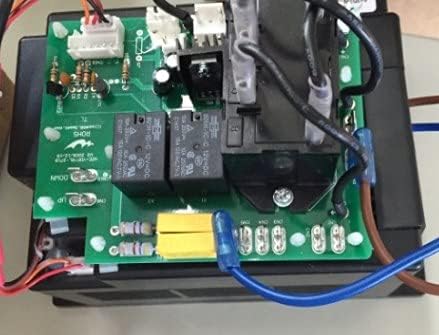
Figure 3.1: Top view of the DAVITU motor driver circuit board, showing relays, capacitors, and multiple wired connections for power and control signals.
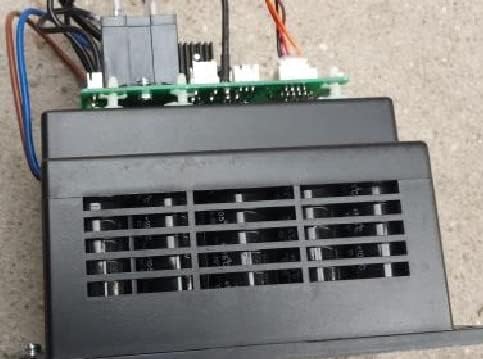
Figure 3.2: Side view of the DAVITU motor driver, illustrating the heatsink enclosure designed for thermal management, with the green circuit board visible above.
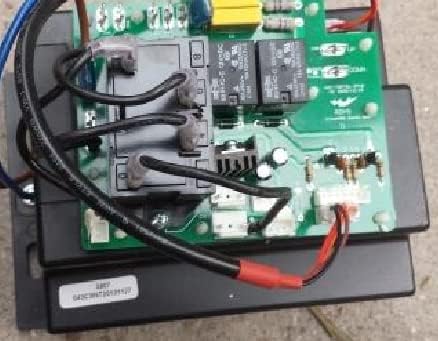
Figure 3.3: Detailed top view of the DAVITU motor driver, providing a clearer perspective on the arrangement of components and the routing of various wires.
4. Setup and Installation
Proper installation is critical for the controller's performance and safety. Refer to the wiring diagram provided with your specific running machine for exact connection points.
4.1 Mounting the Controller
- Choose a secure, dry, and well-ventilated location within the running machine's enclosure.
- Ensure adequate clearance around the controller for airflow and heat dissipation.
- Use appropriate fasteners to mount the controller firmly to a stable surface.
4.2 Wiring Connections
The controller requires connections for power input, motor output, and control signals from the running machine's console. Always ensure power is disconnected before making any connections.
- Power Input: Connect the DC power supply to the designated input terminals. Observe correct polarity.
- Motor Output: Connect the DC motor leads to the motor output terminals.
- Control Signals: Connect the communication cables from the running machine's console (e.g., speed control, emergency stop) to the corresponding terminals on the controller.
- Grounding: Ensure the controller and the running machine are properly grounded.

Figure 4.1: Close-up view of the DAVITU motor driver with various wires connected, demonstrating typical installation and connection points.
5. Operating Instructions
Once installed and wired correctly, the controller operates in conjunction with the running machine's console. The following steps outline general operation:
- Ensure all connections are secure and power is supplied to the running machine.
- Turn on the running machine's main power switch.
- Use the console controls to start the treadmill belt. The controller will regulate the DC motor speed based on your input.
- Adjust speed as desired using the console.
- To stop, use the console's stop function or the emergency stop button.
6. Maintenance
Regular maintenance ensures the longevity and reliable operation of the motor driver.
- Cleaning: Periodically inspect the controller for dust and debris. Use a soft, dry brush or compressed air to gently clean the circuit board and heatsink. Ensure power is disconnected before cleaning.
- Connections: Check all wiring connections for tightness and signs of wear or corrosion. Re-tighten any loose connections.
- Environment: Ensure the operating environment remains within specified temperature and humidity ranges to prevent component degradation.
7. Troubleshooting
This section addresses common issues that may arise during the operation of the motor driver. For problems not listed here, contact customer support.
| Problem | Possible Cause | Solution |
|---|---|---|
| Motor does not start. | No power, loose connections, faulty motor, or console error. | Check power supply. Verify all wiring. Test motor independently if possible. Consult running machine manual. |
| Motor runs erratically. | Unstable power, loose control signal wires, or motor overload. | Ensure stable power. Check control signal connections. Reduce load if applicable. |
| Controller overheats. | Insufficient ventilation, excessive load, or internal fault. | Ensure proper airflow around the heatsink. Reduce motor load. Discontinue use and contact support if overheating persists. |
8. Specifications
The following are the technical specifications for the DAVITU SHUA/Running Machine Inverter Controller (Model SH5907 series):
- Motor Type: DC Motor
- Power Supply: DC
- Model Number: SH5907 (Compatible with SH-5905, SH-5906, X3, X5 series)
- Manufacturer: DAVITU
- Number of Pieces: 1 (Controller unit)
9. Warranty and Support
9.1 Warranty Information
This product is typically covered by a standard return policy, allowing for refunds or replacements within 30 days of purchase. For specific warranty terms and conditions, please refer to your purchase documentation or contact the seller directly. Extended protection plans may be available for purchase separately.
9.2 Customer Support
For technical assistance, troubleshooting guidance beyond this manual, or warranty claims, please contact your retailer or the DAVITU customer support channel. Provide your product model number (SH5907) and purchase details when seeking support.