
1. Introduction
This manual provides essential information for the safe and efficient operation of the DAVITU Leadshine 57HSM24-E1 Hybrid Servo Motor. Please read this manual thoroughly before installation, operation, or maintenance to ensure proper use and prevent damage to the product or injury to personnel. Keep this manual for future reference.
2. Safety Information
WARNING: Failure to follow these safety instructions may result in electric shock, fire, serious injury, or death.
- Ensure all power is disconnected before performing any installation, wiring, or maintenance.
- Only qualified personnel should install and service this equipment.
- Do not operate the motor in environments with flammable gases, liquids, or explosive dust.
- Protect the motor from moisture, dust, and corrosive substances.
- Ensure proper grounding to prevent electrical hazards.
- Avoid touching the motor during or immediately after operation, as it may be hot.
3. Product Overview
The DAVITU Leadshine 57HSM24-E1 is a high-performance hybrid servo motor designed for precision motion control applications. It integrates a 1000-line encoder for accurate position feedback and offers a 2.4Nm holding torque with an 8mm shaft. This motor is suitable for use with H2-506 series drives.
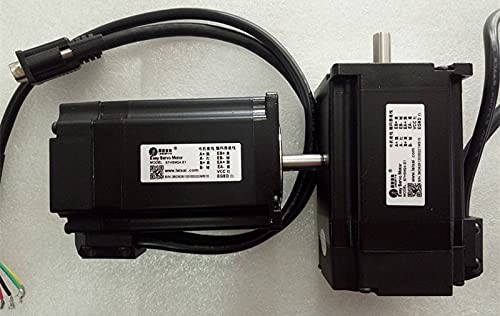
Figure 3.1: Front view of the DAVITU Leadshine 57HSM24-E1 Hybrid Servo Motor. This image shows the motor body, shaft, and connector for the encoder and power cables.
4. Setup
4.1. Mechanical Mounting
- Ensure the mounting surface is flat, rigid, and free from vibrations.
- Align the motor shaft with the load carefully to avoid excessive radial or axial forces.
- Secure the motor using appropriate screws and torque specifications for the mounting holes.
- Verify that there is adequate clearance for ventilation around the motor.
4.2. Electrical Wiring
Refer to the wiring diagram provided with your H2-506 drive for specific connections. General wiring steps include:
- Power Connection: Connect the motor power cables to the drive's motor output terminals (U, V, W). Ensure correct phase sequence.
- Encoder Connection: Connect the 1000-line encoder cable to the drive's encoder input port. Pay close attention to pin assignments (A+, A-, B+, B-, Z+, Z-, VCC, GND).
- Grounding: Connect the motor's ground terminal to the system's protective earth ground.
- Double-check all connections for tightness and correct polarity before applying power.
5. Operating Instructions
- Initial Power-Up: After verifying all connections, apply power to the H2-506 drive. Observe the drive's status indicators.
- Parameter Configuration: Configure the drive parameters according to your application requirements and the motor's specifications (e.g., motor type, encoder resolution, current limits). Refer to the H2-506 drive manual for detailed parameter settings.
- Test Run: Perform a low-speed test run without load to confirm correct motor rotation and encoder feedback.
- Load Operation: Gradually increase the load and speed, monitoring motor temperature and performance.
- Emergency Stop: Familiarize yourself with the emergency stop procedure for your system.
6. Maintenance
Regular maintenance ensures the longevity and reliable operation of your hybrid servo motor.
- Cleaning: Keep the motor free from dust, debris, and oil. Use a soft, dry cloth for cleaning. Do not use solvents that may damage the motor's finish or internal components.
- Inspection: Periodically inspect the motor for signs of wear, damage, or loose connections. Check cables for fraying or insulation damage.
- Ventilation: Ensure cooling fins are clear of obstructions to maintain proper heat dissipation.
- Bearing Life: The motor bearings are typically sealed and lubricated for life under normal operating conditions. If unusual noise or vibration occurs, consult a qualified technician.
7. Troubleshooting
| Problem | Possible Cause | Solution |
|---|---|---|
| Motor does not move or rotates erratically. | Incorrect wiring, insufficient power, drive fault, incorrect parameters. | Check all wiring connections. Verify power supply. Check drive error codes. Review drive parameters. |
| Motor overheats. | Excessive load, insufficient ventilation, incorrect current settings. | Reduce load. Ensure proper airflow. Adjust drive current settings. |
| Excessive vibration or noise. | Misalignment, loose mounting, damaged bearings, resonance. | Check mechanical alignment. Tighten mounting screws. Inspect bearings. Adjust drive's anti-resonance parameters. |
| Loss of position accuracy. | Encoder cable issue, encoder damage, mechanical slippage. | Check encoder cable for damage or loose connections. Inspect encoder. Verify mechanical coupling. |
If troubleshooting steps do not resolve the issue, contact technical support.
8. Specifications
| Feature | Specification |
|---|---|
| Model | 57HSM24-E1 |
| Brand | DAVITU (Leadshine component) |
| Holding Torque | 2.4 Nm |
| Encoder Resolution | 1000 lines (4000 counts/revolution) |
| Shaft Diameter | 8 mm |
| Compatible Drive | H2-506 series (or equivalent hybrid servo drives) |
| Manufacturer | DAVITU |
| Part Number | DVT-7838D66279818D52EB6668CBCEAF94F7 |
| ASIN | B09FSWK8RX |
| Date First Available | March 26, 2023 |
9. Warranty and Support
This product is covered by a standard manufacturer's warranty against defects in materials and workmanship. For specific warranty terms and conditions, please refer to the documentation provided at the time of purchase or contact your vendor.
For technical support, troubleshooting assistance, or warranty claims, please contact DAVITU customer service through your purchase platform or the official DAVITU website. Please have your model number (57HSM24-E1) and purchase details ready when contacting support.