
BRPOM BM500
BRPOM Car Jump Starter
User Manual
Model: BM500
Introduction
The BRPOM 5000A Peak Car Jump Starter is a versatile and powerful device designed to reliably start 12V dead batteries in various vehicles, including cars, motorcycles, trucks, and boats. Beyond its primary function, it serves as a portable power bank for electronic devices and features an emergency LED flashlight with multiple modes. This manual provides essential information for safe and effective use.
Product Overview
The BRPOM Jump Starter (Model BM500) is engineered for durability and ease of use. It features a robust casing, smart clamp cables, and multiple ports for charging and lighting.

Figure 1: BRPOM 5000A Peak Car Jump Starter and included accessories.

Figure 2: The jump starter can start 99.9% of dead batteries in seconds, supporting up to 10.0L gas or 8.0L diesel engines with 5000A peak current and 23800mAh battery capacity.

Figure 3: Smart Jumper Cables provide comprehensive protection including short circuit, over charge, over discharge, reverse connection, reverse polarity, over current, and over heat protection.
Setup
Before first use, ensure the jump starter is fully charged. Due to long transportation times, the battery may have virtual power and requires a full charge to function correctly.
- Initial Charge: Connect the jump starter to a power source using the provided Type-C cable. A full recharge takes approximately 4.5 hours.
- Battery Level Check: Press the power button once to check the battery indicator lights. Ensure at least three lights are illuminated for optimal performance.

Figure 4: The jump starter can be fully recharged via Type-C input within 4.5 hours and offers 12 months of standby time. It also functions as a power bank with two smart USB output ports (18W Quick Charge included).
Operating Instructions
Jump Starting a Vehicle
- Insert Jumper Cable: Insert the blue end of the smart jumper cable into the 12V jump start EC5 port on the jump starter.
- Connect Clamps: Connect the red (+) clamp to the positive (+) terminal of the vehicle battery and the black (-) clamp to the negative (-) terminal of the vehicle battery. The smart clamps have built-in visible alarms to detect incorrect connections.
- Start Engine: Once the clamps are securely connected and the smart cable indicates a ready status, start your car engine.
- Remove Clamps: After the engine starts, immediately remove the clamps from the vehicle battery and then unplug the smart cable from the jump starter.
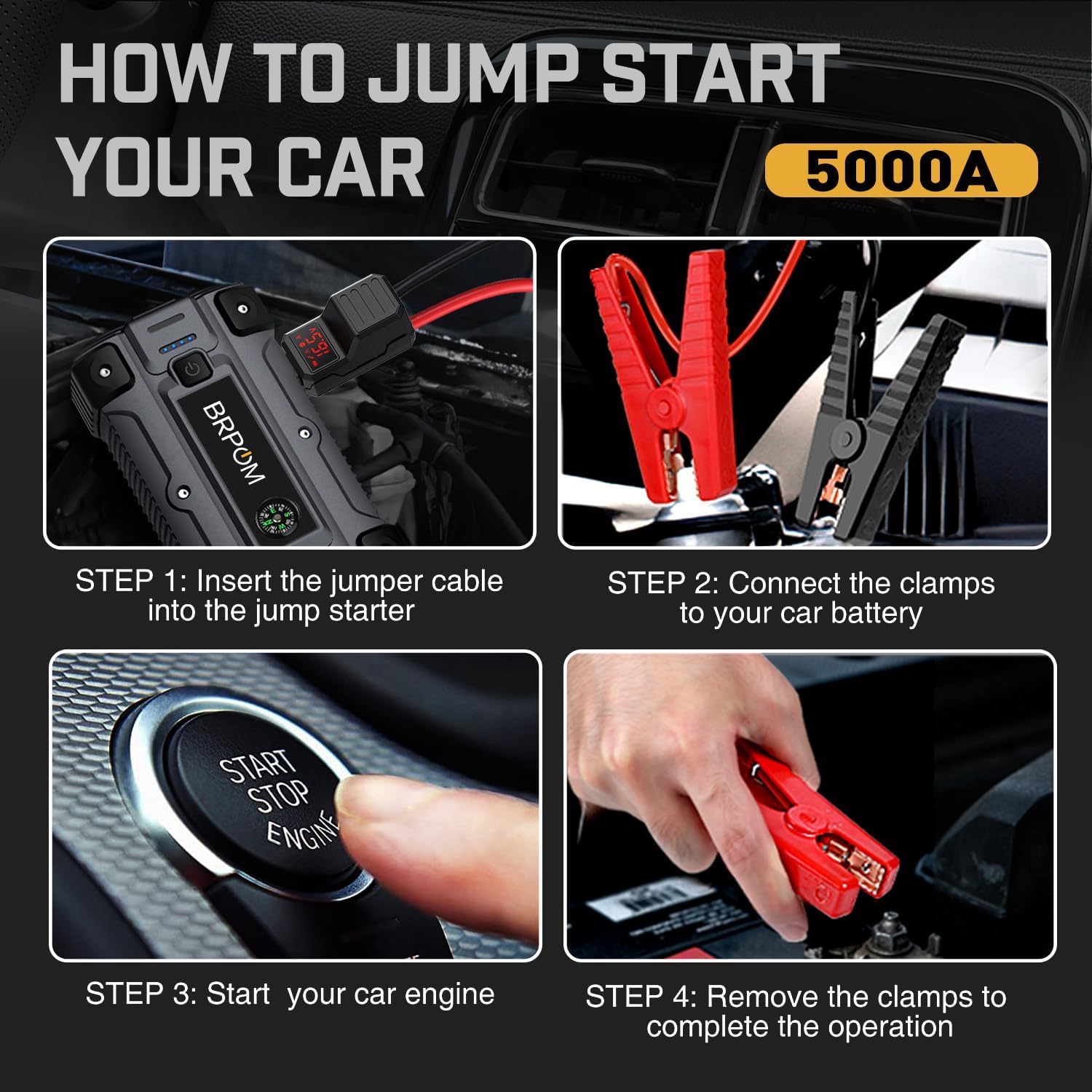
Figure 5: Step-by-step guide for jump starting your car: 1. Insert jumper cable, 2. Connect clamps, 3. Start engine, 4. Remove clamps.
Emergency Flashlight
The jump starter is equipped with a bright LED flashlight with three modes:
- Lighting Mode: Press and hold the power button for 3 seconds to turn on the flashlight.
- Flash Mode: Press the power button once more to switch to flash mode.
- SOS Mode: Press the power button a third time to activate SOS mode.
- Red and Blue Warning: Some models may feature additional red and blue warning lights for enhanced visibility in emergencies.

Figure 6: The emergency flashlight offers Spotlight, Strobe, SOS, and Red and Blue Warning modes, providing over 72 hours of continuous use.
Power Bank Function
The jump starter can also charge your electronic devices:
- Connect your mobile phone or tablet to the smart USB output ports (18W Quick Charge available).
- The jump starter can charge devices quickly and safely.
Safety Precautions
- Always ensure correct polarity when connecting clamps to the battery terminals (red to positive, black to negative).
- Do not short-circuit the clamps.
- Avoid operating the device in extremely wet conditions.
- Keep out of reach of children.
- Refer to the smart clamp's visible alarms for immediate feedback on connection status.
Maintenance
- Charging: For optimal battery life, fully charge the device every 3-6 months, even if not in use. It has an extreme low self-discharge rate, allowing it to standby for up to 12 months.
- Storage: Store the jump starter in a cool, dry place away from direct sunlight and extreme temperatures.
- Cleaning: Wipe the device with a dry, soft cloth. Do not use harsh chemicals or abrasive materials.
Troubleshooting
- Device Not Charging: If the device does not charge upon first use, ensure it is fully charged for 4-5 hours. Long shipping times can lead to a virtual power situation.
- Vehicle Not Starting: Ensure the smart clamps are correctly connected to the battery terminals. Check the digital display on the smart clamp for any error indicators.
- No Power Output: Verify the device's battery level. If low, recharge the unit.
Specifications
| Feature | Specification |
|---|---|
| Brand | BRPOM |
| Model | BM500 |
| Peak Current | 5000 Amps |
| Battery Capacity | 23800mAh |
| Engine Compatibility | Up to 10.0L Gas or 8.0L Diesel |
| Start Voltage | 12V |
| USB Output 1 | 5V/2A, 9V/2A (Quick Charge) |
| USB Output 2 | 5V/2.1A |
| Type-C Input | 5V/2A, 9V/2A |
| Item Weight | 350 Grams (12.3 ounces) |
| Product Dimensions | 4"D x 10"W x 5"H |
Warranty and Support
For warranty information and customer support, please refer to the documentation included with your product or contact BRPOM directly.
Customer Service Email: brpom_service@outlook.com
Related documentsBM500

Ask a question about this manual
Ask about setup, troubleshooting, compatibility, parts, safety, or missing instructions. Manuals+ will review the question and use this page’s manual context to help answer it.