
iFORWAY T-REX 1000
iFORWAY T-REX 1000 Portable Power Station User Manual
Your comprehensive guide to operating and maintaining your iFORWAY T-REX 1000.
1. Introduction
The iFORWAY T-REX 1000 is a high-capacity, fast-charging portable power station designed to provide reliable power for various applications, from home emergencies to outdoor adventures. With a 1228WH capacity and 1000W (1500W peak) AC output, it can power a wide range of devices. Its unique Super-Q technology allows for rapid recharging from 0% to 100% in just 2 hours. The integrated Uninterruptible Power Supply (UPS) function ensures critical devices remain powered during outages. This manual provides essential information for safe and efficient operation.

Image: The iFORWAY T-REX 1000 Portable Power Station, a compact and robust power solution.
2. Safety Instructions
Please read all safety instructions carefully before using the iFORWAY T-REX 1000. Failure to follow these instructions may result in electric shock, fire, or serious injury.
- Do not disassemble, repair, or modify the unit.
- Do not place the unit near fire or expose it to high temperatures.
- Do not use or store the unit in direct sunlight or in hot environments.
- Do not use or store the unit in a bathroom or in areas exposed to water or moisture.
- Do not drop, strike, or subject the unit to strong impacts.
- Keep out of reach of children and pets.
- Ensure proper ventilation during use to prevent overheating.
- Use only original or certified charging cables and adapters.
- If the unit emits smoke, odor, or unusual noise, stop using it immediately and contact customer support.
3. Product Overview
3.1. Package Contents
Verify that all items are included in your package:
- 1 x iFORWAY T-REX 1000 Portable Power Station
- 1 x AC Charging Cable
- 1 x Car Charging Cable
- 1 x User Guide
3.2. Component Diagram

Image: Detailed diagram showing the various input and output ports, and control buttons on the iFORWAY T-REX 1000.
- Car Outlet
- DC Output
- DC ON/OFF Switch
- Main Power Button
- USB ON/OFF Switch
- AC Outlet 110V/1000W (x6)
- USB 3.0 Ports (x4)
- USB-C PD100W Ports (x2)
- AC Input
- Solar Input
- DC Input
- LCD Display

Image: Close-up view of the LCD display, showing input/output wattage, battery percentage, and estimated remaining time.
4. Setup
4.1. Initial Charging
Before first use, it is recommended to fully charge the iFORWAY T-REX 1000. This ensures optimal battery performance and calibration.
- Connect the provided AC charging cable to the AC Input port on the power station.
- Plug the other end of the AC charging cable into a standard wall outlet (110V).
- The LCD display will show the charging status and input wattage. The unit will fully charge in approximately 2 hours.

Image: The iFORWAY T-REX 1000 connected to a wall outlet for fast charging, highlighting its 2-hour recharge time.
5. Operating Instructions
5.1. Powering On/Off
- To turn on the unit, press and hold the Main Power Button for 3 seconds. The LCD display will light up.
- To turn off the unit, press and hold the Main Power Button for 3 seconds again.
5.2. Using AC Outputs
The T-REX 1000 provides six 1000W (1500W peak) pure sine wave AC outlets.
- Ensure the unit is powered on.
- Press the AC ON/OFF Switch to activate the AC outlets. The AC icon will appear on the LCD.
- Plug your AC devices into the outlets. Ensure the total power consumption does not exceed 1000W.
- When finished, press the AC ON/OFF Switch again to turn off the AC outputs.
5.3. Using DC and USB Outputs
The unit features DC outputs (13.6V/8A), a car outlet (13.6V/8A), four QC3.0 USB-A ports, and two 100W USB-C PD ports.
- Ensure the unit is powered on.
- For DC outputs (including car outlet), press the DC ON/OFF Switch. The DC icon will appear on the LCD.
- For USB outputs, press the USB ON/OFF Switch. The USB icon will appear on the LCD.
- Plug your devices into the appropriate ports.
- When finished, press the respective ON/OFF switches to deactivate the outputs.
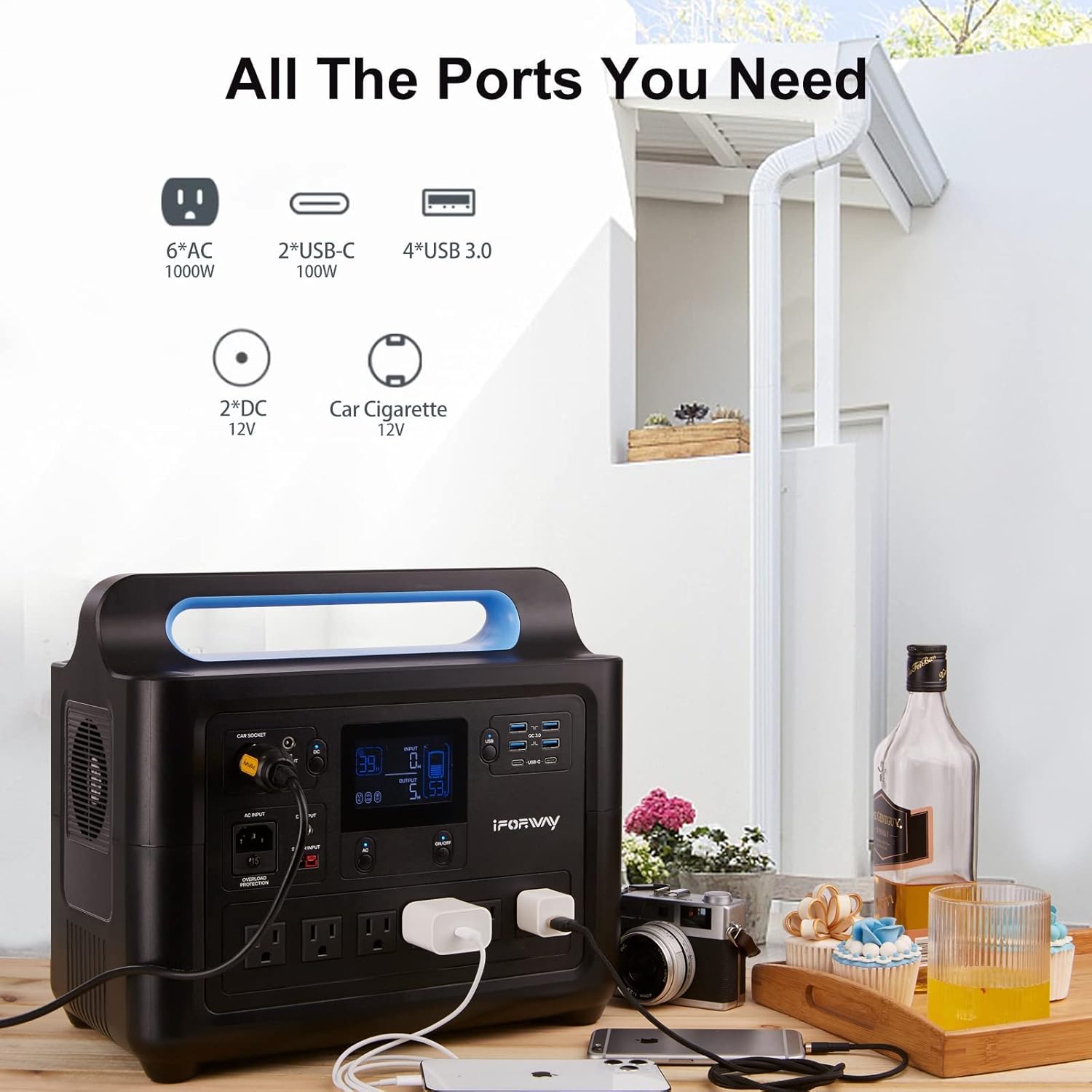
Image: The iFORWAY T-REX 1000 demonstrating its multiple output ports, including AC, USB-C, USB-A, DC, and car cigarette lighter, powering various devices.
5.4. Uninterruptible Power Supply (UPS) Function
The T-REX 1000 can function as an Uninterruptible Power Supply (UPS) for devices under 700W. When connected to a wall outlet and powering devices, it will pass through grid power. In case of a power outage, it automatically switches to battery power within 0ms, ensuring continuous operation for critical devices.
- Connect the T-REX 1000 to a wall outlet using the AC charging cable.
- Plug your critical devices (e.g., computer, medical equipment) into the AC outlets of the T-REX 1000.
- Ensure the total power consumption of devices connected for UPS functionality does not exceed 700W.

Image: The iFORWAY T-REX 1000 providing Uninterruptible Power Supply (UPS) to a desktop computer and monitor, ensuring continuous operation during power fluctuations.
6. Charging the Power Station
The iFORWAY T-REX 1000 offers multiple charging methods:
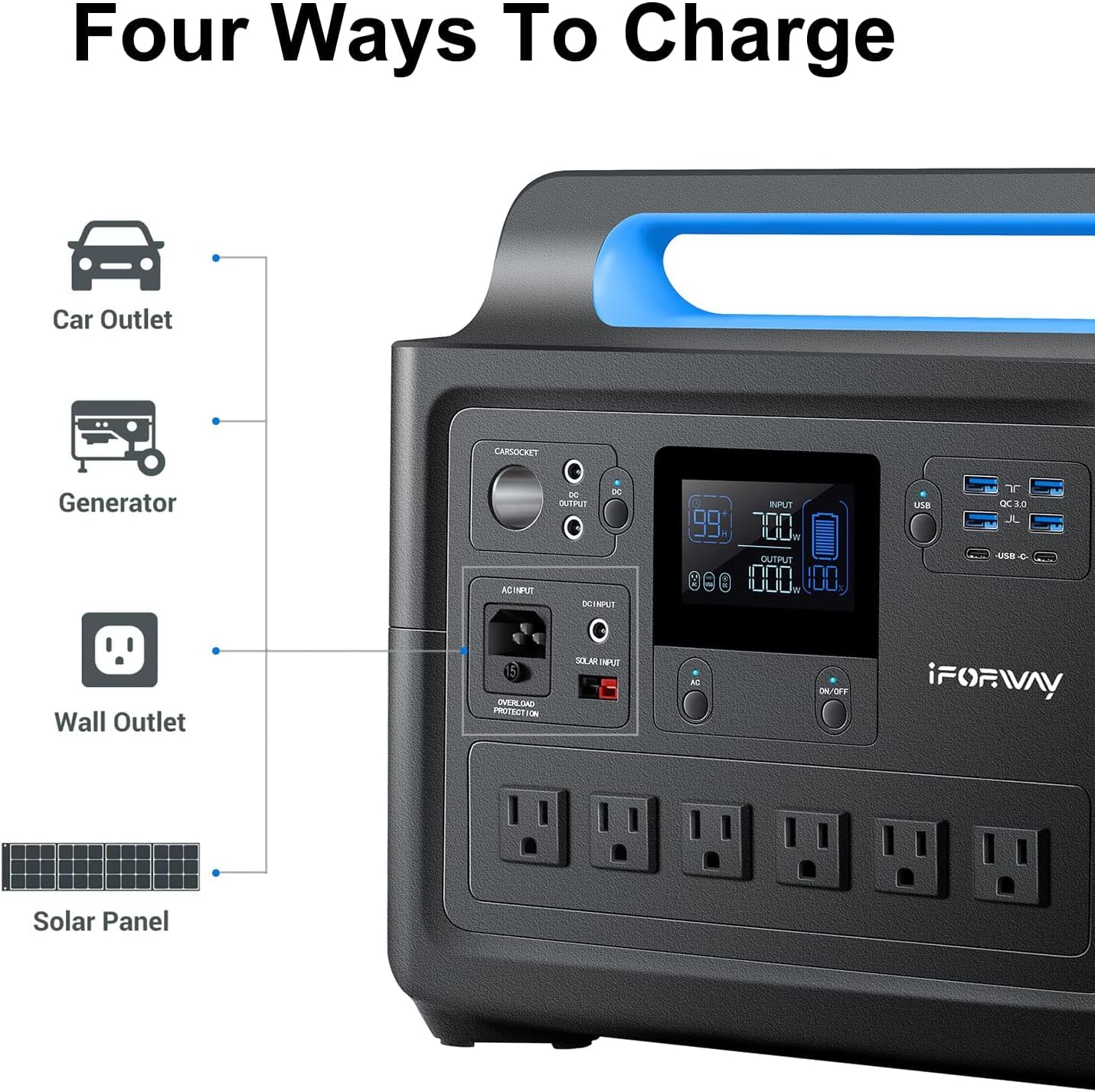
Image: Visual representation of the four charging methods: Car Outlet, Generator, Wall Outlet, and Solar Panel.
6.1. AC Wall Charging
Use the provided AC charging cable to connect the unit to a standard wall outlet. The Super-Q fast charging technology allows for a full charge in approximately 2 hours (110V).
6.2. Solar Panel Charging
The T-REX 1000 supports solar charging, providing an eco-friendly way to recharge, especially outdoors.
- Connect compatible solar panels (not included) to the Solar Input port on the power station.
- Ensure the solar panels are placed in direct sunlight for optimal charging efficiency.
- The LCD display will show the input wattage from the solar panels.

Image: A person connecting the iFORWAY T-REX 1000 to a set of portable solar panels on a sandy beach, demonstrating its fast solar charging capability.
6.3. Car Charging
Use the provided car charging cable to recharge the unit from your vehicle's 12V cigarette lighter outlet.
- Connect one end of the car charging cable to the Car Outlet port on the power station.
- Plug the other end into your vehicle's 12V cigarette lighter socket.
7. Maintenance
7.1. Storage
- Store the unit in a cool, dry place, away from direct sunlight and extreme temperatures.
- For long-term storage, charge the unit to 50-80% every 3-6 months to preserve battery health.
- Avoid storing the unit in environments with high humidity or corrosive substances.
7.2. Cleaning
- Disconnect all cables before cleaning.
- Use a soft, dry cloth to wipe the exterior of the unit.
- Do not use abrasive cleaners or solvents.
7.3. Battery Care
The iFORWAY T-REX 1000 uses high-quality 3C EVA grade battery cells and a Battery Management System (BMS) for optimal performance and safety.

Image: A close-up of a Battery Management System (BMS) chip, illustrating the advanced safety and control features integrated into the power station's battery.
- Avoid fully discharging the battery frequently.
- Do not expose the battery to extreme temperatures (below -10°C or above 40°C).
- The BMS provides over-voltage, over-current, over-temperature, and short-circuit protection.
8. Troubleshooting
If you encounter issues with your iFORWAY T-REX 1000, refer to the following common problems and solutions:
| Problem | Possible Cause | Solution |
|---|---|---|
| Unit does not turn on. | Battery is completely drained; Power button not pressed long enough. | Charge the unit using AC power; Press and hold the Main Power Button for 3 seconds. |
| AC outlets not working. | AC output not activated; Overload protection triggered; Device power exceeds 1000W. | Press the AC ON/OFF Switch; Disconnect devices, restart AC output; Reduce total load. |
| Unit not charging. | Charging cable not properly connected; Faulty cable/adapter; Extreme temperature. | Ensure secure connections; Try a different cable/adapter; Move to a suitable temperature environment. |
| UPS function not working. | Device power exceeds 700W for UPS mode. | Ensure total load for UPS is under 700W. |
If the problem persists after trying these solutions, please contact iFORWAY customer support.
9. Specifications
| Feature | Detail |
|---|---|
| Model | T-REX 1000 |
| Capacity | 1228 WH |
| AC Output | 6 x 1000W (1500W Peak) Pure Sine Wave, 110V |
| USB-C PD Output | 2 x 100W |
| USB-A Output | 4 x QC3.0 |
| DC Output | 2 x 13.6V/8A |
| Car Outlet | 1 x 13.6V/8A |
| AC Input (Charging) | Up to 700W (for UPS function) |
| Recharge Time (AC) | 0-100% in 2 hours (110V) |
| Battery Cell Type | Lithium-Phosphate (3C EVA Grade) |
| Dimensions | 34.04 x 22.35 x 30.48 cm (13.4 x 8.8 x 12 inches) |
| Weight | 15.42 kg (34 lbs) |
| UPS Function | 0ms switchover for devices < 700W |
10. Warranty and Support
iFORWAY provides a comprehensive warranty and dedicated customer support for your T-REX 1000 Portable Power Station.
10.1. Warranty Information
Your iFORWAY T-REX 1000 comes with an 18-month warranty from the date of purchase. This warranty covers manufacturing defects and ensures the product meets its specified performance. Please retain your proof of purchase for warranty claims.
Additionally, iFORWAY offers a 30-day free return policy from the date of purchase.
10.2. Customer Support
For any questions, technical assistance, or warranty claims, please contact iFORWAY customer support. Our friendly team is ready to assist you.
- Website: www.iforway.com (Note: This is a placeholder URL, please refer to official product documentation for actual contact details.)
- Email: support@iforway.com (Note: This is a placeholder email, please refer to official product documentation for actual contact details.)
Related documentsT-REX 1000

Ask a question about this manual
Ask about setup, troubleshooting, compatibility, parts, safety, or missing instructions. Manuals+ will review the question and use this page’s manual context to help answer it.