
Retevis FA9230AX2
Retevis RM01 Marine Two-Way Radio Instruction Manual
Brand: Retevis | Model: FA9230AX2
1. Product Overview & Features
The Retevis RM01 is a professional handheld marine radio designed for reliable communication in various water environments. It offers robust features for safety and convenience.
- IP67 Waterproof & Floating: Designed to float if dropped in water, making it easy to retrieve.
- NOAA Weather Channel & Alert: Provides timely weather information for enhanced safety.
- Long Battery Life & Easy Charging: Compatible with 5 AAA Ni-MH batteries (included) for extended operation.
- User-Friendly Interface: Features an LCD display for clear visibility and a multi-functional keypad for easy setting adjustments.
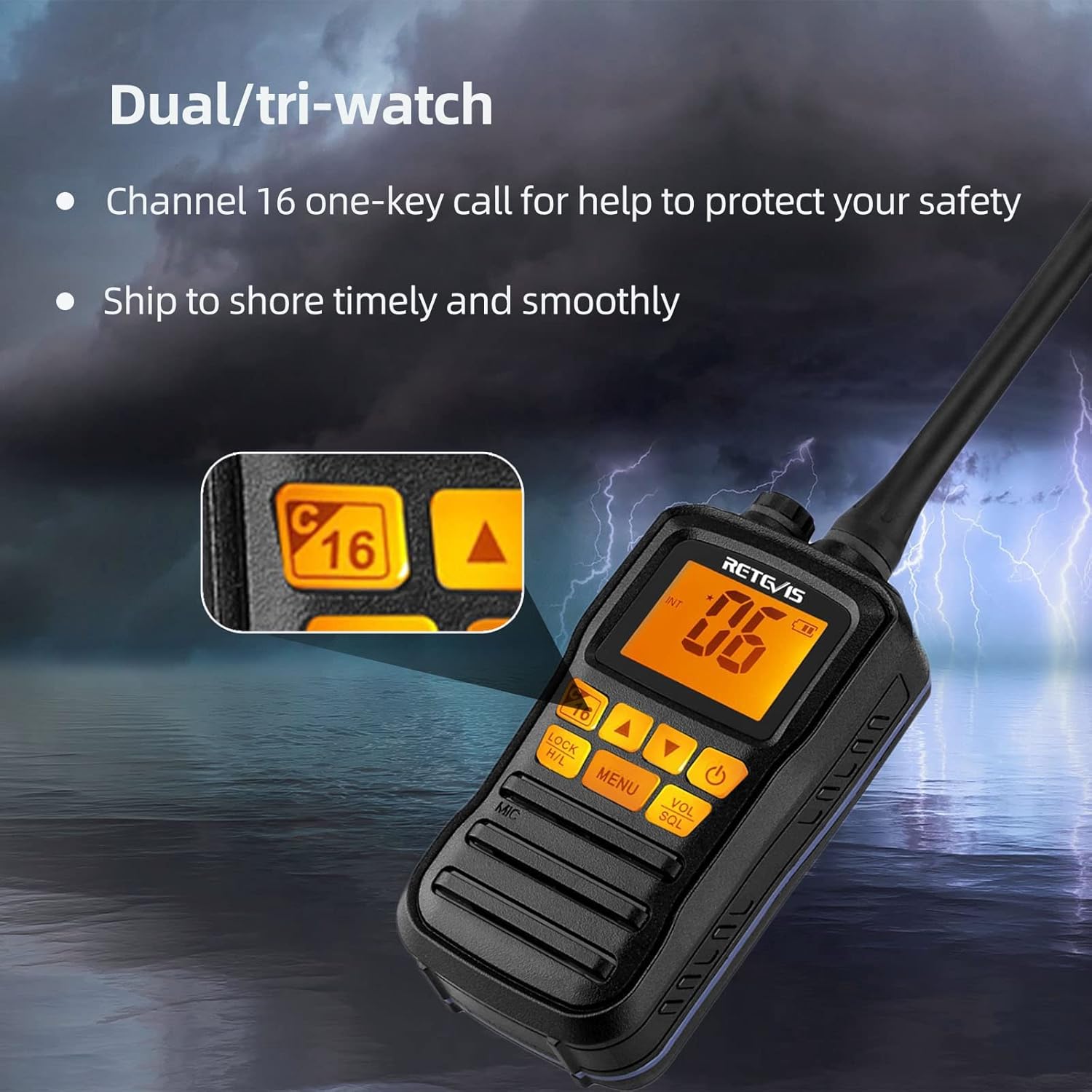
- Safety Features: Includes instant access to Channel 16 for emergencies and Dual/Tri-Watch functions to monitor multiple channels simultaneously.
- Durable Design: Built with a hard body shell, ideal for offshore workers, fishing vessels, cargo boats, and yachts.
2. Package Contents
Verify that all items listed below are included in your package:
- 2 x Retevis RM01 Marine Transceiver
- 10 x 1.2V (AAA) Ni-MH Battery
- 2 x Antenna
- 2 x Adaptor & 2 x Car charger & 2 x Charging cable
- 2 x Belt clip & 2 x Lanyard & 2 x Manual

3. Product Components
Familiarize yourself with the main components of your Retevis RM01 radio:


- Antenna: For transmitting and receiving signals.
- LCD Display: Shows channel number, battery status, and menu options.
- Keypad: Buttons for channel selection, menu navigation, volume adjustment, and other functions.
- PTT (Push-to-Talk) Button: Located on the side, press and hold to transmit, release to receive.
- Volume/Squelch Knob: Adjusts audio volume and squelch level.
- Battery Compartment: Houses the AAA Ni-MH batteries.
4. Setup
4.1 Battery Installation
The Retevis RM01 uses 5 AAA Ni-MH batteries. To install or replace batteries:
- Open the battery compartment cover on the back of the radio.
- Insert the 5 AAA Ni-MH batteries, ensuring correct polarity (+/-).
- Securely close the battery compartment cover.

4.2 Charging the Radio
The radio can be charged using the included wall adapter or car charger. Ensure the radio is powered off before charging.
To charge, connect the charging cable to the radio's charging port (located at the top, under a waterproof plug) and then to either the wall adapter or car charger. The battery indicator on the LCD will show charging status.
5. Operating Instructions
5.1 Power On/Off
To power on the radio, press and hold the power button (usually marked with a power symbol) until the LCD screen illuminates. To power off, press and hold the same button until the screen turns off.
5.2 Channel Selection
Use the UP/DOWN arrow buttons on the keypad to navigate through the available marine channels. The selected channel number will be displayed on the LCD.
5.3 Menu Navigation & Settings
Press the 'MENU' button to access the radio's settings. Use the UP/DOWN arrows to scroll through options like Beep, VOX, Weather Channel, Backlight, and Squelch. Press 'MENU' again to confirm a selection or 'EXIT' to return to the main screen.
5.4 Dual/Tri-Watch Function
The Dual/Tri-Watch feature allows you to monitor Channel 16 (emergency channel) and a selected call channel in addition to your current working channel. This ensures you don't miss important communications.
5.5 NOAA Weather Alert
Access the NOAA weather channels through the menu to receive real-time weather forecasts and alerts, crucial for safe navigation.
6. Maintenance
6.1 Waterproof & Floating Capabilities
The Retevis RM01 is IP67 rated, meaning it is protected from dust and can withstand immersion in water up to 1 meter for 30 minutes. Its floating design ensures it remains on the surface if dropped overboard.

6.2 Vibration Drainage
After exposure to water, the radio features a vibration drainage function to expel water from the speaker grille, ensuring clear audio quality. Activate this function as needed after submersion.
7. Troubleshooting
If you encounter issues with your Retevis RM01 radio, consider the following common troubleshooting steps:
- No Power: Ensure batteries are correctly installed and fully charged.
- Poor Audio Quality: Check volume and squelch settings. If recently exposed to water, activate the vibration drainage function.
- Cannot Transmit/Receive: Verify you are on the correct channel and that the antenna is securely attached. Check for any obstructions.
- Keypad Unresponsive: Check if the keypad lock function is activated.
For persistent issues, refer to the detailed troubleshooting section in the included manual or contact customer support.
8. Specifications
| Feature | Specification |
|---|---|
| Item Weight | 6.3 ounces |
| Product Dimensions | 1.34 x 2.17 x 10.63 inches |
| Country of Origin | China |
| Item Model Number | FA9230AX2 |
| Batteries | 2 Lithium Ion batteries required. (included) - Note: Product description states 5 AAA Ni-MH batteries. Please verify. |
| Brand | Retevis |
| Color | Black, Orange |
| Number of Channels | 88 |
| Special Feature | Floating, NOAA Weather Alert |
| Frequency Range | 156-174 MHz |
| Tuner Technology | VHF |
| Voltage | 1.2 Volts |
| Water Resistance Level | Waterproof (IP67) |
9. Warranty & Support
Retevis provides a 2-year warranty for the radio body and a 1-year warranty for accessories. A 30-day no-reason return policy is also available.
Beyond the warranty period, maintenance services are offered, with buyers responsible for associated costs.
For any inquiries or support needs, please contact Retevis customer service via Amazon. They aim to reply within 12 hours.
For additional resources and product information, visit the official Retevis Store on Amazon: Retevis Store
Related documentsFA9230AX2


Ask a question about this manual
Ask about setup, troubleshooting, compatibility, parts, safety, or missing instructions. Manuals+ will review the question and use this page’s manual context to help answer it.