
Sharper Image 1014495
Sharper Image Spahaven Foot Bath Instruction Manual
Model: 1014495
Product Overview
The Sharper Image Spahaven Foot Bath is designed to provide a relaxing and therapeutic foot spa experience at home. It features invigorating bubble jets, adjustable heat settings, and dynamic massage rollers to soothe tired feet. The integrated pumice stone helps to smooth calluses, and the insulated tub walls maintain water temperature for prolonged comfort. This foot bath accommodates various foot sizes, up to men's shoe size 13.
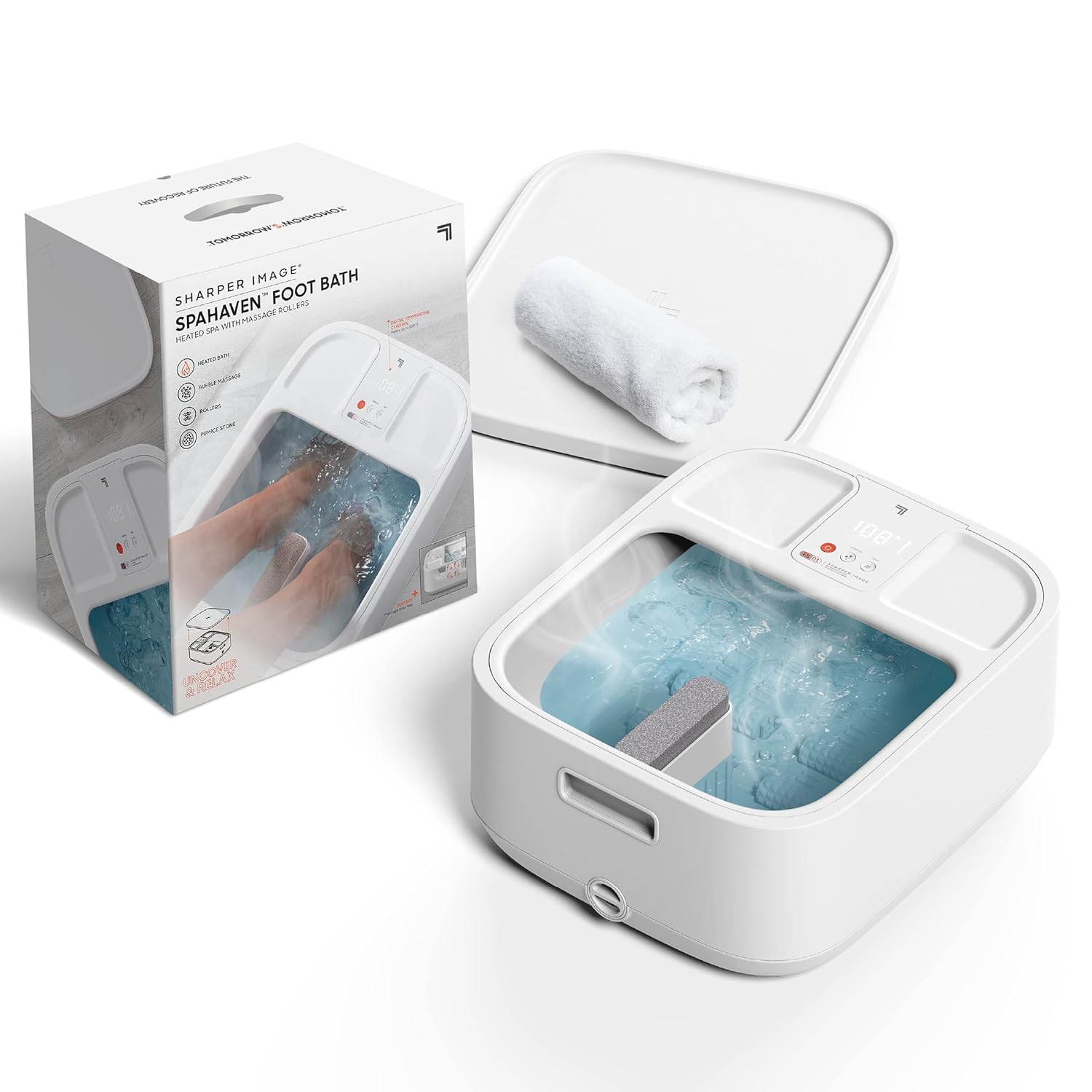
Image: The Sharper Image Spahaven Foot Bath, showcasing the unit itself, its retail packaging, and a small white towel, highlighting its complete spa experience.
Setup
Before first use, ensure all packaging materials are removed. Place the foot bath on a flat, stable surface. Do not plug in the unit until water has been added.
- Fill with Water: Fill the foot bath with warm water up to the indicated maximum fill line. Do not overfill.
- Connect Power: Plug the power cord into a standard electrical outlet.
- Optional Components: The foot bath includes removable massage rollers and a pumice stone. These can be placed in their designated slots as desired.

Image: A top-down view of the foot bath with the lid removed, illustrating the internal layout, including the slots for the massage rollers and the removable pumice stone.

Image: A detailed view of the foot bath's features, including the digital temperature control, free-spinning massage rollers, and the integrated pumice stone, with explanatory text overlays.
Operating Instructions
Once the foot bath is filled and plugged in, you can begin your spa experience:
- Power On: Press the power button on the control panel to turn on the unit. The digital display will illuminate.
- Adjust Temperature: Use the heat control button to cycle through the 5 preset temperature settings, up to 108°F (42°C). The insulated tub walls help maintain the desired temperature.
- Activate Bubbles: Press the bubble button to activate the invigorating bubble jets for a soothing massage.
- Use Massage Rollers: Gently rub your feet against the free-spinning rollers located at the bottom of the tub to target sore areas and promote relaxation.
- Utilize Pumice Stone: For smoothing calluses, use the removable pumice stone by gently rubbing it against the desired areas of your feet.
- Lid as Tray: The lid can be inverted and used as a convenient tray for holding pedicure tools or other items during your foot spa session.

Image: A detailed view of the foot bath's digital control panel, displaying the current temperature and buttons for activating bubble massage and adjusting heat settings.

Image: A user enjoying the foot bath, demonstrating how the multi-functional lid can be inverted and used as a convenient tray for personal items during the spa session.
Video: This video demonstrates the operation of the Sharper Image Spahaven Foot Bath, including how to adjust temperature settings and activate the bubble massage feature.
Maintenance
Proper maintenance ensures the longevity and hygiene of your foot bath:
- Draining Water: After each use, unplug the unit. Utilize the convenient quick-drain spout located at the bottom of the unit to easily empty the water. This feature allows for draining without lifting and pouring the entire tub.
- Cleaning: Clean the interior of the foot bath with a mild soap and water. Rinse thoroughly and wipe dry with a soft cloth. Do not use abrasive cleaners or harsh chemicals.
- Storage: Store the foot bath in a cool, dry place. Ensure it is completely dry before storing to prevent mold or mildew.

Image: A close-up view of the quick-drain spout on the side of the foot bath, designed for easy and convenient water drainage after use.
Troubleshooting
If you encounter any issues with your Sharper Image Spahaven Foot Bath, refer to the following common problems and solutions:
| Problem | Possible Cause | Solution |
|---|---|---|
| Unit does not power on. | Not plugged in; power outlet issue; unit malfunction. | Ensure power cord is securely plugged into a working outlet. Try a different outlet. If issue persists, contact customer support. |
| Water not heating or not maintaining temperature. | Heat function not activated; water level too low; internal heating element issue. | Ensure heat button is pressed and desired temperature is set. Verify water level is above minimum. Allow time for heating. If temperature fluctuates significantly or does not heat, contact customer support. |
| Bubbles are weak or not activating. | Bubble function not activated; air vents blocked. | Press the bubble button. Check for any obstructions in the bubble vents at the bottom of the tub. |
| Rollers are not moving. | Rollers are free-spinning, not motorized. | The massage rollers are designed to be manually operated by rubbing your feet against them. They are not motorized. |
Specifications
- Product Dimensions: 14.4 x 8.3 x 16.9 inches
- Item Weight: 10.4 Pounds
- Model Number: 1014495
- UPC: 843479153903
- Material: Plastic, Stone
- Power Source: Corded Electric
- Maximum Temperature: Up to 108°F (42°C)
- Foot Size Accommodation: Up to Men's Shoe Size 13
- Manufacturer: Merchsource
- Country of Origin: China
Warranty and Support
For warranty information and customer support, please refer to the documentation included with your product or visit the official Sharper Image website. Keep your purchase receipt for warranty claims.
For direct assistance, you may contact Sharper Image customer support through their official channels.
Related documents1014495

Ask a question about this manual
Ask about setup, troubleshooting, compatibility, parts, safety, or missing instructions. Manuals+ will review the question and use this page’s manual context to help answer it.