
1. Introduction
The BOSS DD-500 is a powerful and versatile digital delay pedal designed for musicians seeking advanced sound-shaping capabilities. It features studio-level sound quality with 32-bit AD/DA conversion, 32-bit floating point processing, and a 96 kHz sampling rate. The pedal offers 12 distinct delay modes, deep editing controls, a graphic display, patch memories, MIDI connectivity, and USB. This manual provides essential information for setting up, operating, maintaining, and troubleshooting your DD-500 pedal.

Figure 1: The BOSS DD-500 Digital Delay Pedal, shown with the included instrument cable, patch cable, and guitar picks. This image provides a comprehensive view of the product bundle.
2. Setup
2.1 Unpacking and Contents Verification
Carefully unpack your BOSS DD-500 pedal. Ensure all components are present:
- BOSS DD-500 Digital Delay Pedal
- 10-foot instrument cable
- 6-inch patch/pedal cable
- 3-pack of BOSS celluloid guitar picks
- Owner's Manual (this document)
2.2 Power Connection
The DD-500 requires a 9V DC power supply. Connect a compatible power adapter (not included in this bundle) to the DC IN jack on the rear panel. Ensure the power adapter meets the specified voltage and current requirements (300 Milliamps).
2.3 Audio and Control Connections
Connect your instrument to the INPUT A/MONO jack. If using a stereo setup, connect a second instrument or stereo source to INPUT B. Connect the OUTPUT A/MONO jack to your amplifier or audio interface. For stereo output, connect OUTPUT B as well. The pedal also features CTL 1,2/EXP, USB, and MIDI IN/OUT ports for advanced control and connectivity.
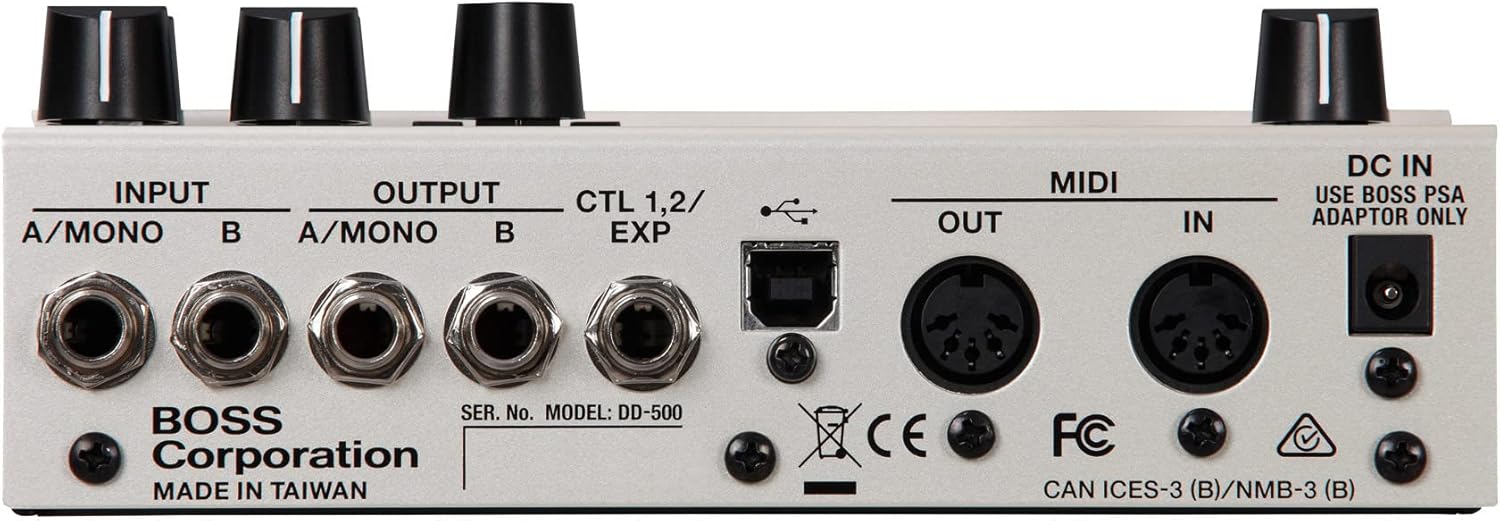
Figure 2: Rear panel connections of the BOSS DD-500. This view highlights the input/output jacks, MIDI ports, USB port, and DC power input.
3. Operating Instructions
3.1 Front Panel Overview
The DD-500's front panel provides intuitive controls for selecting delay modes, adjusting parameters, and navigating settings.

Figure 3: Detailed view of the BOSS DD-500 front panel, showing the mode selector, LCD screen, parameter knobs, and footswitches.
- MODE Knob: Selects one of the 12 delay types (e.g., Standard, Analog, Tape, Vintage Digital, Dual, Pattern, Reverse, Tera Echo, Slow Attack, Filter, Shimmer, SFX).
- TIME/VALUE Knob: Adjusts delay time or navigates menu values.
- FEEDBACK Knob: Controls the number of delay repeats.
- E. LEVEL Knob: Sets the effect level (mix) of the delay.
- TONE Knob: Adjusts the tone of the delayed sound.
- MOD DEPTH Knob: Controls the modulation depth for modulated delay types.
- WRITE Button: Saves your customized settings as a patch.
- EXIT Button: Exits menus or cancels operations.
- EDIT Button: Enters the editing menu for detailed parameter adjustments.
- A, B, TAP/CTL Footswitches: Used for patch selection, tap tempo, looper control, and custom assignments.
- Graphic LCD: Displays current patch name, delay mode, parameter values, and menu navigation.
3.2 Basic Operation
- Power On: Connect the power adapter. The unit will power on automatically.
- Select a Mode: Turn the MODE knob to choose your desired delay type.
- Adjust Parameters: Use the TIME/VALUE, FEEDBACK, E. LEVEL, TONE, and MOD DEPTH knobs to shape the delay sound.
- Engage/Bypass: Use the A or B footswitches to engage or bypass the selected delay patch.
- Tap Tempo: Press the TAP/CTL footswitch multiple times to set the delay tempo.
3.3 Saving Patches
After adjusting parameters to your preference, you can save your settings as a user patch. Press the WRITE button, use the TIME/VALUE knob to select a patch location, and press WRITE again to confirm.
3.4 Phrase Looper
The DD-500 includes a built-in Phrase Looper. Refer to the detailed owner's manual for specific instructions on recording, overdubbing, and playback using the looper functions assigned to the footswitches.
3.5 Version 2 Software Enhancements
The DD-500 Version 2 software update introduces powerful new performance enhancements. These include five new effect types (such as vintage Binson Echorec 2 emulation and touch-responsive filter delay), an Insert Loop function, selectable EQ insertion positions, expanded independent delay connection modes, and enhanced effects with sound quality refinements like stereo pitch shifters and overtone effects. The update also offers additional MIDI controls, new modulation types, and a feedback loop function.

Figure 4: The BOSS DD-500 pedal shown as part of a larger, integrated pedalboard setup, demonstrating its compatibility and professional application.
4. Maintenance
4.1 Cleaning
To clean the unit, use a soft, dry cloth. Avoid abrasive cleaners, waxes, or solvents. Do not spray liquid directly onto the unit.
4.2 Software Updates
Periodically check the official BOSS website for firmware updates. Updates can be installed via the USB port, often enhancing features or improving performance. Follow the instructions provided with the update files carefully.
4.3 Storage
When not in use for extended periods, store the DD-500 in a dry, cool environment away from direct sunlight and extreme temperatures. Disconnect all cables and the power supply.
5. Troubleshooting
5.1 No Sound or Intermittent Sound
- Check all cable connections (instrument, amplifier, power). Ensure they are securely plugged in.
- Verify the power adapter is correctly connected and supplying power.
- Ensure the E. LEVEL knob is not set to minimum.
- Bypass the pedal to check if the issue is with the pedal or other equipment in your signal chain.
5.2 Unexpected Behavior
- Perform a factory reset (refer to the full owner's manual for instructions on how to do this).
- Ensure the latest firmware is installed.
- Check for any external MIDI messages that might be interfering with the pedal's operation.
5.3 Further Assistance
If you encounter issues that cannot be resolved using this guide, please consult the comprehensive owner's manual available on the official BOSS website or contact BOSS customer support for assistance.
6. Specifications
| Feature | Specification |
|---|---|
| Model Number | AUS-DD500-COMBO-STD-V2 |
| Item Weight | 3 pounds |
| Package Dimensions | 3 x 3 x 3 inches |
| Body Material | Plastic, Metal |
| Power Source | USB Powered (for data), 9 Volts DC (for operation) |
| Voltage | 9 Volts |
| Amperage | 300 Milliamps |
| Connector Type | USB, 1/4" Phone Jack, MIDI |
| Signal Format | Digital |
| Sampling Rate | 96 kHz |
| AD/DA Conversion | 32-bit |
| Processing | 32-bit floating point |
7. Warranty and Support
For detailed warranty information, please refer to the warranty card included with your product or visit the official BOSS website. BOSS provides comprehensive customer support and resources for their products.
Online Resources: For the most up-to-date information, firmware updates, and additional documentation, please visit the official BOSS website.
Customer Service: If you require technical assistance or have questions regarding your DD-500, please contact BOSS customer support through their official channels.


