
Introduction
Thank you for choosing Glovii Heated Thermoactive Universal Gloves GS8. These gloves are designed to provide thermal comfort in cold conditions, making them ideal for winter sports, hiking, photography, and other outdoor activities. This manual provides essential information for the safe and effective use of your heated gloves.
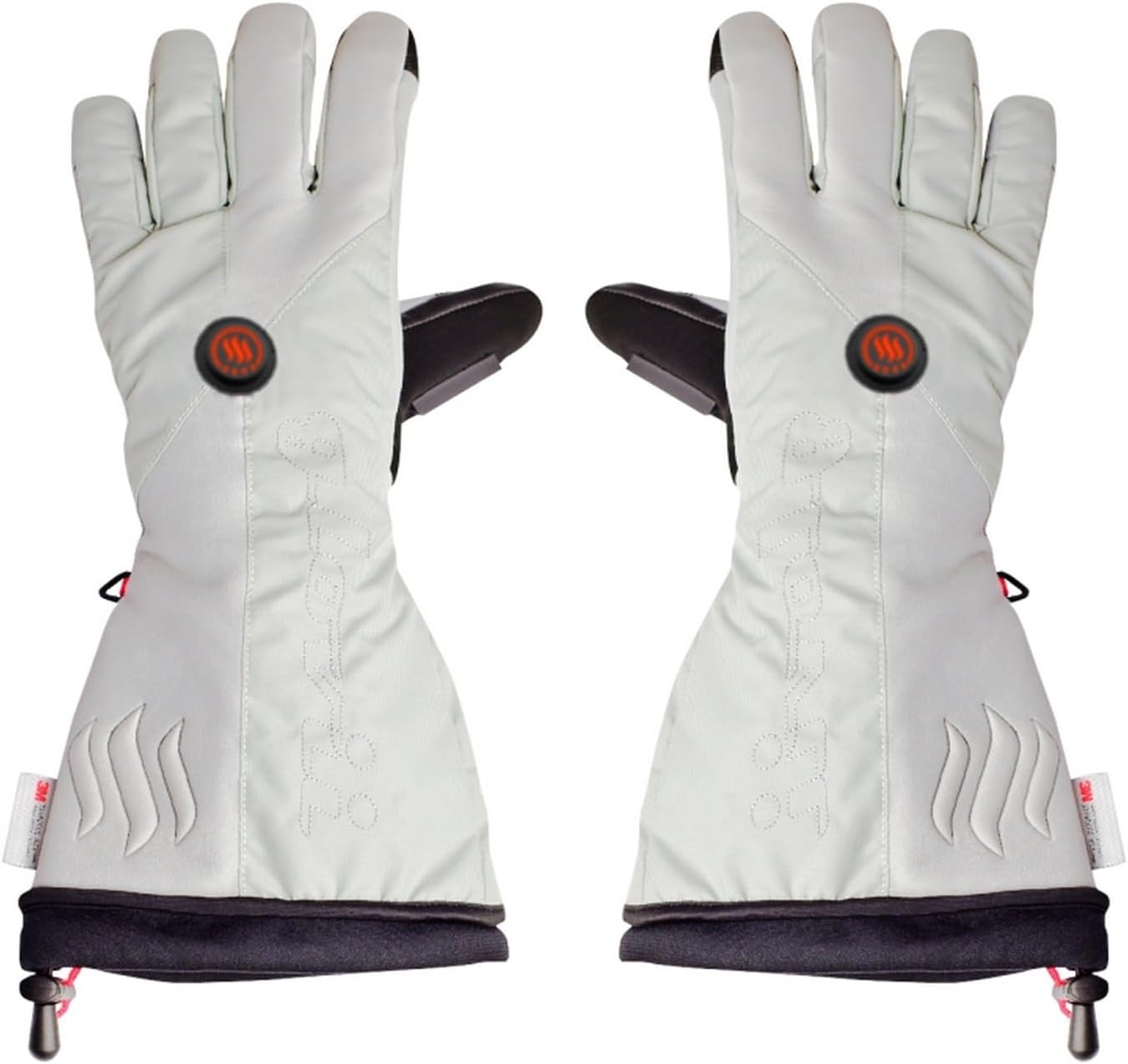
Image: Front view of the Glovii GS8 heated gloves.
Safety Information
- Read all instructions before use.
- Do not use if the gloves or batteries are damaged.
- Keep batteries away from water and extreme temperatures.
- Do not puncture, open, or disassemble the battery pack.
- Consult a doctor before use if you have a medical condition, especially related to circulation or nerve sensitivity.
- Discontinue use immediately if you experience discomfort, pain, or skin irritation.
- Keep out of reach of children.
Package Contents
The Glovii GS8 heated glove set includes the following items:
- 1 pair of Glovii GS8 Heated Ski Gloves
- 2x 2100 mAh Li-Poly rechargeable batteries
- 1x Battery charger
- Set of international power adapters (EU, UK, US)
- 1x Convenient protective case

Image: Included batteries, charger, and adapters.
Setup
- Charge Batteries: Before first use, fully charge both Li-Poly batteries using the provided charger and appropriate power adapter. The charger indicator light will typically change color (e.g., red to green) when charging is complete.
- Insert Batteries: Locate the battery pocket inside each glove (usually near the cuff). Carefully insert one charged battery into each glove's pocket.
- Connect Batteries: Connect the battery cable from the glove to the battery pack. Ensure a secure connection.
- Secure Pockets: Close the battery pocket securely to prevent the battery from falling out during use.
Operating Instructions
- Power On/Off: Press and hold the power button (located on the back of the glove) for approximately 3 seconds to turn the heating system on or off. The button will illuminate when active.
- Adjust Heat Levels: Briefly press the power button to cycle through the three available heat settings. Each press will change the heat level, indicated by a change in the button's LED color or flashing pattern.
- High Heat: Provides maximum warmth for extreme cold.
- Medium Heat: Balanced warmth for general cold conditions.
- Low Heat: Gentle warmth for extended use or milder cold.
- Touchscreen Compatibility: The gloves feature a conductive filament on the thumb and index finger, allowing you to operate touchscreen devices without removing your gloves.

Image: Heating control button.

Image: Thermal view demonstrating heat distribution.
Maintenance
- Cleaning: Disconnect and remove batteries before cleaning. Hand wash the gloves gently with mild soap and cold water. Do not machine wash, tumble dry, bleach, or iron. Allow to air dry completely before reconnecting batteries or storing.
- Battery Care: For optimal battery life, fully charge batteries before long-term storage and recharge them every 3-6 months, even if not in use. Store batteries in a cool, dry place.
- Storage: Store gloves and batteries in the provided protective case in a dry place, away from direct sunlight and extreme temperatures.
Troubleshooting
| Problem | Possible Cause | Solution |
|---|---|---|
| Gloves not heating | Battery not connected, battery discharged, power button not pressed correctly. | Ensure batteries are fully charged and securely connected. Press and hold the power button for 3 seconds to activate. |
| Short heating duration | Battery not fully charged, high heat setting used continuously, old battery. | Fully charge batteries. Use lower heat settings for longer duration. Consider replacing old batteries if performance degrades significantly. |
| Uneven heating | Heating element issue, internal cable damage. | Contact customer support if the issue persists after checking battery connection. |
Specifications
| Feature | Detail |
|---|---|
| Model Number | GS8 |
| Brand | Glovii |
| Manufacturer | SUNEN |
| Material Composition | Outer: 50% natural leather, 50% nylon; Lining: 100% polyester |
| Heating Element | Carbon fibers, infrared wave emission |
| Power Source | 2x Lithium-Polymer 2100 mAh batteries (included) |
| Heat Settings | 3 levels (High, Medium, Low) |
| Special Features | Breathable, Slip resistance, Touchscreen compatible |
| Hand Orientation | Ambidextrous |
| Intended Use | Cold temperatures, Skiing, Outdoor activities |
| Product Dimensions | 16.2 x 36.5 x 7.2 cm |
| Weight | 270 g (gloves only, without batteries) |
Sizing Chart

Image: Glovii glove sizing chart.
To determine your size, measure the circumference of your hand around the knuckles, excluding the thumb.
- S: 14.5-16 cm
- M: 16-17.5 cm
- L: 17.5-19 cm
- XL: 19-21 cm
Warranty and Support
Glovii products are manufactured to high-quality standards. For warranty information, product support, or to report any issues, please refer to the contact information provided with your purchase or visit the official Glovii website. Keep your proof of purchase for warranty claims.
For further assistance, please contact SUNEN customer service.


