1. Introduction
Welcome to the DOCKIN D Pure NC user manual. These over-ear headphones are designed to provide a high-fidelity audio experience with advanced features such as Active Noise Cancellation (ANC) and Transparency Mode. This manual will guide you through the setup, operation, and maintenance of your headphones, ensuring you get the most out of your device.
Please read this manual carefully before using your DOCKIN D Pure NC headphones and retain it for future reference.
2. Package Contents
Ensure all items listed below are present in your package:
- DOCKIN D Pure NC Wireless Bluetooth Headphones
- High-quality durable nylon carrying case
- USB Charging Cable
- 3.5mm AUX Audio Cable
- User Manual

Image: The DOCKIN D Pure NC headphones, a black carrying case, the user manual, a USB charging cable, and a 3.5mm AUX audio cable are displayed on a dark background.
3. Product Overview
The DOCKIN D Pure NC headphones feature a robust design with 40mm high-fidelity drivers for balanced audio. They are equipped with adjustable earcups and memory foam for comfort, and a foldable design for portability.
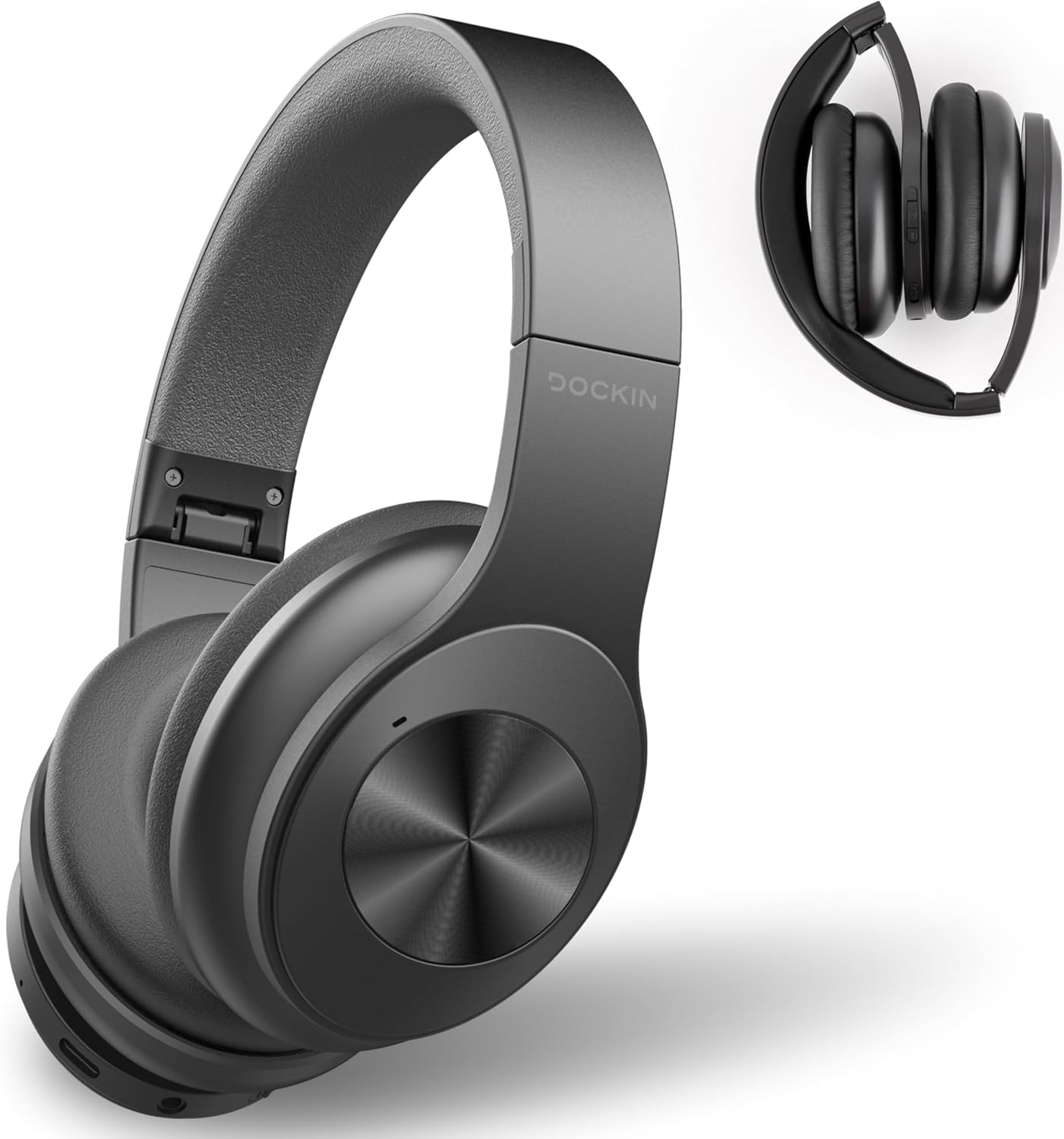
Image: A pair of black DOCKIN D Pure NC over-ear headphones in the foreground, with a smaller image of the headphones folded for storage in the background.
Controls and Ports
The headphones feature intuitive controls for power, volume, playback, and mode selection.

Image: A close-up shot of the right earcup of the DOCKIN D Pure NC headphones, showing the power button, volume controls, and a switch for ANC/Transparency modes.
- Power Button: Used to power on/off the headphones.
- Volume Up/Next Track Button: Increases volume with a short press, skips to next track with a long press.
- Volume Down/Previous Track Button: Decreases volume with a short press, goes to previous track with a long press.
- Multi-function Button: Play/pause music, answer/end calls.
- ANC/Transparency Mode Switch: Toggles between Active Noise Cancellation, Transparency Mode, and normal mode.
- 3.5mm AUX Port: For wired connection.
- USB-C Charging Port: For charging the headphones.
4. Setup
4.1 Charging the Headphones
Before first use, fully charge your DOCKIN D Pure NC headphones. A full charge provides up to 34 hours of playtime or 42 hours of talk time.
- Connect the USB charging cable to the USB-C port on the headphones.
- Connect the other end of the USB cable to a compatible USB power adapter (not included) or a computer's USB port.
- The LED indicator will show charging status (e.g., red for charging, blue for fully charged).

Image: A person with blonde hair wearing DOCKIN D Pure NC headphones from behind, with text indicating 'Up to 34h battery life with one charge'.
4.2 Bluetooth Pairing
To connect your headphones wirelessly via Bluetooth 5.1:
- Ensure the headphones are charged and powered off.
- Press and hold the Power button until the LED indicator flashes blue and red, indicating pairing mode.
- On your device (smartphone, tablet, computer), enable Bluetooth and search for available devices.
- Select "DOCKIN D Pure NC" from the list of devices.
- Once connected, the LED indicator will flash blue slowly.
4.3 Wired Connection (AUX)
You can also use the headphones with a wired connection:
- Connect one end of the 3.5mm AUX audio cable to the AUX port on the headphones.
- Connect the other end to the 3.5mm audio jack of your device.
- The headphones will automatically switch to wired mode.

Image: A close-up of the DOCKIN D Pure NC headphones with a 3.5mm AUX cable plugged into the audio port, illustrating wired connectivity.
5. Operating Instructions
5.1 Power On/Off
- Power On: Press and hold the Power button for 3 seconds.
- Power Off: Press and hold the Power button for 3 seconds.
5.2 Active Noise Cancellation (ANC) and Transparency Mode
The DOCKIN D Pure NC headphones offer two distinct modes to manage ambient sound:

Image: A woman wearing DOCKIN D Pure NC headphones in what appears to be a subway station, with text overlays indicating 'Noise Cancellation & Transparency Mode' and 'Water Resistant (IPX7)'.
- Active Noise Cancellation (ANC): Flip the ANC switch to activate. This mode effectively reduces distracting ambient noise, ideal for travel or noisy environments.
- Transparency Mode: Flip the ANC switch again to activate Transparency Mode. This mode allows you to hear your surroundings clearly while still enjoying your audio, useful for public transport announcements or conversations.

Image: A woman wearing DOCKIN D Pure NC headphones at a train station, with text explaining 'Transparency Mode: Hear music and amplify outside sounds you don't want to miss (announcements at the station or airport).'
5.3 Music Playback
- Play/Pause: Short press the Multi-function button.
- Volume Up: Short press the Volume Up button.
- Volume Down: Short press the Volume Down button.
- Next Track: Long press the Volume Up button.
- Previous Track: Long press the Volume Down button.
5.4 Call Management
- Answer/End Call: Short press the Multi-function button.
- Reject Call: Long press the Multi-function button.
- Voice Assistant: Double-press the Multi-function button (if supported by your device).
5.5 Equalizer Function (via App)
Enhance your audio experience with the equalizer function available through a dedicated app (if provided by DOCKIN). This allows for custom sound profiles, including bass boost and other adjustments.

Image: A close-up of the DOCKIN D Pure NC headphones next to a smartphone displaying an equalizer interface with options for bass boost, volume control, and various speaker modes.
6. Maintenance
To ensure the longevity and optimal performance of your DOCKIN D Pure NC headphones, follow these maintenance guidelines:
- Cleaning: Use a soft, dry cloth to clean the earcups and headband. Do not use harsh chemicals or abrasive materials.
- Storage: When not in use, store the headphones in the provided carrying case to protect them from dust, scratches, and impacts. Store in a cool, dry place.
- Avoid Moisture: While the headphones are water-resistant, avoid prolonged exposure to water or high humidity. Do not submerge them.
- Charging: Charge the headphones regularly, even if not used frequently, to maintain battery health.

Image: A composite image showing the DOCKIN D Pure NC headphones with adjustable earcups made of memory foam and a separate image illustrating the compact foldable design.
7. Troubleshooting
If you encounter any issues with your DOCKIN D Pure NC headphones, refer to the following common problems and solutions:
| Problem | Possible Cause | Solution |
|---|---|---|
| No power | Battery is depleted | Charge the headphones fully. |
| Cannot pair via Bluetooth | Headphones not in pairing mode; device Bluetooth off; too far from device | Ensure headphones are in pairing mode (flashing blue/red). Turn on Bluetooth on your device. Move headphones closer to your device. |
| No sound | Volume too low; incorrect audio source; loose AUX cable | Increase volume on headphones and device. Check audio output settings on your device. Ensure AUX cable is securely connected. |
| ANC not working effectively | ANC not activated; improper fit | Ensure ANC switch is on. Adjust headphones for a snug fit over your ears. |
| Sound distortion | Volume too high; interference | Lower the volume. Move away from potential sources of interference (e.g., Wi-Fi routers, other Bluetooth devices). |
8. Specifications
Key technical specifications for the DOCKIN D Pure NC headphones:
- Model Name: D PURE NC
- Brand: DOCKIN
- Connectivity Technology: Wireless (Bluetooth), Wired (3.5mm Jack)
- Bluetooth Version: 5.1
- Driver Size: 40mm High-Fidelity Drivers
- Frequency Response: 20 Hz - 20 kHz
- Noise Cancellation: Active Noise Cancellation (ANC)
- Microphone Technology: CVC 8.0
- Battery Life (Playtime): Up to 34 hours
- Battery Life (Talk Time): Up to 42 hours
- Standby Time: Up to 900 hours
- Weight: 270 Grams
- Special Features: Foldable design, Built-in microphone, Remote control, Transparency Mode
- Compatible Devices: Computer, Smartphone, iPhone, Tablet
- Material: Plastic, Aluminum, Stainless Steel, Textile, Leather, Silicone, Rubber

Image: An exploded view diagram of the DOCKIN D Pure NC headphones, showcasing internal components including the 40mm high-fidelity drivers.
9. Safety Information
Please observe the following safety precautions:
- Do not expose the headphones to extreme temperatures or direct sunlight.
- Avoid dropping or subjecting the headphones to strong impacts.
- Do not attempt to disassemble or modify the headphones, as this may void the warranty and cause damage.
- Listen at moderate volume levels to prevent hearing damage.
- Keep out of reach of children and pets.
- Dispose of the product responsibly according to local regulations.
10. Warranty and Support
Warranty information for the DOCKIN D Pure NC headphones is not explicitly provided in the product details. For specific warranty terms and conditions, please refer to the documentation included with your purchase or contact DOCKIN customer support directly.
For technical support or inquiries, please visit the official DOCKIN website or contact their customer service channels.


