
1. Introduction
This manual provides comprehensive instructions for the safe and efficient operation of your Retevis RB17P GMRS Handheld Radio. The RB17P is a versatile two-way radio designed for reliable communication in various outdoor and professional settings. It features 30 memory channels, GMRS base station compatibility, a long-lasting 2200mAh battery, NOAA weather alerts, and an SOS function for emergencies.
2. Package Contents
Verify that all items listed below are included in your package:
- 2 x RB17P GMRS two-way radio
- 2 x 2200 mAh Lithium Battery
- 2 x Back clip & Lanyard
- 2 x USB Charger
- User Manual

3. Product Overview
The Retevis RB17P radio features a robust design with intuitive controls for ease of use. Key components include the antenna, volume/power knob, LCD display, PTT button, and various function keys.


4. Setup
- Battery Installation: The RB17P comes with a 2200mAh lithium battery. Ensure the battery is securely attached to the back of the radio.
- Charging: Connect the provided USB charger to the charging base. Place the radio into the charging base. The LED indicator on the radio will show charging status. The radio can also be charged directly via its USB-C port. A full charge provides up to 24 hours of continuous talk time and 7 days of standby time.
- Antenna Attachment: Screw the antenna clockwise onto the connector at the top of the radio until it is finger-tight.
- Power On: Rotate the top knob clockwise to power on the radio and adjust the volume.

5. Operating Instructions
- Channel Selection: The RB17P features 30 memory channels, including 8 dedicated GMRS base station channels. Use the up/down arrow buttons on the keypad to navigate and select channels.
- Push-to-Talk (PTT): Press and hold the PTT button on the side of the radio to transmit your voice. Release the button to listen.
- Volume Control: Rotate the top knob to adjust the listening volume.
- NOAA Weather Alert: The radio includes a built-in NOAA weather channel and alert system. This provides real-time updates on severe weather conditions. Refer to the full user manual for specific activation steps.
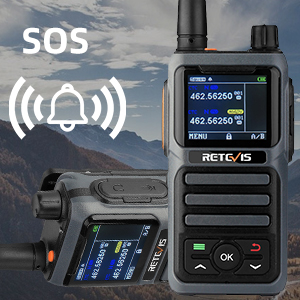
- SOS Function: In emergencies, activate the SOS function to quickly call for help. Consult the user manual for detailed instructions on activating and using this feature.
- CHIRP and Keypad Programming: The RB17P supports both CHIRP and keypad programming for channel management and customization. CHIRP compatibility extends to Windows XP/7/8/10/11 systems.
- Voice-Activated Transmit (VOX): This feature allows for hands-free communication. When activated, the radio will transmit automatically when it detects your voice.
- Keyboard Lock: To prevent accidental changes to settings, the keypad can be locked.
- CTCSS/DCS Tones: Utilize Continuous Tone-Coded Squelch System (CTCSS) and Digital-Coded Squelch (DCS) tones to filter out unwanted transmissions and ensure clearer communication within your group.



Official Product Videos:
Video 5.1: An overview of the Retevis RB17P GMRS Handheld 2 Way Radio, detailing its features and functionality.
Video 5.2: A demonstration of the Retevis RB17P GMRS Handheld Radio in action, showcasing its practical use.
6. Maintenance
- Battery Care: To maximize battery life, fully charge the 2200mAh lithium battery before first use. Avoid overcharging or completely draining the battery frequently. Store the radio and battery in a cool, dry place when not in use for extended periods.
- Cleaning: Use a soft, damp cloth to clean the radio's exterior. Do not use harsh chemicals or abrasive cleaners. Ensure all port covers are securely closed to maintain water resistance.
- Durability: The RB17P features a solid structure and thickened PC plastic shell for enhanced durability. While designed to withstand rugged use, avoid unnecessary drops or impacts. The radio is not water resistant, so avoid submersion.

7. Troubleshooting
If you encounter issues with your Retevis RB17P GMRS Radio, refer to the following common troubleshooting tips:
- No Power: Ensure the battery is fully charged and correctly installed. Rotate the volume/power knob to the 'on' position.
- Cannot Transmit or Receive: Verify that both radios are on the same channel and using compatible CTCSS/DCS tones. Check that the antenna is securely attached. Ensure you are within range.
- Poor Audio Quality: Adjust the volume. Check for obstructions between radios. Ensure the microphone and speaker are clear of debris.
- Battery Not Charging: Confirm the USB charger and charging base are properly connected and receiving power. Check the charging contacts on both the radio and the base for cleanliness.
For more detailed troubleshooting, please consult the full user manual provided in the package.
8. Specifications
| Feature | Specification |
|---|---|
| Item Weight | 2.16 pounds |
| Product Dimensions | 4.72 x 2.28 x 1.53 inches |
| Battery | 2200mAh Lithium Ion (included) |
| Display Type | LCD |
| Number of Channels | 30 |
| Special Feature | Long Range, Rechargeable |
| Frequency Range | 462 MHz - 467 MHz |
| Talking Range Maximum | 3 Mile |
| Voltage | 7.4 Volts (DC) |
| Water Resistance Level | Not Water Resistant |
9. Warranty and Support
Retevis provides a 2-year warranty for the radio body and a 1-year warranty for accessories. We offer a 30-day no-reason return policy. Beyond the warranty period, maintenance services are available, with buyers responsible for associated costs.
For support, please contact Retevis customer service on Amazon. We aim to reply within 12 hours.

