
1. Introduction
Thank you for purchasing the AlfaBot MK288 Cordless Rotary Mop Cleaner. This manual provides essential information for the safe and effective use, maintenance, and troubleshooting of your new appliance. Please read this manual thoroughly before operating the device and keep it for future reference.
2. Product Overview and Components
Familiarize yourself with the parts of your AlfaBot MK288 Cordless Rotary Mop Cleaner.

Figure 2.1: Main Unit and Mop Pads. This image displays the AlfaBot MK288 Cordless Rotary Mop Cleaner along with three types of mop pads: striped grey pads for general cleaning, pink pads for floor wiping, and blue pads for waxing.
2.1 Included Components

Figure 2.2: Package Contents. This image shows all items included in the AlfaBot MK288 package: the main mop unit (disassembled handle and base), user manual, charger, funnel, two pairs of grey striped mop pads, two pairs of pink mop pads, two pairs of blue mop pads, and the removable battery.
- Main Mop Unit (Handle, Extension Pole, Mop Head)
- Removable Battery (2500mAh)
- AC Adapter/Charger
- Water Filling Funnel
- Mop Pads:
- 2 x Grey Striped Pads (for general cleaning)
- 2 x Pink Pads (for floor wiping/polishing)
- 2 x Blue Pads (for waxing)
- User Manual
3. Setup
3.1 Assembly
- Attach the Handle: Connect the handle section to the extension pole. Ensure it clicks securely into place.
- Attach the Extension Pole to Mop Head: Connect the assembled handle and pole to the main mop head unit.
- Install Mop Pads: Align the desired mop pads with the hook-and-loop fasteners on the bottom of the mop head and press firmly to secure them.
3.2 Charging the Battery

Figure 3.1: Battery Charging. The image shows the removable battery being charged by plugging the AC adapter into a wall outlet and connecting it to the battery pack. The battery can be charged independently or while installed in the mop.
The AlfaBot MK288 uses a removable battery. For optimal performance, fully charge the battery before first use.
- Remove the battery from the mop head by pressing the release button and pulling it out.
- Connect the AC adapter to the charging port on the battery.
- Plug the AC adapter into a standard wall outlet.
- The charging indicator light on the battery will illuminate during charging and turn off or change color when fully charged.
- A full charge provides approximately 60 minutes of continuous operation.
3.3 Filling the Water Tank

Figure 3.2: Water Tank and Funnel. This image illustrates the 300mL water tank on the mop head and the included funnel, which simplifies the process of filling the tank with water for wet mopping.
- Locate the water tank cap on the mop head.
- Open the cap and use the provided funnel to fill the 300mL water tank with clean tap water. Do not overfill.
- Securely close the water tank cap.
- Note: For best results, use distilled water to prevent mineral buildup, especially if using the spray function frequently. Do not add cleaning solutions or chemicals to the water tank unless specifically approved by AlfaBot.
4. Operating Instructions
4.1 Powering On/Off

Figure 4.1: Handle Controls. This image highlights the two main buttons on the mop's handle: one for power ON/OFF and another for activating the water spray function.
- To turn on the mop, press the power button located on the handle. The LED lights on the mop head will illuminate, and the mop pads will begin to rotate.
- To turn off the mop, press the power button again.
4.2 Using the Water Spray Function

Figure 4.2: Water Spray. A close-up view of the mop head spraying water onto the floor, activated by a button on the handle.
- While the mop is powered on, press the water spray button on the handle to release a fine mist of water from the front of the mop head.
- Release the button to stop spraying.
- Use the spray function to moisten stubborn dirt or for wet mopping.
4.3 Adjusting Length and Angle
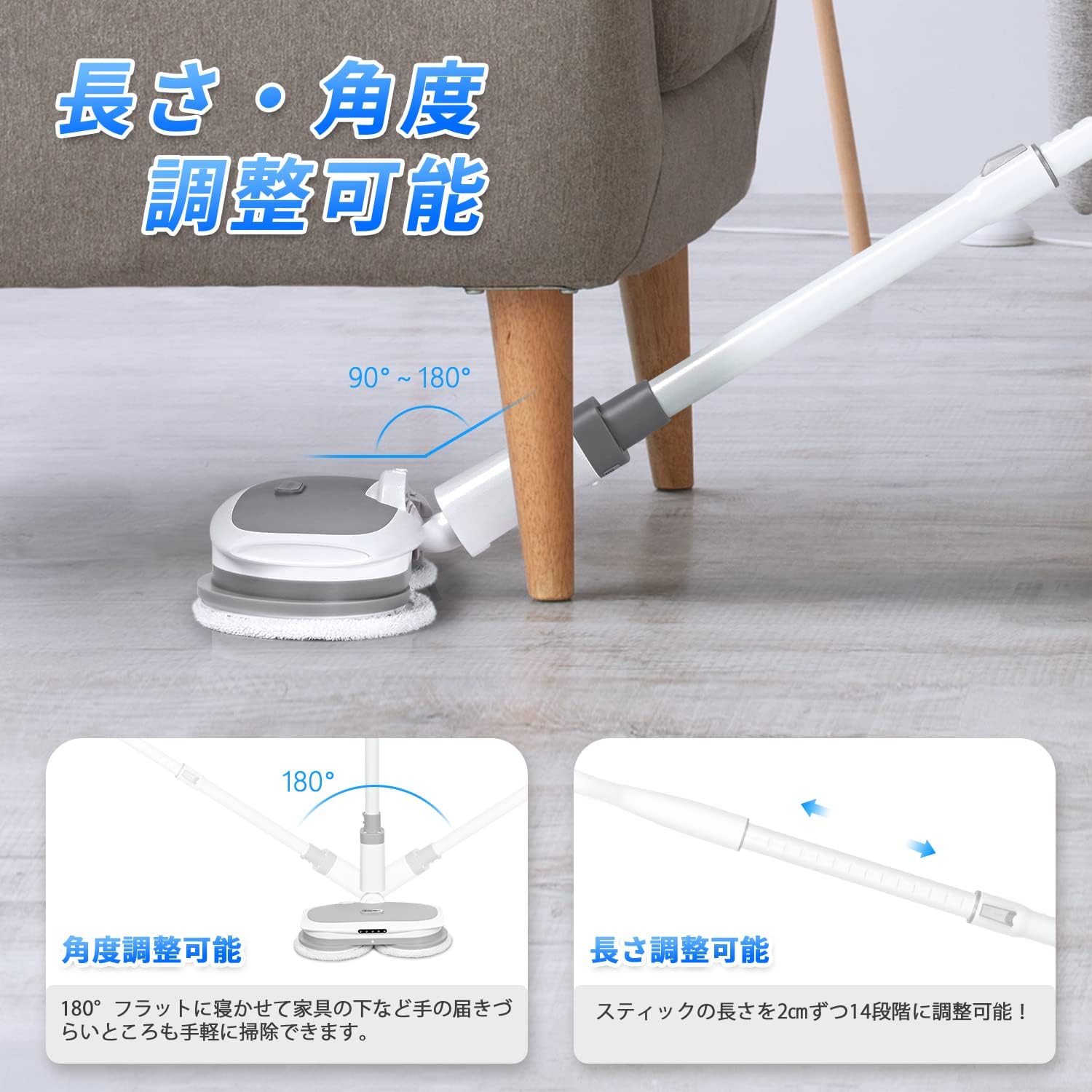
Figure 4.3: Adjustable Features. This image demonstrates the mop's ability to adjust its handle length and the mop head's angle (from 90 to 180 degrees) for reaching under furniture.
- Angle Adjustment: The mop head can pivot from 90° to 180°, allowing you to easily clean under furniture and in tight spaces. Simply tilt the handle to adjust the angle.
- Length Adjustment: The handle length is adjustable in 14 steps, increasing by 2cm per step, from approximately 98cm to 126cm. To adjust, locate the locking mechanism on the extension pole, release it, extend or retract the pole to the desired length, and then secure the lock.
4.4 Cleaning Modes and Surfaces
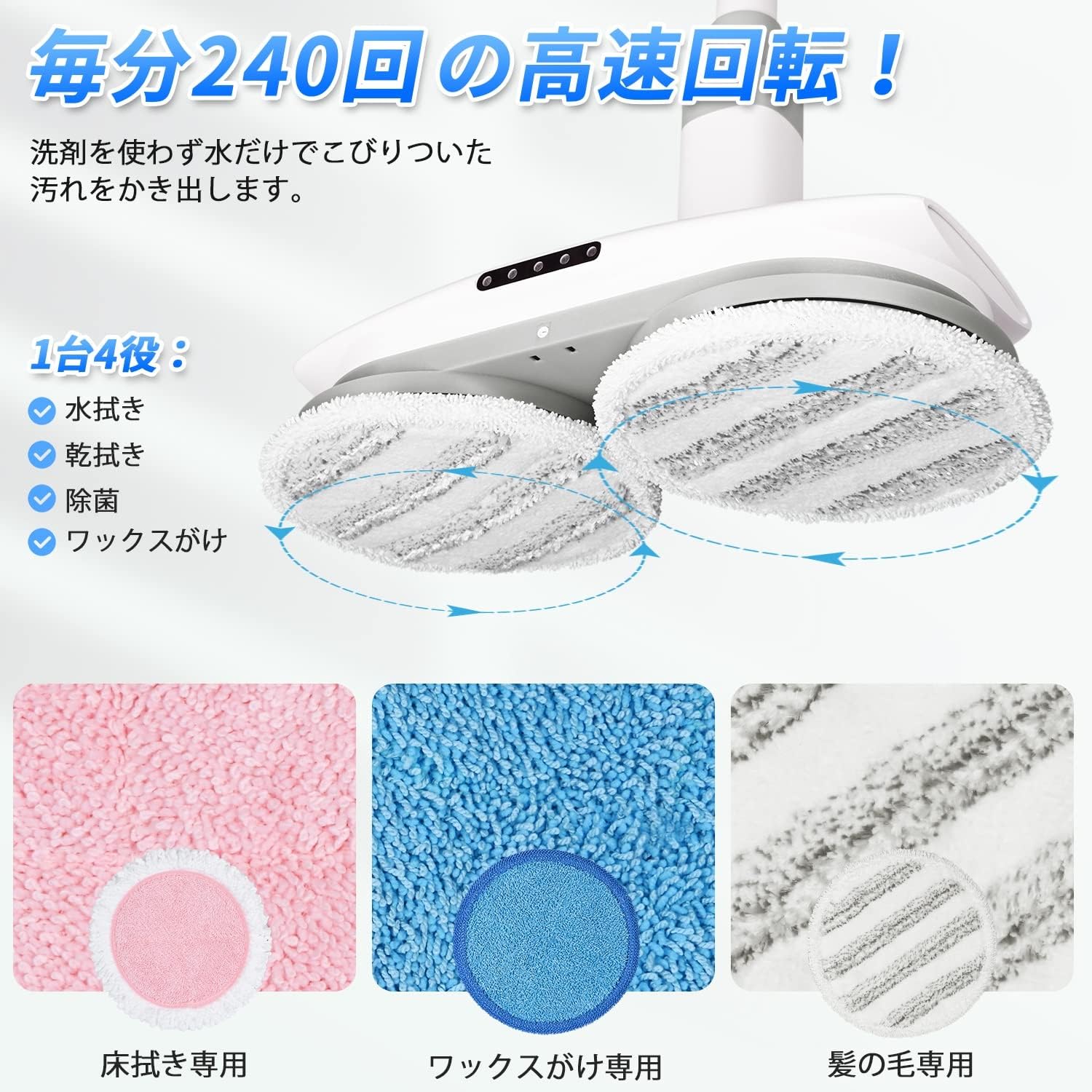
Figure 4.4: Versatile Cleaning. This image highlights the mop's high-speed rotation (240 RPM) and its four-in-one functionality: wet mopping, dry wiping, sterilization, and waxing, with specific pads for each purpose.
- The mop pads rotate at approximately 240 revolutions per minute (RPM) for effective cleaning.
- Wet Mopping: Use the grey striped pads or pink pads with the water spray function for general wet cleaning on hard floors. The self-propelled feature assists in effortless movement.
- Dry Wiping: Use the grey striped pads or pink pads without water for dry wiping and dusting hard floors.
- Waxing: Use the blue pads for applying wax or polish to hard floors. Ensure the floor is clean before waxing.
- Suitable Surfaces: This mop is designed for use on various hard floor surfaces including hardwood, tile, laminate, and vinyl. It can also be used on low-pile carpets for light cleaning or refreshing with appropriate pads.

Figure 4.5: Effortless Cleaning. The image shows the self-propelled feature of the mop, making it easy to clean floors with minimal effort, effectively removing dirt, sebum, hair, and dust.
The self-propelled design allows for easy operation with one hand, reducing user fatigue.
5. Maintenance and Cleaning
5.1 Cleaning Mop Pads

Figure 5.1: Mop Pad Variety. This image displays the different types of mop pads included with the AlfaBot MK288, designed for various cleaning tasks such as wet mopping, waxing, and dry wiping.
- After each use, remove the mop pads from the mop head.
- The mop pads are machine washable. Wash them with similar colors in cold water and tumble dry on low, or air dry.
- Do not use bleach or fabric softeners, as these can damage the pad material.
- Ensure pads are completely dry before reattaching them to the mop head or storing.
5.2 Cleaning the Water Tank and Mop Head
- Empty any remaining water from the tank after each use.
- Rinse the water tank with clean water.
- Wipe the exterior of the mop head and handle with a damp cloth. Do not submerge the mop head in water.
- Periodically check the spray nozzle for blockages and clean if necessary.
5.3 Battery Care and Storage
- Store the battery in a cool, dry place when not in use.
- If storing for an extended period, charge the battery to approximately 50% capacity.
- Avoid fully discharging the battery frequently, as this can reduce its lifespan.
6. Troubleshooting
If you encounter issues with your AlfaBot MK288, refer to the following table before contacting customer support.
| Problem | Possible Cause | Solution |
|---|---|---|
| Mop does not turn on. | Battery is not charged or not properly installed. | Ensure the battery is fully charged and securely inserted into the mop head. |
| Water spray is weak or not working. | Water tank is empty; nozzle is clogged; pump malfunction. | Refill the water tank. Check the spray nozzle for blockages and clean it. If the issue persists, contact customer support. |
| Mop pads are not rotating. | Obstruction preventing rotation; motor issue. | Check for any debris or foreign objects caught in the mop pads. Ensure the mop is on a flat surface. If the problem continues, contact support. |
| Poor cleaning performance. | Mop pads are dirty or worn out; insufficient water. | Clean or replace mop pads. Ensure the water tank is filled and the spray function is used as needed. |
7. Specifications
| Feature | Detail |
|---|---|
| Model Name | AlfaBot MK288 |
| Dimensions (Packaged) | 50.2 x 40 x 13.2 cm |
| Weight (Packaged) | 4.14 kg |
| Water Tank Capacity | 300 mL |
| Battery Capacity | 2500 mAh |
| Operating Time | Approx. 60 minutes (fully charged) |
| Rotation Speed | Approx. 240 RPM |
| Handle Length Adjustment | Approx. 98cm to 126cm (14 steps) |
| Mop Head Angle Adjustment | 90° to 180° |
| Features | Cordless, Rotary, Water Spray, LED Light, Self-Propelled, Quiet Operation, Removable Battery |
| Recommended Use | Flooring, Carpet (light cleaning) |
8. Safety Information
- Read all instructions before using the appliance.
- Do not immerse the mop head or any electrical components in water.
- Keep the appliance away from children and pets.
- Use only the provided charger and battery.
- Do not use the mop on uneven or damaged surfaces that could cause the mop to tip over or get stuck.
- Do not use the mop to pick up flammable or combustible liquids, or anything that is burning or smoking.
- Always unplug the charger from the outlet when not in use and before cleaning.
- Do not operate the mop with a damaged cord or plug.
- If the appliance is not working as it should, has been dropped, damaged, left outdoors, or dropped into water, return it to a service center.
9. Warranty and Support
For warranty information or technical support, please contact AlfaBot customer service through the retailer where you purchased the product or visit the official AlfaBot website. Please have your model number (MK288) and purchase date ready when contacting support.
For more information about AlfaBot products, visit: AlfaBot Store on Amazon.co.jp


