
1. Introduction
Thank you for choosing the HELLO KITTY TWS EARPODS HEADSET. These True Wireless Stereo (TWS) earbuds are designed to provide a high-quality audio experience with convenience and style. They feature Bluetooth 5.0 for stable connectivity, smart touch controls, and a portable charging case for extended listening time.
2. What's in the Box
- Hello Kitty TWS Earbuds (Left and Right)
- Wireless Charging Case
- USB Type-C Charging Cable (not explicitly listed but implied for Type C charging case)
- Additional Ear Tips (Small and Large sizes)
- User Manual

Figure 2.1: Hello Kitty TWS Earbuds packaging box, showing the product and brand.
3. Setup
3.1 Initial Charging
Before first use, ensure the charging case is fully charged. The carrying case battery charging time is approximately 1.5 hours. The earbuds themselves charge within the case, providing up to 6 hours of listening time per charge.
- Connect the USB Type-C charging cable to the charging port on the case and to a power source.
- The LED indicators on the case will show charging status.
- Once fully charged, disconnect the cable.

Figure 3.1: Closed Hello Kitty TWS Earbuds charging case, showing the LED indicators for battery status.
3.2 Pairing with a New Device
Follow these steps to pair your earbuds with a Bluetooth-enabled device:
- Remove both earbuds from the charging case. They will automatically power on and attempt to pair with each other. You will hear an acoustic signal indicating successful earbud pairing. If they do not pair, place them back in the case and repeat this step.
- Activate the Bluetooth function on your smartphone, tablet, or other compatible device.
- In your device's Bluetooth settings, search for available devices and select "HK TWS Earbuds" from the list.
- Once connected, you will hear an acoustic signal confirming the connection. The earbuds will automatically connect to this device for future use when removed from the case.
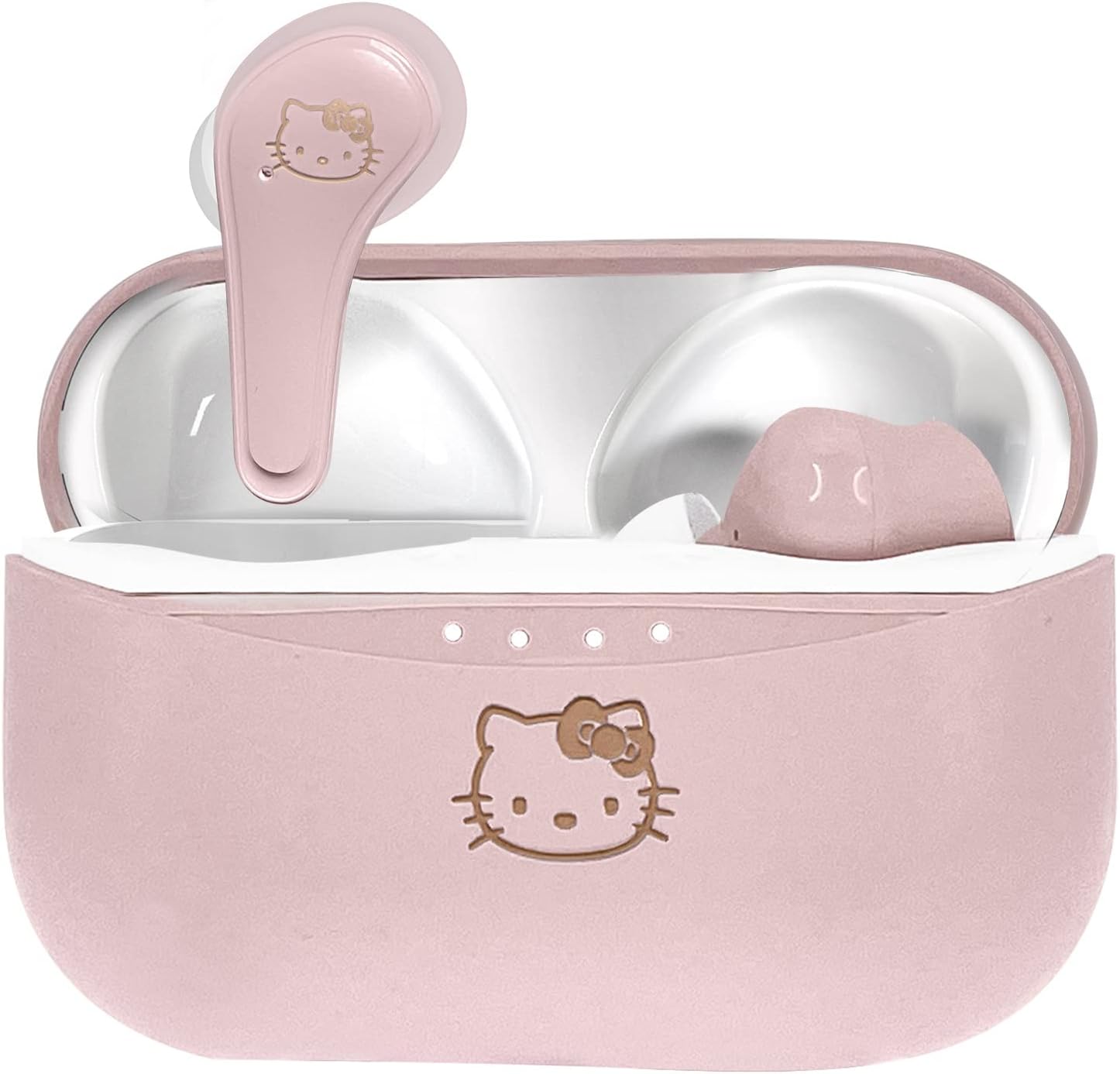
Figure 3.2: Hello Kitty TWS Earbuds in their charging case, ready for use.
4. Operating Instructions
The Hello Kitty TWS Earbuds feature smart touch controls for easy management of your audio and calls.
| Function | Action |
|---|---|
| Power On | Remove earbuds from charging case. |
| Power Off | Place earbuds back into charging case. |
| Play/Pause Music | Single tap on either earbud. |
| Next Track | Double tap on the right earbud. |
| Previous Track | Double tap on the left earbud. |
| Answer/End Call | Single tap on either earbud. |
| Reject Call | Press and hold either earbud for 2 seconds. |
| Activate Voice Assistant (Siri/Google Assistant) | Triple tap on either earbud. |

Figure 4.1: Earbuds in the open charging case, illustrating their design and touch control areas.
5. Maintenance
Proper care will extend the life of your Hello Kitty TWS Earbuds.
- Cleaning: Use a soft, dry cloth to clean the earbuds and charging case. Do not use harsh chemicals, solvents, or alcohol-based cleaners.
- Storage: When not in use, store the earbuds in their charging case to protect them from dust and damage.
- Temperature: Avoid exposing the earbuds to extreme temperatures (hot or cold) as this can damage the battery and internal components.
- Water Resistance: The earbuds are water resistant, but not waterproof. Avoid submerging them in water or exposing them to heavy rain.

Figure 5.1: Close-up of the earbuds, highlighting the importance of regular cleaning.
6. Troubleshooting
If you encounter issues with your earbuds, refer to the following common problems and solutions:
- Earbuds do not turn on:
Ensure the earbuds and charging case are sufficiently charged. Place earbuds in the case, close the lid, and then reopen to activate. - Earbuds do not pair with each other:
Place both earbuds back into the charging case, close the lid, wait a few seconds, then remove them again. They should automatically pair. - Earbuds do not connect to the Bluetooth device:
- Ensure Bluetooth is enabled on your device.
- Make sure the earbuds are in pairing mode (removed from case).
- Restart your Bluetooth device.
- Forget/Delete "HK TWS Earbuds" from your device's paired Bluetooth list and repeat the pairing process (Section 3.2).
- Ensure the earbuds are within 10 meters (33 feet) of your device and there are no significant obstacles.
- Ensure earbuds are fully charged.
- No sound or low volume:
Check the volume level on both your device and the earbuds. Ensure the earbuds are properly seated in your ears. - Intermittent connection:
Move closer to your device. Avoid environments with strong Wi-Fi or other wireless interference.
7. Specifications
| Feature | Detail |
|---|---|
| Model Name | Hello Kitty gold (HK0856) |
| Connectivity Technology | Wireless (Bluetooth 5.3) |
| Wireless Communication Technology | Bluetooth |
| Ear Placement | In Ear |
| Control Method | Touch |
| Battery Life (Earbuds) | 6 Hours |
| Charging Time (Earbuds) | 6 Hours (within case) |
| Carrying Case Battery Charging Time | 1.5 Hours |
| Frequency Range | 20Hz - 20,000Hz |
| Impedance | 16 Ohm |
| Item Weight | 145 Grams (5.1 ounces) |
| Product Dimensions | 2.76 x 1.18 x 1.97 inches |
| Material | Plastic |
| Color | Pink |
| Water Resistance Level | Water Resistant |
| Manufacturer | OTL Technologies |

Figure 7.1: Back of the product packaging, detailing specifications and certifications.
8. Warranty and Support
8.1 Product Warranty
This product is guaranteed against defects in materials or manufacturing for a period of 12 months from the date of purchase. The warranty does not cover damages caused by improper use, negligence, accidents, unauthorized alterations, or repairs. Normal wear and tear, including damage to cables, connectors, or batteries, is not covered.
To claim warranty, please contact the retailer or manufacturer with your proof of purchase. It is important to keep your sales receipt as proof of purchase. The warranty is valid only in the country where the product was purchased and is not transferable. This warranty does not affect your statutory consumer rights.
8.2 Important Safety Warnings
- Do not disassemble, repair, or modify the headphones.
- Do not expose to extreme temperatures (hot or cold).
- Do not use cleaning products containing benzene, solvents, or alcohol.
- Do not dispose of headphones in fire or water.
- Do not use headphones while driving or in situations requiring full attention.
- Keep out of reach of children.
- Avoid using headphones at high volume for extended periods to prevent hearing damage.
8.3 Contact Information
For further support or inquiries, please visit the official OTL Technologies website: www.otltechnologies.com

Figure 8.1: Earbuds and case, representing the complete product.


