
1. Important Safety Instructions
Always observe basic safety precautions when using electrical tools to reduce the risk of fire, electric shock, and personal injury. Read all instructions carefully before operating this tool.
General Safety
- Work Area Safety: Keep your work area clean and well-lit. Cluttered or dark areas invite accidents. Do not operate power tools in explosive atmospheres, such as in the presence of flammable liquids, gases, or dust.
- Electrical Safety: Power tool plugs must match the outlet. Never modify the plug in any way. Avoid body contact with earthed or grounded surfaces.
- Personal Safety: Always wear eye protection. Use hearing protection when operating for extended periods. Dress properly; avoid loose clothing or jewelry. Secure workpiece with clamps or a vise.
- Tool Use and Care: Do not force the power tool. Use the correct power tool for your application. Disconnect the plug from the power source before making any adjustments, changing accessories, or storing power tools.
- Maintenance: Maintain power tools. Check for misalignment or binding of moving parts, breakage of parts, and any other condition that may affect the power tool’s operation.
2. Product Overview and Components
The DEWINNER Electric Wood Router is designed for various woodworking tasks such as grooving, trimming, and carving. Familiarize yourself with its components for safe and effective operation.
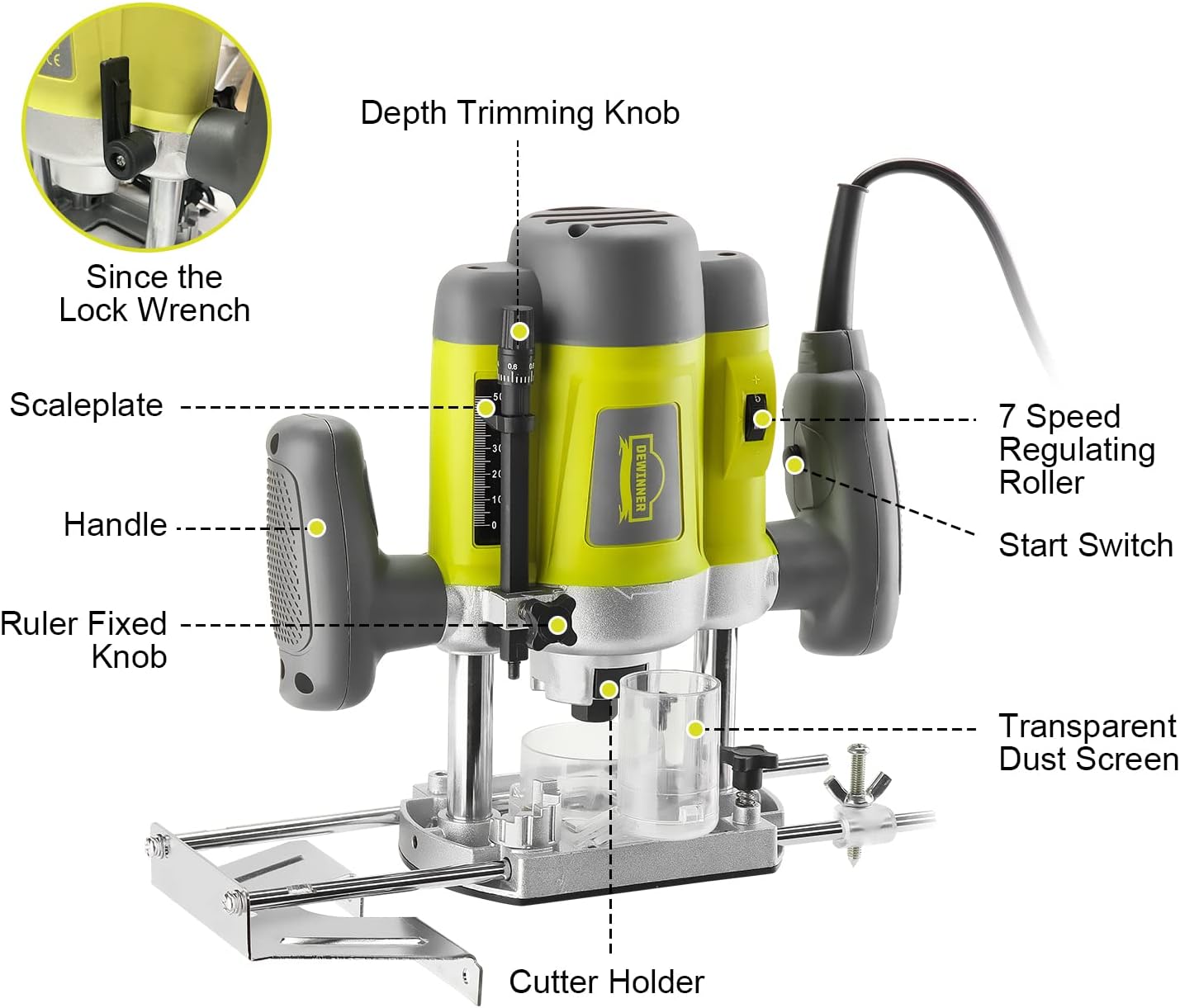
Figure 2.1: Labeled components of the DEWINNER Electric Wood Router.
Included Accessories
Your DEWINNER Electric Wood Router comes with a comprehensive set of accessories to support various applications:
- 1 x Electric Router
- 1 x Parallel Guide
- 12 x Router Bits (various profiles)
- 2 x Carbon Brushes
- 1 x Dust Collection Tube
- 1 x 6/8mm Chuck Adapter
- 1 x Contour Card
- 1 x Clamping Needle
- 1 x Wrench
- 1 x Lever Instruction
- 1 x Storage Box

Figure 2.2: Complete set of the DEWINNER Electric Wood Router and its accessories.
3. Setup
Installing Router Bits
- Ensure the router is unplugged from the power source.
- Loosen the collet nut using the provided wrench.
- Insert the desired router bit into the collet, ensuring at least 3/4 of the shank is seated.
- Tighten the collet nut firmly with the wrench. Do not overtighten.
Adjusting Cutting Depth
The router features a quick lock system and a fine adjustment dial for precise depth control.
- Place the router on the workpiece.
- Loosen the depth trimming knob (refer to Figure 2.1).
- Lower the router until the bit touches the workpiece surface.
- Adjust the scaleplate to the desired depth. The scaleplate allows for adjustments from 0-50mm, with fine trimming from 0-0.8mm.
- Tighten the depth trimming knob to secure the setting.

Figure 3.1: Depth adjustment mechanism with scaleplate.
Attaching the Parallel Guide
The parallel guide assists in making straight cuts parallel to the edge of the workpiece.
- Slide the parallel guide rods into the designated slots on the router base.
- Adjust the guide to the desired distance from the router bit.
- Tighten the ruler fixed knob (refer to Figure 2.1) to secure the guide in place.
4. Operating Instructions
Powering On/Off and Speed Control
The router features a start switch and a 7-speed regulating roller for variable speed control.
- Plug the router into a suitable power outlet.
- Adjust the 7-speed regulating roller to the desired RPM for your material and bit type. The speed range is 16,000-33,000 RPM.
- To start the router, press the start switch (refer to Figure 2.1).
- To stop the router, release the start switch.

Figure 4.1: Start switch and speed control.
Routing Techniques
Always ensure the workpiece is securely clamped before routing. Move the router smoothly and consistently across the material. Avoid forcing the tool, as this can lead to poor cuts and potential kickback.

Figure 4.2: Router in operation on a wooden surface.
Dust Collection
The router is equipped with a transparent dust screen and a large dust outlet design to help manage sawdust during operation. Connect a suitable dust extraction system to the dust collection tube for a cleaner work environment.

Figure 4.3: Dust collection features.
5. Maintenance
Regular maintenance ensures the longevity and optimal performance of your DEWINNER Electric Wood Router.
Cleaning
- Always unplug the tool before cleaning.
- Use a soft brush or compressed air to remove dust and debris from the ventilation openings and around the collet area.
- Wipe the exterior with a damp cloth. Do not use harsh chemicals or abrasive cleaners.
Carbon Brush Replacement
The carbon brushes are wear items and should be inspected periodically. Replace them when they are worn down to approximately 1/4 inch (6mm) or if the motor performance decreases significantly. Refer to the included 'Lever Instruction' for detailed steps on replacing carbon brushes.
Storage
Store the router and its accessories in the provided storage box in a dry, secure location, out of reach of children.
6. Troubleshooting
If you encounter issues with your router, refer to the following common problems and solutions:
| Problem | Possible Cause | Solution |
|---|---|---|
| Router does not start | No power supply; Faulty switch; Worn carbon brushes | Check power connection; Test switch; Replace carbon brushes |
| Poor cutting performance | Dull or incorrect bit; Incorrect speed setting; Forcing the tool | Replace or sharpen bit; Adjust speed; Reduce feed rate |
| Excessive vibration | Loose bit; Bent bit shank; Damaged bearings | Ensure bit is tight; Replace bent bit; Contact service for bearing replacement |
| Overheating | Blocked ventilation; Overloading the motor | Clean ventilation slots; Reduce load; Allow tool to cool |
If the problem persists after attempting these solutions, please contact DEWINNER customer support.
7. Specifications
Technical specifications for the DEWINNER Electric Wood Router Model DE-60082BMC-fr-2:
| Feature | Specification |
|---|---|
| Brand | DEWINNER |
| Model Number | DE-60082BMC-fr-2 |
| Power | 1200 W |
| Voltage | 240 Volts |
| No-Load Speed | 16,000 - 33,000 RPM (6 adjustable speeds) |
| Product Dimensions | 15 x 15 x 10 cm |
| Product Weight | 1.5 kg |
| Material | Plastic (housing) |
| Power Source | Corded Electric |
| Chuck Adapter | 6/8 mm |
| Base Type | Plunge |
8. Warranty and Support
Warranty Information
DEWINNER products are manufactured to high-quality standards and are guaranteed against manufacturing defects. Please refer to your purchase documentation or the DEWINNER official website for specific warranty terms and conditions applicable to your region. Keep your proof of purchase for warranty claims.
Customer Support
For technical assistance, spare parts, or service, please contact DEWINNER customer support through the retailer where the product was purchased or visit the official DEWINNER website for contact information.

