
Introduction
This user manual provides comprehensive instructions for the TECLAST P30T Android 15 Tablet. It covers essential information regarding product features, setup, operation, maintenance, and troubleshooting to ensure optimal performance and user experience. Please read this manual thoroughly before using your device.
Package Contents
Upon opening the package, please verify that all the following items are included:

Figure 1: TECLAST P30T 10-Piece Set Contents
- TECLAST P30T Tablet
- P30T Case
- Bluetooth Keyboard
- Wireless Mouse
- Stylus Pen
- Protective Film (pre-applied or included)
- 3.5mm Headphones
- Tablet Stand
- Charging Kit (Adapter and USB Type-C Cable)
- OTG Interface Adapter
- User Manual (this document)
Product Overview
The TECLAST P30T is a high-performance Android 15 tablet designed for versatile use, from entertainment to productivity. Key features include:
- Operating System: Android 15, offering enhanced privacy controls and optimized performance.
- Memory & Storage: 12GB RAM (4GB LPDDR4 + 8GB Virtual Memory) and 128GB ROM, expandable up to 4TB via Micro SD card.
- Processor: Unisoc T606 Octa-Core CPU (2x Arm Cortex-A75 2GHz + 6x Cortex-A55), with Mali-G57 GPU for efficient performance.
- Display: 10.1-inch IPS display with 1280x800 resolution, TÜV-certified for eye protection, and TDDI technology for improved touch response.
- Battery: 6000mAh high-capacity battery for extended usage.
- Connectivity: Dual-band Wi-Fi (2.4G/5G) and Bluetooth 5.0 for fast and stable connections.
- Cameras: 5MP rear camera and 2MP front camera for photos and video calls.
- Design: Lightweight metal body, 8.0mm thin, weighing approximately 440g.
- Certifications: GMS and Widevine L1 certified, allowing access to a wide range of applications and high-definition streaming.

Figure 2: TECLAST P30T Tablet and Accessories

Figure 3: TECLAST P30T Thin and Portable Design

Figure 4: Unisoc T606 Processor Overview
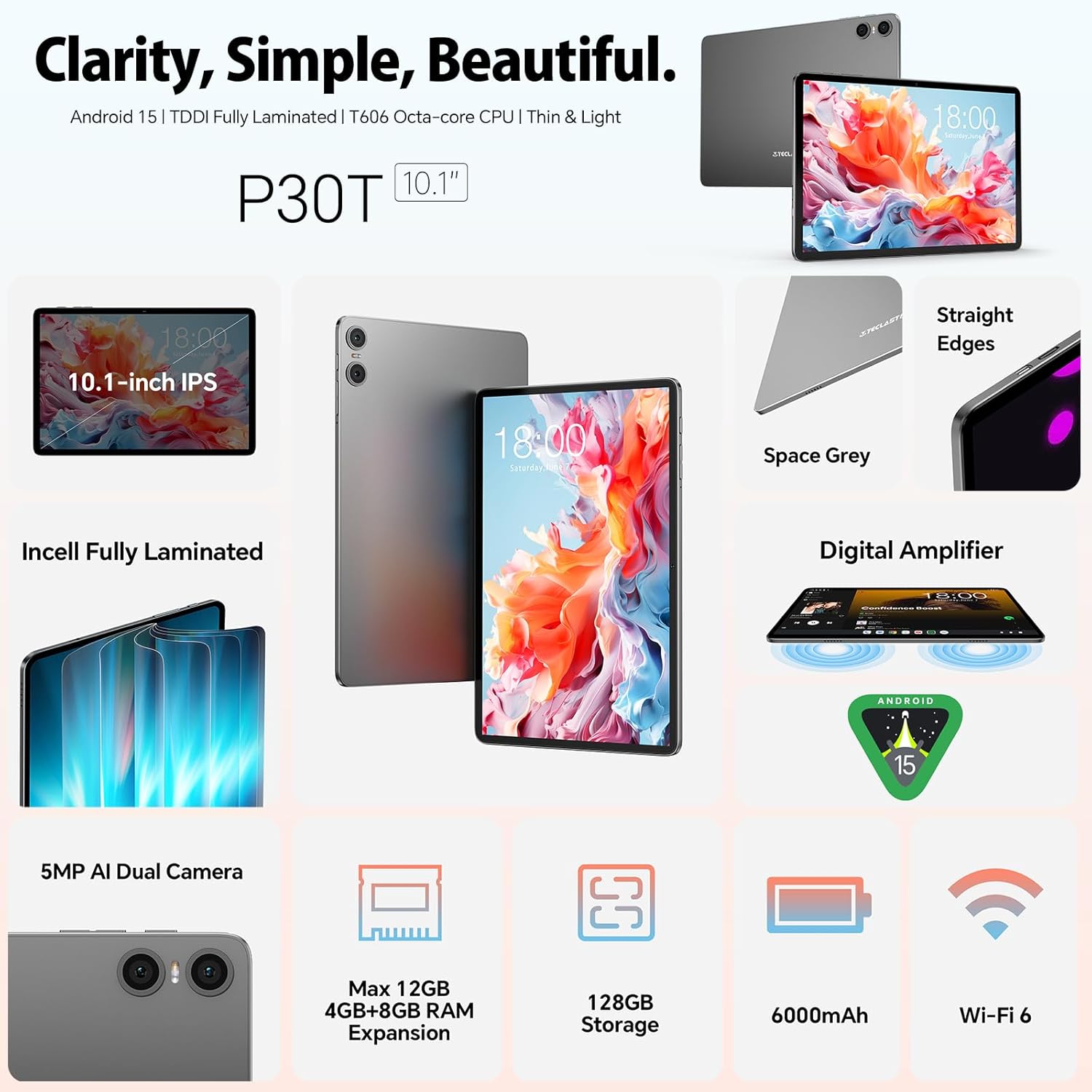
Figure 5: Key Features: Audio, Wi-Fi, Battery, and Camera

Figure 6: 10.1-inch TÜV-Certified Display
Video 1: TECLAST P30T Tablet Overview and Performance Demonstration. This video provides a visual demonstration of the tablet's features and smooth operation.
Setup
1. Initial Charging
Before first use, it is recommended to fully charge the tablet. Connect the provided USB Type-C cable to the tablet's charging port and the other end to the power adapter. Plug the adapter into a wall outlet. The charging indicator will show the charging status. A full charge typically takes several hours.
2. Powering On/Off
- To Power On: Press and hold the Power button (usually located on the side) until the TECLAST logo appears on the screen.
- To Power Off: Press and hold the Power button until a power-off menu appears. Select "Power off" or "Shut down".
- To Restart: From the power-off menu, select "Restart".
3. Initial Setup Wizard
Upon first power-on, the tablet will guide you through an initial setup wizard. Follow the on-screen prompts to:
- Select your language.
- Connect to a Wi-Fi network.
- Sign in with your Google account (or create a new one). This is essential for accessing the Google Play Store and other Google services.
- Set up screen lock (PIN, pattern, password).
- Review and accept terms and conditions.
Operating Instructions
1. Basic Navigation
The TECLAST P30T uses standard Android touch gestures:
- Tap: To select an item or open an app.
- Swipe: To scroll through screens or lists.
- Pinch-to-zoom: To zoom in or out on images or web pages.
- Long press: To access contextual menus or move icons.
2. Connecting Accessories
The TECLAST P30T comes with a 10-piece set, including a Bluetooth keyboard and mouse. Follow these steps to connect them:
- Bluetooth Keyboard/Mouse:
- Ensure the keyboard/mouse is charged and powered on.
- Put the accessory into pairing mode (refer to the accessory's specific instructions, usually a button press).
- On your tablet, go to Settings > Connected devices > Bluetooth.
- Turn on Bluetooth and tap "Pair new device".
- Select the keyboard/mouse from the list of available devices and follow any on-screen prompts to complete pairing.
- Stylus Pen: The stylus pen is generally passive and does not require Bluetooth pairing. Simply use it directly on the screen.
- OTG Interface: Use the provided OTG adapter to connect USB devices such as flash drives, external hard drives, or other peripherals to your tablet.
3. Wi-Fi Connection
To connect to a Wi-Fi network:
- Go to Settings > Network & internet > Internet.
- Turn on Wi-Fi.
- Select your desired network from the list.
- Enter the password if prompted and tap "Connect".
4. Expanding Storage
The tablet supports Micro SD card expansion up to 4TB. Insert the Micro SD card into the designated slot until it clicks into place. You may be prompted to format the card for use with the tablet.
Maintenance
1. Cleaning the Tablet
- Use a soft, lint-free cloth to clean the screen and body.
- For stubborn smudges, slightly dampen the cloth with water or a screen cleaner. Avoid harsh chemicals.
- Do not spray liquids directly onto the tablet.
2. Software Updates
Regularly check for system updates to ensure your tablet has the latest features, security patches, and performance improvements. Go to Settings > System > System update.
3. Battery Care
- Avoid extreme temperatures, as they can degrade battery life.
- Use only the provided charging kit or certified compatible chargers.
- For long-term storage, charge the battery to about 50% and power off the device.
Troubleshooting
| Problem | Possible Cause | Solution |
|---|---|---|
| Tablet does not turn on. | Low battery; system crash. | Charge the tablet for at least 30 minutes. Press and hold the Power button for 10-15 seconds to force restart. |
| Cannot connect to Wi-Fi. | Incorrect password; router issue; Wi-Fi disabled. | Ensure Wi-Fi is enabled. Double-check the password. Restart your Wi-Fi router. Try connecting to another network. |
| Bluetooth accessory not pairing. | Accessory not in pairing mode; Bluetooth disabled; interference. | Ensure the accessory is in pairing mode. Turn Bluetooth off and on again on the tablet. Move closer to the accessory. |
| Tablet is slow or unresponsive. | Too many apps running; low storage; software glitch. | Close background apps. Clear cache. Free up storage space. Restart the tablet. |
Specifications
| Feature | Detail |
|---|---|
| Brand | TECLAST |
| Model Name | TECLAST P30T |
| Operating System | Android 14 (Note: Product title states Android 15, but specifications list Android 14. Please verify with manufacturer if critical.) |
| Processor Brand | Unisoc |
| Processor Speed | 2 GHz |
| Screen Size | 10.1 Inches |
| Screen Resolution | 1280 x 800 pixels |
| GPU | Mali-G57 |
| Connectivity Type | Wi-Fi (802.11a/b/g/n/ac), Bluetooth |
| Hardware Interface | USB Type C, Audio 3.5 mm, Micro SD |
| Battery Life | 10 hours (6000mAh) |
| Dimensions (L x W x H) | 24.2 x 16.1 x 0.9 cm |
| Product Weight | 440 Grams |
| Special Features | USB OTG support, Stylus support |
| Installed RAM Size | 12 GB (4GB LPDDR4 + 8GB Virtual) |
| Memory Storage Capacity | 128 GB |
Warranty and Support
The TECLAST P30T tablet comes with a two-year limited warranty from the date of purchase. This warranty covers manufacturing defects and ensures your product functions as intended under normal use.
For any questions, technical assistance, or warranty claims, please contact TECLAST customer service. Our support team is available to resolve issues within 24 hours on working days.
Please refer to your purchase documentation or the official TECLAST website for the most current contact information and detailed warranty terms.
TECLAST is committed to ensuring you enjoy your digital life with our products.


