
1. Introduction
Thank you for choosing the TECLAST P50T Tablet. This manual provides essential information for setting up, operating, maintaining, and troubleshooting your device. Please read it carefully to ensure optimal performance and longevity of your tablet.
The TECLAST P50T is an 11-inch tablet featuring a 90Hz display, powered by Android 16, and equipped with an 8000mAh battery. It includes a Unisoc T7250 Octa-Core processor, 16GB RAM, 128GB ROM, and supports WiFi 6 connectivity. Key features include Gemini AI, Widevine L1 certification, GPS, 13MP camera, OTG, and GMS support.
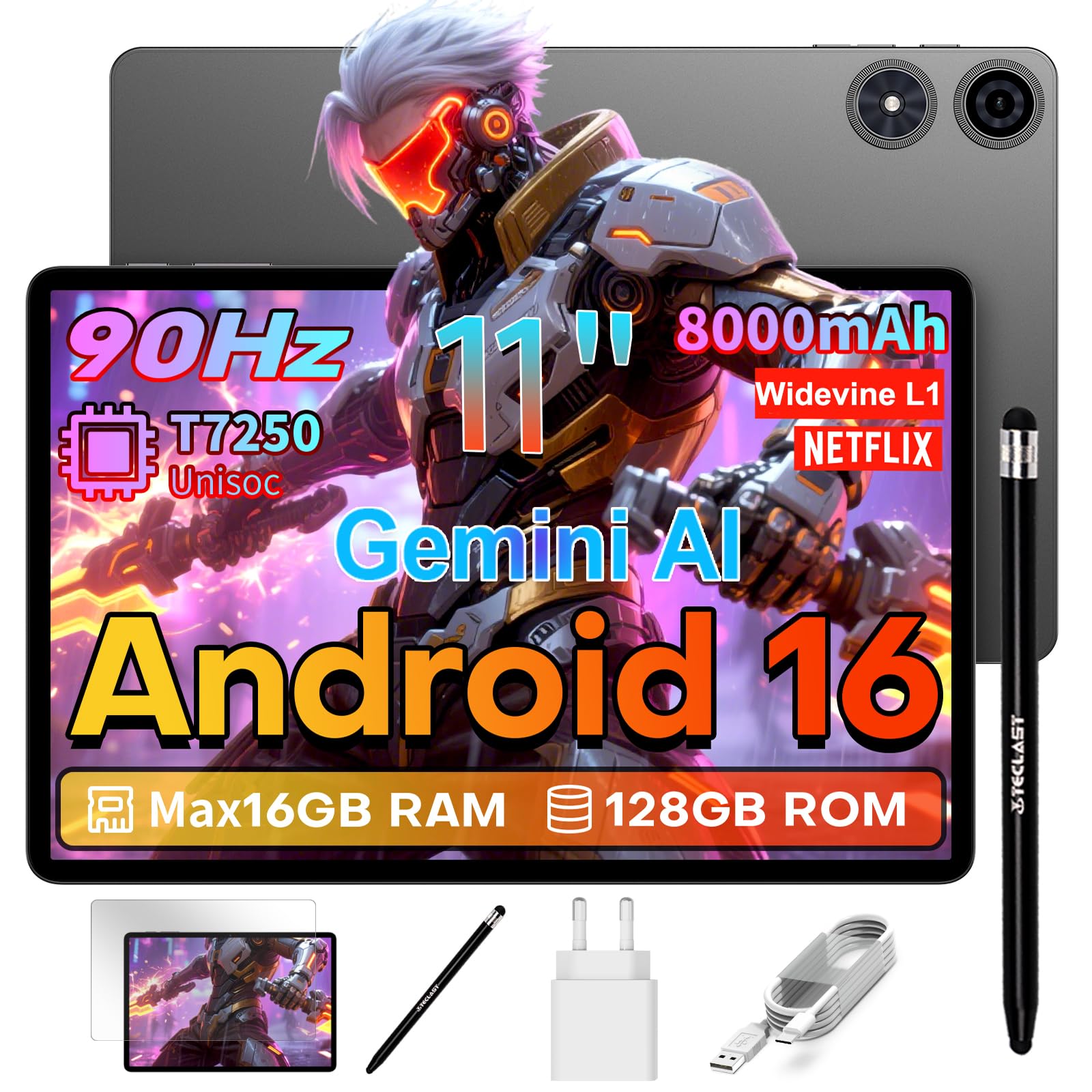
Image: TECLAST P50T Tablet, showcasing its sleek design and display.
2. What's in the Box
Verify that all the following items are included in your package:
- TECLAST P50T Tablet
- Stylus for Tablet
- Screen Protector (pre-applied or in package)
- Charger
- Type-C Charging Cable
- SIM Eject Tool / Manual
3. Initial Setup
3.1 Charging the Tablet
Before first use, fully charge your TECLAST P50T tablet. Connect the provided Type-C charging cable to the tablet's USB-C port and the other end to the charger. Plug the charger into a power outlet. The 8000mAh battery provides extended usage time.
3.2 Power On/Off
- To Power On: Press and hold the Power button until the TECLAST logo appears on the screen.
- To Power Off: Press and hold the Power button until the power options appear. Select "Power Off" and confirm.
- To Restart: Press and hold the Power button and select "Restart."
3.3 Screen Protector Application
If a screen protector is not pre-applied, carefully follow the instructions provided with the screen protector to apply it to the tablet's display. Ensure the screen is clean and dust-free before application.
3.4 Stylus Usage
The included stylus can be used for precise input, drawing, and note-taking on the tablet's touchscreen. Simply touch the stylus tip to the screen to interact with the device.

Image: Stylus, an accessory for enhanced interaction with the tablet.
4. Operating Instructions
4.1 Display
The TECLAST P50T features an 11-inch TDDI HD IPS display with a 90Hz refresh rate, providing smooth scrolling and sharp details. It includes eye protection technology to reduce harmful blue light. With Widevine L1 certification, you can stream high-definition content from platforms like Netflix, YouTube, Hulu, and Amazon Prime Video.

Image: Illustrates the tablet's 90Hz fluid display for immersive viewing.
4.2 Performance and Operating System
Running on the latest Android 16, the tablet offers optimized app permission control for enhanced privacy. The powerful Unisoc T7250 Octa-Core processor, clocked at 2.0GHz, handles multitasking, high-resolution video playback, and light gaming efficiently. The Mali-G57 GPU ensures smooth graphics. Integrated Gemini AI intelligently optimizes resources for tasks like photo editing and real-time translations.

Image: Depicts the Android 16 operating system interface.

Image: Shows the Unisoc T7250 Octa-Core processor.

Image: Highlights the Mali-G57 GPU for smooth mobile gaming.
4.3 Memory and Storage
The tablet comes with 16GB of RAM (3GB LPDDR4X physical RAM + 13GB virtual memory) and 128GB of internal storage (ROM). Storage can be expanded up to 5TB using a TF (microSD) card, allowing ample space for photos, videos, and files.

Image: Illustrates the tablet's smart storage capabilities and expansion options.
4.4 Connectivity
The P50T supports dual-band WiFi (2.4G+5G) for stable and fast network connections, along with Bluetooth 5.2 for connecting peripherals. It also features precise positioning via AGPS/GPS/BeiDou/GLONASS/Galileo and OTG functionality for connecting USB devices.

Image: Shows the tablet's fast network and seamless connection features.

Image: Illustrates the tablet's rapid positioning capabilities with multiple satellite systems.
4.5 Cameras
Capture memories with the 13MP rear camera and engage in clear video calls using the 5MP front camera. The rear camera features autofocus and an LED flash for improved low-light performance.

Image: Highlights the tablet's camera features, including the 13MP rear and 5MP front cameras.
4.6 Audio
Experience immersive sound with the tablet's stereo speakers and 7th-gen SmartK amplifier. A 3.5mm audio jack is also available for connecting headphones.

Image: Illustrates the tablet's powerful sound and immersive audio experience.
4.7 Security and Google Services
The tablet supports Face ID for quick and secure unlocking. It is GMS certified, providing full access to the Google ecosystem, including the Play Store for downloading apps, and services like Google Maps, YouTube, and more.

Image: Shows the tablet's compatibility with Google Mobile Services (GMS).

Image: Details the features of Gemini AI 3.0, including visual recognition and real-time translation.
4.8 Battery Life
The 8000mAh battery provides up to 10-13 hours of usage for video watching, e-reading, or internet browsing. The Type-C port supports fast charging.

Image: Highlights the tablet's large 8000mAh battery and Type-C fast charging.
4.9 Usage Scenarios
The TECLAST P50T is versatile for various uses:
- Entertainment: Enjoy movies and series in HD with Widevine L1 support on platforms like Netflix, YouTube, Prime Video, Hulu, and HBO MAX.
- Education: Access a wide range of educational applications for learning and leisure.
- Productivity: Use for business, creative tasks, and student work with its powerful processor and stylus support.

Image: Displays various streaming service logos, indicating Widevine L1 compatibility.

Image: Illustrates the availability of educational applications for learning.
5. Maintenance
5.1 General Care
- Avoid exposing the tablet to extreme temperatures, direct sunlight, or high humidity.
- Do not drop or subject the tablet to strong impacts.
- Keep the tablet away from liquids and dust.
5.2 Cleaning
- Use a soft, lint-free cloth to clean the screen and body of the tablet.
- For stubborn smudges, slightly dampen the cloth with water or a screen cleaner.
- Avoid using harsh chemicals, abrasive cleaners, or aerosol sprays.
5.3 Software Updates
Regularly check for and install system updates to ensure your tablet has the latest features, security patches, and performance improvements. You can usually find this option in the tablet's Settings menu under "System" or "About tablet."
6. Troubleshooting
If you encounter issues with your TECLAST P50T tablet, refer to the following common solutions:
- Tablet not turning on: Ensure the battery is charged. Connect the charger and wait a few minutes before attempting to power on again.
- Screen unresponsive: Try restarting the tablet. If the issue persists, perform a force restart by holding the power button for an extended period (e.g., 10-15 seconds).
- Apps crashing or freezing: Close background applications. Clear the cache of the problematic app in Settings > Apps. If the issue continues, uninstall and reinstall the app.
- Slow performance: Close unnecessary apps, clear storage space, and restart the tablet. Check for system updates.
- Wi-Fi connectivity issues: Restart your Wi-Fi router and the tablet. Forget the network on the tablet and reconnect. Ensure you are within range of the Wi-Fi signal.
- Battery draining quickly: Reduce screen brightness, disable unused features like GPS or Bluetooth, and close background apps. Check battery usage in Settings to identify power-hungry apps.
- Stylus not working: Ensure the stylus tip is clean and undamaged. If the stylus requires power, check its battery.
For more complex issues, please refer to the official TECLAST support resources or contact customer service.
7. Specifications
| Feature | Specification |
|---|---|
| Brand | TECLAST |
| Model Name | TECLAST P50T |
| Storage Capacity | 128 GB |
| Screen Size | 11 Inches |
| Max Display Resolution | 1280 x 800 Pixels |
| Operating System | Android 16 |
| Installed RAM Size | 16 GB (3GB physical + 13GB virtual) |
| Battery Life | 13 hours |
| Included Components | Charger/Type-C Charging Cable, Screen Protector, SIM Eject Tool/Manual, P50T Tablet, Tablet with Stylus |
| Special Product Uses | Business/Entertainment/Creative/Student |
| Item Highlight | 2GHz Octa-Core T7250 Gemini AI, Widevine L1, GPS, 13MP/OTG/GMS, Touch Tablet with Stylus+Screen Protector+Charger |
| Max Flash Memory Supported Size | 5 TB (via microSD) |
| Hardware Connectivity | 802.11 ac/b/g/n, 3.5mm Audio, Bluetooth 5, Micro SD, USB Type C |
| Wireless Technology | Bluetooth, Wi-Fi (2.4GHz+5GHz) |
| Cellular Technology | 5G WiFi (Note: This refers to 5GHz Wi-Fi, not cellular 5G) |
| Screen Capture Resolution | FHD 1080p |
| Camera Description | Rear, Front 5MP |
| Rear Camera Sensor Resolution | 13 Megapixels |
| Front Camera Sensor Resolution | 5 MP |
| GPU Manufacturer | ARM |
| Item Weight | 530 Grams |
| Item Dimensions L x W x Thickness | 26L x 17W x 0.8Thickness centimeters |
| Graphics Coprocessor | Mali-G57 |
| Human Input Interface | Touchscreen with Stylus |
| Compatible Devices | Headphones, Keyboard, Speaker, Mouse, Stylus |
| Processor Speed | 2 GHz |
| Processor Description | Unisoc T7250 |
| Product Features | Stereo Speaker, Wireless Projection/Parental Control, Expandable Storage, Equipped with Gemini AI/USB OTG Support |
| Sensor Type | Gravity Sensor/Light Sensor/Distance Sensor/Hall Sensor |
| GPS Geopositioning Feature | GPS+BDS+GLONASS+Galileo |
| Biometric Security Feature | Facial Recognition |
| Headphone Jack | 3.5 mm |
8. Warranty and Support
Your TECLAST P50T tablet comes with a 3-year manufacturer's warranty. This warranty covers defects in materials and workmanship under normal use.
For any issues or inquiries, TECLAST offers customer support with a 24-hour response time. You can contact TECLAST customer service through their official channels. Please refer to the contact information provided in your product packaging or on the official TECLAST website.
TECLAST is committed to providing a positive user experience and has been a trusted brand since 1999, serving over 200 million users worldwide.