
SHUA SH-T5100A
Contents
SHUA Treadmill SH-T5100A User Manual
Model: SH-T5100A
Important Safety Information
Please read all instructions carefully before using the SHUA Treadmill SH-T5100A. Retain this manual for future reference.
- Always consult with a healthcare professional before starting any new exercise program.
- Keep children and pets away from the treadmill during operation.
- Ensure the treadmill is placed on a flat, stable surface with adequate clearance around it.
- Wear appropriate athletic footwear and clothing.
- Do not operate the treadmill if it is damaged or malfunctioning.
- Use the safety key clip at all times during operation.
- Unplug the treadmill from the power outlet when not in use or before cleaning/maintenance.
- Do not exceed the maximum user weight of 130 kg.
Product Overview
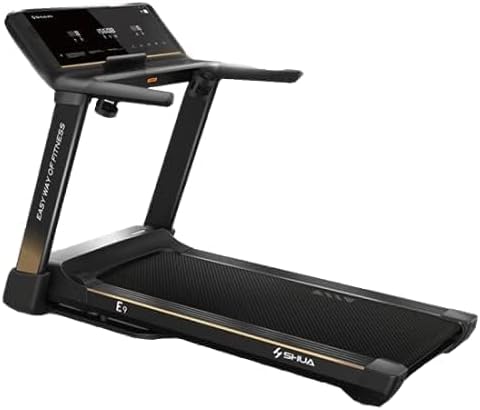
The SHUA Treadmill SH-T5100A is designed for effective home fitness, offering a range of features to enhance your workout experience. It includes a powerful AC motor, automatic incline adjustment, and a clear LED display for tracking your progress.

The SHUA Treadmill SH-T5100A, showcasing its sleek design and robust frame.
A detailed view of the SHUA Treadmill's LED display console, showing workout metrics.

A user demonstrating the SHUA Treadmill in use, highlighting the spacious running area.

Multiple SHUA treadmills lined up, illustrating their commercial-grade design and consistent appearance.
Setup and Assembly
Follow these steps to correctly set up your SHUA Treadmill SH-T5100A. It is recommended to have two people for assembly.
- Unpacking: Carefully remove all components from the packaging. Check against the parts list (not provided in this manual, refer to packaging for full list) to ensure all parts are present.
- Base Stabilization: Place the main frame on a flat, level surface. Adjust the leveling feet if necessary to ensure stability.
- Upright Assembly: Attach the upright posts to the main frame using the provided hardware. Ensure they are securely fastened.
- Console Attachment: Mount the console onto the upright posts. Connect all necessary cables from the console to the main frame, ensuring proper alignment and secure connections.
- Handlebar Installation: Secure the handlebars to the console or uprights as per the design.
- Power Connection: Plug the power cord into a grounded electrical outlet.
- Initial Check: Before first use, ensure all bolts and nuts are tightened. Test the safety key and emergency stop function.
Operating Your Treadmill
Console Features
The SH-T5100A features an intuitive LED display console that provides real-time feedback on your workout.
- Display Content: Calories, Pulse, Time, Distance, Incline, Steps.
- Programs: Includes Manual mode, 8 Preset programs, Fat Analysis, and 3 User-defined programs.
- Heart Rate Monitoring: Display heart rate by touching the integrated sensors on the handlebars.
Starting a Workout
- Power On: Ensure the treadmill is plugged in and the main power switch (if present) is turned on.
- Attach Safety Key: Clip the safety key to your clothing and insert it into the designated slot on the console. The treadmill will not operate without the safety key in place.
- Start: Press the "START" button. The belt will begin to move at a low speed.
- Adjust Speed: Use the speed control buttons (usually '+' and '-') to increase or decrease the belt speed. The speed range is 1-18 Km/h.
- Adjust Incline: Use the incline control buttons to adjust the incline level. The treadmill features Auto Incline from 0-12%.
Using Programs
The SH-T5100A offers various programs to diversify your workouts:
- Preset Programs: Select from 8 pre-programmed workouts designed for different fitness goals. Follow the on-screen prompts.
- User Programs: Create and save up to 3 custom workout programs tailored to your preferences. Refer to the console instructions for setting up user programs.
- Fat Analysis: Utilize the fat analysis program to estimate body fat percentage. Follow the instructions on the console for accurate readings.
Maintenance and Care
Regular maintenance ensures the longevity and optimal performance of your SHUA Treadmill.
- Cleaning: Wipe down the treadmill surfaces with a damp cloth after each use. Avoid abrasive cleaners.
- Belt Lubrication: The running belt requires periodic lubrication to reduce friction. Refer to the specific lubrication instructions provided with your treadmill or contact customer support for guidance.
- Belt Tension and Alignment: Check the running belt tension and alignment regularly. Adjust if the belt slips or drifts to one side. Consult the detailed instructions for belt adjustment.
- Motor Cover Cleaning: Periodically remove the motor cover and vacuum any dust or debris that may have accumulated. Ensure the treadmill is unplugged before performing this.
- Storage: If storing the treadmill, ensure it is in a dry, clean environment. Some models may be foldable for space-saving storage.
Troubleshooting Guide
This section addresses common issues you might encounter with your SHUA Treadmill SH-T5100A.
| Problem | Possible Cause | Solution |
|---|---|---|
| Treadmill does not power on. | Not plugged in; power switch off; circuit breaker tripped; safety key not inserted. | Check power cord connection; ensure power switch is on; reset circuit breaker; insert safety key fully. |
| Running belt slips or hesitates. | Belt too loose; belt needs lubrication; worn belt. | Adjust belt tension; lubricate the running deck; contact customer support for belt replacement. |
| Unusual noise during operation. | Loose parts; motor issues; belt rubbing. | Check and tighten all visible bolts; inspect motor area for debris; adjust belt alignment. If noise persists, contact support. |
| Incline not adjusting. | Incline motor issue; connection problem. | Check all cable connections to the incline motor. If problem persists, contact customer support. |
If you encounter issues not listed here or if solutions do not resolve the problem, please contact SHUA customer support.
Technical Specifications
Detailed specifications for the SHUA Treadmill SH-T5100A:
| Feature | Specification |
|---|---|
| Monitor Display | White LED display |
| Display Content | Calories, Pulse, Time, Distance, Incline, Steps |
| Programs | Manual, 8 Preset, Fat Analysis, 3 User Programs |
| Motor Type | AC Motor |
| Power Peak | 5.0 HP |
| Power (Continuous) | 2.5 HP |
| Speed Range | 1-18 Km/h |
| Incline | Auto Incline 0-12% |
| Shock Absorption | Multiple shock absorption system |
| Handlebar | PU armrest with heart rate sensors |
| Max. User Weight | 130 kg |
| Walking Area | 137 x 50 CM |
| Belt Size | 287 x 50 CM |
| Dimension (LxWxH) | 170 x 88 x 148 CM |
| Frame Material | Alloy Steel |
| Item Weight | 98 Kilograms |
Warranty and Customer Support
SHUA products are manufactured to high-quality standards and are backed by a limited warranty. For specific warranty terms and conditions, please refer to the warranty card included with your purchase or visit the official SHUA website.
For technical assistance, parts replacement, or any inquiries regarding your SHUA Treadmill SH-T5100A, please contact SHUA customer support. Have your model number (SH-T5100A) and purchase date ready when contacting support.

The official SHUA brand logo.

Image displaying the ACSM (American College of Sports Medicine) certification logo, indicating adherence to health and fitness standards.
Ask a question about this manual
Ask about setup, troubleshooting, compatibility, parts, safety, or missing instructions. Manuals+ will review the question and use this page’s manual context to help answer it.