1. Introduction
The Purline HOTI T100 is a digital ceramic tower heater designed to provide efficient and comfortable heating for indoor spaces. This appliance features two power levels (1300W/2000W), a 12-hour timer, automatic horizontal oscillation, and an ambient LED light with four selectable colors. For enhanced user convenience, it includes a remote control. Its compact and modern design makes it suitable for various home environments, effectively heating rooms up to 20m².
2. Important Safety Instructions
Please read all instructions carefully before using this heater. Failure to follow these instructions may result in electric shock, fire, or personal injury. Keep this manual for future reference.
- Always plug the heater directly into a wall outlet. Never use with an extension cord or relocatable power tap.
- This heater is hot when in use. To avoid burns, do not let bare skin touch hot surfaces.
- Keep combustible materials, such as furniture, pillows, bedding, papers, clothes, and curtains at least 1 meter (3 feet) from the front and sides of the heater.
- Extreme caution is necessary when any heater is used by or near children or invalids and whenever the heater is left operating unattended.
- Always unplug the heater when not in use.
- Do not operate any heater with a damaged cord or plug or after the heater malfunctions, has been dropped, or damaged in any manner.
- Do not use outdoors. This heater is intended for indoor use only.
- Never place the heater where it may fall into a bathtub or other water container.
- Do not run cord under carpeting. Do not cover cord with throw rugs, runners, or similar coverings. Arrange cord away from traffic area and where it will not be tripped over.
- To disconnect heater, turn controls to OFF, then remove plug from outlet.
- Do not insert or allow foreign objects to enter any ventilation or exhaust opening as this may cause an electric shock or fire, or damage the heater.
- To prevent a possible fire, do not block air intakes or exhaust in any manner. Do not use on soft surfaces, like a bed, where openings may become blocked.
- A heater has hot and arcing or sparking parts inside. Do not use it in areas where gasoline, paint, or flammable liquids are used or stored.
- Use this heater only as described in this manual. Any other use not recommended by the manufacturer may cause fire, electric shock, or injury to persons.
- Always ensure the heater is placed on a stable, level surface.
3. Package Contents
Verify that all components are present and in good condition:
- Purline HOTI T100 Digital Ceramic Tower Heater
- Remote Control
- User Manual (this document)
4. Product Overview
Familiarize yourself with the main components and controls of your Purline HOTI T100 heater.

Figure 4.1: Front view of the Purline HOTI T100 Digital Ceramic Tower Heater. The image displays the sleek, dark grey and silver tower design with a prominent digital display and control buttons located on the base.
4.1 Control Panel and Digital Display

Figure 4.2: Close-up view of the heater's control panel and digital display. The display shows temperature, fan speed, timer, and oscillation icons. The control buttons include Swing, Mode, Timer, Temp, Light, and ON/OFF.
The control panel is located on the top section of the heater's base, featuring intuitive buttons for various functions. The digital display provides real-time information on temperature, operating mode, timer settings, and oscillation status.
4.2 Remote Control

Figure 4.3: The Purline HOTI T100 heater, highlighting its compatibility with a remote control for convenient operation from a distance.
The included remote control allows you to operate all functions of the heater from a distance, providing convenience and ease of use.
5. Setup
5.1 Placement
Place the heater on a firm, level surface. Ensure there is at least 1 meter (3 feet) of clear space around the heater to allow for proper airflow and to prevent fire hazards. Do not place the heater near curtains, furniture, or other combustible materials.

Figure 5.1: Example of the Purline HOTI T100 heater placed in a bedroom, demonstrating suitable placement away from bedding and furniture.
5.2 Power Connection
Plug the power cord directly into a standard 230V AC wall outlet. Ensure the outlet is in good condition and not overloaded with other appliances.
6. Operating Instructions
The heater can be operated using the control panel buttons or the remote control.
6.1 Power On/Off
- Press the ON/OFF button on the control panel or remote control to turn the heater on or off.
6.2 Adjusting Power Levels
- Press the MODE button to cycle between the two power settings: 1300W (low heat) and 2000W (high heat). The digital display will indicate the selected power level.
6.3 Setting the Timer
- Press the TIMER button to activate the timer function. Each press will increase the timer setting by 1 hour, up to a maximum of 12 hours. The heater will automatically turn off after the set time has elapsed.
6.4 Activating Oscillation
- Press the SWING button to activate or deactivate the automatic horizontal oscillation feature, which helps distribute heat more evenly across the room.
6.5 Ambient LED Light
The heater features an integrated LED light with four color options to enhance your room's ambiance.
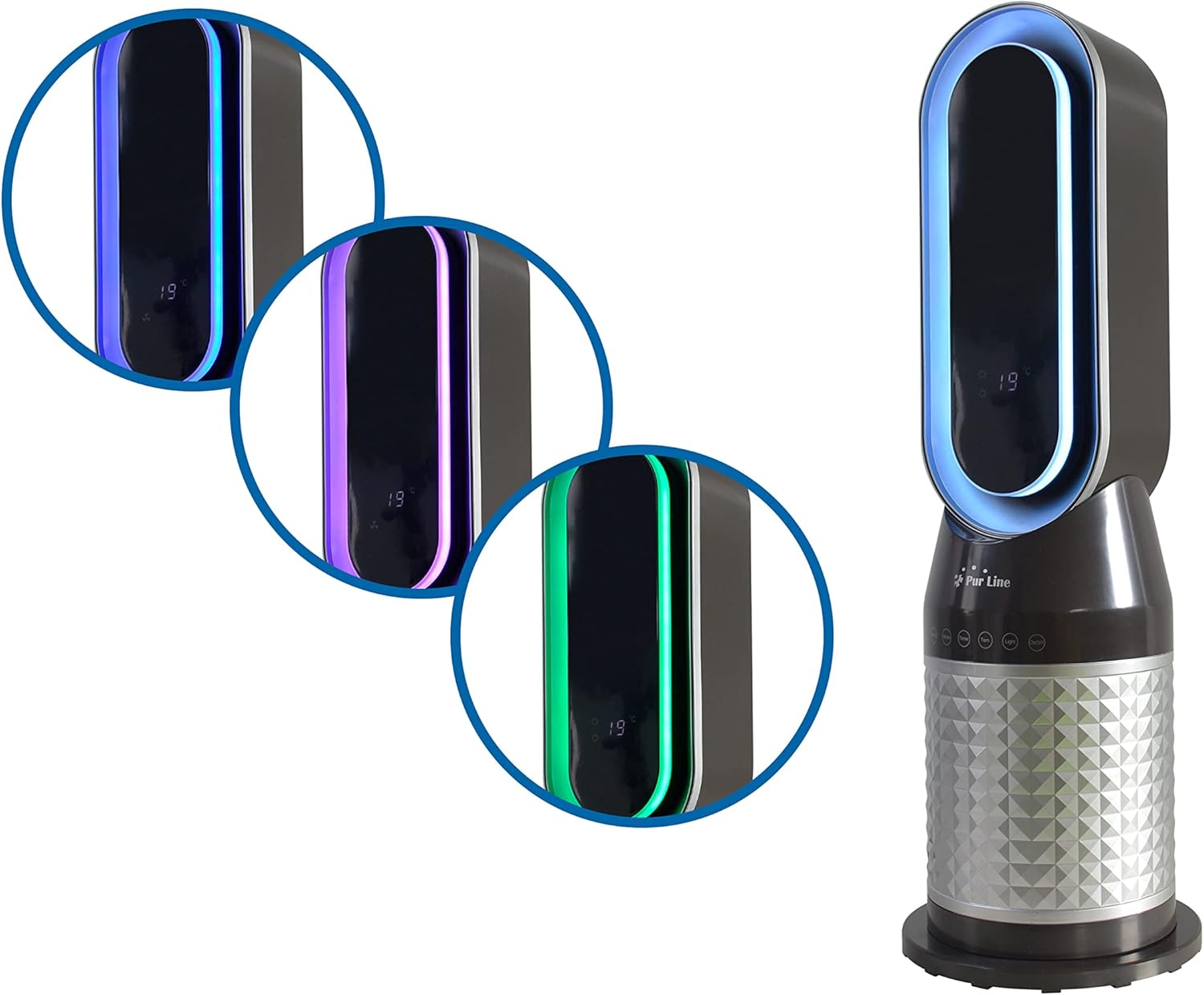
Figure 6.1: The Purline HOTI T100 heater showcasing its ambient LED light feature with various color options.
- Press the LIGHT button to cycle through the available LED light colors.
6.6 Temperature Setting
- Press the TEMP button to adjust the desired temperature. The digital display will show the set temperature.
7. Maintenance
7.1 Cleaning
- Always unplug the heater and allow it to cool completely before cleaning.
- Use a soft, damp cloth to wipe the exterior surfaces of the heater. Do not use abrasive cleaners or solvents.
- Do not immerse the heater in water or allow water to drip into the interior.
- Periodically clean the air intake and exhaust vents with a vacuum cleaner attachment to remove dust and debris.
7.2 Storage
- When not in use, store the heater in a cool, dry place, preferably in its original packaging.
- Ensure the power cord is neatly wrapped and secured to prevent damage.
8. Troubleshooting
If you encounter issues with your heater, refer to the following common problems and solutions:
| Problem | Possible Cause | Solution |
|---|---|---|
| Heater does not turn on. | No power supply; Power button not pressed; Overheat protection activated. | Check power cord connection and wall outlet; Press the ON/OFF button; Unplug, wait 30 minutes, then plug back in. |
| No heat output. | Low power setting; Thermostat set too low. | Press MODE to select 2000W; Increase the temperature setting using the TEMP button. |
| Oscillation not working. | Oscillation function not activated. | Press the SWING button to activate oscillation. |
| Remote control not working. | Batteries are dead or incorrectly inserted; Obstruction between remote and heater. | Replace batteries; Ensure clear line of sight to the heater's sensor. |
If the problem persists after attempting these solutions, please contact customer support.
9. Specifications
Technical details for the Purline HOTI T100 Digital Ceramic Tower Heater:
| Feature | Detail |
|---|---|
| Brand | PUR LINE |
| Model Number | HOTI T100 |
| Color | White |
| Product Dimensions (L x W x H) | 23 x 23 x 70 cm |
| Item Weight | 4 Kilograms |
| Voltage | 230 Volts (AC) |
| Power Levels | 1300W / 2000W |
| Timer Function | Up to 12 hours |
| Special Features | Digital Display, Rapid Heating, Lightweight, Silent Operation, Remote Control, Automatic Shut-off Function, Ambient LED Light |
| Form Factor | Tower |
| Indoor/Outdoor Use | Indoor |
| Power Source | Corded Electric |
| Heating Method | Forced Air |
| Recommended Uses | Home |
| Mounting Type | Floor Mount |
| Spare Parts Availability | Information unavailable |
10. Warranty and Support
For warranty information or technical support, please refer to the documentation provided at the point of purchase or contact the manufacturer directly. Keep your purchase receipt as proof of purchase.


