
DEWINNER B09FJFW84C
DEWINNER Oscillating Multi-Tool User Manual
Model: B09FJFW84C
Brand: DEWINNER
1. Introduction
Thank you for choosing the DEWINNER Oscillating Multi-Tool. This versatile 300W power tool is designed for a wide range of applications including cutting, sanding, grinding, and scraping. Its variable speed control and multi-angle oscillating action provide precision and efficiency for various tasks. Please read this manual carefully before operation to ensure safe and effective use of the tool.
2. General Safety Instructions
WARNING: Read all safety warnings, instructions, illustrations and specifications provided with this power tool. Failure to follow all instructions listed below may result in electric shock, fire and/or serious injury.
2.1 Work Area Safety
- Keep work area clean and well lit. Cluttered or dark areas invite accidents.
- Do not operate power tools in explosive atmospheres, such as in the presence of flammable liquids, gases or dust. Power tools create sparks which may ignite the dust or fumes.
- Keep children and bystanders away while operating a power tool. Distractions can cause you to lose control.
2.2 Electrical Safety
- Power tool plugs must match the outlet. Never modify the plug in any way.
- Avoid body contact with earthed or grounded surfaces, such as pipes, radiators, ranges and refrigerators. There is an increased risk of electric shock if your body is earthed or grounded.
- Do not expose power tools to rain or wet conditions. Water entering a power tool will increase the risk of electric shock.
2.3 Personal Safety
- Always wear eye protection. Use safety glasses, goggles, or a face shield.
- Dress properly. Do not wear loose clothing or jewelry. Keep your hair and clothing away from moving parts.
- Stay alert, watch what you are doing and use common sense when operating a power tool.
3. Components and Features
Familiarize yourself with the parts of your DEWINNER Oscillating Multi-Tool and its included accessories.

Figure 3.1: Tool Components Overview
- 6-Speed Adjustment: Dial to select desired oscillation speed.
- Encapsulation: Ergonomic housing for comfortable grip.
- Switch: Power on/off switch.
- Aluminium Alloy Head: Durable head for accessory attachment.
- Air Intake: Vents for motor cooling.
- Ventilation: Additional vents for heat dissipation.
- Universal Adaptor: For attaching various accessories.

Figure 3.2: Included Accessories
- Plunge Cutting Blade: For making precise cuts in various materials.
- Scraper Blade (x2): For removing paint, adhesive, or other materials.
- Semicircle Blade: Ideal for flush cutting and larger cuts.
- Sanding Base Plate: For attaching sandpaper for sanding tasks.
- Sandpaper (18 sheets): Assorted grits (240*5, 120*5, 80*5, 60*3) for various sanding needs.
- Hex Wrench: For securing and changing accessories.
Key Features:
- 6 Variable Speeds: Adjust speed from 0-23000 RPM to match the application and material.
- 3° Oscillating Angle: Provides efficient cutting, sanding, and grinding action.
- Soft Anti-Vibration Grip: Enhances user comfort and control during extended use.
- Quick Accessory Change: Designed for easy and fast blade replacement.
4. Setup and Accessory Installation
Always ensure the tool is unplugged from the power source before installing or changing accessories.
4.1 Attaching/Changing Accessories
- Unplug the Tool: Disconnect the multi-tool from the power outlet.
- Loosen the Bolt: Use the provided hex wrench to counter-rotate and loosen the accessory mounting bolt on the tool head.

Figure 4.1: Loosening the Accessory Bolt
- Place the Accessory: Align the accessory (blade, scraper, or sanding pad) with the universal adaptor on the tool head. Ensure it sits flush and securely.
Figure 4.2: Placing the Accessory
- Tighten the Bolt: Use the hex wrench to clockwise rotate and firmly tighten the accessory mounting bolt. Ensure the accessory is securely fastened and does not wobble.
Figure 4.3: Tightening the Accessory Bolt
- For Sanding: If using the sanding base plate, attach the desired sandpaper sheet by pressing it firmly onto the hook-and-loop surface of the pad.
5. Operating Instructions
5.1 Powering On/Off
- To turn the tool ON, slide the power switch forward.
- To turn the tool OFF, slide the power switch backward.

Figure 5.1: Power Switch Location
5.2 Adjusting Speed
The tool features a 6-level variable speed adjustment dial. Rotate the dial to select the appropriate speed for your application.
- Lower speeds (1-2) are suitable for delicate work, sanding, or when more control is needed.
- Medium speeds (3-4) are good for general cutting and scraping.
- Higher speeds (5-6) are ideal for aggressive cutting and grinding.

Figure 5.2: Speed Adjustment Dial
5.3 Application Examples
The DEWINNER Oscillating Multi-Tool is highly versatile. Here are some common applications:
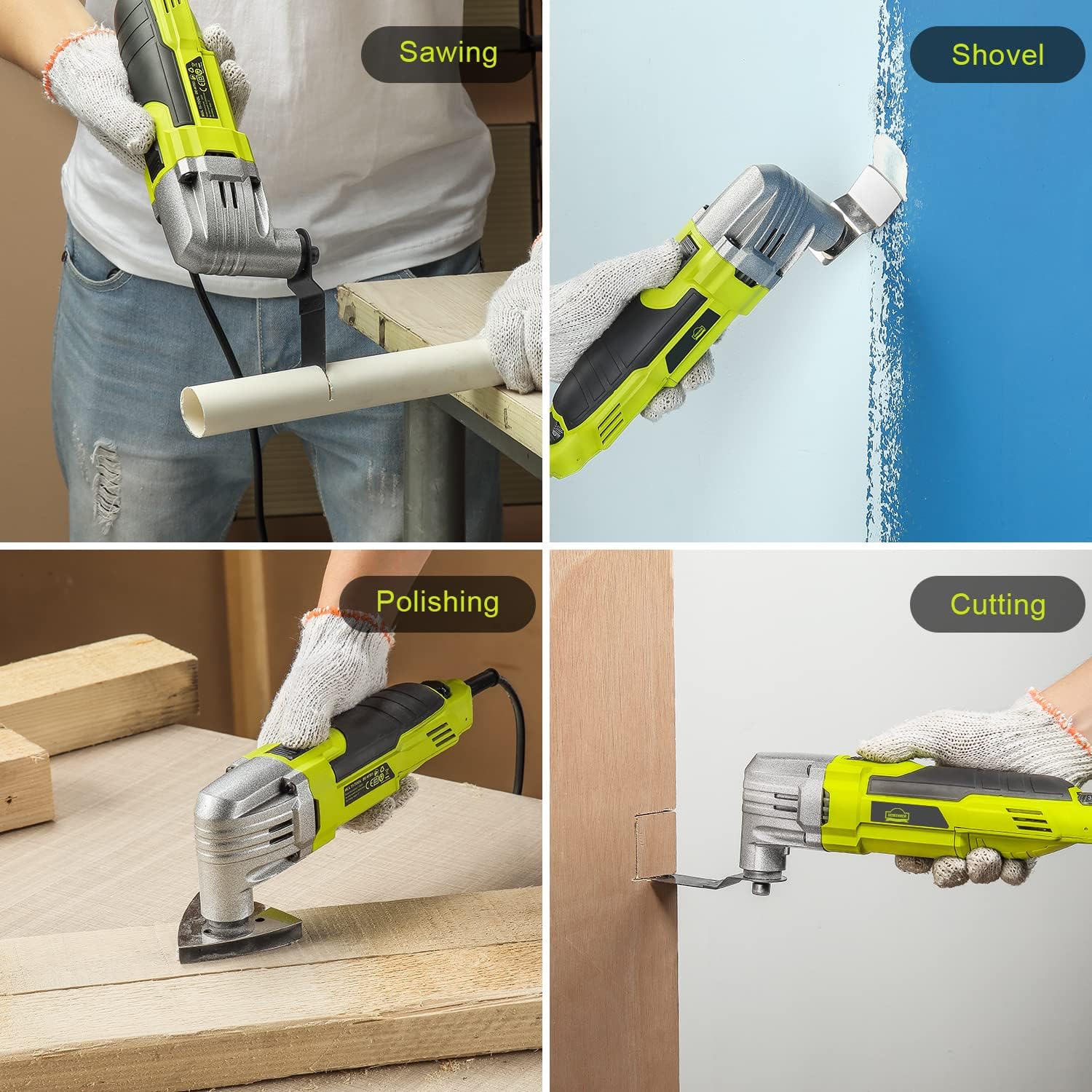
Sawing: Use appropriate saw blades for cutting wood, plastic, or soft metals. Apply steady, even pressure.
Shoveling/Scraping: Attach a scraper blade to remove old paint, caulk, or adhesive from surfaces.
Polishing/Sanding: Use the sanding base plate with appropriate grit sandpaper for smoothing surfaces. Move the tool in a consistent pattern.
Cutting: For plunge cuts or flush cuts, select the correct blade and guide the tool carefully into the material.
6. Maintenance
Regular maintenance ensures the longevity and optimal performance of your multi-tool. Always unplug the tool before performing any maintenance.
6.1 Cleaning
- After each use, wipe down the tool with a clean, damp cloth. Do not use harsh chemicals or abrasive cleaners.
- Keep the ventilation openings clear of dust and debris to prevent overheating. Use compressed air if necessary.
- Clean accessories (blades, scrapers) after use to remove residue and prolong their lifespan.
6.2 Storage
- Store the tool in a dry, secure place, out of reach of children.
- Protect the power cord from damage. Do not wrap it tightly around the tool.
6.3 Accessory Care
- Inspect blades and other accessories for wear or damage before each use. Replace worn or damaged accessories immediately.
- Store accessories in a protective case or organizer to prevent damage and loss.
7. Troubleshooting
If you encounter issues with your DEWINNER Oscillating Multi-Tool, refer to the table below for common problems and solutions.
| Problem | Possible Cause | Solution |
|---|---|---|
| Tool does not start. | No power supply. Power switch is off. | Check power outlet and cord. Ensure power switch is in the ON position. |
| Tool overheats. | Blocked ventilation openings. Excessive load. | Clean ventilation openings. Reduce pressure on the tool; allow it to cool. |
| Accessory wobbles or falls off. | Accessory not tightened properly. Incorrect accessory installation. | Ensure the accessory bolt is fully tightened. Re-install accessory, ensuring it is flush with the adaptor. |
| Reduced performance. | Worn or dull accessory. Incorrect speed setting. | Replace the accessory. Adjust speed dial to a higher setting for the task. |
If the problem persists after trying these solutions, please contact DEWINNER customer support.
8. Technical Specifications
| Feature | Specification |
|---|---|
| Brand | DEWINNER |
| Model | B09FJFW84C |
| Input Power | 300W |
| No-load Speed | 0-23000 RPM |
| Oscillating Angle | 3° |
| Power Source | Corded Electric |
| Package Dimensions | 32.4 x 10.8 x 8.8 cm |
| Item Weight | 1.71 kilograms |
| Manufacturer | vanbox |
| Country of Origin | China |

Figure 8.1: Key Specifications Overview
9. Warranty and Support
DEWINNER products are manufactured to high-quality standards. For warranty information, technical support, or service inquiries, please refer to the contact information provided with your purchase or visit the official DEWINNER website. Please retain your proof of purchase for warranty claims.
Ask a question about this manual
Ask about setup, troubleshooting, compatibility, parts, safety, or missing instructions. Manuals+ will review the question and use this page’s manual context to help answer it.