
Kenmore BU4050
Kenmore BU4050 Intuition Bagged Upright Vacuum User Manual
Model: BU4050 | Brand: Kenmore
1. Introduction
This manual provides essential information for the safe and efficient operation, maintenance, and troubleshooting of your Kenmore BU4050 Intuition Bagged Upright Vacuum. Please read it thoroughly before using the appliance and retain it for future reference.
The Kenmore BU4050 Intuition is a versatile bagged upright vacuum cleaner designed for comprehensive home cleaning. Key features include a Lift-Up canister for portable cleaning, a Hair Eliminator brushroll to prevent tangles, No Touch Bag Technology for hygienic disposal, PowerFlow Bag Technology for consistent suction, and a Completely Sealed System with HEPA filtration to trap 99.97% of dust and allergens.
2. Important Safety Information
WARNING: To reduce the risk of fire, electric shock, or injury, read and follow all instructions and warnings before use.
- Always unplug the vacuum cleaner from the electrical outlet before servicing or cleaning the unit.
- Do not use outdoors or on wet surfaces.
- Do not allow to be used as a toy. Close attention is necessary when used by or near children.
- Use only as described in this manual. Use only manufacturer's recommended attachments.
- Do not use with damaged cord or plug. If appliance is not working as it should, has been dropped, damaged, left outdoors, or dropped into water, return it to a service center.
- Do not pull or carry by cord, use cord as a handle, close a door on cord, or pull cord around sharp edges or corners. Do not run appliance over cord. Keep cord away from heated surfaces.
- Do not unplug by pulling on cord. To unplug, grasp the plug, not the cord.
- Do not handle plug or vacuum cleaner with wet hands.
- Do not put any object into openings. Do not use with any opening blocked; keep free of dust, lint, hair, and anything that may reduce airflow.
- Keep hair, loose clothing, fingers, and all parts of body away from openings and moving parts.
- Do not pick up anything that is burning or smoking, such as cigarettes, matches, or hot ashes.
- Do not use to pick up flammable or combustible liquids, such as gasoline, or use in areas where they may be present.
- Do not use without dust bag and/or filters in place.
- Turn off all controls before unplugging.
- Use extra care when cleaning on stairs.
3. Package Contents
Carefully unpack your Kenmore BU4050 Intuition vacuum and verify that all items are present. If any parts are missing or damaged, contact customer service.
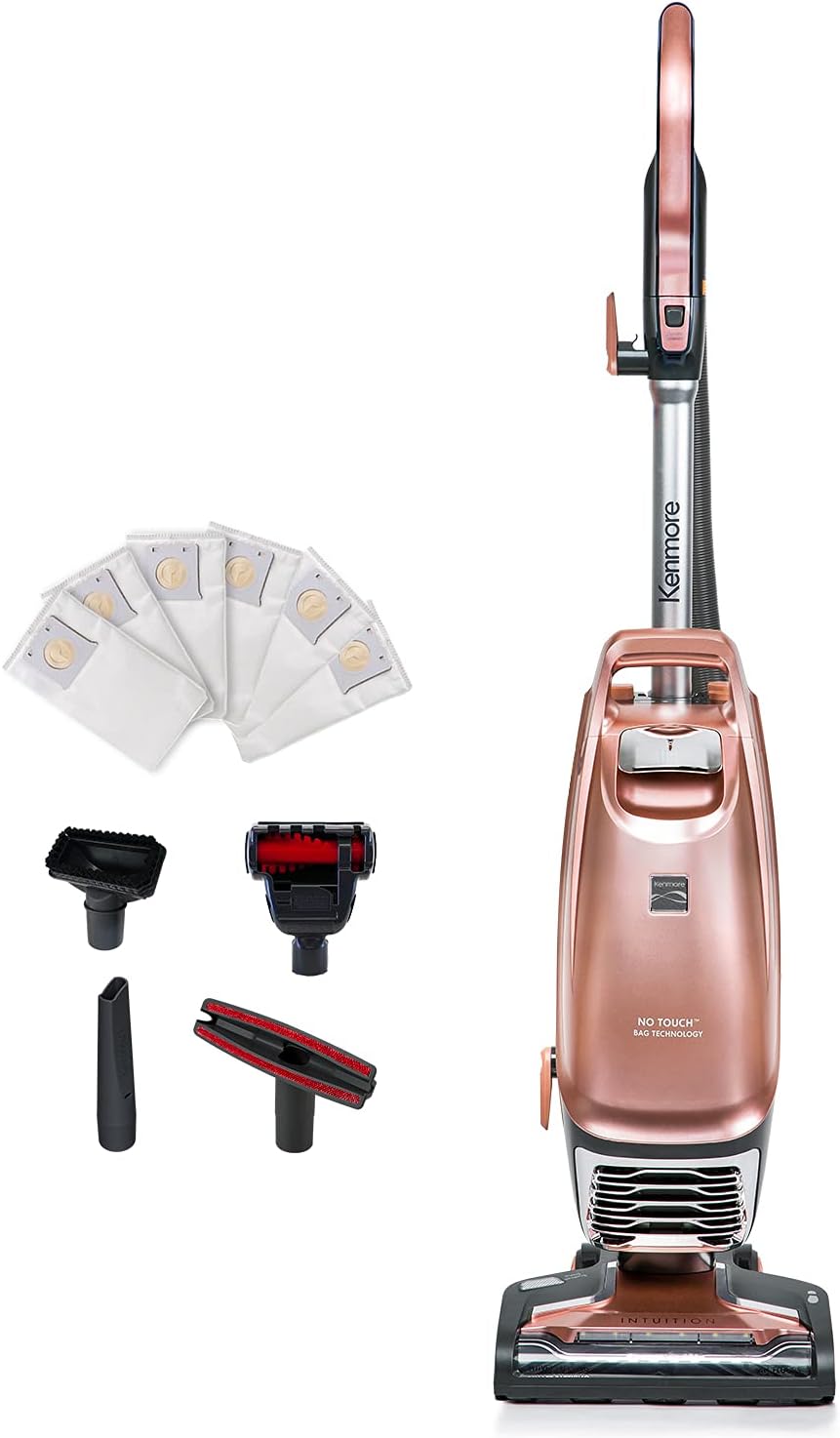
- Kenmore BU4050 Intuition Upright Vacuum Unit
- Crevice Tool
- Upholstery Tool
- Pet Handi-Mate
- Dusting Brush
- 4 x HEPA Dust Bags (initial supply)
4. Assembly and Setup
Your Kenmore BU4050 Intuition vacuum requires minimal assembly before first use.
- Attach the Handle: Insert the upper handle assembly into the main vacuum body until it clicks securely into place. Ensure the cord hook aligns correctly.
- Connect the Hose: Attach the flexible hose to the designated port on the back of the vacuum. Twist or push until it locks.
- Install Dust Bag: Open the dust bag compartment. Ensure a HEPA dust bag is correctly seated in the bracket and the compartment door closes securely. Refer to the 'Maintenance: Replacing the Dust Bag' section for detailed instructions.
- Store Accessories: Place the included cleaning tools onto the onboard storage clips for easy access during cleaning.
5. Operating Instructions
5.1. Upright Vacuuming (Carpets and Hard Floors)
- Plug the power cord into a suitable electrical outlet.
- Step on the nozzle and pull the handle back to recline the vacuum.
- Press the Power button to turn on the vacuum.
- Press the Brushroll On/Off button to activate or deactivate the brushroll. Use the brushroll for carpets and turn it off for bare floors to prevent scattering debris.
- Guide the vacuum over the cleaning surface.

5.2. Lift-Up Canister Mode (Stairs and Above-Floor)
The Lift-Up feature allows you to detach the canister for lightweight, portable cleaning.
- Ensure the vacuum is in the upright position and powered off.
- Press the Lift-Up release button, typically located near the base of the canister, to detach the portable canister from the floor nozzle.
- Carry the canister using the integrated handle.
- Attach desired cleaning tools (e.g., Pet Handi-Mate, Crevice Tool) to the end of the hose or wand for targeted cleaning.
- To reattach, align the canister with the floor nozzle and push down until it clicks securely.

5.3. Above Floor Cleaning with Wand and Attachments
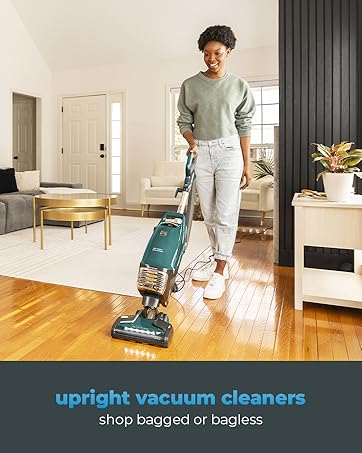
For extended reach and cleaning various surfaces, utilize the wand and specialized attachments.
- With the vacuum in Lift-Up mode or upright, detach the hose from its storage clip.
- Attach the extension wand to the end of the hose for increased reach.
- Select the appropriate tool for the task:
- Crevice Tool: For tight spaces, corners, and edges.
- Upholstery Tool: For furniture, curtains, and delicate fabrics.
- Pet Handi-Mate: A motorized tool specifically designed for removing pet hair from upholstery and stairs.
- Dusting Brush: For dusting delicate surfaces, blinds, and vents.
- Attach the chosen tool to the end of the wand or directly to the hose.
- Turn on the vacuum and begin cleaning.
6. Maintenance
Regular maintenance ensures optimal performance and extends the life of your vacuum cleaner.
6.1. Replacing the Dust Bag (No Touch Bag Technology)
The Kenmore BU4050 features No Touch Bag Technology for hygienic dust bag replacement.
- Ensure the vacuum is unplugged from the power outlet.
- Locate the dust bag compartment release button. Press it to open the compartment door.
- The self-sealing dust bag will automatically close upon removal. Grasp the top of the bag and pull it out of the bracket.
- Dispose of the full bag in a waste bin.
- Insert a new Kenmore HEPA dust bag into the bracket, ensuring it is fully seated.
- Close the dust bag compartment door firmly until it latches.

6.2. Filter Maintenance (HEPA Filter)
The vacuum is equipped with a HEPA filter system. Check and replace filters as recommended by the manufacturer, typically every 6-12 months depending on usage, or when suction noticeably decreases.
- Unplug the vacuum.
- Locate the HEPA filter compartment (refer to your vacuum's specific diagram if needed).
- Remove the old filter and dispose of it.
- Insert a new Kenmore HEPA filter, ensuring it fits snugly.
- Close the filter compartment.
6.3. Hair Eliminator Brushroll Cleaning
The Hair Eliminator brushroll is designed to automatically remove hair. However, occasional inspection and manual cleaning may be necessary if debris accumulates.
- Unplug the vacuum.
- Turn the floor nozzle over to access the brushroll.
- Inspect the brushroll for any tangled hair or debris that the automatic system may not have removed.
- Carefully cut away any stubborn hair or threads with scissors.
- Ensure the brushroll spins freely before resuming operation.

7. Troubleshooting
Before contacting customer service, review the following common issues and solutions.
| Problem | Possible Cause | Solution |
|---|---|---|
| Vacuum does not turn on | No power to outlet; Power cord not fully plugged in; Thermal protector activated. | Check circuit breaker/fuse; Ensure plug is fully inserted; Unplug, wait 30 minutes for motor to cool, then plug back in. |
| Loss of suction | Dust bag full; Clog in hose or nozzle; Filters dirty. | Replace dust bag; Check hose and nozzle for obstructions; Clean or replace filters. |
| Brushroll not spinning | Brushroll switch off; Obstruction in brushroll; Belt broken. | Ensure brushroll switch is on; Clear any debris from brushroll; Contact customer service for belt replacement. |
| Unusual noise | Clog in airflow path; Object caught in brushroll; Motor issue. | Check for and remove clogs; Clear brushroll; If noise persists, contact customer service. |
For more detailed troubleshooting, please refer to the official user manual PDF available online or contact Kenmore customer support.
8. Specifications
| Feature | Detail |
|---|---|
| Brand | Kenmore |
| Model Name | BU4050 |
| Color | Rose Gold |
| Form Factor | Upright |
| Wattage | 120 watts |
| Voltage | 120 volts |
| Capacity | 3 Liters (Dust Bag) |
| Filter Type | HEPA Filter |
| Special Features | Lightweight, Hair Eliminator Brushroll, HEPA Filtration, Headlight, Lift-Up Canister |
| Included Components | Crevice Tool, Upholstery Tool, Pet HandiMate, Dusting Brush, 4pcs HEPA Dust Bags |
| Item Weight | 14 pounds |
| Product Dimensions | 13"L x 12"W x 34"H |
| Cordless? | No (Corded) |
| Assembly Required | Yes |
9. Warranty and Support
9.1. Product Warranty
This Kenmore BU4050 Intuition Bagged Upright Vacuum comes with a 1-year limited warranty from the date of purchase. This warranty covers defects in materials and workmanship under normal household use. Please retain your proof of purchase for warranty claims.
For specific warranty terms and conditions, refer to the documentation included with your product or visit the official Kenmore website.
9.2. Customer Support
If you have any questions, require assistance, or need to report a problem with your vacuum cleaner, please contact Kenmore Customer Service.
- Online Resources: For additional information, FAQs, and support, visit the official Kenmore website.
- Official User Manual (PDF): A detailed PDF version of the user manual is available for download: Download PDF Manual
Related documentsBU4050


Ask a question about this manual
Ask about setup, troubleshooting, compatibility, parts, safety, or missing instructions. Manuals+ will review the question and use this page’s manual context to help answer it.