
NutriBullet NBA07100
NutriBullet XXL Digital Air Fryer 7L User Manual
Model: NBA07100
1. Introduction
Welcome to the NutriBullet XXL Digital Air Fryer 7L user manual. This appliance is designed to provide a healthier way to cook your favorite foods, utilizing rapid air circulation technology to fry, roast, bake, and dehydrate with little to no oil. Please read this manual thoroughly before first use to ensure safe and optimal operation.
2. Important Safety Information
When using electrical appliances, basic safety precautions should always be followed, including the following:
- Read all instructions before operating the appliance.
- Do not touch hot surfaces. Use handles or knobs.
- To protect against electric shock, do not immerse cord, plugs, or the main unit in water or other liquid.
- Close supervision is necessary when any appliance is used by or near children.
- Unplug from outlet when not in use and before cleaning. Allow to cool before putting on or taking off parts.
- Do not operate any appliance with a damaged cord or plug, or after the appliance malfunctions or has been damaged in any manner.
- The use of accessory attachments not recommended by the appliance manufacturer may cause injuries.
- Do not use outdoors.
- Do not let cord hang over edge of table or counter, or touch hot surfaces.
- Do not place on or near a hot gas or electric burner, or in a heated oven.
- Extreme caution must be used when moving an appliance containing hot oil or other hot liquids.
- Always attach plug to appliance first, then plug cord into the wall outlet. To disconnect, turn any control to "off", then remove plug from wall outlet.
- Do not use appliance for other than intended household use.
- Ensure adequate ventilation around the appliance during use.
3. Product Overview
3.1 Components
The NutriBullet XXL Digital Air Fryer consists of the main unit, a removable cooking basket, and a crisper plate.

Image: Front view of the NutriBullet XXL Digital Air Fryer, showcasing its sleek black design and digital control panel.

Image: Close-up view of the crisper plate, designed to allow air circulation around food for even cooking.
3.2 Control Panel
The air fryer features a large touch screen control panel for easy operation.
- Power Button: Turns the unit on/off and starts/pauses cooking.
- Temperature Controls (+/-): Adjusts cooking temperature.
- Time Controls (+/-): Adjusts cooking time.
- Mode Button (M): Cycles through 8 pre-programmed cooking functions.
- Pre-programmed Icons: Visual indicators for different food types (e.g., fries, chicken, fish, steak, cake, shrimp, vegetables, dehydrate).
- Digital Display: Shows current temperature and remaining cooking time.

Image: Detailed view of the digital touch screen control panel, showing temperature, time, and various cooking mode icons.
4. Setup and First Use
- Unpack: Carefully remove all packaging materials and promotional labels from the air fryer.
- Clean Components: Wash the cooking basket and crisper plate with hot, soapy water. Rinse thoroughly and dry completely. Wipe the main unit with a damp cloth.
- Assemble: Insert the crisper plate into the cooking basket. Ensure it sits securely at the bottom. Slide the assembled basket back into the main unit until it clicks into place.
- Placement: Place the air fryer on a stable, heat-resistant surface, away from walls and other appliances to allow for proper air circulation. Ensure there is at least 15 cm of clear space on all sides.
- Initial Run (Optional but Recommended): For the first use, it is recommended to run the air fryer empty for about 10-15 minutes at 180°C (350°F) to burn off any manufacturing residues. A slight odor may be present, which is normal.

Image: A person demonstrating the insertion of the crisper plate into the cooking basket, illustrating the setup process.
5. Operating Instructions
5.1 Pre-heating
Pre-heating the air fryer ensures optimal cooking results and crispiness.
- Plug the air fryer into a grounded wall outlet.
- Press the Power button to turn on the display.
- Adjust the temperature using the Temperature controls (+/-) to your desired pre-heat temperature (e.g., 180°C / 350°F).
- Set the time for 3-5 minutes using the Time controls (+/-).
- Press the Power button again to start pre-heating. The air fryer will begin heating.
5.2 Cooking with Pre-programmed Modes
The NutriBullet XXL Digital Air Fryer offers 8 pre-programmed cooking modes for convenience.
- After pre-heating (or directly if not pre-heating), pull out the cooking basket.
- Place your food evenly on the crisper plate inside the basket. Do not overfill the basket to allow for proper air circulation. The 7L capacity is suitable for a whole chicken or 1kg of fries.
- Slide the basket back into the air fryer.
- Press the Mode button (M) repeatedly to cycle through the 8 pre-programmed cooking functions until the desired icon is selected. The display will show the default time and temperature for that mode.
- You can adjust the default time and temperature using the respective +/- buttons if needed.
- Press the Power button to start cooking.
- During cooking, the air fryer's built-in technology automatically adjusts cooking time to compensate for heat loss if the cooking basket is opened, ensuring food is cooked perfectly.
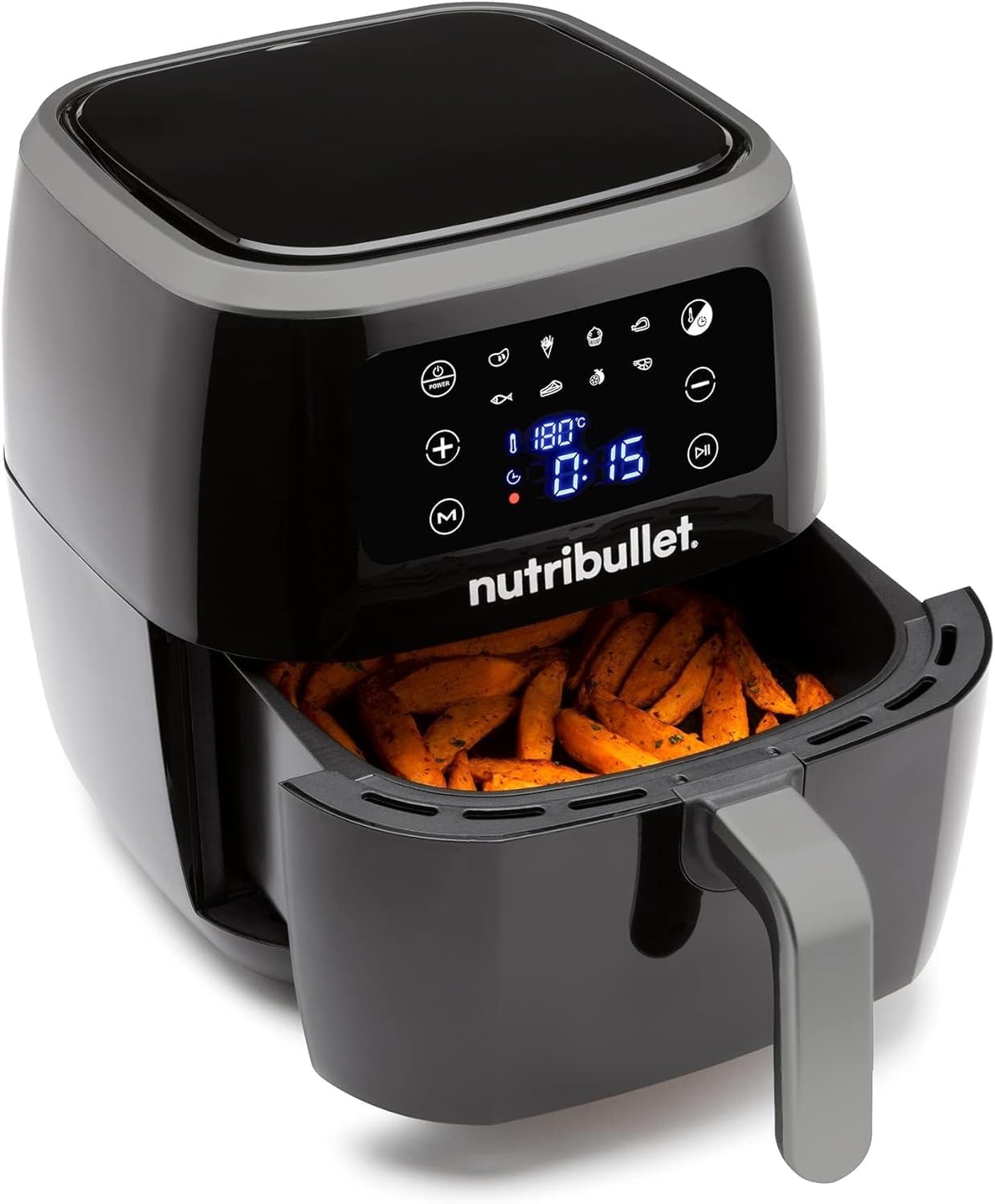
Image: The air fryer with its basket pulled out, revealing sweet potato fries cooking inside, demonstrating the cooking process.
5.3 Manual Cooking Settings
For full control, you can set the time and temperature manually.
- Place food in the cooking basket and slide it into the unit.
- Press the Power button.
- Use the Temperature controls (+/-) to set your desired cooking temperature.
- Use the Time controls (+/-) to set your desired cooking duration.
- Press the Power button to start cooking.
5.4 Shaking and Flipping Food
For certain foods, especially smaller items like fries or nuggets, shaking or flipping them halfway through the cooking process helps ensure even browning and crispiness.
- Carefully pull out the cooking basket during the cooking cycle. The air fryer will automatically pause.
- Gently shake the basket or use non-abrasive, heat-resistant tongs to flip the food.
- Slide the basket back into the air fryer. Cooking will resume automatically.

Image: A person pulling out the air fryer basket to check or shake food, with cooked chicken and vegetables visible nearby.
6. Cleaning and Maintenance
Regular cleaning ensures the longevity and optimal performance of your air fryer. Always unplug the appliance and allow it to cool completely before cleaning.
- Cooking Basket and Crisper Plate: These parts are non-stick coated and can be washed by hand with warm, soapy water and a non-abrasive sponge. They are also dishwasher safe for convenience.
- Main Unit: Wipe the exterior of the air fryer with a damp cloth. Do not immerse the main unit in water or any other liquid.
- Heating Element: Use a soft brush to remove any food residue from the heating element located inside the air fryer.
- Storage: Ensure all parts are clean and dry before storing the air fryer in a cool, dry place.
7. Troubleshooting
If you encounter issues with your NutriBullet XXL Digital Air Fryer, refer to the table below for common problems and solutions.
| Problem | Possible Cause | Solution |
|---|---|---|
| Air fryer does not turn on. | Not plugged in; Power outlet not working; Basket not fully inserted. | Ensure the power cord is securely plugged into a working outlet. Push the cooking basket firmly into the main unit until it clicks. |
| Food is not cooked evenly. | Basket is overcrowded; Food not shaken/flipped. | Cook food in smaller batches. Shake or flip food halfway through cooking. |
| Food is not crispy. | Too much moisture; Not enough oil (for certain foods); Temperature too low. | Pat food dry before cooking. Lightly coat food with oil if desired. Increase temperature or cooking time. |
| White smoke coming from the appliance. | Grease residue from previous use; High-fat food cooking. | Clean the basket and crisper plate thoroughly after each use. For high-fat foods, consider draining excess fat during cooking. |
8. Specifications
| Feature | Detail |
|---|---|
| Brand | NutriBullet |
| Model Number | NBA07100 |
| Colour | BLACK |
| Capacity | 7 Litres |
| Power/Wattage | 1800 watts |
| Voltage | 240 Volts |
| Material | Plastic |
| Auto shut-off | Yes |
| Special Features | Temperature Control |
| Item Weight | 6.7 kg |
| Product dimensions | 30 x 30 x 32 cm |
9. Warranty and Support
For warranty information and customer support, please refer to the warranty card included with your product or visit the official NutriBullet website. Keep your purchase receipt as proof of purchase.
No official product videos from the seller were found in the provided data.
Related documentsNBA07100


Ask a question about this manual
Ask about setup, troubleshooting, compatibility, parts, safety, or missing instructions. Manuals+ will review the question and use this page’s manual context to help answer it.