
1. Introduction
This manual provides comprehensive instructions for the installation, operation, maintenance, and troubleshooting of the Axis Communications M7116 Video Encoder. The M7116 is designed to integrate analog video surveillance systems into an IP-based network, allowing for remote monitoring and management of up to 16 analog cameras.
2. Safety Information
Please read all safety instructions carefully before installing or operating the device. Keep this manual for future reference.
- Ensure the power supply meets the specified voltage requirements.
- Do not expose the device to moisture or extreme temperatures.
- Avoid blocking ventilation openings to prevent overheating.
- Only use accessories specified by Axis Communications.
- Refer all servicing to qualified service personnel.
3. Package Contents
Verify that all items are present in the package:
- Axis Communications M7116 Video Encoder
- Power Adapter
- Installation Guide
- Mounting Kit (if applicable)
4. Product Overview
The Axis M7116 is a 16-channel video encoder that digitizes analog video signals for network transmission. It features multiple BNC inputs for analog cameras, an Ethernet port for network connectivity, and serial ports for PTZ control.
4.1 Front Panel
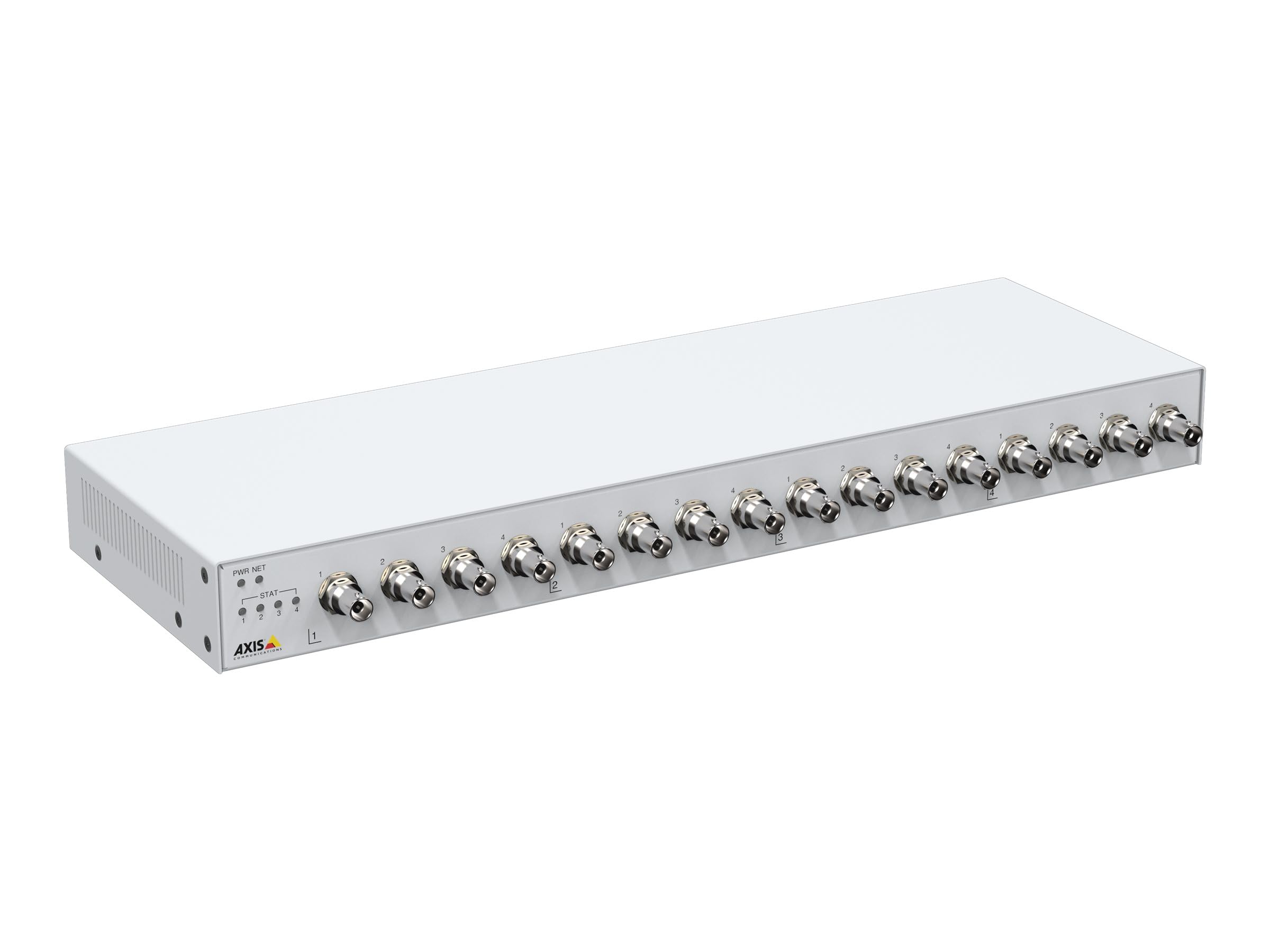
Figure 1: Front view of the Axis M7116 Encoder, showing 16 BNC video input connectors and status indicator LEDs on the left side.

Figure 2: Close-up of the front panel, highlighting the Power (PWR), Network (NET), and Status (STAT) LEDs, along with the first four BNC video input ports.
4.2 Rear Panel

Figure 3: Rear view of the Axis M7116 Encoder, showing the Ethernet port, power input, and RS-485/422 serial communication ports.
4.3 Indicators
- PWR (Power) LED: Indicates power status. Solid green for normal operation.
- NET (Network) LED: Indicates network activity. Flashing green for data transmission.
- STAT (Status) LED: Indicates device status. Refer to the online help for detailed status codes.
5. Setup
Follow these steps to set up your Axis M7116 Encoder:
- Mounting: Securely mount the encoder in a suitable location, ensuring adequate ventilation. The device is suitable for both indoor and outdoor usage, but ensure proper environmental protection if used outdoors.
- Connect Analog Cameras: Connect up to 16 analog cameras to the BNC input connectors on the front panel.
- Connect to Network: Connect an Ethernet cable (Cat 5e or higher) from the encoder's NET port to your network switch or router.
- Connect Power: Connect the power adapter to the power input on the rear panel and then plug it into a power outlet. The PWR LED should illuminate.
- Initial Configuration: Use the Axis IP Utility or a web browser to discover the device on your network and assign an IP address. Access the device's web interface for further configuration, including video settings, user management, and network parameters.
6. Operating Instructions
Once the M7116 Encoder is set up and configured, it will begin encoding video streams from the connected analog cameras. You can access and manage these streams through the device's web interface or compatible video management software.
- Accessing the Web Interface: Open a web browser and enter the IP address of the encoder. Log in with your credentials to access live views, recordings, and system settings.
- Video Streaming: The encoder provides H.264 and MJPEG video streams. Configure resolution, frame rate, and compression settings as needed for each channel.
- PTZ Control: If PTZ (Pan/Tilt/Zoom) cameras are connected via the RS-485/422 ports, you can control them through the web interface or integrated VMS.
- Event Management: Set up event triggers and actions, such as motion detection, tampering alarms, and scheduled recordings.
7. Maintenance
Regular maintenance ensures optimal performance and longevity of your Axis M7116 Encoder.
- Cleaning: Gently clean the exterior of the device with a soft, dry cloth. Do not use liquid cleaners or aerosols. Ensure ventilation openings are free from dust and debris.
- Firmware Updates: Periodically check the Axis Communications website for firmware updates. Keeping the firmware up-to-date ensures access to the latest features, security patches, and performance improvements.
- System Monitoring: Regularly check system logs and status indicators for any anomalies.
8. Troubleshooting
This section addresses common issues you might encounter with the M7116 Encoder.
| Problem | Possible Cause | Solution |
|---|---|---|
| No power (PWR LED off) | Power adapter not connected or faulty; power outlet issue. | Check power cable connections. Test power outlet. Replace power adapter if necessary. |
| No network connection (NET LED off/no activity) | Ethernet cable disconnected or faulty; network configuration issue. | Verify Ethernet cable connection. Check network switch/router status. Confirm IP address settings. |
| No video from a camera channel | Analog camera not connected or faulty; BNC cable issue; encoder channel misconfigured. | Check camera power and functionality. Inspect BNC cable. Verify channel settings in the web interface. |
| Cannot access web interface | Incorrect IP address; network connectivity issue; firewall blocking access. | Ensure correct IP address. Check network connection. Temporarily disable firewall for testing. |
9. Specifications
Key technical specifications for the Axis Communications M7116 Encoder (Model 02036-003):
- Brand: Axis Communications
- Model Number: 02036-003
- Product Dimensions: 19.69 x 19.69 x 11.02 inches
- Item Weight: 4.4 pounds
- Connector Type: Ethernet, BNC
- Cable Type: Ethernet (Cat 5e recommended)
- Compatible Devices: Analog cameras, Network Video Recorders (NVRs), Video Management Systems (VMS)
- Special Feature: Tangle Free (referring to internal cabling/design)
- Recommended Uses: Connecting electronic devices, specifically for integrating analog video into IP networks
- Connector Gender: Male-to-Female (for specific cable types)
- Number of Pins: 8 (for Ethernet)
- Unit Count: 1.0 Count
- Specification Met: RoHS
- Indoor/Outdoor Usage: Indoor, Outdoor (with appropriate environmental protection)
- Number of Items: 1
- Manufacturer: AXIS - ENCODER/DECODER
- First Available Date: October 22, 2021
10. Warranty and Support
The Axis Communications M7116 Encoder comes with a 2-year warranty from the date of purchase, covering defects in materials and workmanship under normal use. For warranty claims or technical support, please contact Axis Communications customer service or visit their official website for support resources, FAQs, and contact information.
For the most up-to-date support information, please visit: www.axis.com/support


