
1. Product Overview
The GoolRC Flysky Paladin EV is an advanced 2.4GHz 18-channel RC transmitter designed for precise control of various remote-controlled models. It features 5D Hall sensor gimbals, a 3.5-inch TFT touching screen, and utilizes the AFHDS 3 protocol for reliable communication. This transmitter is suitable for a wide range of models, including engineering vehicles (excavators, bulldozers, loaders, dump trucks), truck models, military vehicles (tanks, armored vehicles), special vehicles (fire trucks, tugboats), and robot models.
Key Features:
- Precise Control: Equipped with metal Hall multi-dimensional joysticks for smooth and delicate control.
- Versatile Application: Compatible with a broad spectrum of RC models.
- Integrated Power: Features a built-in 4300mAh battery supporting both USB and wireless charging.
- Intuitive Interface: A 3.5-inch full-color touching screen with a graphical user interface (UI) and support for Chinese and English languages.
- Feedback System: Includes real voice speech and vibration prompts via a built-in speaker.

Figure 1: Front view of the GoolRC Flysky Paladin EV RC Transmitter, showing the screen, joysticks, and control buttons.

Figure 2: Angled view of the transmitter highlighting key features such as metal Hall joysticks, dual metal toggles, 18CH remote control mode, mechanical model exclusive structure, track mixed control, and full-color touch screen.
2. Setup and Initial Use
2.1 Package Contents
Before proceeding, verify that all items are present in the package:
- 1x GoolRC Flysky Paladin EV Transmitter with 301 High Frequency Module
- 1x High Frequency Fixing Plate
- 1x Thin Hand Glue
- 1x Receiver
- 1x USB Cable
- Some Stickers
- 1x Quick Operation Guide
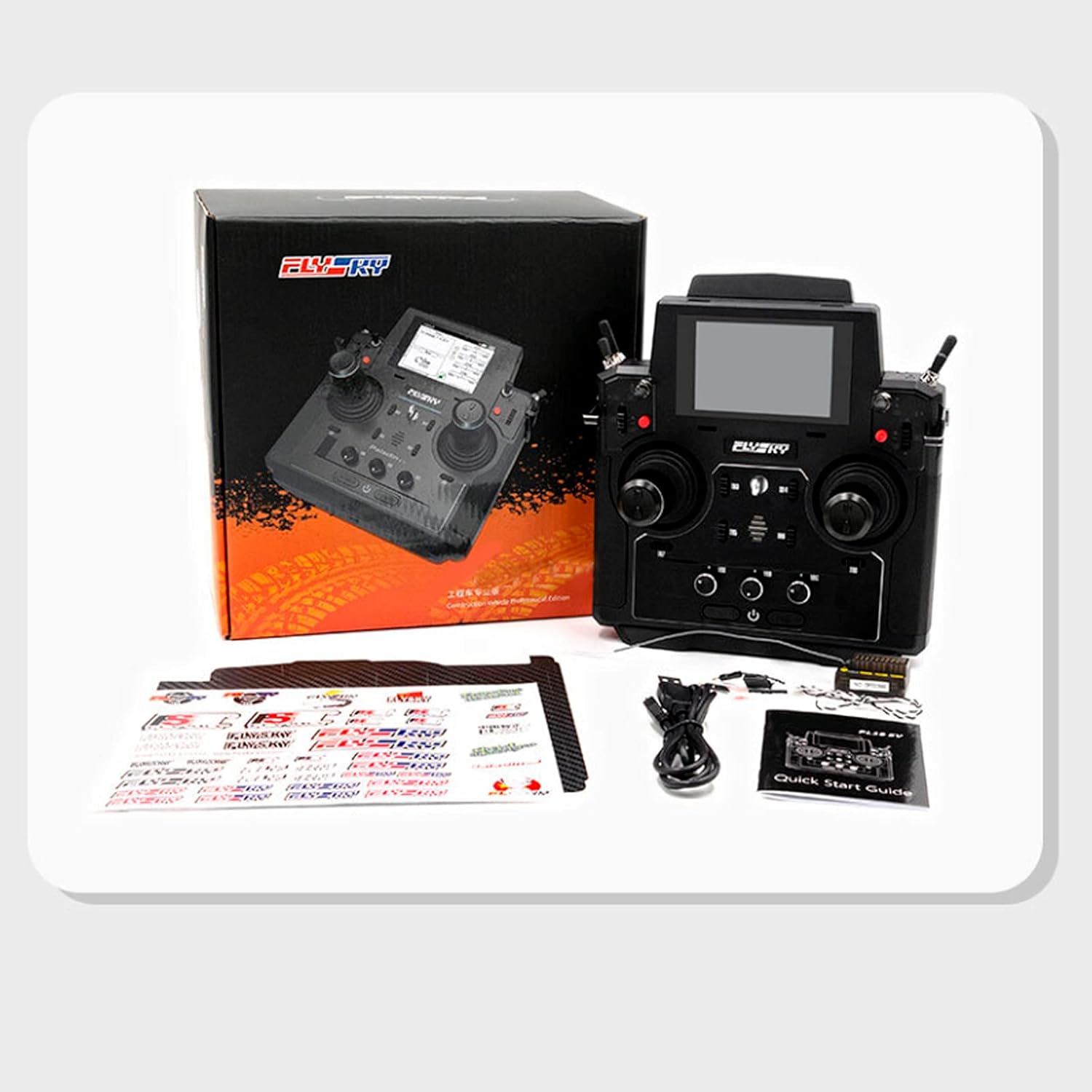
Figure 3: Contents of the GoolRC Flysky Paladin EV package, including the transmitter, receiver, USB cable, and quick start guide.
2.2 Charging the Transmitter
The Paladin EV transmitter has a built-in 1S (3.7V) 4300mAh battery. It supports two charging methods:
- USB Charging: Connect the included USB cable to the transmitter's charging interface and a 5V/2A USB power adapter. Charging time is approximately 6 hours.
- Wireless Charging: Place the transmitter on a compatible wireless charging pad. Charging time is approximately 7 hours with a 5V/2A wireless charger.
A low voltage warning will activate when the battery drops below 3.65V. Ensure the transmitter is fully charged before extended use.
2.3 Binding the Receiver
To establish communication between the transmitter and your model, the receiver must be bound to the transmitter. Refer to the included Quick Operation Guide for specific binding instructions for your receiver model. Generally, this involves:
- Powering on the receiver in binding mode (often by holding a bind button while powering on).
- Activating the binding function on the transmitter via its menu.
- Confirming successful binding, usually indicated by a solid LED on the receiver.
3. Operating Instructions
3.1 Powering On/Off
To power on the transmitter, press and hold the power button located at the bottom center until the screen illuminates. To power off, press and hold the power button again until the shutdown sequence completes.
3.2 Navigating the Touch Screen Interface
The Paladin EV features a 3.5-inch HVGA TFT touch screen (320*480 resolution) with a graphical user interface (UI). The new Flysky OS provides comprehensive functions accessible through touch input. The interface supports both Chinese and English languages, which can be selected in the system settings.

Figure 4: The transmitter's touch screen displaying control settings and channel outputs.
3.3 Control Functions
The transmitter offers 18 channels and a variety of physical controls for versatile operation:
- Hall Sensor Gimbals: The metal Hall multi-dimensional joysticks provide precise and responsive control.
- Multi-type Switches: Includes 2-position and 3-position switches, some with self-return functionality, and custom switch combinations.
- Track Mixed Control: This function allows for synchronized and independent speed control of different movements, particularly useful for models like tanks, track excavators, and track loaders.
- Exclusive Mechanical Model Structure: Designed with specific functions for mechanical models, such as "rotating platform," "hydraulic pump," "large and small arm," "Digger," and "sound group." Nine auxiliary functions can be set up for different models.

Figure 5: Detailed diagram illustrating the various control features and their functions on the Paladin EV transmitter.
3.4 Voice and Vibration Prompts
The built-in speaker provides real voice prompts, and the transmitter also offers vibration feedback to alert the user to various statuses or warnings.
4. Maintenance
4.1 Battery Care
To maximize battery life and ensure safe operation:
- Avoid fully discharging the battery. Recharge when the low voltage warning is triggered.
- Do not expose the transmitter to extreme temperatures.
- If storing for an extended period, charge the battery to approximately 50-60% capacity.
4.2 Cleaning and Storage
Keep the transmitter clean and free from dust and debris. Use a soft, dry cloth for cleaning. Avoid using harsh chemicals or solvents. Store the transmitter in a cool, dry place away from direct sunlight and moisture.
5. Troubleshooting
This section addresses common issues you might encounter with your Paladin EV transmitter.
5.1 No Power
- Ensure the battery is sufficiently charged. Connect the transmitter to a power source using the USB cable or wireless charger.
- Verify that the power button is pressed and held for the required duration to turn on the device.
5.2 No Connection to Receiver
- Confirm that the receiver is powered on and correctly installed in your model.
- Re-attempt the binding process as described in Section 2.3.
- Ensure the transmitter and receiver are within operational range and free from significant interference.
5.3 Screen Not Responding
- Gently clean the screen with a soft, lint-free cloth to remove any dirt or smudges.
- Restart the transmitter by powering it off and then on again.
- If the issue persists, contact customer support.
6. Technical Specifications
| Feature | Specification |
|---|---|
| Channels | 18 |
| Adaptable Receivers | All AFHDS 3 Receivers |
| Model Type | Engineering Vehicles, Simulation Ship, etc. |
| Radio Frequency | 2.4GHz |
| Radio Frequency Power | <20dBm |
| 2.4GHz Protocol | AFHDS 3 |
| Channel Resolution | 4096 |
| Battery | 1S (3.7V) 4300mAh (built-in) |
| Charging Interface | USB/Wireless Charging |
| Charging Time | 6h@5V*2A (USB) / 7h@5V*2A (Wireless) |
| Life Time | >5.5h (Standard Accessories) |
| Low Voltage Warning | <3.65V |
| Antenna Type | Dual Antenna |
| Display | HVGA 3.5 TFT, 320*480 |
| Language | Chinese and English |
| Simulator | USB Simulator |
| Data Interface | USB, Non-standard Interface(USART), PHJACK(PPM) |
| Temperature Range | -10℃—+60℃ |
| Humidity Range | 20%-95% |
| Online Update | Yes |
| Color | Black |
| Dimensions (L*W*H) | 120mm*195mm*213 mm |
| Weight | 1012g |

Figure 6: Dimensions of the GoolRC Flysky Paladin EV transmitter.
7. Warranty and Support
For warranty information, technical support, or service inquiries, please refer to the contact details provided in your Quick Operation Guide or visit the official GoolRC website. Keep your purchase receipt as proof of purchase for any warranty claims.