
Introduction
Thank you for choosing the SOMIC MS300 Over-Ear Wireless Bluetooth Headphones. This manual provides essential information for setting up, operating, and maintaining your headphones to ensure optimal performance and longevity. Please read this manual thoroughly before using the product.
Package Contents
- SOMIC MS300 Over-Ear Wireless Bluetooth Headphones
- USB Charging Cable
- 3.5mm Audio Cable
- User Manual (this document)
Product Overview
Familiarize yourself with the various components and controls of your SOMIC MS300 headphones.
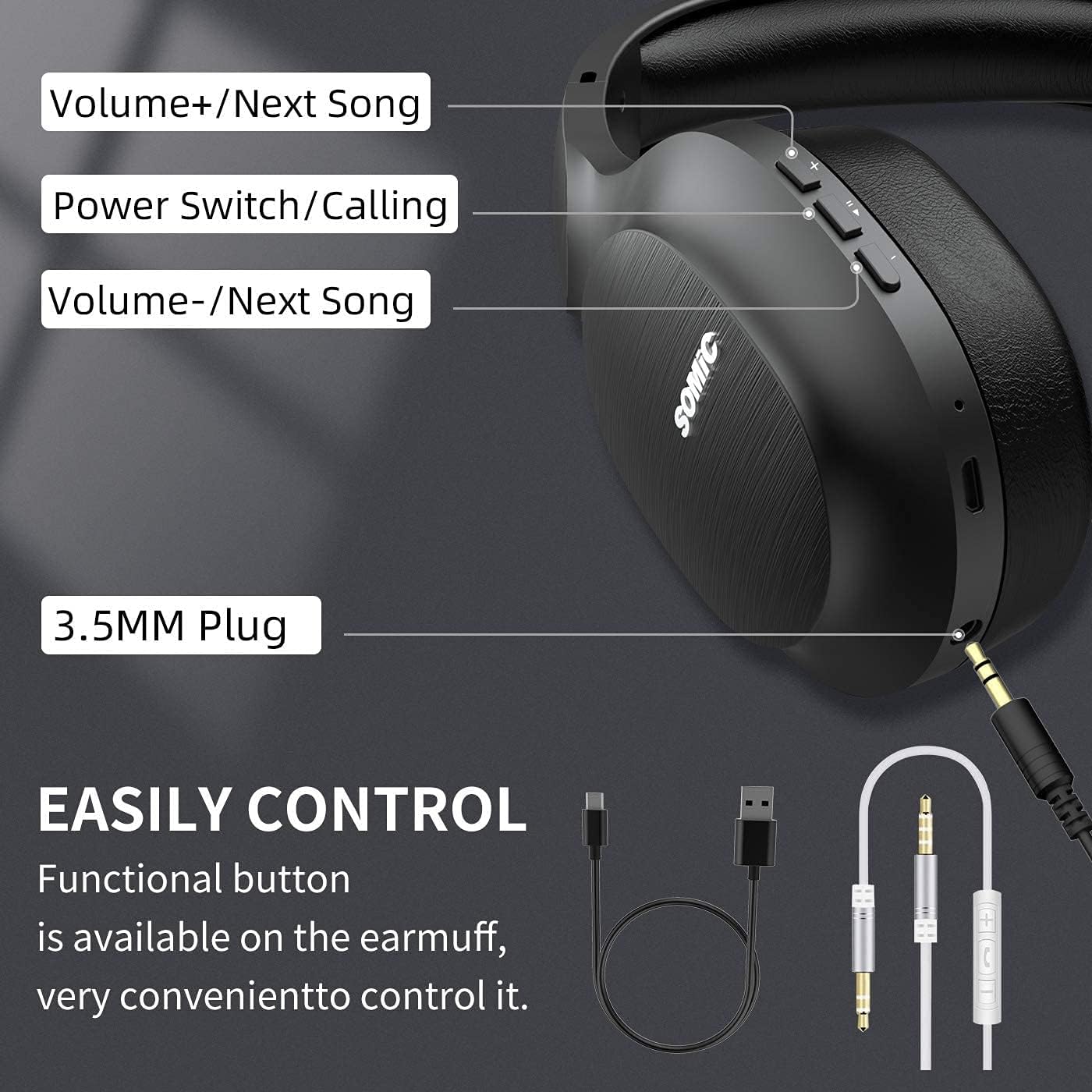
Image: Overview of the SOMIC MS300 headphone controls, including volume buttons, power switch, and 3.5mm audio jack.
Controls and Ports
- Volume + / Next Song: Press briefly to increase volume, press and hold to skip to the next song.
- Power Switch / Calling: Press and hold to power on/off. Briefly press to play/pause music. During a call, press to answer/end a call.
- Volume - / Previous Song: Press briefly to decrease volume, press and hold to go to the previous song.
- 3.5mm Audio Jack: For wired connection using the included 3.5mm audio cable.
- USB Charging Port: For charging the headphones using the included USB cable.
- Microphone: Built-in for hands-free calling.
Setup
Charging the Headphones

Image: The SOMIC MS300 headphones illustrating the fast charging capability: 5 minutes of charge provides 2 hours of playback.
- Connect the small end of the USB charging cable to the USB charging port on the headphones.
- Connect the larger end of the USB charging cable to a USB power adapter (not included) or a computer's USB port.
- The LED indicator will show charging status (e.g., red for charging, blue for fully charged).
- A full charge takes approximately 2-3 hours. For quick use, a 5-minute charge provides up to 2 hours of playtime.

Image: The SOMIC MS300 headphones highlighting their strong endurance with up to 72 hours of playtime on a single charge.
Powering On/Off
- To Power On: Press and hold the Power Switch button for approximately 3 seconds until the LED indicator flashes blue.
- To Power Off: Press and hold the Power Switch button for approximately 3 seconds until the LED indicator turns off.
Bluetooth Pairing
- Ensure the headphones are powered off.
- Press and hold the Power Switch button for about 5-7 seconds until the LED indicator flashes red and blue alternately, indicating pairing mode.
- On your device (smartphone, tablet, computer), enable Bluetooth and search for available devices.
- Select "SOMIC MS300" from the list of devices.
- Once connected, the LED indicator will flash blue slowly.
Wired Connection (3.5mm Audio Cable)

Image: The SOMIC MS300 headphones demonstrating their versatility with both wireless Bluetooth connectivity and a wired option via a 3.5mm audio cable.
The SOMIC MS300 headphones can also be used with a wired connection, even if the battery is depleted.
- Connect one end of the 3.5mm audio cable to the 3.5mm audio jack on the headphones.
- Connect the other end of the 3.5mm audio cable to the audio output port of your device.
- The headphones will automatically switch to wired mode. Bluetooth functionality will be disabled.
Operating Instructions
Music Playback
- Play/Pause: Briefly press the Power Switch button.
- Volume Up: Briefly press the Volume + button.
- Volume Down: Briefly press the Volume - button.
- Next Track: Press and hold the Volume + button.
- Previous Track: Press and hold the Volume - button.
Phone Calls
- Answer/End Call: Briefly press the Power Switch button.
- Reject Call: Press and hold the Power Switch button for 2 seconds.
- Redial Last Number: Double-press the Power Switch button.
Dual Device Connection
The SOMIC MS300 headphones support connecting to two Bluetooth devices simultaneously.
- Connect the headphones to the first device as described in the "Bluetooth Pairing" section.
- Disable Bluetooth on the first device. The headphones will re-enter pairing mode.
- Connect the headphones to the second device.
- Re-enable Bluetooth on the first device. The headphones should automatically reconnect to both devices.
- Audio will play from the device that is actively playing media or receiving a call.
Noise Cancellation (CVC 8.0)

Image: A person wearing SOMIC MS300 headphones in a public setting, demonstrating the effectiveness of CVC Noise Cancelling Technology in reducing ambient noise.
The SOMIC MS300 headphones feature CVC 8.0 noise cancelling technology, which helps reduce ambient noise during calls for clearer communication. This feature is automatically active when using the built-in microphone.
Maintenance
Cleaning
- Wipe the headphones with a soft, dry, lint-free cloth.
- Do not use abrasive cleaners, solvents, or spray cleaners.
- Avoid getting moisture into any openings.
Storage
- Store the headphones in a cool, dry place away from extreme temperatures and direct sunlight.
- When not in use for extended periods, charge the headphones at least once every three months to preserve battery life.
Battery Care
- Do not attempt to replace the battery yourself. Contact customer support for battery-related issues.
- Avoid fully discharging the battery frequently, as this can reduce its overall lifespan.
Troubleshooting
| Problem | Possible Solution |
|---|---|
| Headphones do not power on. | Ensure the headphones are charged. Connect to a power source using the USB cable. |
| Cannot pair with a device. | Ensure headphones are in pairing mode (LED flashing red and blue). Turn off and on Bluetooth on your device. Move headphones closer to the device. |
| No sound or low volume. | Check volume levels on both headphones and the connected device. Ensure headphones are properly paired or the 3.5mm cable is fully inserted. |
| Sound quality is poor. | Move closer to the connected device to avoid interference. Ensure there are no obstacles between the headphones and the device. |
| Microphone not working. | Ensure the headphones are connected via Bluetooth. Check microphone settings on your device. |
Specifications

Image: An exploded view of the 40mm dynamic driver and the Qualcomm QCC Bluetooth 5.0 chip, highlighting the audio technology within the SOMIC MS300 headphones.
| Feature | Detail |
|---|---|
| Model | MS300 |
| Brand | SOMIC |
| Connectivity | Wireless (Bluetooth 5.0), Wired (3.5mm Audio Jack) |
| Bluetooth Chip | Qualcomm QCC Bluetooth 5.0 |
| Driver Size | 40mm Dynamic Drivers |
| Noise Control | CVC 8.0 Noise Cancellation |
| Battery Capacity | 1000mAh |
| Playtime | Up to 72 hours |
| Fast Charging | 5 minutes charge for 2 hours playtime |
| Earpads Material | Memory Foam Protein |
| Weight | 208g |
| Color | Black |
| Water Resistance | Not Water Resistant |
Warranty and Support
Warranty Information
SOMIC products are designed and manufactured to the highest quality standards. This product is covered by a limited warranty from the date of purchase. Please refer to the warranty card included in your package for specific terms and conditions. Keep your proof of purchase for warranty claims.
Customer Support
If you encounter any issues or have questions regarding your SOMIC MS300 headphones, please contact our customer support team. Contact details can typically be found on the warranty card or the official SOMIC website. Please have your model number (MS300) and purchase information ready when contacting support.


