
1. Introduction
Thank you for choosing ZOHAN Hearing Protection Headphones. This manual provides detailed instructions for the safe and effective use of your ZOHAN 033 and EM037 models. These headphones are designed to protect your hearing while allowing you to enjoy audio content via Bluetooth or AM/FM radio.
1.1 Safety Information
Your ZOHAN headphones provide a Noise Reduction Rating (NRR) of 25dB, which helps protect your hearing in noisy environments. Always ensure the earmuffs fit snugly to achieve optimal noise reduction. Improper fit will reduce effectiveness.

Figure 1.1: Illustration of noise reduction effectiveness (NRR 25dB) in various environments such as cutting, mowing, construction sites, and vacuum cleaning.

Figure 1.2: Examples of suitable environments for ZOHAN hearing protection, including woodworking, studying, and operating machinery like tractors.
2. Product Overview
The ZOHAN 033 and EM037 models offer robust hearing protection with integrated audio features. While sharing core functionalities, they have distinct characteristics.
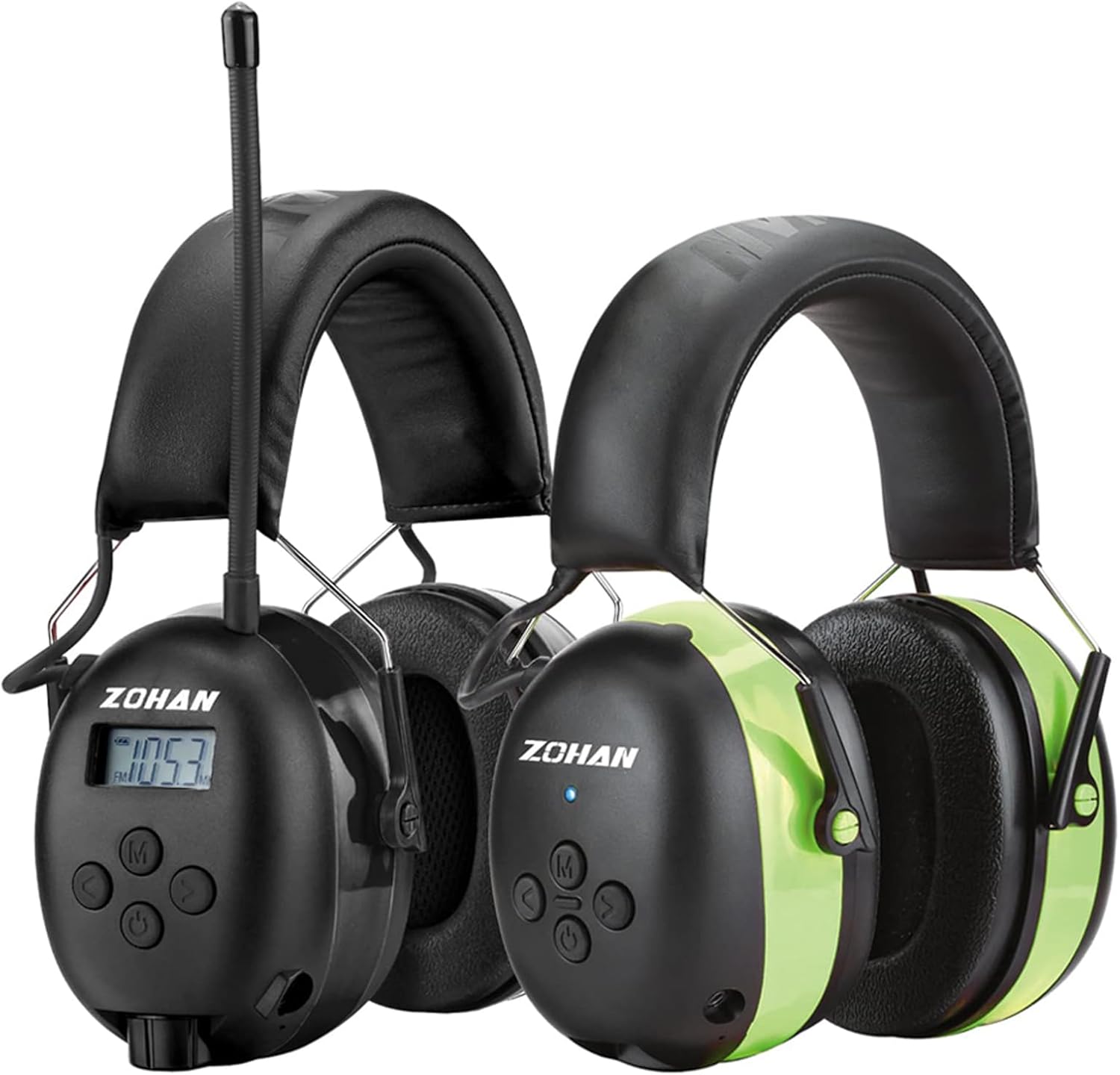
Figure 2.1: ZOHAN 033 (left) and EM037 (right) Hearing Protection Headphones.
2.1 ZOHAN 033 Features and Components

Figure 2.2: Key components and features of the ZOHAN 033 model.
- Bluetooth 5.0 Technology: For stable wireless connection.
- AM/FM Radio: Digital tuning with LCD display, stores up to 10 AM and 10 FM stations.
- Built-in Microphone: For hands-free calls.
- Rechargeable Battery: 2000mAh, up to 48 hours playtime in Bluetooth mode, 40+ hours in wired/FM/AM mode.
- Adjustable Headband: Ultra-padded for comfort.
- 3-Layer Ear Cup & Replaceable Foam Ear Cushions: Enhance noise reduction and comfort.
- Reinforced Volume Control: Durable and easy to operate.
- Strengthened Antenna: For improved radio reception.
2.2 ZOHAN EM037 Features and Components

Figure 2.3: Key components and features of the ZOHAN EM037 model.
- Bluetooth 5.0 Technology: For stable wireless connection with a range up to 80ft.
- Built-in Microphone: For hands-free calls.
- Rechargeable Battery: 1500mAh, up to 40 hours playtime in Bluetooth mode.
- Adjustable Steelband & Extra-Thick Headband: Designed for comfort and durability.
- 3-Layer Ear Cup & Replaceable Foam Ear Pads: Enhanced noise reduction and easy maintenance.
- LED Indicator Light: Alerts for Bluetooth connection and power status.
- 3.5mm Audio Input Jack: For wired audio connection.

Figure 2.4: Overview of ZOHAN EM037 key advantages.
3. Setup
3.1 Charging the Battery
Before first use, fully charge your headphones. Both models feature a built-in rechargeable lithium battery.
- Connect the charging cable (typically USB-C for 033, micro-USB for EM037, refer to your specific model's port) to the charging port on the earmuff.
- Connect the other end of the cable to a USB power source (e.g., computer, wall adapter).
- The LED indicator (on EM037) or LCD display (on 033) will show charging status.
- A full charge typically takes approximately 4 hours.
- Once fully charged, disconnect the cable.
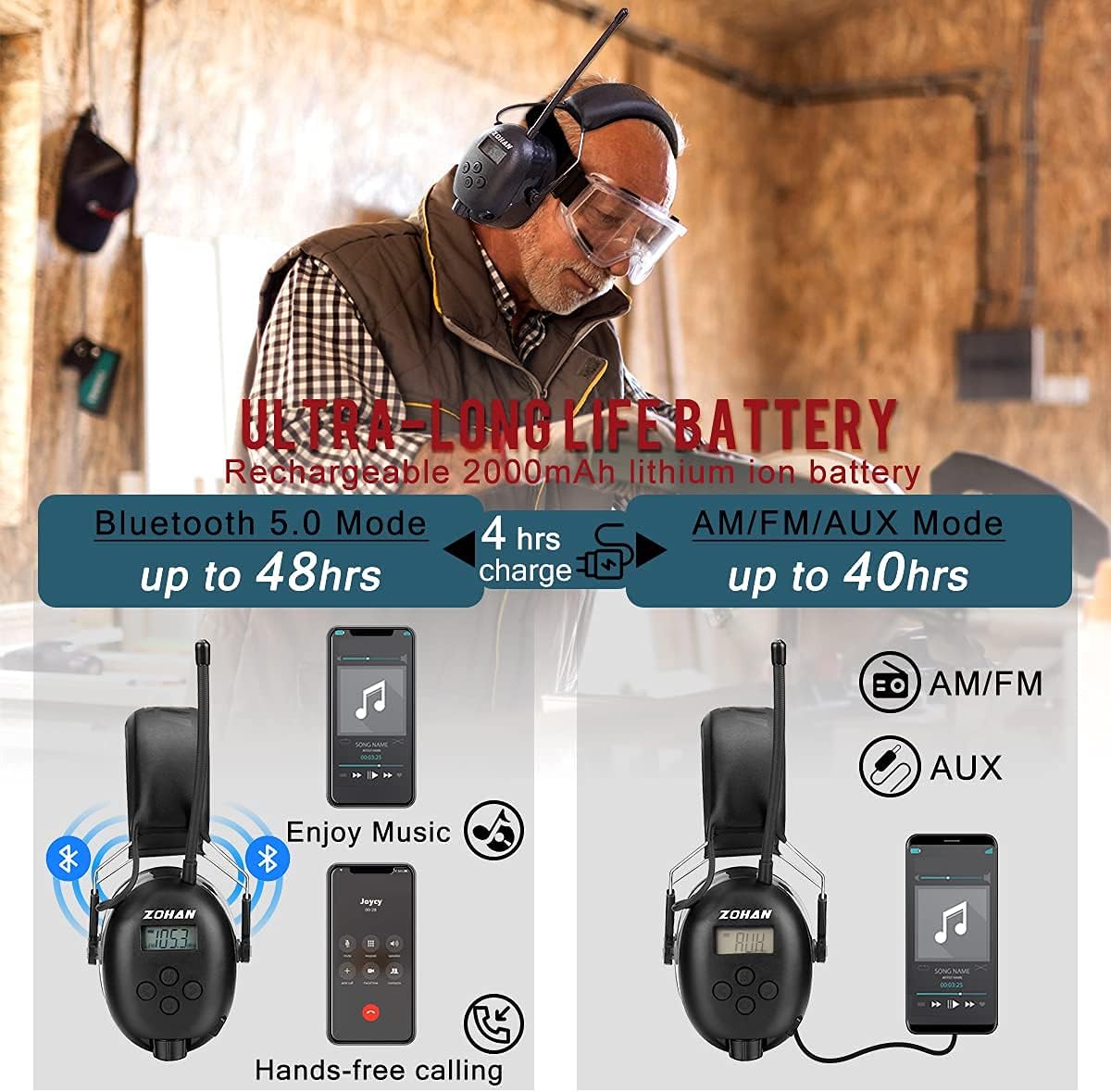
Figure 3.1: Battery life and charging details for ZOHAN 033.
3.2 Bluetooth Pairing
- Ensure the headphones are powered off.
- Press and hold the Power/Bluetooth button until the LED indicator (EM037) flashes blue and red, or the LCD (033) shows "PAIRING" (or similar). This indicates pairing mode.
- On your mobile device, enable Bluetooth and search for available devices.
- Select "ZOHAN 033" or "ZOHAN EM037" from the list.
- Once connected, the LED indicator will typically show a solid blue light (EM037) or the LCD will confirm connection (033).

Figure 3.2: Bluetooth connectivity and hands-free features in use.
4. Operating Instructions
4.1 Power On/Off
- Power On: Press and hold the Power button (often combined with the Bluetooth button) for a few seconds.
- Power Off: Press and hold the Power button again for a few seconds until the indicators turn off.
4.2 Bluetooth Audio Playback
- Once paired, audio from your connected device will play through the headphones.
- Use the volume buttons on the headphones to adjust the listening level.
- Use the multi-function button (often marked with a phone icon or 'M') to Play/Pause music.
- For track skipping, refer to your specific model's button layout (e.g., short press volume buttons for track skip on some models).
4.3 AM/FM Radio Operation (ZOHAN 033 only)
- Switch to Radio Mode: Press the Mode button (M) to cycle through modes until the LCD displays the radio frequency.
- Auto Scan: Press and hold the Scan button (often combined with a play/pause button) to automatically scan and save available stations.
- Manual Tuning: Use the tuning buttons (often +/- or arrow buttons) to manually adjust the frequency.
- Preset Stations: Use the preset buttons (e.g., M1-M10 or arrow buttons after scanning) to select saved stations.
- Volume Control: Use the dedicated volume knob or buttons.
4.4 Hands-Free Calling
- Answer/End Call: Press the multi-function button (phone icon or 'M') once.
- Reject Call: Press and hold the multi-function button for 2 seconds.
- Redial Last Number: Double-press the multi-function button.
- The built-in microphone allows for clear communication.
4.5 Wired Audio Connection (ZOHAN EM037 only)
- Connect a 3.5mm audio cable (not always included) from your audio source to the 3.5mm audio input jack on the EM037 headphones.
- This allows for audio playback even when the battery is low or if Bluetooth is not desired.
5. Maintenance
5.1 Cleaning
- Wipe the exterior of the earmuffs with a soft, damp cloth.
- Do not use abrasive cleaners or immerse the headphones in water.
- Ensure all ports are dry before charging.
5.2 Ear Cushion Replacement
For optimal hygiene and noise reduction performance, ear cushions should be replaced periodically, especially if they show signs of wear or damage.
- Gently pull off the old ear cushion from the ear cup. They are designed for snap-in replacement.
- Align the new ear cushion with the ear cup and press firmly around the edges until it snaps securely into place.
- Ensure a tight seal for effective hearing protection.
6. Troubleshooting
| Problem | Possible Cause | Solution |
|---|---|---|
| No power | Battery is depleted. | Charge the headphones fully. |
| Cannot pair Bluetooth | Headphones not in pairing mode; device Bluetooth off; too far from device. | Ensure headphones are in pairing mode (flashing LED/LCD). Turn on device Bluetooth. Move closer to device. Forget device on phone and re-pair. |
| Poor radio reception (033) | Weak signal; antenna not extended. | Extend the antenna fully. Move to an area with better signal. Try auto-scanning again. |
| No sound | Volume too low; incorrect mode; device not playing audio. | Increase volume on headphones and connected device. Ensure correct mode (Bluetooth/AM/FM). Check if audio is playing on the source device. |
| Uncomfortable fit | Headband not adjusted correctly; ear cushions worn. | Adjust the headband for a snug but comfortable fit. Consider replacing ear cushions if they are old or damaged. |
7. Specifications
7.1 General Specifications (Both Models)
- Noise Reduction Rating (NRR): 25dB
- Bluetooth Version: 5.0
- Bluetooth Range: Up to 80ft (EM037), standard range for 033.
- Ear Cup Design: 3-Layer for enhanced noise reduction.
- Ear Cushions: Replaceable foam.
7.2 ZOHAN 033 Specifics
- Battery: 2000mAh rechargeable lithium-ion.
- Playtime: Up to 48 hours (Bluetooth), 40+ hours (AM/FM/Wired).
- Charging Time: Approx. 4 hours.
- Radio: AM/FM with digital tuning and LCD display.
- Radio Presets: 10 AM, 10 FM.
7.3 ZOHAN EM037 Specifics
- Battery: 1500mAh rechargeable lithium-ion.
- Playtime: Up to 40 hours (Bluetooth).
- Charging Time: Approx. 4 hours.
- Audio Input: 3.5mm AUX jack.
8. Warranty and Support
ZOHAN products are manufactured to high-quality standards. For warranty information, technical support, or customer service inquiries, please refer to the warranty card included with your product or visit the official ZOHAN website.
Website: www.zohanelectronics.com (Example link, please verify actual ZOHAN support website)