
1. Introduction
Thank you for choosing the Hama Digital Radio DR7 USB. This manual provides essential information for the safe and efficient operation of your new radio. Please read it thoroughly before use and keep it for future reference. This portable radio supports DAB/DAB+ digital radio and conventional FM reception, offering clear sound quality and portability.
2. Safety Instructions
- Protect the product from dirt, moisture, and overheating. Use it only in dry environments.
- Do not drop the product or expose it to severe shocks.
- Do not open the product or continue to operate it if it becomes damaged.
- Do not attempt to service or repair the product yourself. Leave any service work to qualified experts.
- Keep this product, as all electrical products, out of the reach of children.
- Dispose of packaging material immediately according to locally applicable regulations.
- Batteries must be inserted with the correct polarity.
- Remove batteries from the product if it is not to be used for an extended period.
3. Package Contents
- Hama Digital Radio DR7 USB
- 4 x AA batteries
- Instruction manual
4. Setup
4.1 Power Supply
The Hama Digital Radio DR7 USB can be powered by either batteries or an external USB power source.
4.1.1 Battery Installation
To use the radio with batteries, open the battery compartment cover located on the back of the device. Insert 4 AA alkaline batteries, ensuring correct polarity (+/-). Close the battery compartment cover securely.

Image: Back view of the radio with the battery compartment open, showing battery insertion.
4.1.2 External Power Connection
For continuous operation, connect the radio to a USB power source using a compatible USB 2.0 cable. The DC IN port requires 5.0V-0.5A. The USB port is located on the back of the radio.
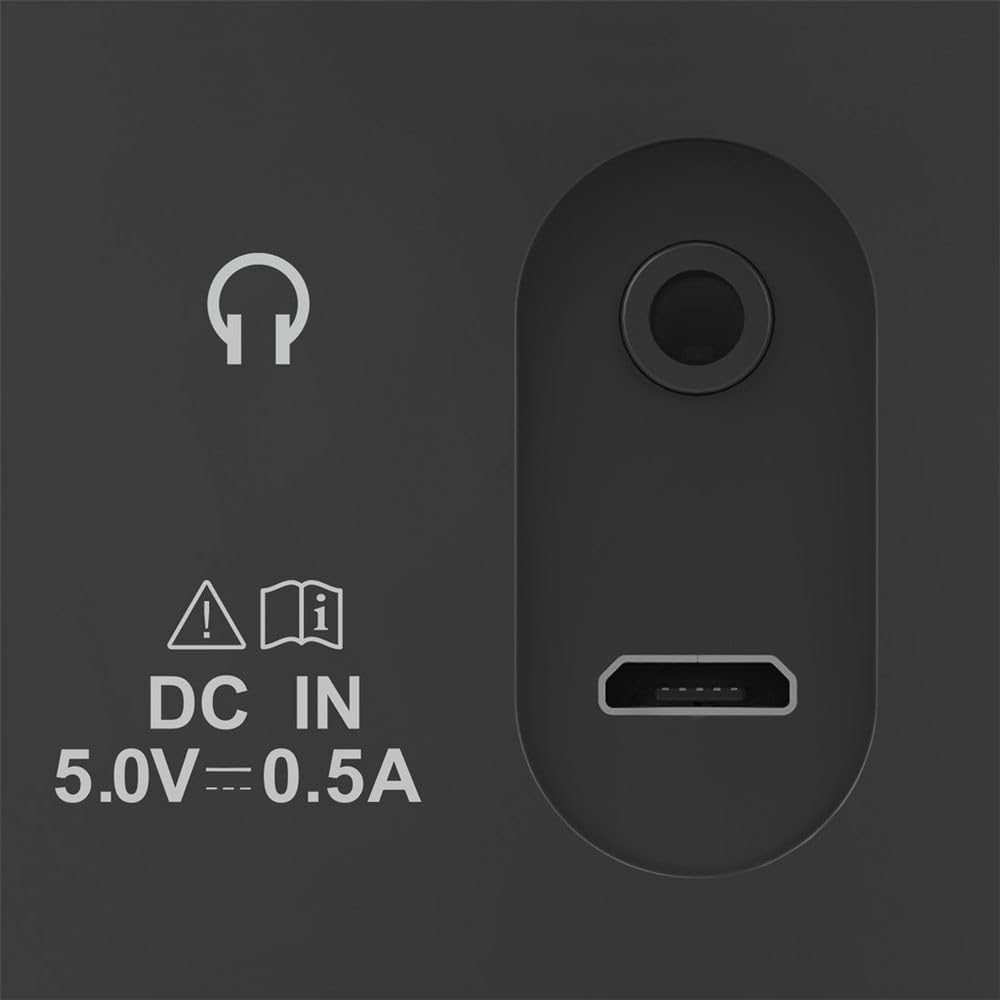
Image: Close-up of the radio's rear ports, including DC IN and USB.
4.2 Antenna
Extend the telescopic antenna fully for optimal radio reception. Adjust its position to improve signal strength if needed.

Image: Back view of the radio with the antenna extended.
5. Operating Instructions
5.1 Turning On/Off
Press the Power button (usually marked with a circle and a vertical line) to turn the radio on or off.
5.2 Mode Selection (DAB/DAB+ and FM)
Use the Mode or Source button to switch between DAB/DAB+ digital radio and FM radio modes.
5.3 Station Tuning
5.3.1 Automatic Scan (DAB/DAB+)
In DAB/DAB+ mode, press the Scan button to automatically search for available digital radio stations. The radio will store all found stations.
5.3.2 Manual Tuning (FM)
In FM mode, use the Tune +/- buttons or the rotary knob (if available) to manually adjust the frequency. Press and hold the Tune +/- buttons for automatic station seeking.

Image: Front view of the radio, highlighting the display and controls.
5.4 Preset Stations
The radio features two direct selection buttons and allows for storing up to 10 preset stations.
- To Save: Tune to the desired station. Press and hold a preset button (e.g., 1 or 2) or the Preset button until the display confirms the station is saved.
- To Recall: Briefly press the corresponding preset button to quickly switch to a saved station.
5.5 Volume Control
Adjust the volume using the Volume rotary knob or dedicated volume buttons.
5.6 Alarm Clock Function
The radio includes an alarm clock feature. Refer to the detailed instructions in the printed manual for setting and managing alarms.
5.7 Headphone Use
Connect standard 3.5mm headphones to the headphone jack on the back of the radio for private listening. The internal speaker will mute automatically.
6. Maintenance
- Clean this product only with a slightly damp, lint-free cloth and do not use aggressive cleaning agents.
- Ensure no water gets into the product.
- When replacing batteries, always replace all batteries at once.
- Store the radio in a cool, dry place when not in use for extended periods.
7. Troubleshooting
| Problem | Possible Cause | Solution |
|---|---|---|
| No power | Batteries are depleted or incorrectly inserted; power cable is disconnected. | Replace batteries, check polarity; ensure power cable is securely connected. |
| Poor or no reception | Antenna not extended; weak signal; interference. | Fully extend and adjust the telescopic antenna; try moving the radio to a different location; perform a new station scan. |
| No sound | Volume too low; headphones connected. | Increase volume; disconnect headphones if you want to use the speaker. |
8. Specifications
- Model: 00054242
- Dimensions (L x W x H): 16.5 x 5.5 x 10.5 cm
- Weight: 448.54 g
- Tuner Technology: DAB, DAB+, FM
- Frequency (FM): 87.5 MHz
- Power Source: 4 x AA Alkaline Batteries, USB 2.0 (DC IN 5.0V-0.5A)
- Material: Plastic
- Special Features: Alarm clock, 2 direct selection buttons, 10 preset stations
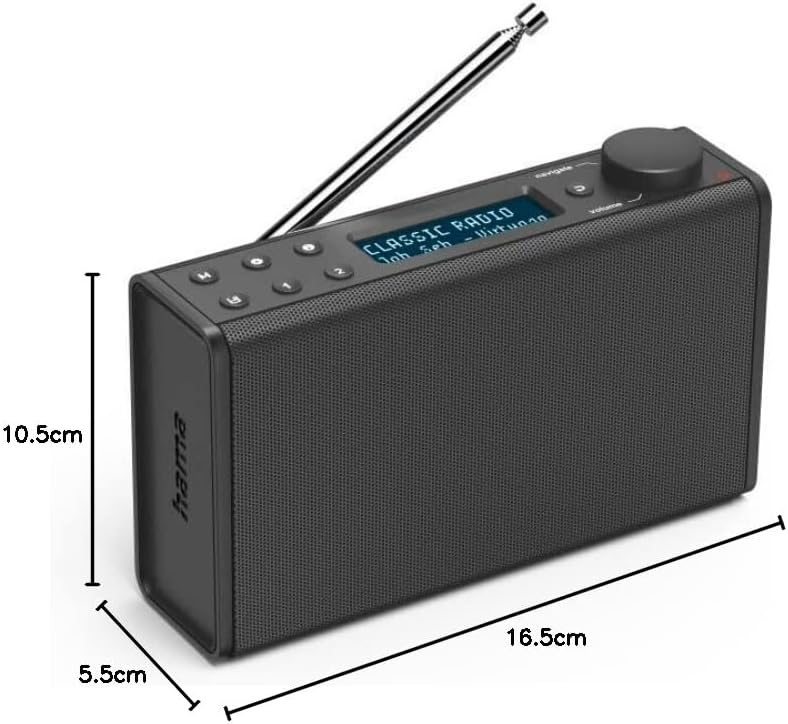
Image: Dimensions of the Hama Digital Radio DR7 USB.
9. Warranty and Support
Hama GmbH & Co KG assumes no liability and provides no warranty for damage resulting from improper installation/mounting, improper use of the product, or from failure to observe the operating instructions and/or safety notes. For further support, please visit the official Hama website or contact their customer service.


