
Techly IDATA TV-DT2-RC
Techly 363739 Universal Replacement Remote Control User Manual
Model: IDATA TV-DT2-RC
Introduction
This manual provides instructions for the setup, operation, and maintenance of your Techly IDATA TV-DT2-RC Universal Replacement Remote Control. This 2-in-1 universal remote is designed for easy configuration and features self-learning capabilities. It is a suitable replacement for Techly digital terrestrial receivers, including models IDATA TV-DT2PLB, IDATA TV-DT2SCA, and IDATA TV-DT2MB. The remote utilizes rapid code localization techniques to copy codes and functions from original IR remote controls, offering a permanent memory solution for multiple devices.
Product Overview
The Techly IDATA TV-DT2-RC is a versatile remote control compatible with various infrared devices such as TVs, SAT receivers, and DVD players. It is powered by 2 AAA batteries (included).
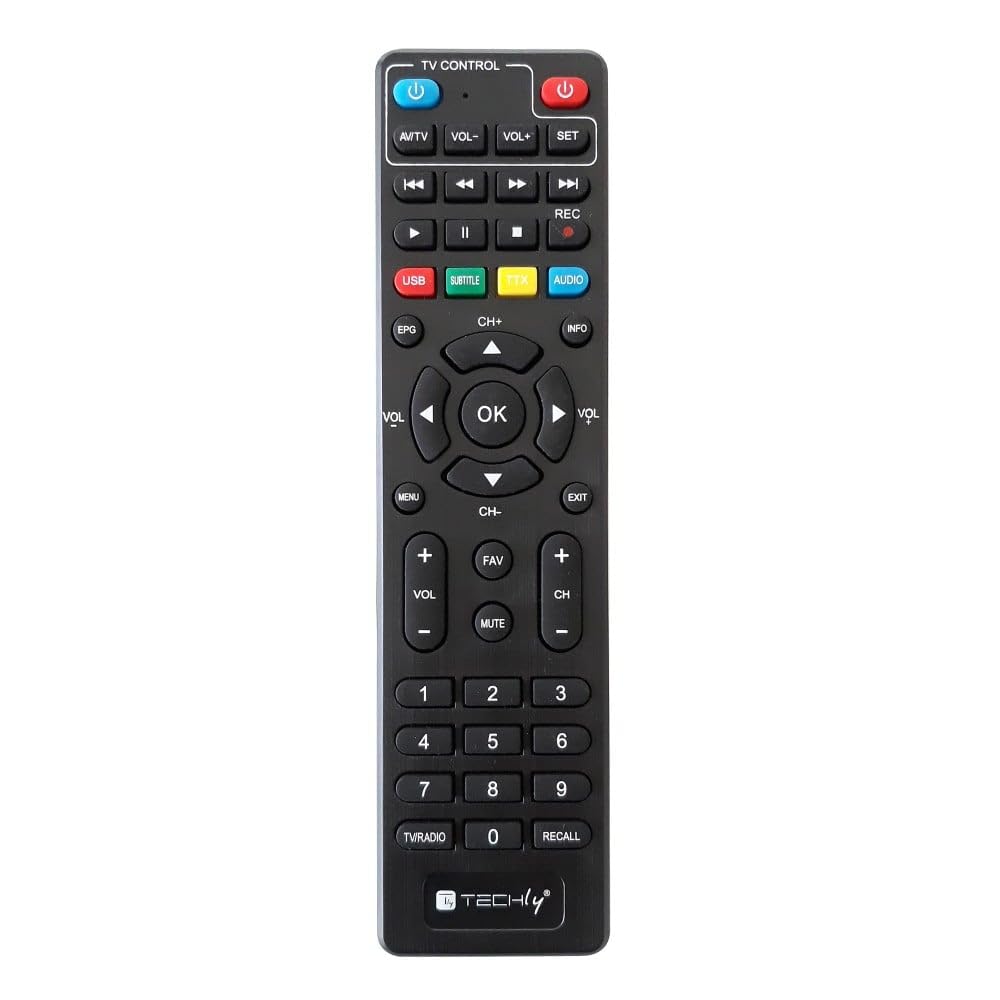
Image: Front view of the Techly IDATA TV-DT2-RC Universal Remote Control, black in color.
Video: A 360-degree view of the Techly IDATA TV-DT2-RC Universal Remote Control, showcasing its design and buttons.
Setup Instructions
- Insert Batteries: Open the battery compartment on the back of the remote control. Insert the two included AAA batteries, ensuring correct polarity (+/-). Close the compartment securely.
- Initial Pairing (Self-Learning):
- Place the original remote control and the Techly universal remote control on a flat surface, facing each other, with a distance of approximately 2-3 cm.
- Press and hold the SET button on the Techly remote until the LED indicator lights up continuously.
- Press the button on the Techly remote that you wish to program (e.g., Power button). The LED will flash slowly.
- Press the corresponding button on your original remote control. The LED on the Techly remote will flash three times and then light up continuously, indicating successful learning.
- Repeat this process for all desired buttons.
- To exit the learning mode, press the SET button again. The LED will turn off.
- Testing: After programming, test the remote control with your digital terrestrial receiver or other compatible devices to ensure all functions work correctly.
Operating Instructions
Once configured, the Techly IDATA TV-DT2-RC operates like your original remote control. Point the remote directly at the device you wish to control.
- Power On/Off: Use the POWER button to turn your device on or off.
- Channel Navigation: Use the CH+ and CH- buttons to change channels. Numeric buttons (0-9) can be used for direct channel input.
- Volume Control: Adjust the volume using the VOL+ and VOL- buttons. The MUTE button silences the audio.
- Menu Access: Press the MENU button to access the device's menu. Use the directional arrows (UP, DOWN, LEFT, RIGHT) and OK button to navigate and confirm selections.
- Special Functions: Buttons like EPG (Electronic Program Guide), INFO, SUBTITLE, and AUDIO provide access to specific features of your digital terrestrial receiver.
Maintenance and Care
- Cleaning: Wipe the remote control with a soft, dry cloth. Do not use liquid cleaners or abrasive materials.
- Battery Replacement: Replace batteries when the remote's response becomes sluggish or the LED indicator does not light up. Always use new AAA batteries and dispose of old batteries responsibly.
- Storage: Store the remote in a cool, dry place away from direct sunlight and extreme temperatures.
- Avoid Drops: Protect the remote from physical impact, as this can damage internal components.
Troubleshooting
| Problem | Possible Cause | Solution |
|---|---|---|
| Remote not responding. | Dead or incorrectly inserted batteries. | Replace batteries with new ones, ensuring correct polarity. |
| Remote not controlling the device. | Not properly programmed; remote not pointed at device; obstruction. | Re-program the remote using the self-learning function. Ensure direct line of sight to the device's IR receiver. Remove any obstructions. |
| Some buttons do not work. | Specific buttons not programmed correctly. | Re-program the non-working buttons individually. |
| LED indicator does not light up during programming. | Batteries are low or dead; SET button not held long enough. | Replace batteries. Ensure the SET button is held until the LED lights up continuously. |
Specifications
- Brand: Techly
- Model Number: IDATA TV-DT2-RC
- Connectivity Technology: Infrared
- Controller Type: Infrared
- Special Feature: Universal, Self-learning
- Compatible Devices: Set-top box, Television, SAT, DVD, and other infrared devices
- Color: Black
- Material: ABS
- Power Source: 2 x AAA Batteries (included)
- Dimensions (W x L x H): 4.5 cm x 17 cm x 1.5 cm
Warranty and Support
This product is covered by a return policy allowing returns within 14 days of purchase. For detailed warranty information or technical support, please refer to the official Techly website or contact your retailer. Keep your proof of purchase for warranty claims.
For further assistance, you may visit the Techly Store on Amazon.
Ask a question about this manual
Ask about setup, troubleshooting, compatibility, parts, safety, or missing instructions. Manuals+ will review the question and use this page’s manual context to help answer it.