
1. Introduction
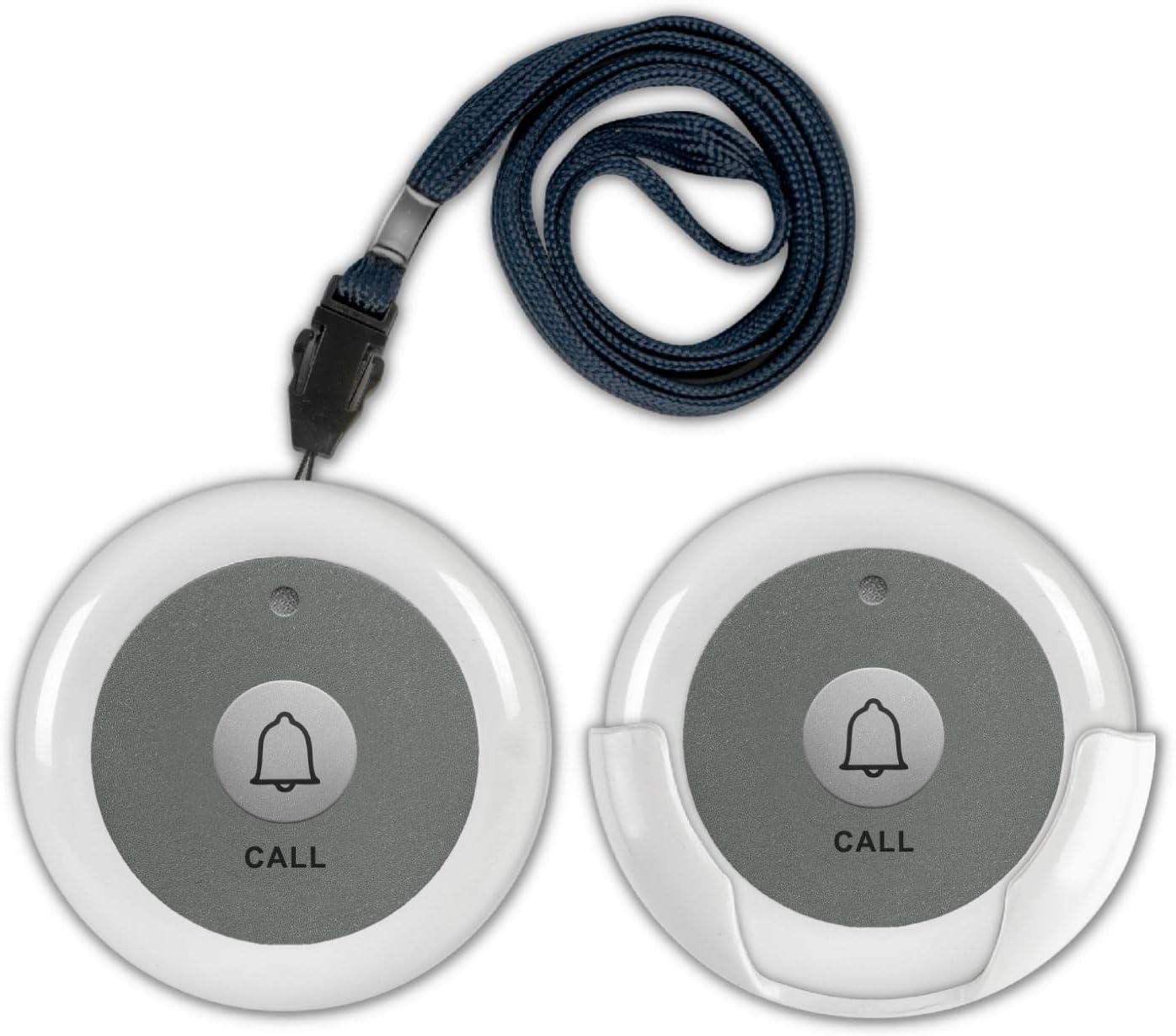
The SYNLETT Wireless Call Button F007W is an accessory designed to work with a compatible SYNLETT central monitoring unit (e.g., Q034G-F007). It allows individuals to signal caregivers or service staff for assistance remotely with a simple press of the button. This manual provides detailed instructions for setup, operation, and maintenance to ensure optimal performance.
2. Package Contents
Verify that all items listed below are included in your package:
- 2 x Call Buttons (F007W)
- 2 x 12V 23A Batteries
- 2 x Call Button Mounting Brackets
- 2 x Lanyard Straps
- 2 x Double-Sided Adhesive Tapes

3. Setup
3.1. Call Button Battery Installation
The call button requires a 12V 23A battery (included). Follow these steps to install the battery:
- Locate the small slot on the side of the call button.
- Carefully insert a mini flathead screwdriver into the slot at a 45-degree angle.
- Gently twist the screwdriver to pry open the call button cover.
- Place the 12V 23A battery into the battery compartment, ensuring correct polarity.
- Align the cover with the base, ensuring the lanyard post (if applicable) is correctly positioned.
- Snap the cover back into place, applying gentle pressure until it clicks securely.
3.2. Mounting Options
The call button offers versatile mounting options:
- Wall Mount: Use the provided mounting bracket and screws to fix the button to a wall, such as bedside or in a bathroom.
- Adhesive Mount: Affix the button to most smooth and clean surfaces using the included double-sided adhesive tapes.
- Wearable Pendant: Attach the lanyard strap to the call button to wear it around the neck for easy access.

3.3. Pairing with Central Monitoring Unit
The call button (F007W) MUST be paired to a SYNLETT central monitoring unit (e.g., Q034G-F007) before it can function properly. Refer to your central monitoring unit's manual for specific pairing instructions. Generally, the process involves:
- Ensure the central monitoring unit is powered on and in 'unlocked' mode.
- Activate the pairing mode on the central monitoring unit (usually by long-pressing a 'REPLACE/ADD' button until a melodic tone is heard).
- Quickly press the call button you wish to pair. The monitoring unit should acknowledge the pairing (e.g., display a number or emit a beep).
- Exit pairing mode on the central monitoring unit (usually by pressing a 'CLEAR' or 'REPLACE/ADD' button again).
3.4. Pairing SYNLETT Wireless Motion Sensor (Optional Accessory)
If you are using a SYNLETT wireless motion sensor as an additional component, it also needs to be paired with the central monitoring unit. Ensure the motion sensor has its batteries installed and its antenna fully extended for optimal signal range.
3.5. Connecting Two Monitoring Units (Optional)
For extended coverage or dual monitoring, two SYNLETT central monitoring units can be connected and paired to the same call buttons. Ensure both units are powered and in 'unlocked' mode before initiating the pairing process for each call button with both units.
4. Operating Instructions
4.1. Making a Call
To signal for assistance, simply press the 'CALL' button on the F007W unit. The central monitoring unit will receive the signal and display the corresponding number, often accompanied by an audible alert.
4.2. Clearing Calls with a Clear Call Button (Accessory)
If you have a SYNLETT clear call button (e.g., F007A), you can remotely clear all active calls on the central monitoring unit. This accessory must also be paired with the monitoring unit.
5. Maintenance
- Cleaning: Wipe the call button with a soft, dry cloth. Avoid using harsh chemicals or abrasive cleaners.
- Battery Replacement: Replace the 12V 23A battery when the LED indicator on the call button no longer lights up or the signal strength diminishes. Refer to Section 3.1 for battery installation.
- Storage: Store the device in a cool, dry place when not in use for extended periods.
6. Troubleshooting
| Problem | Possible Cause | Solution |
|---|---|---|
| Call button not responding | Low or dead battery | Replace the 12V 23A battery (see Section 3.1). |
| Call button not responding | Not paired with monitoring unit | Ensure the call button is correctly paired with the central monitoring unit (see Section 3.3). |
| Intermittent signal | Distance or obstructions | Reduce distance between call button and monitoring unit. Remove obstructions like thick walls or metal objects. |
| Monitoring unit not receiving calls | Monitoring unit is in 'locked' mode | Switch the monitoring unit to 'unlocked' mode. |
7. Specifications
| Feature | Specification |
|---|---|
| Model Number | F007W |
| Brand | SYNLETT |
| Voltage | 12 Volts (DC) |
| Control Method | Touch |
| Mounting Type | Wall Mount |
| UPC | 768564518606 |
| Item Weight | 3.52 ounces |
| Product Dimensions | 2.17 x 2.17 x 0.83 inches |
| Batteries Required | 2 x 12V batteries (included) |
| Special Features | Push Call Button |
8. Warranty and Support
For warranty information or technical support, please refer to the documentation provided with your SYNLETT central monitoring unit or visit the official SYNLETT website. Keep your purchase receipt for warranty claims.
