
MangoKit MGK-MP1BLK-001
Contents
MangoKit MP1 Pocket DAB Radio User Manual
Model: MGK-MP1BLK-001
Introduction
Thank you for purchasing the MangoKit MP1 Pocket DAB Radio. This compact and portable radio allows you to enjoy your favorite DAB/DAB+ and FM radio stations on the go. Designed for ease of use, it features a clear display, simple controls, and a long-lasting rechargeable battery. Please read this manual carefully to ensure proper operation and to get the most out of your device.
What's in the Box
- MangoKit MP1 Pocket DAB Radio
- USB Charging Cable
- Earphones (with built-in antenna)
- User Manual (this document)
Product Overview
Familiarize yourself with the various parts and controls of your MangoKit MP1 radio.
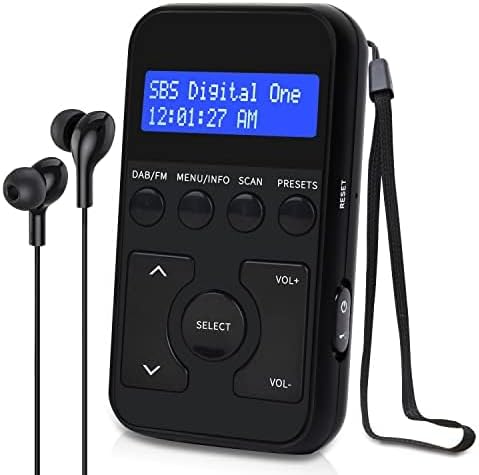

Controls and Ports
| Button/Port | Function |
|---|---|
| DAB/FM | Switches between DAB/DAB+ and FM radio modes. |
| MENU/INFO | Accesses menu options or displays station information. |
| SCAN | Initiates automatic scanning for available stations. |
| PRESETS | Accesses saved station presets. Long press to save current station. |
| SELECT | Confirms selection in menus or selects a station. |
| VOL+/VOL- | Adjusts volume up or down. |
| Up/Down Arrows | Navigates through stations or menu options. |
| Power/Lock Switch | Slides to turn the radio on/off or to lock/unlock buttons. |
| 3.5mm Headphone Jack | Connects earphones (which also serve as the antenna). |
| Micro USB Port | For charging the device. |
Setup
1. Charging the Battery
The MangoKit MP1 has a built-in 1000mAh rechargeable battery. Before first use, it is recommended to fully charge the device.
- Connect the supplied Micro USB cable to the Micro USB port on the radio.
- Connect the other end of the USB cable to a USB power adapter (not included) or a computer's USB port.
- The charging indicator on the display will show the charging status. A full charge typically takes a few hours.
A fully charged battery provides up to 12 hours of playback time.

2. Connecting Earphones (Antenna)
The included earphones serve as the antenna for both DAB/DAB+ and FM reception. They must be connected for the radio to receive signals.
- Insert the 3.5mm jack of the earphones firmly into the headphone port on the radio.
- Ensure the earphone cable is extended as much as possible for optimal reception.
Operating Instructions
1. Power On/Off
To turn the radio on, slide the Power/Lock switch located on the side of the device upwards to the 'On' position. To turn it off, slide the switch downwards to the 'Off' position.
2. Switching Between DAB/DAB+ and FM Modes
Press the DAB/FM button to toggle between Digital Audio Broadcasting (DAB/DAB+) and Frequency Modulation (FM) radio modes.
3. Scanning for Stations
Upon first use or when in a new location, you will need to scan for available radio stations.
DAB/DAB+ Scan:
- Ensure the radio is in DAB mode.
- Press the SCAN button. The radio will automatically scan for all available DAB/DAB+ stations and store them.
- Once scanning is complete, the first available station will begin playing.
FM Scan:
- Ensure the radio is in FM mode.
- Press the SCAN button. The radio will automatically scan for all available FM stations and store them.
- Once scanning is complete, the first available station will begin playing.
For optimal reception during scanning, ensure the earphone cable is fully extended and avoid interference from other electronic devices.
Video demonstrating the scanning process for both DAB and FM modes on the MangoKit MP1 Pocket DAB Radio.
4. Tuning/Selecting Stations
After scanning, use the Up/Down Arrow buttons to navigate through the available stations. Press the SELECT button to confirm your choice and start listening.
5. Saving and Recalling Presets
The radio allows you to store up to 20 favorite stations (10 DAB and 10 FM) for quick access.
Saving a Station:
- Tune to the station you wish to save.
- Press and hold the PRESETS button for approximately 1 second.
- Use the Up/Down Arrow buttons to select a preset number (P1-P10 for each mode).
- Press the SELECT button to confirm and save the station to the chosen preset number.

Recalling a Saved Station:
- Press the PRESETS button (short press).
- Use the Up/Down Arrow buttons to scroll through your saved presets.
- Press the SELECT button to tune to the desired preset station.
6. Adjusting Volume
Use the VOL+ button to increase the volume and the VOL- button to decrease the volume.
7. Lockable Buttons
To prevent accidental button presses, especially when carrying the radio in your pocket or bag, use the lock feature.
- Slide the Power/Lock switch downwards to the 'Lock' position.
- The display will indicate that the buttons are locked.
- To unlock, slide the switch upwards to the 'On' position.

Maintenance
To ensure the longevity and optimal performance of your MangoKit MP1 radio, follow these maintenance guidelines:
- Cleaning: Use a soft, dry cloth to clean the radio's surface. Do not use abrasive cleaners, waxes, or solvents.
- Storage: Store the radio in a cool, dry place away from direct sunlight and extreme temperatures.
- Water Exposure: This device is not waterproof. Avoid exposure to water or high humidity.
- Battery Care: If the radio will not be used for an extended period, charge the battery at least once every three months to maintain its health.
Troubleshooting
| Problem | Possible Cause | Solution |
|---|---|---|
| No power/Radio won't turn on. | Battery is depleted. | Charge the radio using the supplied USB cable. |
| No radio reception or poor sound quality. | Earphones not connected or not fully extended. Weak signal in the area. | Ensure earphones are securely plugged in and fully extended. Try moving to a different location with better signal. Perform a new scan. |
| Buttons are unresponsive. | Buttons are locked. | Slide the Power/Lock switch to the 'On' position to unlock the buttons. |
| Cannot find desired station. | Station not available in your area or not scanned. | Perform a full scan for DAB/DAB+ or FM stations. Check local broadcast availability. |
Specifications
| Feature | Detail |
|---|---|
| Model Number | MGK-MP1BLK-001 |
| Product Dimensions | 5L x 1.5W x 9H centimetres (5 x 1.5 x 19 cm; 65 g) |
| Weight | 65 g |
| Tuner Technology | DAB/FM |
| Radio Bands Supported | DAB/DAB+, FM |
| Power Source | Battery Powered (1 Lithium Ion battery required) |
| Battery Capacity | 1000mAh |
| Playback Time | Up to 12 hours |
| Connectivity Technology | USB (for charging) |
| Special Feature | Portable, Lockable Buttons, 20 Station Presets |
| Manufacturer | MangoKit |
| Country of Origin | China |
Warranty and Support
MangoKit products are designed and manufactured to the highest quality standards. For information regarding warranty, returns, or technical support, please refer to the purchase platform or contact MangoKit customer service directly. Keep your proof of purchase for warranty claims.
For further assistance, please visit the official MangoKit website or contact their support team.
Documents and downloads
Ask a question about this manual
Ask about setup, troubleshooting, compatibility, parts, safety, or missing instructions. Manuals+ will review the question and use this page’s manual context to help answer it.