
Product Overview
The FEZIBO 48x24 inch Electric Standing Desk is designed to enhance your workspace with its height-adjustable functionality and integrated storage. This workstation allows for seamless transitions between sitting and standing positions, promoting a healthier work environment. It features an ergonomic monitor stand, convenient drawers, and robust safety features.
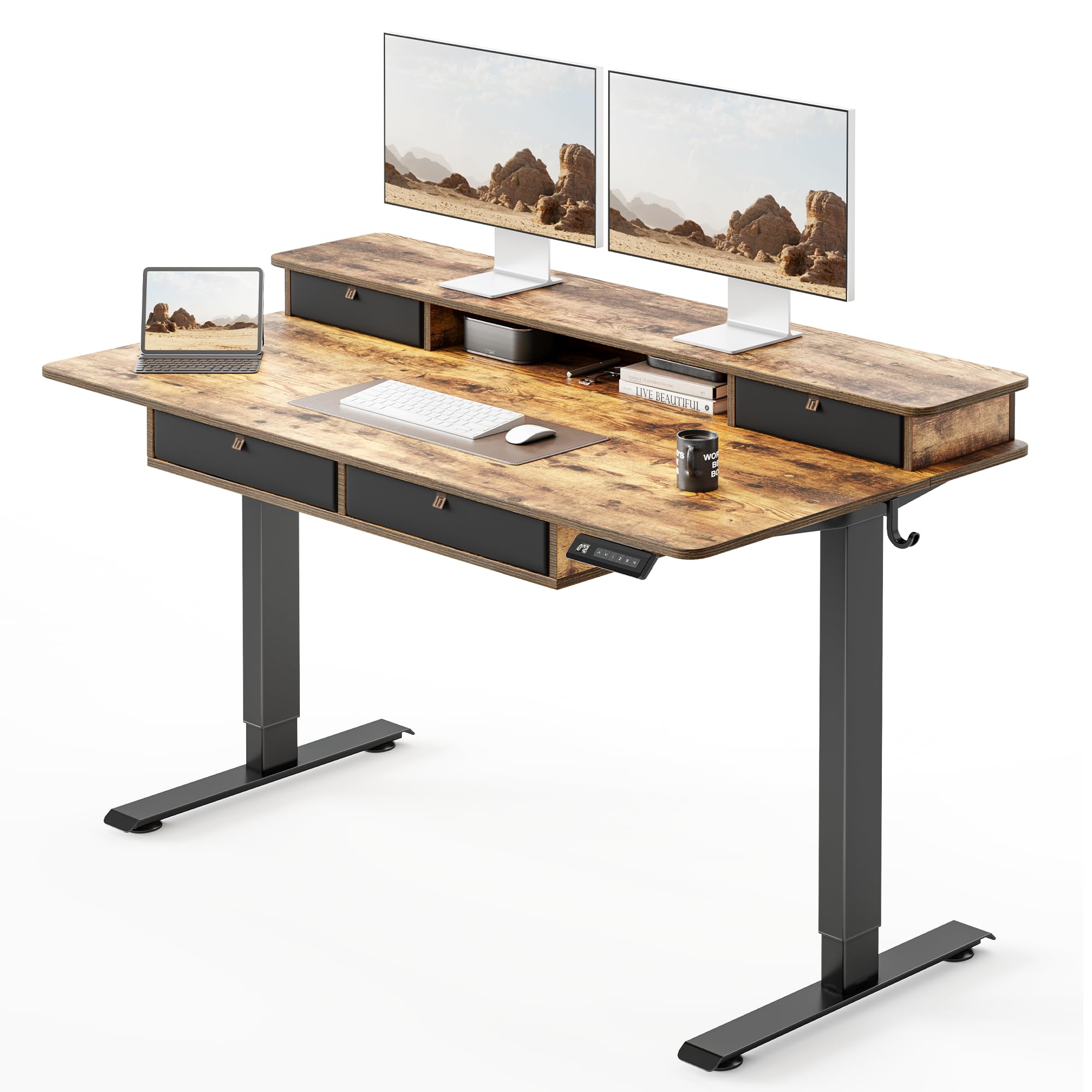
Image: FEZIBO 48x24 Inch Electric Standing Desk in Rustic Brown, showcasing its design and features.
Key Features:
- Electric Height Adjustment: Smoothly switch between sitting and standing positions from 28 to 47 inches at 1 inch per second, with low noise levels under 45 dB.
- Memory Presets: Features 4 programmable memory buttons to save your preferred sitting and standing heights for quick adjustments.
- Ergonomic Monitor Stand: An integrated monitor stand elevates your screen to eye level, helping to reduce neck and back strain.
- Built-in Storage: Includes 4 smooth-glide drawers to keep your workspace organized and clutter-free.
- Anti-Collision Safety: Built-in technology automatically reverses the desk by 2 cm if it encounters obstacles during height adjustment, protecting your equipment and users.
- Sturdy Construction: Constructed with an industrial-grade steel frame and a solid desktop, supporting up to 176 lbs for reliable stability.
Safety Information
Please read and understand all safety instructions before assembly and operation to prevent injury or damage to the product.
- Weight Limit: Do not exceed the maximum weight limit of 176 pounds (80 kg) on the desktop. Overloading may cause instability or damage.
- Caster Safety: If equipped with casters, ensure they are locked when the desk is in use to prevent unintended movement.
- Clearance: Maintain clear space around the desk during height adjustments to avoid collisions with objects or persons.
- Power Cord: Ensure the power cord is not pinched or damaged during assembly or operation. Keep it away from heat sources and sharp edges.
- Children and Pets: Keep children and pets away from the desk during operation. Activate the child lock feature when not in use to prevent accidental adjustments.
- Stable Surface: Always place the desk on a flat, stable surface.
Package Contents
Verify that all components are present before beginning assembly. If any parts are missing or damaged, please contact customer support.
- Desktop (48 x 24 inches, Rustic Brown)
- Electric Lifting Columns (Legs)
- Control Panel with Memory Presets
- Power Adapter and Cables
- Monitor Riser / Storage Shelf
- 4 Fabric Drawers
- 2 Headphone Hooks
- Assembly Hardware (screws, bolts, etc.)
- Basic Assembly Tools (some additional tools may be required)
- Instruction Manual
Assembly Instructions
The FEZIBO Electric Standing Desk requires assembly. Please follow the detailed instructions provided in the package for a smooth setup. It is recommended that 2 people assemble this product.
Before You Begin:
- Clear a spacious area for assembly.
- Unpack all components and verify against the package contents list.
- Gather necessary tools. While some tools are included, a Phillips head screwdriver may be beneficial.
General Steps:
- Attach the lifting columns (legs) to the desktop using the provided hardware.
- Install the control panel to the underside of the desktop.
- Connect all necessary electrical cables (motor to control box, control box to control panel, power adapter to control box).
- Assemble and place the monitor riser and storage drawers.
- Attach the headphone hooks to the sides of the desk.
- Ensure all connections are secure and the desk is stable before plugging into a power outlet.

Image: Detailed diagram illustrating the dimensions of the 48x24 inch standing desk.

Image: Visual representation of the desk's dimensions and its maximum load capacity of 176 lbs.
Operating Instructions
Your FEZIBO Electric Standing Desk is equipped with an intuitive control panel for easy height adjustment and personalized settings.
Control Panel Functions:
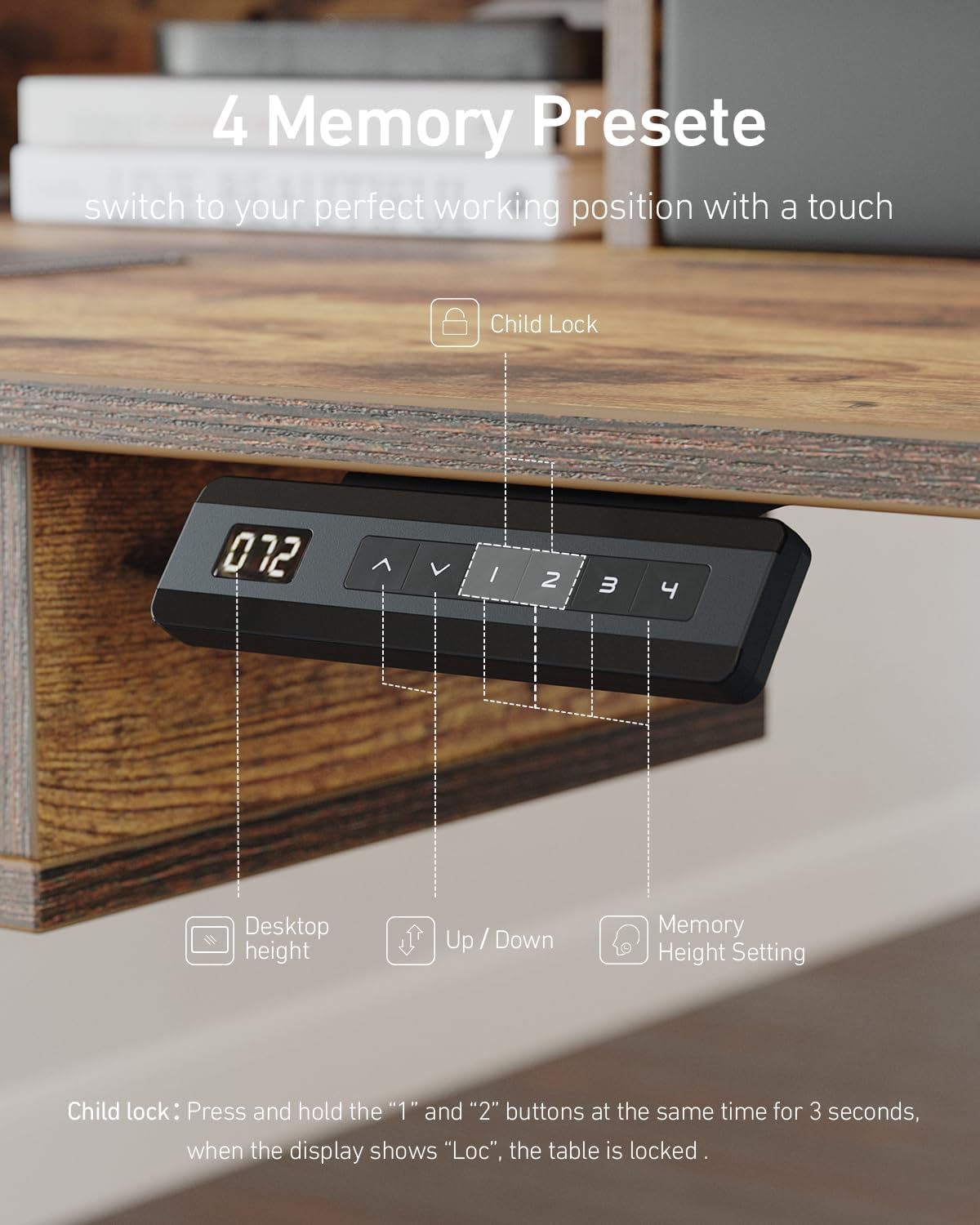
Image: Close-up of the control panel, highlighting the digital display, up/down arrows, memory buttons (1-4), and child lock indicator.
- Up/Down Arrows: Press the up (^) or down (v) arrows to manually adjust the desk height. The current height will be displayed on the LED screen.
- Memory Presets (1, 2, 3, 4): To save a preferred height, adjust the desk to your desired level, then press the 'S' button followed by one of the number buttons (1, 2, 3, or 4). The height is now saved to that preset. To recall a saved height, simply press the corresponding number button.
- Child Lock: To activate the child lock, press and hold buttons '1' and '2' simultaneously for 3 seconds. The display will show 'LOC', indicating the panel is locked. To unlock, press and hold '1' and '2' again for 3 seconds until 'LOC' disappears.
Anti-Collision System:
The desk is equipped with an anti-collision feature. If the desktop encounters an obstacle while moving up or down, it will automatically reverse approximately 2 cm to prevent damage.
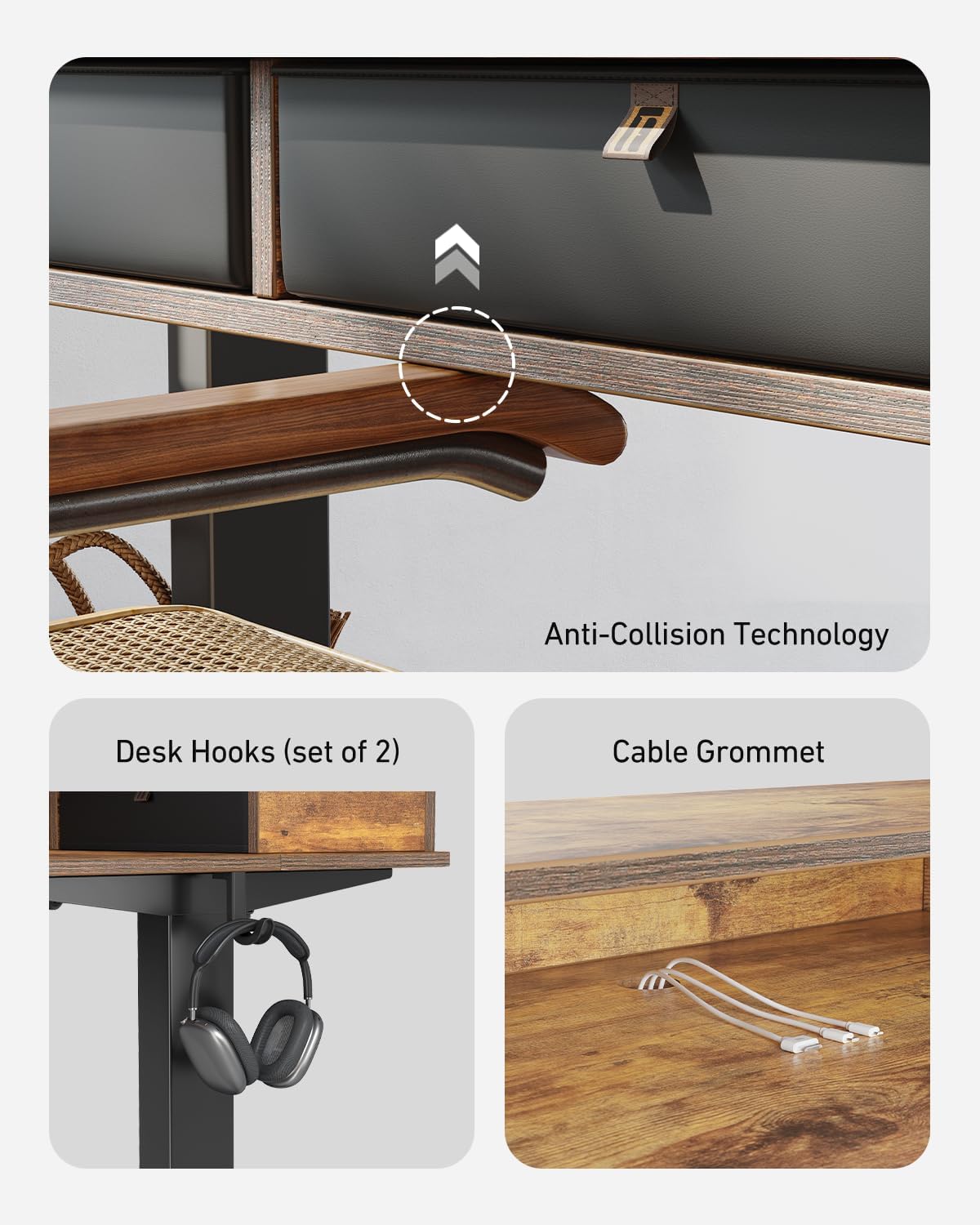
Image: Illustration of the anti-collision technology, showing the desk reversing upon contact. Also highlights the convenient headphone hooks and cable grommet.
Demonstration Videos:
Video: A quick demonstration of the FEZIBO standing desk smoothly adjusting its height from a sitting to a standing position.
Video: This video explains the general functionality of the FEZIBO Electric Adjustable Standing Desk, including basic height adjustments.
Video: A detailed guide on how to program the memory presets and use the child lock feature on the FEZIBO Standing Desk control panel.
Maintenance
Proper care and maintenance will ensure the longevity and optimal performance of your FEZIBO Standing Desk.
- Cleaning: Wipe the desktop and frame with a dry cloth. Avoid using harsh chemicals or abrasive cleaners that could damage the finish.
- Regular Checks: Periodically check all screws and bolts to ensure they are tight. Retighten if necessary.
- Cable Management: Ensure cables are neatly managed and not interfering with the desk's movement or posing a tripping hazard.
- Avoid Liquids: Keep liquids away from the control panel and electrical components to prevent damage.
Troubleshooting
If you encounter any issues with your FEZIBO Standing Desk, please refer to the following common solutions:
- Desk Not Moving: Check all power connections. Ensure the power adapter is securely plugged into both the wall outlet and the desk's control box. Verify the control panel is not in child lock mode ('LOC' displayed).
- Uneven Height: If the desk appears uneven, perform a reset procedure (refer to the full manual for specific steps, usually involving holding down certain buttons).
- Error Codes: If an error code appears on the display, consult the comprehensive manual for specific code meanings and troubleshooting steps.
- Anti-Collision Triggering Frequently: Ensure there are no obstacles in the desk's path. If the issue persists, the sensitivity might need adjustment (refer to the full manual).
For more detailed troubleshooting or persistent issues, please contact FEZIBO customer support.
Product Specifications
| Brand | FEZIBO |
| Model Number | P02.02.37.1794 |
| Product Dimensions | 24"D x 48"W x 27.7"H (61cm D x 122cm W x 70.4cm H) |
| Size | 48 inch |
| Color | Rustic Brown |
| Minimum Height | 27 inches (68.6 cm) |
| Maximum Height | 47 inches (119.4 cm) |
| Maximum Weight Recommendation | 176 Pounds (80 kg) |
| Material Type | Alloy Steel, Wood |
| Number of Drawers | 4 |
| Included Components | Headphone Hook |
| Recommended Number of People for Assembly | 2 |
Warranty and Support
The FEZIBO 48x24 Inch Electric Standing Desk comes with a Limited Warranty. For specific details regarding coverage, duration, and terms, please refer to the warranty information included in your product packaging or contact FEZIBO customer support.
Customer Support:
For any questions, assistance, or warranty claims, please reach out to FEZIBO customer service through their official website or the contact information provided in your product documentation.


