1. Introduction
Thank you for choosing the Earbay BT688SS-JL Bluetooth Headset. This wireless headset is designed for clear communication and comfortable use, featuring Bluetooth 5.0 connectivity, a noise-cancelling microphone, and multi-device support. This manual provides detailed instructions on how to set up, operate, and maintain your headset to ensure optimal performance.

Figure 1: Earbay BT688SS-JL Bluetooth Headset. This image shows the full headset with its adjustable headband and microphone boom.
2. Product Features
- Advanced Noise-Cancelling Microphone: Equipped with a microphone that reduces up to 99.6% of ambient noise for clear conversations.
- Dual Device Connectivity: Connect to two devices simultaneously, allowing seamless switching between your computer and smartphone.
- All-Day Comfort Design: Features a lightweight design (7.1 ounces / 200 grams), soft leather ear cushions, and an adjustable headband for extended wear. The microphone boom is flexible and can rotate 270 degrees.
- Bluetooth 5.0 & 40mm Audio Drivers: Ensures stable connection and high-quality stereo sound.
- Long Battery Life: Provides up to 28 hours of talk time and 220 hours of standby time on a single 2-hour charge.

Figure 2: Handsfree Clear Chat. A man is shown using the headset while working on a laptop, illustrating the clear communication feature.

Figure 3: Dual Connection. The headset is depicted on a stand, wirelessly connected to both a laptop and a smartphone, demonstrating its ability to connect to two devices concurrently.

Figure 4: All Day Comfort. This image highlights the multi-function button, 270-degree flexible boom mic, and adjustable headband, emphasizing the headset's ergonomic design.

Figure 5: Bluetooth 5.0 & 40mm Audio Drivers. An exploded view diagram illustrates the internal components, including the Bluetooth 5.0 chip and 40mm audio drivers, indicating stable connection and quality sound.

Figure 6: Battery Life. The headset is shown with a large '28H' indicator, representing its 28-hour talk time, 220-hour standby time, and 2-hour charge time.
3. Setup and Getting Started
3.1 Charging the Headset
Before first use, fully charge your headset. Connect the charging cable to the headset's charging port and a USB power source. The charging time is approximately 2 hours.
3.2 Powering On/Off
- Power On: Press and hold the Multi-function button until the LED indicator flashes blue.
- Power Off: Press and hold the Multi-function button until the LED indicator flashes red and then turns off.
3.3 Bluetooth Pairing
- Ensure the headset is powered off.
- Press and hold the Multi-function button for approximately 5-7 seconds until the LED indicator flashes red and blue alternately. This indicates pairing mode.
- On your device (smartphone, laptop, etc.), enable Bluetooth and search for available devices.
- Select "BT688SS-JL" or "BT68" from the list of found devices.
- Once connected, the LED indicator on the headset will flash blue slowly.
3.4 Connecting to Multiple Devices (Dual Connection)
The Earbay BT688SS-JL headset supports connecting to two Bluetooth devices simultaneously.
- Pair the headset with the first device following the steps in Section 3.3.
- After successful pairing with the first device, turn off Bluetooth on the first device.
- Put the headset back into pairing mode (red and blue flashing LED).
- Pair the headset with the second device.
- Once connected to the second device, re-enable Bluetooth on the first device. The headset should automatically connect to both devices.

Figure 7: Easy to Connect with 2 Devices. This diagram visually explains the three steps for pairing the headset with two devices simultaneously.
4. Operating Instructions
4.1 Button Functions
The headset features intuitive controls for easy management of calls and audio.
- Multi-function Button: Located on the earcup, this button controls power, pairing, call answering/ending, and music playback.
- Mute Button: Dedicated button on the microphone boom for quickly muting/unmuting your microphone during calls.
4.2 Call Management
- Answer/End Call: Press the Multi-function button once.
- Reject Call: Press and hold the Multi-function button for 2 seconds.
- Mute/Unmute Microphone: Press the Mute button on the microphone boom.
4.3 Audio Playback
- Play/Pause: Press the Multi-function button once.
4.4 Microphone Adjustment
The flexible boom microphone can be rotated 270 degrees to position it optimally for your voice. Ensure the microphone is positioned close to your mouth for the best noise-cancelling performance.

Figure 8: Clear Call Quality. A woman is shown smiling while using the headset, with sound waves emanating from the microphone, indicating clear audio transmission.
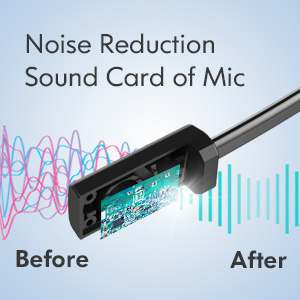
Figure 9: Noise Reduction Technology. A diagram illustrating the noise reduction sound card within the microphone, showing the before and after effect on sound waves.
5. Maintenance
5.1 Cleaning
To maintain the headset's condition, wipe it regularly with a soft, dry cloth. Do not use abrasive cleaners or solvents. Avoid getting moisture into the charging port or microphone.
5.2 Storage
Store the headset in a cool, dry place away from direct sunlight and extreme temperatures. When not in use for extended periods, ensure it is fully charged before storage and recharge it every few months to preserve battery life.
6. Troubleshooting
6.1 Common Issues
- Headset won't turn on: Ensure the headset is fully charged.
- Cannot pair with device: Ensure the headset is in pairing mode (red and blue flashing LED) and your device's Bluetooth is enabled and searching. Try restarting both the headset and your device.
- No audio/poor audio quality: Check the volume levels on both the headset and your connected device. Ensure the headset is selected as the audio output device. Move closer to your device to avoid interference.
- Microphone not working: Ensure the microphone is not muted. Check microphone settings on your device and ensure the headset is selected as the input device.
6.2 PC and Meeting App Connection Tips
For optimal performance with PCs and meeting applications like Zoom, Microsoft Teams, or Skype, follow these guidelines:
- PC Connection Settings: Navigate to your PC's Bluetooth & Other Devices settings. Ensure 'BT68' is selected as both the input and output device under Sound settings.
- Skype & Other Meeting Apps: Within the app's Audio & Video settings, set 'BT68' as your Microphone and Speakers.
- Important Note: If connection issues persist, please update your Bluetooth driver on your PC or consider using a Bluetooth adapter if your PC's built-in Bluetooth is problematic.

Figure 10: PC and Meeting App Connection Settings. This diagram provides a step-by-step guide for configuring the headset on a PC and within common meeting applications like Skype.
7. Specifications
| Feature | Specification |
|---|---|
| Model Name | BT688SS-JL |
| Connectivity Technology | Wireless (Bluetooth) |
| Bluetooth Version | 5.0 |
| Wireless Communication Technology | Bluetooth |
| Material | Leather (ear cushions, headband) |
| Specific Uses For Product | Business, Communication |
| Charging Time | 2 Hours |
| Compatible Devices | Laptops, Desktops, Tablets, Telephones, Smart Speakers |
| Control Type | Call Control, Touch |
| Cable Feature | Without Cable |
| Item Weight | 7.1 ounces (200 Grams) |
| Water Resistance Level | Not Water Resistant |
| Unit Count | 1 Count |
| Battery Life | 28 Hours (Talk Time) |
| Audio Driver Size | 40 Millimeters |
| Earpiece Shape | Circle (On Ear) |
| UPC | 726193602561 |
| Product Dimensions | 7 x 6 x 2 inches |
| Ear Placement | On Ear |
| Noise Control | Active Noise Cancellation (Microphone) |
8. Warranty and Support
Earbay products are designed for reliability and performance. For specific warranty information regarding your BT688SS-JL headset, please refer to the warranty card included in your product packaging or visit the official Earbay website. If you encounter any issues or require technical assistance, please contact Earbay customer support through their official channels. Provide your model number (BT688SS-JL) and purchase details for faster service.
You can visit the Earbay store on Amazon for more information: Earbay Store


