
Introduction
This manual provides instructions for the eKids Disney Princess Toy Microphone, model DP-070. This musical toy features Disney Princess graphics, built-in music, and flashing lights, designed for children aged 3 and up. It is a portable and lightweight device with easy-to-use controls.

Image: Front view of the eKids Disney Princess Toy Microphone, showcasing its pink body, purple top, and Disney Princess decal.
Setup
Battery Installation
The microphone requires 2 AAA (R03) batteries (not included). Battery installation should always be performed by an adult.
- Use a Phillips screwdriver to open the battery compartment door located on the back of the unit.
- Install 2 'AAA' (R03) batteries, ensuring the + and - terminals are aligned as indicated in the compartment.
- Replace the compartment door and tighten the screw with a Phillips screwdriver. Do not over-tighten the screw.
Important Battery Safety Information:
- Do not mix old and new batteries.
- Do not mix alkaline, carbon-zinc, or rechargeable nickel-cadmium batteries.
- Insert batteries with correct polarity (+/-) as indicated.
- Do not attempt to recharge non-rechargeable batteries.
- Do not short-circuit the supply terminals.
- Remove batteries from the product if it will not be used for a long period of time (e.g., 6 months or more).
- Exhausted batteries should be removed from the product.
- Dispose of batteries properly; do not dispose of batteries in a fire, as they may explode or leak.

Image: Detailed view of the back of the product packaging, showing battery installation steps and safety warnings.
Operating Instructions
The eKids Disney Princess Toy Microphone features simple controls for interactive play.
Controls
- Microphone Button: Press this button to amplify your voice through the microphone.
- Song Button: Press this button to play the built-in music. The microphone includes an extended clip of the song 'Starting Now'.
Features
- Flashing Lights: The microphone head illuminates with flashing lights during use, enhancing the play experience.
- Dynamic Speaker: Sound is projected through the speaker located at the base of the microphone.
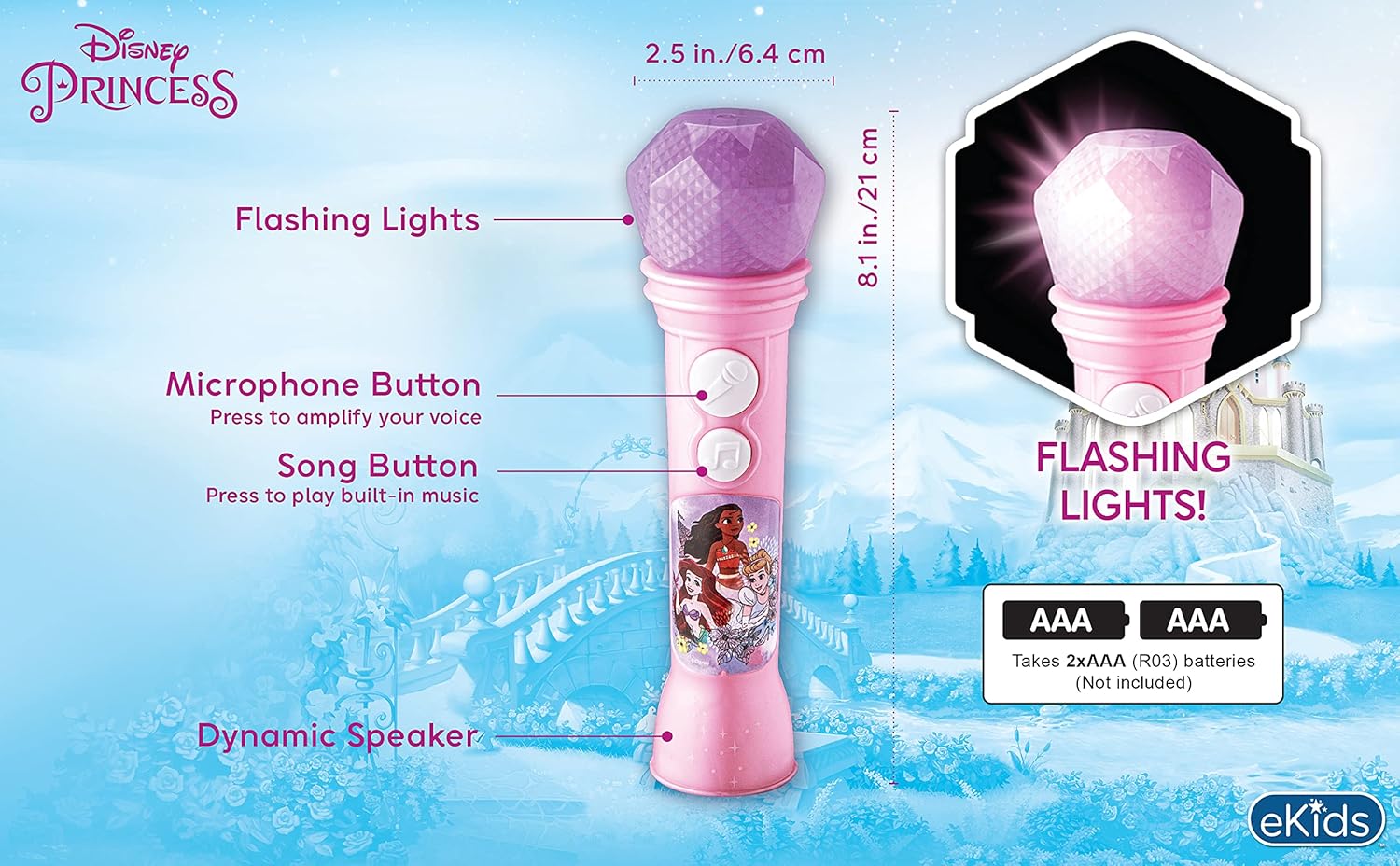
Image: Labeled diagram illustrating the microphone's components, including the microphone button, song button, flashing lights, and dynamic speaker.

Image: A child actively using the eKids Disney Princess Toy Microphone, demonstrating its intended use for singing.
Maintenance
To ensure the longevity and proper functioning of your eKids Disney Princess Toy Microphone, follow these maintenance guidelines:
- Cleaning: Wipe the microphone with a dry, soft cloth. Do not use abrasive cleaners or immerse the unit in water.
- Battery Care: Always remove batteries if the product will not be used for an extended period. Refer to the battery safety information in the Setup section for proper handling and disposal.
- Storage: Store the microphone in a cool, dry place away from direct sunlight and extreme temperatures.
Troubleshooting
If you encounter issues with your microphone, please refer to the following common solutions:
- No Sound or Lights: Check if the batteries are correctly installed and not depleted. Replace with fresh AAA batteries if necessary. Ensure the microphone and song buttons are being pressed firmly.
- Low Microphone Volume: For optimal voice amplification, speak directly and closely into the microphone. The design requires proximity for effective sound pickup.
- Demo Mode: The product may initially be in demo mode. Refer to the product packaging for instructions on how to disable demo mode for full functionality.
Specifications
| Model Number | DP-070 |
| Product Dimensions | 1.98 x 1.99 x 7.06 inches |
| Item Weight | 2.08 ounces |
| Recommended Age | 36 months - 7 years |
| Batteries Required | 2 AAA batteries |
| Brand | eKids |
| Manufacturer | KIDdesigns |
| Color | Pink |
| Included Music | Extended clip of 'Starting Now' |
Warranty Information
This product comes with a one-year limited warranty. This warranty is valid only in the U.S.A. Please retain your proof of purchase for warranty claims.
Support
For further assistance or inquiries, please contact eKids directly:
- Website: www.ekids.com
- Distributed by: eKids, LLC, 1299 Main Street, Rahway, NJ 07065


