
1. Introduction
This manual provides essential information for the GZTAUTO 6.1-inch Touch Screen Digitizer, a replacement component designed for specific Toyota RAV4 radio stereo receivers from model years 2014 to 2018. This digitizer is intended to restore touch functionality to your vehicle's infotainment system when the original screen is damaged or unresponsive. Please read this manual thoroughly before attempting installation or use.
2. Product Overview
The GZTAUTO Touch Screen Digitizer is a high-quality replacement part engineered to address common issues with your car's original touch screen, such as unresponsiveness, freezing, cracks, scratches, delamination, dead pixels, or fading. It is a resistive touch screen made primarily of glass, offering high touch sensitivity and precision.
- Purpose: Replaces damaged or malfunctioning touch panels in compatible Toyota RAV4 radio units.
- Functionality: Restores full touch control to the radio display.
- Key Features: High touch sensitivity, precision, and stability. Supports Can-Bus.
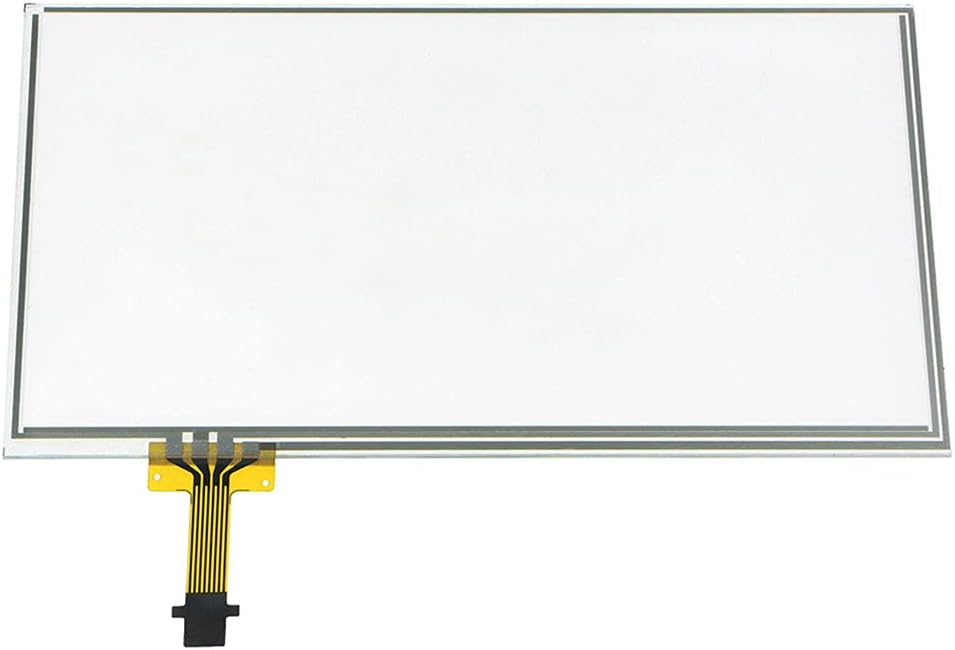
Figure 2.1: Front view of the GZTAUTO 6.1-inch touch screen digitizer, showing its rectangular shape and the flexible ribbon cable connector.

Figure 2.2: An angled perspective of the digitizer, highlighting its slim profile and the integrated ribbon cable.

Figure 2.3: Detailed view of the flexible ribbon cable and its 12-pin interface, crucial for connecting to the radio unit.

Figure 2.4: Image illustrating the protective film applied to the surface of the digitizer, which must be removed prior to installation.
3. Compatibility
This touch screen digitizer is specifically designed for certain Toyota RAV4 radio stereo receivers from 2014 to 2018. It is crucial to verify your radio's specifications and part numbers to ensure compatibility.
3.1 Compatible Models
- Fits Toyota RAV4 car radio 6.1-inch models from 2014-2018.
- Only fits radios with an 'APPS' button on the left side of the unit.
3.2 Compatible Part Numbers and Faceplate IDs
The digitizer is compatible only with the following specific part numbers (PN) and faceplate IDs:
- Part Numbers: 86100-0R060, 86100-0R070, 86140-42200, 86140-0R100, 86100-42230, 86100-42231, 86140-42460
- Faceplate IDs: 100319, 100324, 100325, 100326, 100459, 100574, 100582
3.3 Important Compatibility Notes
- This touch screen does NOT fit 7.0-inch RAV4 radios.
- It is essential to confirm your radio's faceplate ID and screen size before purchase. If your radio's faceplate ID is not listed above, this screen will not fit.
- This product is only a touch panel and does not include the LCD display or the entire head unit.

Figure 3.1: Visual guide for radio compatibility, indicating the 'APPS' button location and listing compatible faceplate IDs. The radio unit shown is for display purposes only and is not included.
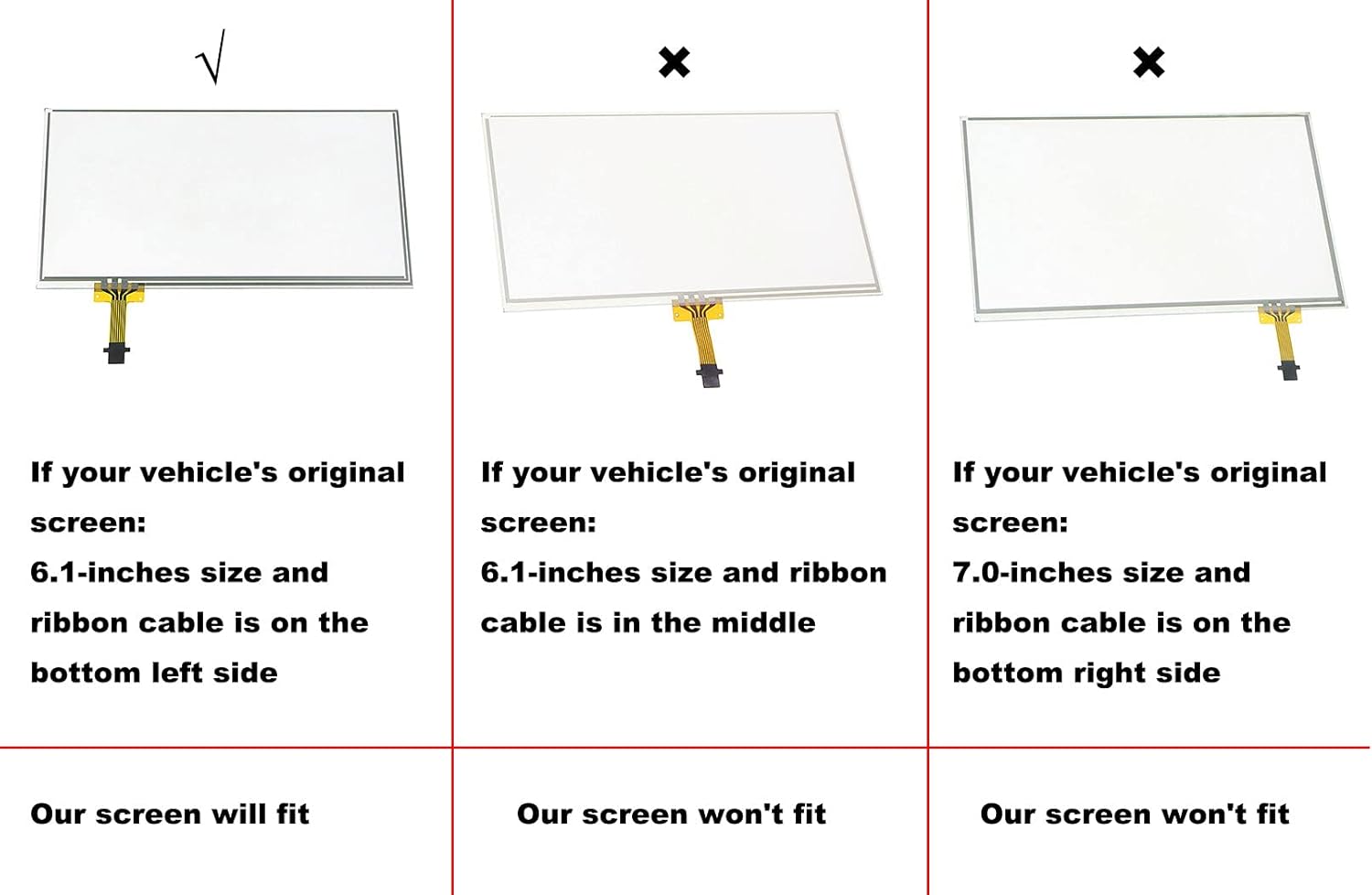
Figure 3.2: A comparison chart illustrating which screen types are compatible. The GZTAUTO screen fits 6.1-inch screens with the ribbon cable on the bottom left side. It does not fit 6.1-inch screens with a middle ribbon cable or 7.0-inch screens.
4. Installation (Setup)
The installation of this touch screen digitizer requires technical proficiency and careful handling. Installation instructions and tools are NOT included in this package. It is highly recommended to seek professional assistance if you are not confident in performing the installation yourself.
4.1 General Guidance
- Preparation: Before beginning, ensure your vehicle's battery is disconnected to prevent electrical damage.
- Reference Materials: Many online resources, including video tutorials, are available that demonstrate the process of replacing a Toyota RAV4 radio touch screen. Searching for your specific radio model and year can provide valuable visual guidance.
- Organization: Keep track of all screws and components removed during disassembly. Using separate containers for different screw types can prevent confusion during reassembly.
- Delicate Components: Exercise extreme caution when handling the radio's internal circuits and especially the tiny ribbon cables. These are fragile and can be easily damaged if not disconnected and reconnected gently.
- Protective Film: There is a layer of protective film on each surface of the new digitizer. Please remove these films carefully before installing the screen into the radio unit.
5. Operation
Once the GZTAUTO Touch Screen Digitizer is correctly installed, your Toyota RAV4 radio's touch functionality should be fully restored. The screen will respond to touch inputs, allowing you to navigate menus, select options, and control your audio system as intended.
- Touch Response: The new digitizer provides high touch sensitivity and precision, ensuring accurate input recognition.
- Calibration: In some cases, after installation, the radio unit may require a touch screen calibration. Refer to your vehicle's owner's manual or online resources for instructions on how to perform this if needed.
6. Maintenance
To ensure the longevity and optimal performance of your new touch screen digitizer, follow these simple maintenance guidelines:
- Cleaning: Use a soft, lint-free cloth (e.g., microfiber cloth) to gently wipe the screen. For stubborn smudges, slightly dampen the cloth with water or a screen-safe cleaner. Avoid harsh chemicals, abrasive materials, or excessive moisture.
- Protection: Avoid pressing on the screen with sharp objects or excessive force, as this can damage the digitizer.
- Temperature: While designed for automotive environments, extreme temperatures can affect electronic components. Avoid prolonged exposure to direct sunlight or extreme cold when possible.
7. Troubleshooting
If you encounter issues after installing the digitizer, consider the following troubleshooting steps:
- No Touch Response:
- Ensure all ribbon cables are securely and correctly seated in their connectors. A loose connection is a common cause of unresponsiveness.
- Verify that the protective films have been completely removed from both sides of the new digitizer.
- Confirm that your radio unit's part number and faceplate ID are indeed compatible with this digitizer (refer to Section 3).
- Inaccurate Touch:
- Attempt a touch screen calibration through your radio's settings, if available.
- Check for any debris or foreign objects between the digitizer and the LCD display.
- Screen Flickering or Dead Pixels:
- This digitizer is a touch panel only; it does not include the LCD display. If you experience display issues (flickering, dead pixels), the problem likely lies with the LCD itself or its connection, not the digitizer.
- Physical Damage to New Digitizer:
- Inspect the digitizer for any cracks or damage that may have occurred during installation. Handle with care.
If problems persist after attempting these steps, it is advisable to consult a professional automotive electronics technician.
8. Specifications
| Feature | Specification |
|---|---|
| Screen Size | 6.1 inches |
| Dimensions (L x W) | 149mm x 84mm (approx. 5.87 x 3.31 inches) |
| Thickness | 1.5mm |
| Interface | 12-Pin |
| Ribbon Cable Length | 33mm |
| Ribbon Cable Position | Bottom left side |
| Main Material | Glass |
| Touch Type | Resistive Touch Screen |
| Special Feature | Support Can-Bus |
| Item Weight | Approx. 5.6 ounces (0.16 Kilograms) |

Figure 8.1: Diagram illustrating the precise dimensions of the digitizer (149mm x 84mm) and the ribbon cable length (33mm), with the ribbon cable located on the bottom left side.
9. What's in the Box
Your package should contain the following item:
- 1x Touch screen digitizer
10. Warranty and Support
10.1 Warranty Information
This GZTAUTO Touch Screen Digitizer comes with a 1-Year Warranty from the date of purchase. This warranty covers manufacturing defects and ensures the product functions as described under normal use. Please retain your proof of purchase for warranty claims.
10.2 Customer Support
For any questions, concerns, or technical assistance regarding your GZTAUTO Touch Screen Digitizer, please contact the seller or manufacturer directly through the platform where the product was purchased. Provide your order details and a clear description of the issue to receive prompt support.


