1. Introduction
Thank you for choosing the GYMAX GM1165 Gaming Chair. This manual provides essential information for the safe assembly, operation, and maintenance of your new chair. Please read it thoroughly before use and retain it for future reference.
The GYMAX GM1165 is designed for comfort and versatility, featuring adjustable components, a massage lumbar pillow, and a durable construction suitable for gaming, office work, and relaxation.
Safety Information
- Ensure all components are securely fastened before use.
- Do not stand on the chair.
- Do not exceed the maximum weight capacity of 330 lbs (150 kg).
- Keep hands and fingers clear of moving parts during adjustments.
- Use on a flat, stable surface.
2. Package Contents
Before assembly, verify that all parts are present and undamaged. If any parts are missing or damaged, please contact customer support.
- Backrest
- Seat Cushion
- Armrests (2)
- Base (5-star)
- Casters (5)
- Gas Lift Cylinder
- Gas Lift Cover
- Mechanism Plate
- Headrest Pillow
- Lumbar Support Pillow (with massage function)
- Hardware Pack (screws, washers, Allen key)
3. Assembly Instructions
Follow these steps carefully for proper assembly. It is recommended to assemble the chair on a soft, clean surface to prevent damage.
- Attach Casters to Base: Insert each of the five casters into the holes at the end of the 5-star base until they click securely into place.
- Install Gas Lift: Place the gas lift cylinder into the center hole of the 5-star base. Cover it with the gas lift cover.
- Attach Mechanism Plate to Seat: Align the mechanism plate with the screw holes on the underside of the seat cushion. Ensure the front of the mechanism faces the front of the seat. Secure with screws provided in the hardware pack.
- Attach Armrests to Seat: Secure the armrests to the sides of the seat cushion using the provided screws. Ensure they are oriented correctly.
- Connect Seat to Gas Lift: Carefully place the assembled seat onto the gas lift cylinder, ensuring the mechanism plate's center hole aligns with the top of the gas lift.
- Attach Backrest to Seat: Align the backrest with the mounting brackets on the seat cushion. Secure with screws.
- Install Pillows: Attach the headrest pillow to the top of the backrest and the lumbar support pillow to the lower back area using their integrated straps.

Image: Overview of the GYMAX Gaming Chair with key dimensions, illustrating the overall structure and components for assembly reference.
4. Operating Instructions
4.1 Seat Height Adjustment
To adjust the seat height (19" to 23"):
- To raise: Lift the lever located under the right side of the seat while taking your weight off the seat. Release the lever at the desired height.
- To lower: Lift the lever while seated. Release the lever at the desired height.

Image: Diagram illustrating the adjustable features of the gaming chair, including seat height lift lever, rocking function, 360° swivel, adjustable armrests, and tilt tension control.
4.2 Backrest Recline Adjustment
The backrest can be reclined from 90° to 180°:
- Locate the angle adjustment lever on the right side of the chair, below the seat.
- Pull the lever up and lean back to the desired angle.
- Release the lever to lock the backrest in position.
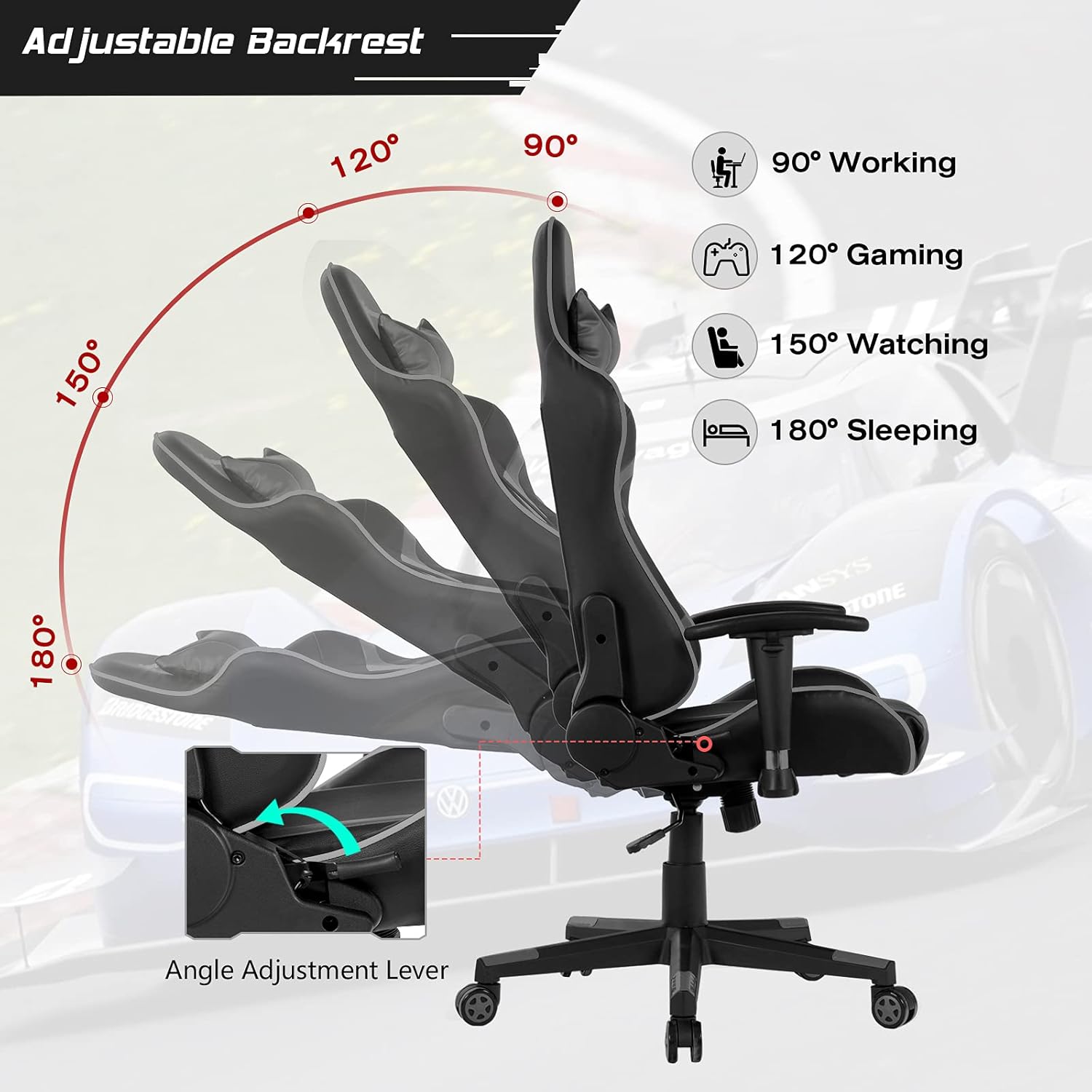
Image: Visual guide demonstrating the adjustable backrest, showing positions from 90° (working) to 180° (sleeping) with the angle adjustment lever.
4.3 Armrest Adjustment
The 2D armrests are adjustable in height (3" range) and can rotate 60°:
- To adjust height: Press the button on the side of the armrest and move it up or down. Release the button to lock.
- To rotate: Gently twist the armrest pad to the desired angle.
4.4 Massage Function (Lumbar Pillow)
The lumbar pillow features a massage function. To activate:
- Locate the USB cable extending from the lumbar pillow.
- Connect the USB cable to a power source such as a power bank, laptop USB port, or computer host.
- The massage function will activate. Disconnect to turn off.

Image: Illustration showing the massage lumbar cushion and various USB power supply options like a power bank, laptop, or computer host, along with a convenient storage pocket.
4.5 Rocking Function and Swivel
- Rocking: The chair supports a rocking motion. To enable/disable, use the tilt tension control knob located under the seat. Turn clockwise to tighten (less rocking), counter-clockwise to loosen (more rocking).
- Swivel: The chair features a 360° swivel for easy movement and communication.
5. Maintenance
- Cleaning: Wipe clean with a damp cloth. Avoid harsh chemicals or abrasive cleaners that may damage the PVC leather surface.
- Inspection: Periodically check all screws and bolts to ensure they are tight. Re-tighten if necessary.
- Caster Care: Keep casters free of hair and debris to ensure smooth rolling.
- Storage: Store the chair in a cool, dry place away from direct sunlight and extreme temperatures.
6. Troubleshooting
| Problem | Possible Cause | Solution |
|---|---|---|
| Chair does not adjust height. | Gas lift cylinder malfunction or lever not engaged. | Ensure the lever is fully pulled. If issue persists, contact support for gas lift replacement. |
| Backrest does not recline or lock. | Recline mechanism jammed or lever not engaged. | Check for obstructions. Ensure the recline lever is fully pulled/released. |
| Chair wobbles or is unstable. | Loose screws or uneven floor. | Tighten all assembly screws. Ensure the chair is on a flat surface. |
| Casters do not roll smoothly. | Debris in casters or damaged casters. | Clean casters of hair and debris. Replace damaged casters if necessary. |
| Massage function not working. | USB power issue or cable disconnected. | Ensure USB cable is securely connected to a working power source. Try a different USB port or power bank. |
7. Specifications
| Feature | Detail |
|---|---|
| Brand | GYMAX |
| Model Name | Massage Gaming Chair (GM1165) |
| Color | Grey |
| Product Dimensions | 29"D x 29"W x 54"H |
| Seat Height Range | 19" - 23" |
| Backrest Recline | 90° - 180° |
| Armrest Adjustment | 2D (Height adjustable 3", 60° rotation) |
| Maximum Weight Recommendation | 330 Pounds (150 kg) |
| Material | PVC Leather, Sponge, Metal Frame |
| Special Features | Massage Lumbar Pillow, Adjustable Headrest, 360° Swivel, Rocking Function |
| Care Instructions | Wipe Clean |

Image: Detailed view highlighting key features such as the comfortable headrest, thick padded cushion, premium PVC leather, high-quality gas rod, sturdy 5-claw base, and 360° smooth rolling wheels.
8. Warranty and Support
GYMAX products are manufactured to high-quality standards. For warranty information or technical support, please contact your retailer or visit the official GYMAX website.
For assistance, please refer to the contact information provided at the point of purchase or visit the GYMAX Store on Amazon.


