
1. Introduction and Overview
The WOPET 4L Automatic Pet Feeder is designed to provide a convenient and reliable feeding solution for your small to medium-sized pets, including cats and dogs. This feeder ensures your pet receives consistent meals, even when you are away or busy. Key features include programmable portion control, scheduled feeding times, a voice recorder for personalized meal calls, and a dual power supply system for uninterrupted operation.

The WOPET Automatic Pet Feeder provides peace of mind, ensuring your pet is fed on schedule whether you are on a business trip or working overtime.
2. Safety Instructions
- Use only dry pet food with kibble sizes between 0.07-0.6 inches (2-15mm) in diameter.
- For indoor use only. Do not expose the feeder to direct sunlight or moisture.
- Keep out of reach of children and pets when not in use or during cleaning.
- Always use the provided 5V DC power adapter. For backup, use three D-size batteries (not included). It is recommended to use both power sources simultaneously to prevent feeding interruptions during power outages.
- Do not immerse the main unit in water. Only the stainless steel bowl is washable.
- Ensure the power cord is placed securely to prevent pets from chewing on it.
3. Product Components
Your WOPET 4L Automatic Pet Feeder package includes the following components:
- Main Feeder Unit (with control panel and food tank)
- Stainless Steel Food Bowl
- Bowl Holder
- Power Adapter
- USB Power Cable
- Desiccant Bag (pre-installed in the lid)

The WOPET 4L Automatic Pet Feeder with its stainless steel bowl.
4. Setup
4.1. Initial Assembly
- Unscrew the lid from the top of the feeder unit.
- Remove the stainless steel bowl and its holder from the feeder.
- Ensure the desiccant bag is securely placed in its compartment within the lid. This helps keep food fresh.
- Attach the stainless steel bowl to its holder, then slide the assembled bowl and holder into the designated slot at the bottom front of the feeder unit.
4.2. Power Supply
The feeder supports dual power supply for reliability:
- Primary Power: Plug the USB power cable into the feeder's port (located at the bottom) and connect the adapter to a wall outlet.
- Backup Power: Open the battery compartment at the bottom of the feeder and insert three D-size batteries (not included). This ensures the feeder continues to operate during power outages.

The dual power supply system provides continuous operation, with battery backup for power outages.
Video demonstrating the setup of the WOPET Automatic Pet Feeder, including bowl assembly, lid placement, and dual power supply connection.
4.3. Food Loading
Once the feeder is powered, open the lid and pour dry pet food into the food tank. Ensure the food level does not exceed the maximum fill line. Close the lid securely to maintain food freshness.
5. Operating Instructions
5.1. Control Panel Overview
The control panel features an LCD display and several buttons for programming:
- Settings Button: Long press to enter programming mode.
- Up/Down Buttons: Navigate through options and adjust values.
- OK Button: Confirm selections.
- Record Button: Record and play personalized voice messages.
- Manual Feed Button: Dispense a single portion immediately.

Detailed view of the feeder's control panel for programming.
5.2. Setting Current Time
- Long press the Settings button until the time display flashes.
- Use the Up/Down buttons to adjust the hour, then press OK.
- Repeat for minutes, then press OK to save.
5.3. Programming Feeding Schedule
You can program up to 6 meals per day, with up to 20 portions per meal.
- Long press the Settings button to enter programming mode.
- Use the Up/Down buttons to select the meal number (1-6) you wish to program, then press OK.
- Set the feeding time (hour and minute) for the selected meal using the Up/Down and OK buttons.
- Set the portion size (1-20) for the selected meal using the Up/Down and OK buttons.
- Repeat for all desired meals. The feeder will automatically save settings after a few seconds of inactivity or by pressing the Settings button again.

Easily schedule up to 6 meals and 20 portions to maintain your pet's healthy dietary routine.
5.4. Voice Recording
Record a 10-second personalized message to call your pet at meal times.
- Press and hold the Record button until you hear a beep.
- Speak your message into the microphone (located above the display) within 10 seconds.
- Release the Record button to save. The message will play automatically during scheduled feeding times.
- To play back the recorded message, briefly press the Record button.

Personalize your pet's mealtime with a custom voice recording.
5.5. Manual Feeding
To dispense a single portion of food immediately, briefly press the Manual Feed button (usually the Down arrow or a dedicated button, refer to your specific model's control panel for exact button). Each press will dispense one portion.
Video demonstrating the manual feeding function of the WOPET Automatic Pet Feeder, showing food dispensing into the bowl.
6. Maintenance and Cleaning
Regular cleaning ensures hygiene and proper functioning of your feeder. Only the stainless steel bowl and its holder are dishwasher safe. All other parts should be hand-washed.
- Unplug the feeder from the power outlet and remove any batteries.
- Remove the stainless steel bowl and its holder. These can be washed with soap and water or placed in a dishwasher.
- To clean the food tank and dispensing mechanism: Unscrew the lid and remove the food tank. The internal auger mechanism can be detached for thorough cleaning. Hand wash these components with mild soap and water.
- Wipe the main unit with a damp cloth. Do not immerse it in water.
- Ensure all parts are completely dry before reassembling and refilling with food.

Disassembly steps for easy cleaning of the feeder components.
7. Troubleshooting
- Feeder not powering on: Check if the power adapter is securely plugged into both the feeder and the wall outlet. Ensure batteries are correctly inserted and not depleted if using backup power.
- Food not dispensing: Check if the food tank is empty. The feeder has a food shortage alarm (red light flashing frequently) to remind you to refill. Ensure kibble size is within the recommended range (0.07-0.6 inches / 2-15mm) to prevent clogging. Clean the dispensing mechanism if necessary.
- Incorrect feeding times/portions: Re-enter the programming settings carefully, ensuring each step is confirmed with the OK button.
- Voice recording not playing: Ensure the message was recorded correctly. Re-record if needed. Check volume settings if available.
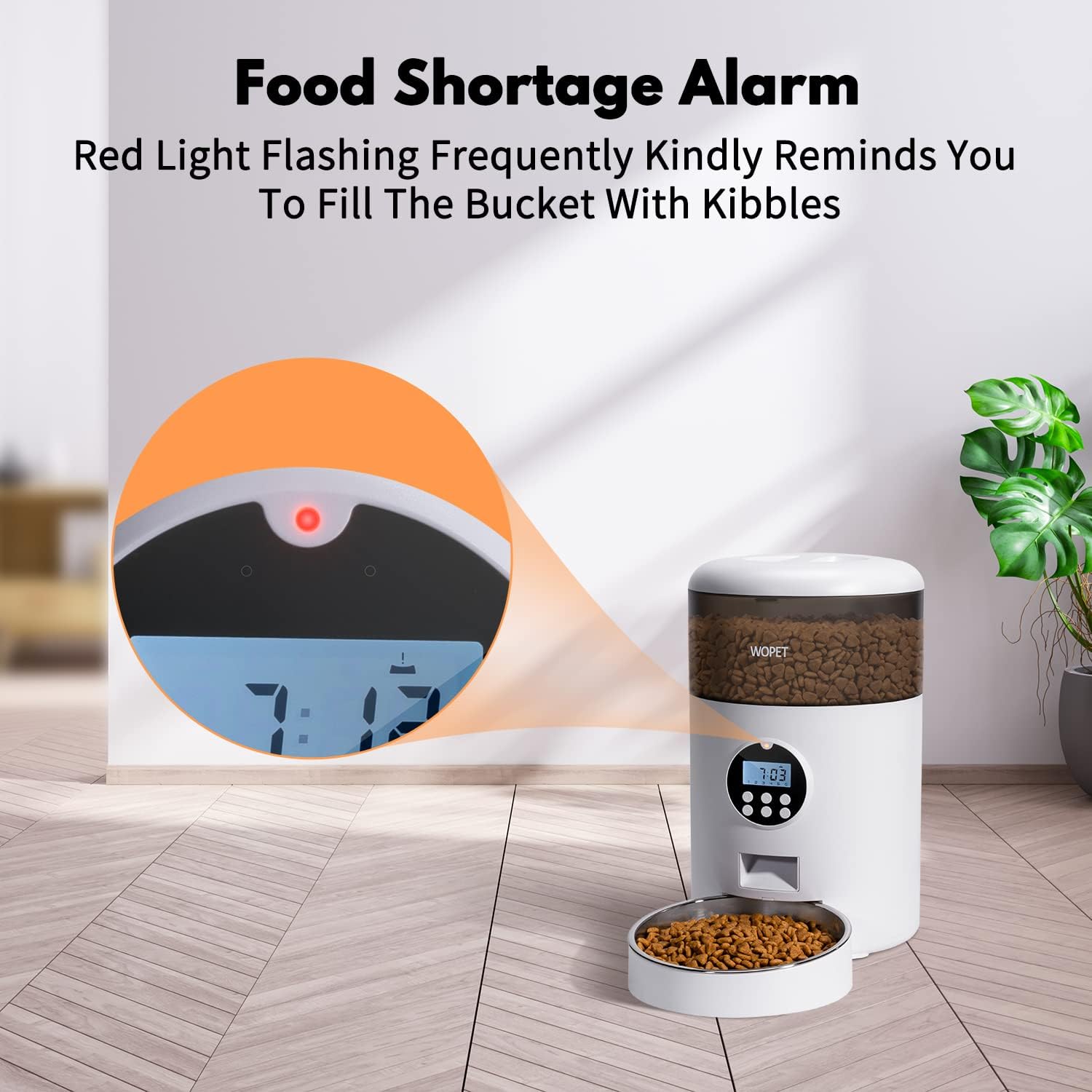
The red light on the control panel indicates a food shortage, prompting a refill.
8. Specifications
| Feature | Specification |
|---|---|
| Capacity | 4L / 17 cups |
| Material | Plastic (BPA-free), Stainless Steel Bowl |
| Kibble Size | 0.07-0.6 inches (2-15mm) dry food |
| Feeding Schedule | 1-6 meals per day |
| Portion Control | Up to 20 portions per meal |
| Voice Recording | 10-second personalized message |
| Power Supply | 5V DC Adapter (included), 3 x D-size Batteries (not included) |
| Dimensions | 8.2 x 7.8 x 12.8 inches |
| Item Weight | 3.91 pounds |

Product dimensions for proper placement and fit.
9. Warranty and Support
For warranty information, technical support, or any inquiries regarding your WOPET 4L Automatic Pet Feeder, please refer to the warranty card included in your product packaging or visit the official WOPET website. You may also contact WOPET customer service directly for assistance.
Thank you for choosing WOPET!