1. Introduction
Thank you for purchasing the Facmogu 33BT Bluetooth Power Amplifier. This manual provides detailed instructions for the proper setup, operation, and maintenance of your device. Please read this manual thoroughly before use to ensure optimal performance and safety.
The Facmogu 33BT is a versatile 2-channel stereo amplifier designed for home audio systems. It features Bluetooth connectivity, USB/SD card playback, FM radio, and dual microphone inputs for karaoke. With its compact design and multiple input options, it serves as a central hub for your audio entertainment.

Image 1.1: Facmogu 33BT Bluetooth Power Amplifier connected to a speaker in a living room environment. This image illustrates the amplifier's compact size and its integration into a home audio setup.
2. Safety Instructions
- Read all instructions before operating the appliance.
- Keep this manual for future reference.
- Do not expose this appliance to rain or moisture.
- Do not block any ventilation openings. Ensure adequate airflow around the unit.
- Do not install near any heat sources such as radiators, heat registers, stoves, or other apparatus (including amplifiers) that produce heat.
- Protect the power cord from being walked on or pinched, particularly at plugs, convenience receptacles, and the point where they exit from the appliance.
- Only use attachments/accessories specified by the manufacturer.
- Unplug this appliance during lightning storms or when unused for long periods of time.
- Refer all servicing to qualified service personnel. Servicing is required when the appliance has been damaged in any way, such as power-supply cord or plug is damaged, liquid has been spilled or objects have fallen into the appliance, the appliance has been exposed to rain or moisture, does not operate normally, or has been dropped.
3. Package Contents
Please check the package for the following items:
- Facmogu 33BT Bluetooth Power Amplifier Unit
- Remote Control
- AC Power Cable
- FM Antenna
- User Manual (this document)
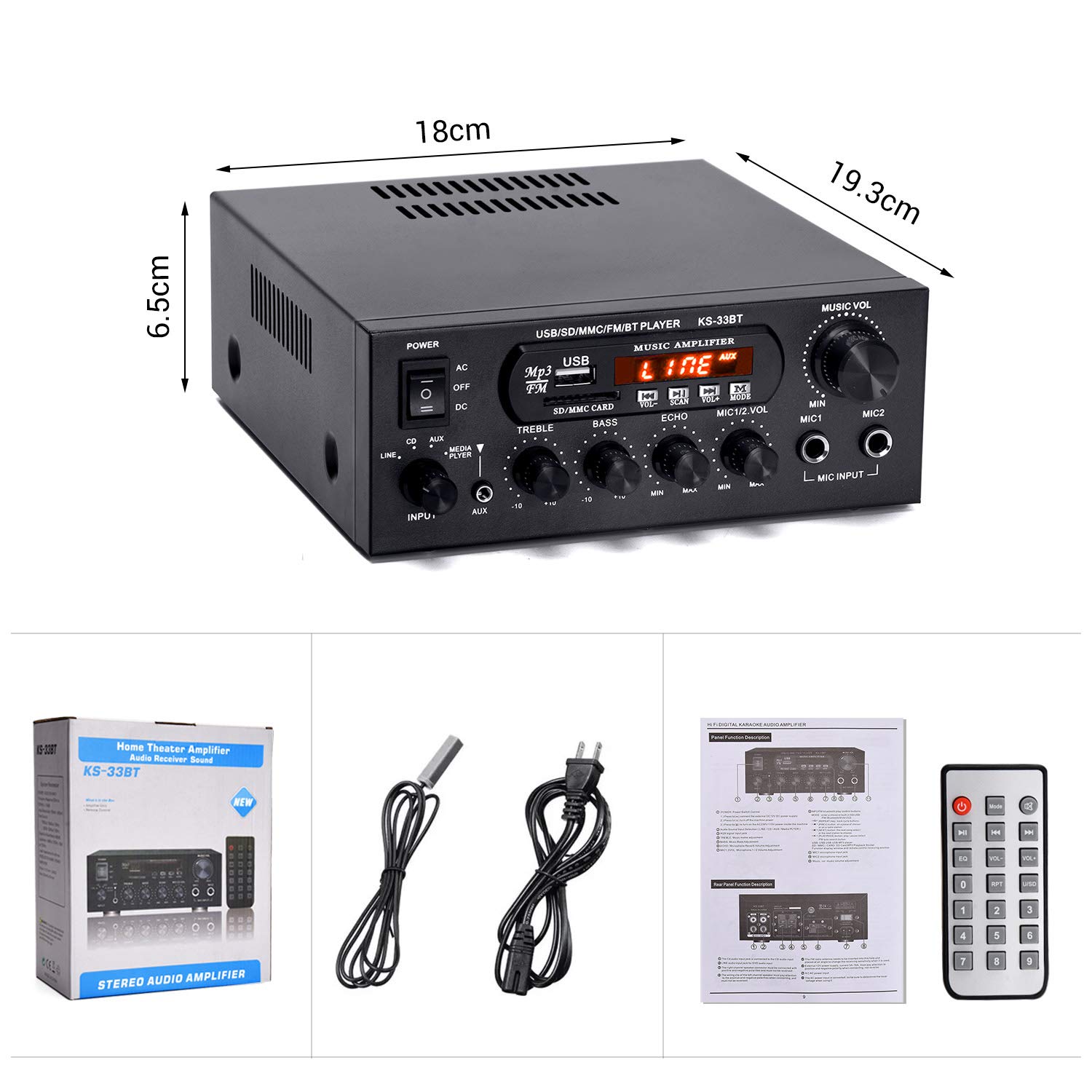
Image 3.1: The image displays the Facmogu 33BT amplifier unit, its remote control, AC power cable, and the instruction manual, representing the typical contents found within the product packaging.
4. Product Overview
4.1 Front Panel Controls

Image 4.1: Detailed view of the amplifier's front panel with labels for each control and input.
- Power Switch: Toggles the amplifier on or off.
- USB Port: For connecting USB flash drives for audio playback.
- SD Card Slot: For inserting SD/MMC cards for audio playback.
- LED Display: Shows current mode, track information, and FM frequency.
- Volume Control (MUSIC VOL): Adjusts the master volume for music playback.
- Input Selector (CD, LINE, AUX, MEDIA PLAYER): Selects the audio input source.
- Treble Control: Adjusts the high-frequency response of the audio.
- Bass Control: Adjusts the low-frequency response of the audio.
- Echo Control: Adjusts the echo effect for microphone inputs.
- MIC 1/2 VOL: Adjusts the volume for microphone inputs.
- MIC Input (MIC1, MIC2): 6.35mm jacks for connecting microphones.
4.2 Rear Panel Connections

Image 4.2: Detailed view of the amplifier's rear panel with labels for each connection port.
- Audio Input (CD, LINE): RCA stereo inputs for external audio sources.
- Left Channel Speaker Output: Terminal for connecting the left speaker.
- Right Channel Speaker Output: Terminal for connecting the right speaker.
- FM ANT: Connector for the FM radio antenna.
- Voltage Conversion Switch (115V/230V): Selects the appropriate input voltage. Ensure this is set correctly for your region before powering on.
- AC Power Input: For connecting the AC power cable.
- DC 12V Power Input: Alternative power input for 12V DC sources.
4.3 Internal Components

Image 4.3: An internal view of the Facmogu 33BT amplifier, highlighting the silent aluminum radiator for efficient heat dissipation and the robust transformer for stable power delivery.
5. Setup
5.1 Speaker Connection
- Ensure the amplifier is powered off and unplugged.
- Connect your passive speakers to the speaker output terminals on the rear panel. Match the positive (+) terminal on the amplifier to the positive (+) terminal on the speaker, and the negative (-) to the negative (-).
- Ensure all connections are secure to prevent short circuits.
5.2 Audio Source Connection
- RCA Inputs (CD, LINE): Use RCA cables to connect external audio devices such as CD players, DVD players, or other audio sources to the corresponding input jacks on the rear panel.
- AUX Input: Use a 3.5mm to RCA cable (not included) to connect devices with a 3.5mm audio output to the AUX input on the front panel.
- USB/SD Card: Insert a USB flash drive or SD/MMC card into the respective slot on the front panel.
5.3 Power Connection
- Before connecting power, verify the Voltage Conversion Switch on the rear panel is set to the correct voltage for your region (115V or 230V). Incorrect setting can damage the unit.
- Connect the supplied AC power cable to the AC Power Input on the rear panel and then to a wall outlet.
- Alternatively, for 12V DC operation, connect a compatible 12V DC power supply (not included) to the DC 12V Power Input.
6. Operating Instructions
6.1 Powering On/Off
Press the Power Switch on the front panel to turn the amplifier on or off. The LED display will illuminate when the unit is powered on.
6.2 Selecting Input Source
Use the Input Selector button on the front panel or the corresponding button on the remote control to cycle through available input sources: CD, LINE, AUX, MEDIA PLAYER (for USB/SD/Bluetooth/FM).
6.3 Bluetooth Operation
- Select the 'MEDIA PLAYER' input mode. The LED display will show 'BLUE' or 'BT'.
- On your mobile device, enable Bluetooth and search for available devices.
- Select 'BT-AUDIO' or similar from the list to pair. A confirmation tone will sound upon successful pairing.
- You can now play audio from your device through the amplifier.
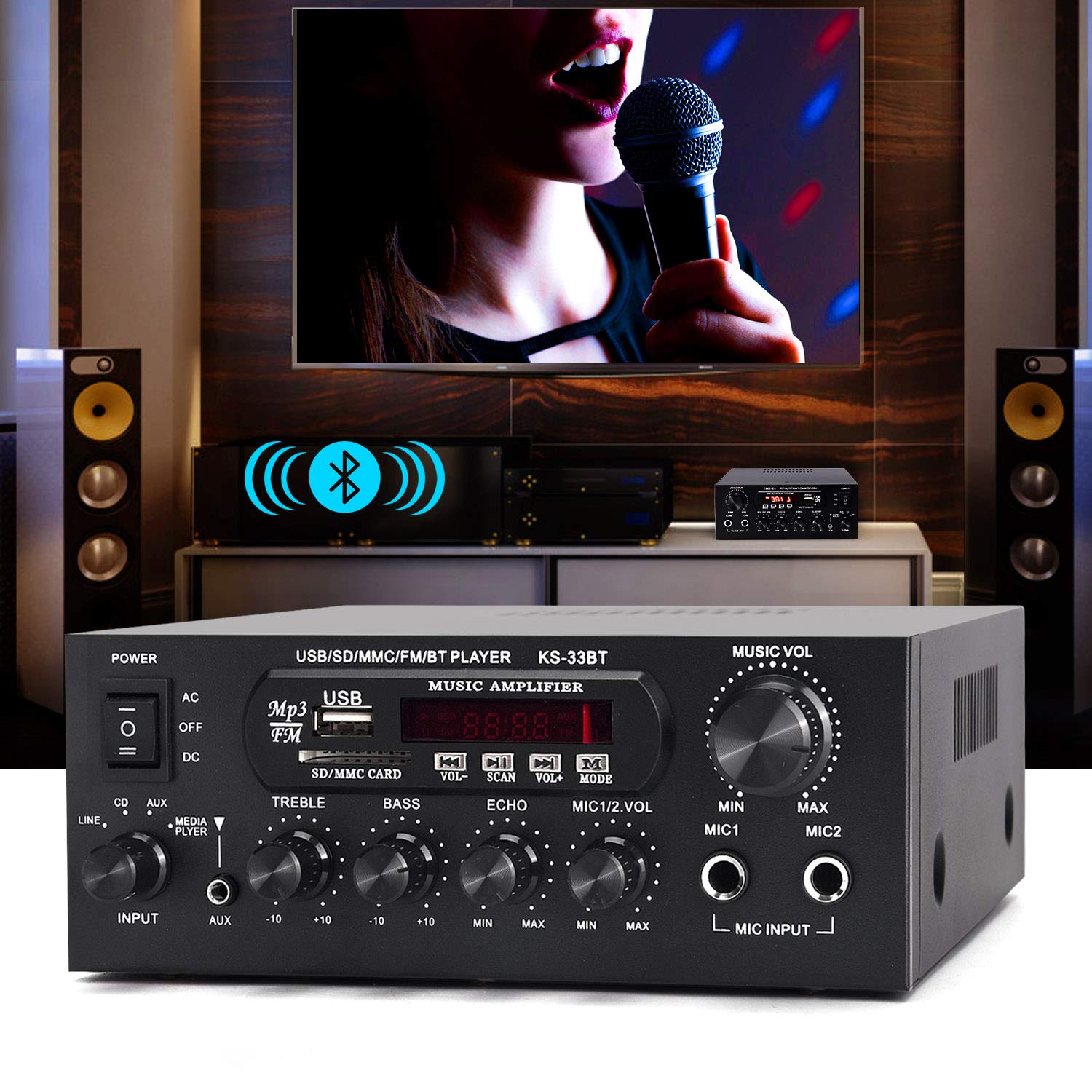
Image 6.1: The amplifier is shown wirelessly connected to a smartphone via Bluetooth, indicating active audio streaming to connected speakers.
6.4 USB/SD Card Playback
- Insert a USB flash drive or SD/MMC card containing MP3 audio files into the respective slot.
- The amplifier will automatically switch to 'MEDIA PLAYER' mode and begin playback.
- Use the 'PREV', 'NEXT', 'PLAY/PAUSE' buttons on the front panel or remote control to manage playback.
6.5 FM Radio Operation
- Connect the supplied FM antenna to the 'FM ANT' port on the rear panel.
- Select the 'MEDIA PLAYER' input mode and cycle until 'FM' appears on the display.
- Use the 'SCAN' button to automatically search and save available FM stations.
- Use the 'PREV' and 'NEXT' buttons to navigate through saved stations.
6.6 Microphone Usage
- Connect up to two microphones to the 'MIC1' and 'MIC2' input jacks on the front panel.
- Adjust the microphone volume using the 'MIC 1/2 VOL' knob.
- Adjust the echo effect using the 'ECHO' knob.
6.7 Tone and Master Volume Control
- MUSIC VOL: Rotate this large knob to adjust the overall music volume.
- TREBLE: Rotate to increase or decrease high frequencies.
- BASS: Rotate to increase or decrease low frequencies.
6.8 Remote Control
The included remote control allows for convenient operation of the amplifier from a distance. Functions include power on/off, input selection, volume control, track navigation, and FM tuning.
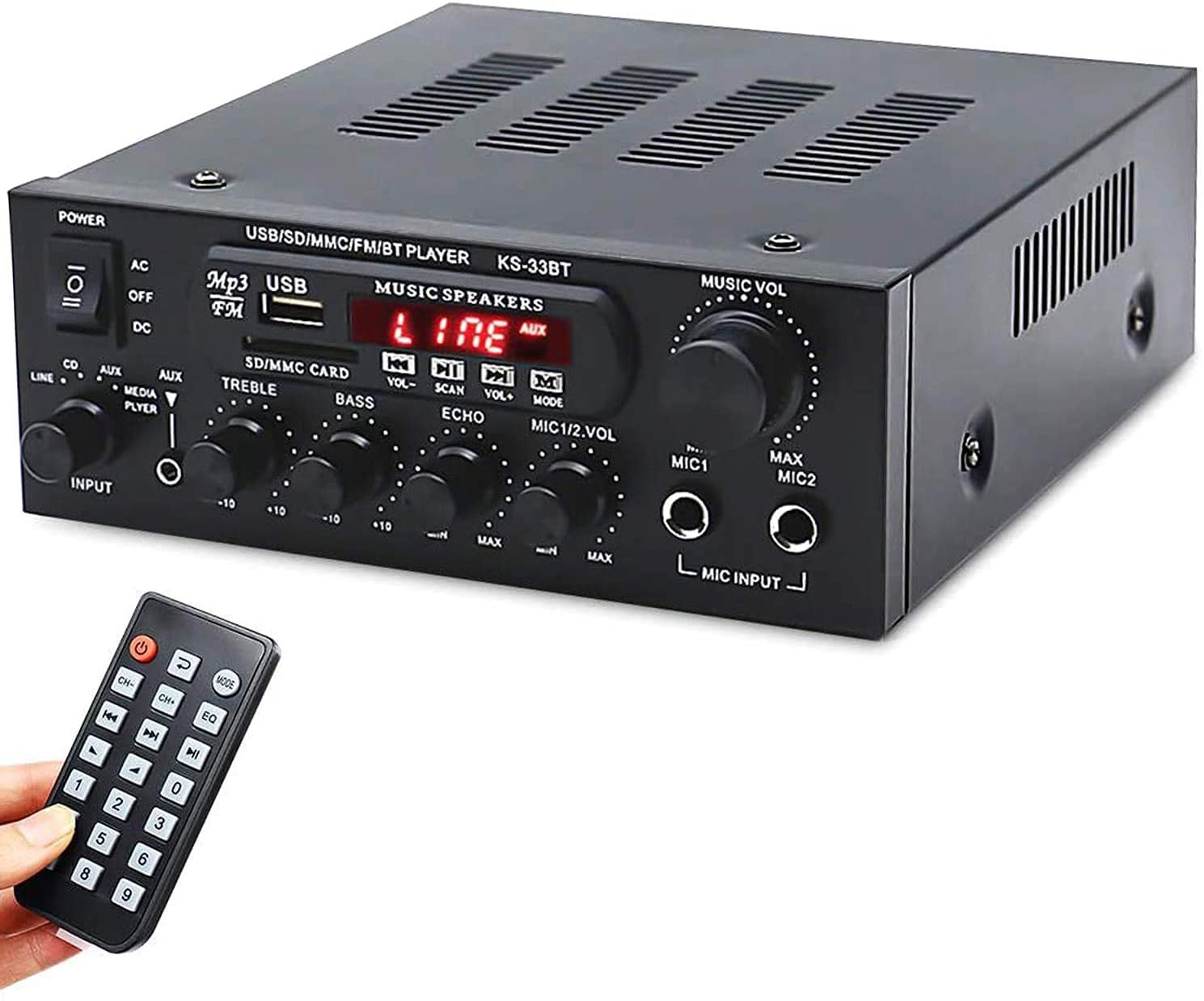
Image 6.2: The Facmogu 33BT amplifier is displayed alongside its remote control, which provides convenient wireless operation for various functions.
6.9 Demonstration Video
Video 6.1: This video demonstrates the Facmogu 33BT amplifier playing music through connected speakers, showcasing its audio output capabilities.
7. Maintenance
- Cleaning: Use a soft, dry cloth to clean the exterior of the amplifier. Do not use liquid cleaners or aerosols.
- Ventilation: Ensure the ventilation openings are clear of dust and debris to prevent overheating.
- Storage: When not in use for extended periods, store the amplifier in a cool, dry place away from direct sunlight and extreme temperatures.
- Power Cord: Regularly inspect the power cord for any signs of damage. If damaged, discontinue use and replace with a manufacturer-approved cord.
8. Troubleshooting
| Problem | Possible Cause | Solution |
|---|---|---|
| No power | Power cord not connected; Power switch off; Incorrect voltage setting; Power outlet fault. | Check power cord connection; Turn power switch on; Verify voltage switch (115V/230V); Test power outlet with another device. |
| No sound output | Incorrect input source selected; Speaker wires loose or incorrectly connected; Volume too low; Mute activated; Faulty audio source. | Select correct input source; Check speaker wire connections (positive/negative); Increase master volume; Ensure mute is off; Test with a different audio source. |
| Bluetooth not connecting | Amplifier not in Bluetooth mode; Device not in pairing mode; Amplifier too far from device; Interference. | Switch amplifier to Bluetooth mode; Ensure device Bluetooth is on and searching; Move device closer to amplifier; Reduce interference from other wireless devices. |
| USB/SD card not playing | Incorrect file format; Card/drive not inserted correctly; Corrupted files. | Ensure files are MP3 format; Reinsert USB/SD card; Try a different USB/SD card with known good files. |
| Microphone not working | Microphone not connected; MIC VOL too low; Faulty microphone. | Connect microphone securely; Increase MIC VOL; Test with a different microphone. |
9. Specifications
| Feature | Detail |
|---|---|
| Brand | Facmogu |
| Model | 33BT (KS-33BT) |
| Number of Channels | 2 |
| Voltage | 110 Volts (with 115V/230V selectable switch) |
| Package Dimensions | 10.2 x 8.58 x 3.98 inches |
| Weight | 4.01 Pounds |
| Date First Available | September 1, 2021 |
Image 9.1: This image provides a visual representation of the amplifier's dimensions, indicating its width, depth, and height for reference.
10. Warranty and Support
For warranty information and customer support, please refer to the documentation included with your purchase or contact Facmogu customer service directly. Keep your purchase receipt as proof of purchase for any warranty claims.
For further assistance, you may visit the official Facmogu store on Amazon: Facmogu Store
