
1. Introduction
This manual provides comprehensive instructions for the ZdalaMit 101018E0036 Replacement Remote Control. This remote is designed to function as a direct replacement for original remotes of compatible Magnavox Roku TV models, offering immediate usability without complex programming.
Important Note: This remote is specifically for Magnavox Roku TVs. It is not compatible with standalone Roku players, Roku boxes, or Roku sticks.
2. Package Contents
- 1x ZdalaMit 101018E0036 Replacement Remote Control
Batteries are not included and must be purchased separately.
3. Setup
3.1 Battery Installation
- Locate the battery compartment on the back of the remote control.
- Slide open the battery compartment cover.
- Insert two (2) 1.5V AAA alkaline batteries, ensuring correct polarity (+ and -) as indicated inside the compartment.
- Close the battery compartment cover securely.
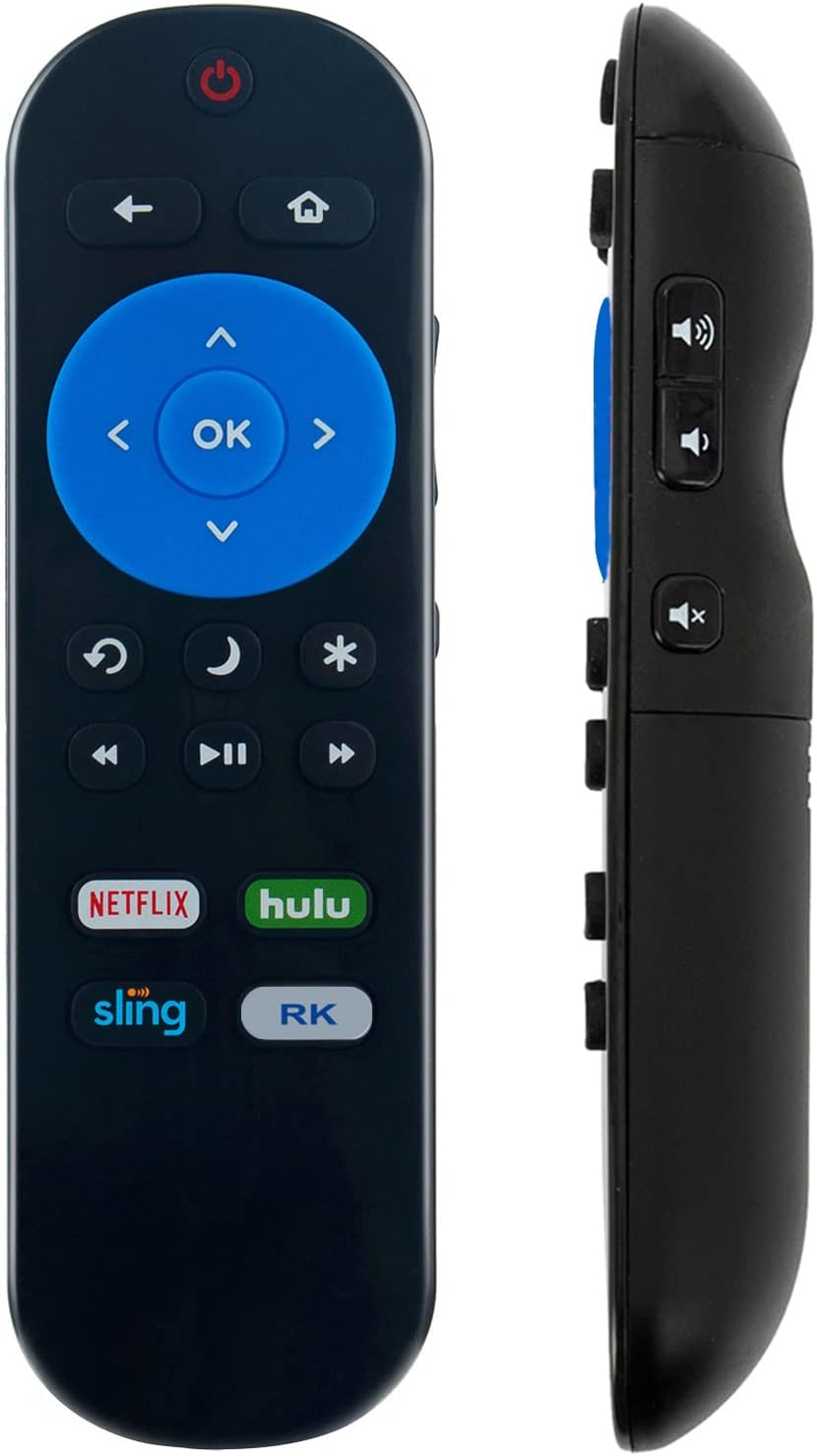
Image 1: Front view of the ZdalaMit 101018E0036 Replacement Remote Control. Shows the power button, navigation pad, and dedicated streaming service buttons.
3.2 Initial Use
No programming or pairing is required for this replacement remote. Once batteries are correctly installed, the remote is ready for immediate use with compatible Magnavox Roku TV models.
3.3 Compatibility
This remote control is compatible with the following Magnavox Roku TV models:
- 32MV319R/F7, 32MV319R
- 43MV349R/F7, 43MV349R
- 50MV349R/F7, 50MV349R
- 55MV379R/F7, 55MV379R
- 65MV379R/F7, 65MV379R
This remote is NOT compatible with standalone Roku players, Roku boxes, or Roku sticks.
4. Operating Instructions
Point the remote control directly at your Magnavox Roku TV. Ensure there are no obstructions between the remote and the TV's infrared receiver.
4.1 Button Functions
The remote features standard buttons for navigating your Magnavox Roku TV:
- Power (⏻): Turns the TV on or off.
- Back (←): Returns to the previous screen or menu.
- Home (⌂): Navigates to the Roku Home screen.
- Navigation Pad (Up, Down, Left, Right): Moves cursor or selection on screen.
- OK: Confirms a selection or action.
- Volume Up/Down (🔊 / 🔉): Adjusts the TV volume.
- Mute (🔇): Mutes or unmutes the TV audio.
- Instant Replay (↻): Jumps back a few seconds in video playback.
- Sleep Timer (🌛): Accesses sleep timer settings.
- Star Button (✱): Accesses options or settings within an app.
- Rewind (⏪): Rewinds video playback.
- Play/Pause (⏯): Plays or pauses video playback.
- Fast Forward (⏩): Fast forwards video playback.
- Dedicated Streaming Service Buttons (Netflix, Hulu, Sling, RK): Direct access to these streaming applications.

Image 2: Side view of the ZdalaMit 101018E0036 Replacement Remote Control, highlighting its ergonomic design and side-mounted volume and mute buttons.
5. Maintenance
5.1 Battery Replacement
When the remote control's performance degrades or it stops responding, replace the batteries. Always replace both AAA batteries simultaneously with new ones. Do not mix old and new batteries, or different types of batteries.
5.2 Cleaning
To clean the remote control, use a soft, dry cloth. Do not use liquid cleaners, aerosols, or abrasive materials, as these may damage the remote's surface or internal components.
5.3 Storage
Store the remote control in a cool, dry place away from direct sunlight and extreme temperatures. If the remote will not be used for an extended period, it is recommended to remove the batteries to prevent leakage.
6. Troubleshooting
- Remote not responding:
- Ensure batteries are correctly installed with proper polarity.
- Replace old batteries with new 1.5V AAA alkaline batteries.
- Check for any obstructions between the remote and the TV's infrared sensor.
- Ensure you are within the effective range and pointing the remote directly at the TV.
- Remote works intermittently:
- This often indicates low battery power. Replace batteries.
- Verify line of sight to the TV.
- Remote does not control Roku player/box/stick:
This remote is designed exclusively for Magnavox Roku TVs and is not compatible with standalone Roku streaming devices. Please refer to the compatibility section for supported TV models.
7. Specifications
| Model Number | 101018E0036 |
| Brand | ZdalaMit |
| Compatible Devices | Magnavox Roku TVs (specific models listed in Section 3.3) |
| Power Supply | 2 x 1.5V AAA Alkaline Batteries (not included) |
| Dimensions (L x W x H) | 4.5 x 1.5 x 0.5 inches (approx.) |
| Item Weight | 1.5 ounces (approx.) |
| Color | Black |
| Special Feature | Ergonomic Design |
8. Support
For any questions or assistance regarding your ZdalaMit 101018E0036 Replacement Remote Control, please contact the seller or manufacturer's customer support. We are committed to providing support for our products.