1. Introduction
This manual provides essential instructions for the safe operation and maintenance of your Potensic T25 2K GPS FPV Camera Drone. Please read this manual thoroughly before operating the drone to ensure proper usage and to prevent damage or injury. Keep this manual for future reference.
2. Components
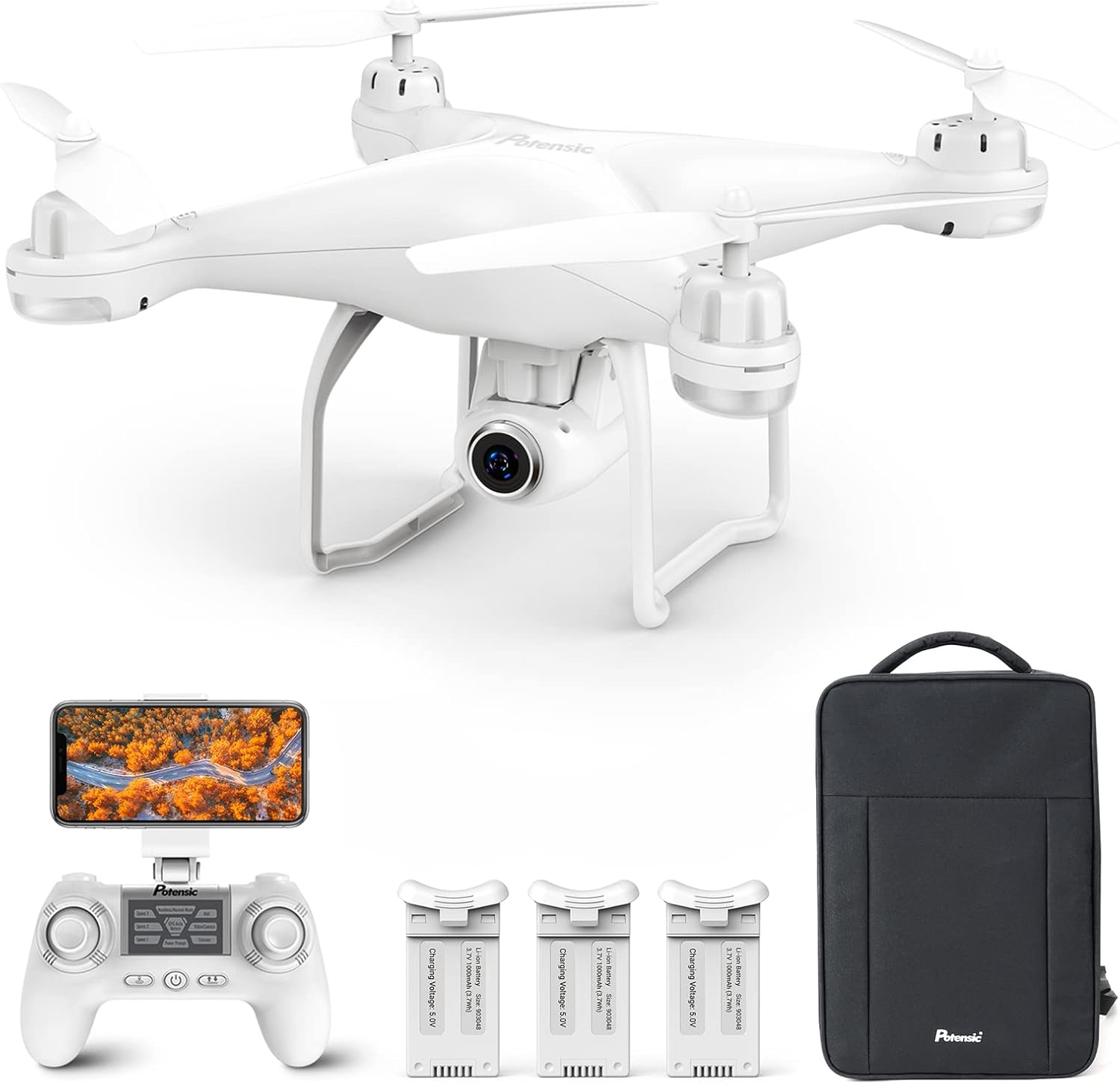
The Potensic T25 drone package includes the following items:
- Potensic T25 Drone
- Remote Control
- 3 x Intelligent Flight Batteries
- Backpack for transport
- USB Charging Cable
- Spare Propellers
- Propeller Guards
- User Manual (this document)
3. Key Features
- 2K HD 75° Adjustable Camera: Equipped with a 2K HD camera for capturing high-resolution photographs and videos. The camera angle can be adjusted remotely during flight, offering a 120° Field of View (FOV).
- Extended Flight Time: Includes three upgraded 1000 mAh intelligent batteries, providing up to 30 minutes of flight time per battery.
- GPS Auto Return & Stable Flight: Features a dual positioning system (GPS and Optical Flow Positioning) for enhanced flight stability. The drone can automatically return to its home point upon pressing the Return-to-Home (RTH) button, loss of signal, or low battery.
- Intelligent Flight Modes: Supports various user-friendly modes including Headless Mode, Altitude Hold, One Key Take-off/Landing for beginners, and advanced modes like Follow Me and Waypoint Fly for enriched flight experiences.
- Portable Design: Comes with a backpack for convenient outdoor use. The drone's weight is less than 250g, which may exempt it from FAA registration requirements in some regions.
4. Setup
4.1 Charging Batteries
Ensure all drone and remote control batteries are fully charged before each flight. Use the provided USB charging cable. The intelligent flight batteries are 1000 mAh Lithium Polymer batteries.
4.2 Propeller Installation
- Identify the 'A' and 'B' marked propellers and motors.
- Attach 'A' propellers to 'A' motors and 'B' propellers to 'B' motors. Ensure they are securely fastened.
- Install propeller guards if desired for added protection.
4.3 Remote Control and App Connection
- Power on the drone and the remote control.
- Download and install the Potensic drone application on your smartphone.
- Connect your smartphone to the drone's Wi-Fi network.
- Open the Potensic app to establish a connection and view the FPV feed.
5. Operating Instructions
5.1 Pre-Flight Checklist
- Ensure all batteries are fully charged.
- Check that propellers are correctly installed and secure.
- Verify the drone and remote control are paired.
- Confirm GPS signal acquisition before flying outdoors.
- Fly in open areas, away from obstacles, people, and animals.
5.2 Basic Flight Controls
- One Key Take-off/Landing: Press the designated button on the remote control for automatic take-off or landing.
- Altitude Hold: The drone maintains a stable altitude, allowing for easier control and photography.
- Headless Mode: In this mode, the drone's orientation is relative to the pilot, simplifying flight control regardless of the drone's front direction.
5.3 Intelligent Flight Modes
The Potensic T25 offers advanced flight modes for enhanced user experience:
- Follow Me Mode: The drone will automatically follow the remote control or the connected smartphone, capturing footage as you move.
- Waypoint Fly: Plan a custom flight path by drawing points on the map within the app. The drone will then fly along the specified route.


5.4 Camera Operation and FPV
The drone is equipped with a 2K HD camera. You can adjust its angle by 75° via the remote control. The FPV (First Person View) feature allows real-time video transmission to your smartphone, enabling you to see what the drone sees.


5.5 GPS Auto Return
For safety, the drone can automatically return to its take-off point. This feature activates under the following conditions:
- Manual activation via the RTH button on the remote control.
- Loss of signal between the drone and the remote control.
- Low battery level.

5.6 Product Video Overview
Video: An official product video from Potensic showcasing the T25 drone's features, including one-key take-off/landing, dual GPS, Follow Me mode, Waypoint Fly, Headless Mode, LED lights, and Smart Return Home functionality.
6. Maintenance
6.1 Battery Care
- Always use the original charger and cables.
- Do not overcharge or over-discharge batteries.
- Store batteries in a cool, dry place away from direct sunlight and extreme temperatures.
- If storing for extended periods, charge batteries to approximately 50-60% capacity.
6.2 Cleaning and Storage
- Clean the drone with a soft, dry cloth. Avoid using solvents or harsh chemicals.
- Regularly check propellers for damage and replace if necessary.
- Store the drone and its components in the provided backpack to protect them from dust and physical damage.
7. Troubleshooting
If you encounter issues with your Potensic T25 drone, refer to the following common problems and solutions:
| Problem | Possible Cause | Solution |
|---|---|---|
| Drone does not power on | Low or uncharged battery | Ensure batteries are fully charged and correctly inserted. |
| Drone cannot connect to remote control/app | Incorrect pairing procedure; Wi-Fi interference | Follow the pairing instructions in the manual. Ensure no other devices are interfering with the Wi-Fi signal. |
| Unstable flight or drifting | Improper calibration; strong winds; damaged propellers | Perform IMU and compass calibration. Fly in calm conditions. Check and replace damaged propellers. |
| Poor camera image quality or no FPV feed | Weak Wi-Fi signal; camera lens obstruction; app issue | Ensure strong Wi-Fi connection. Clean the camera lens. Restart the app and drone. |
| GPS features (RTH, Follow Me) not working | Insufficient GPS satellites; flying indoors/under cover | Ensure the drone has acquired enough GPS satellites (usually 7 or more) before flight. Fly in open outdoor areas. |
8. Specifications
| Feature | Detail |
|---|---|
| Brand | Potensic |
| Model Name | T25 |
| Age Range (Description) | Adult |
| Color | White |
| Video Capture Resolution | 2K |
| Connectivity Technology | Wired (for charging), Wi-Fi (for FPV) |
| Skill Level | Beginner |
| Battery Capacity | 1000 Milliamp Hours (per battery) |
| Battery Cell Composition | Lithium Polymer |
| Product Dimensions | 7.48"L x 7.48"W x 4.3"H |
| Item Weight | 2.72 pounds |
9. Warranty and Support
Potensic offers a 360-day free return or exchange policy for this product. For any questions, technical assistance, or warranty claims, please contact Potensic customer support directly. Refer to the product packaging or the official Potensic website for the most current contact information.


