Introduction
The ColourNoise Sound Machine is designed to create a peaceful and conducive environment for sleep, relaxation, and focus. It features a wide array of soothing sounds, adjustable night light colors, and convenient timer settings, making it suitable for various uses including aiding sleep for adults and babies, enhancing focus during work, or simply creating a calming atmosphere.
This device combines 30 non-looping sleep sounds, 12 night light colors, and 10 brightness levels to cater to your specific needs. Its compact and portable design ensures it can be easily used at home, in the office, or during travel.

Image: The ColourNoise Sound Machine in black, showcasing its top control panel and the range of 12 available night light colors.
Package Contents
- ColourNoise Sound Machine
- Power Adapter
- USB Charging Cable
- User Manual
Setup
- Unboxing: Carefully remove all components from the packaging.
- Power Connection: Connect the provided USB charging cable to the sound machine's power input port. Plug the other end of the USB cable into the power adapter, and then plug the adapter into a standard electrical outlet. The device can also be powered via any compatible USB port.
- Placement: Place the sound machine on a stable, flat surface away from direct sunlight, heat sources, and moisture.

Image: The ColourNoise Sound Machine shown with its included power adapter and USB charging cable, illustrating how it is powered.
Operating Instructions
Familiarize yourself with the control panel on top of the device for easy operation.
Power On/Off
- Press the Power button (
 ) to turn the device on or off.
Sound Selection and Volume Control
- Sound Selection: Press the Next Sound button (
 ) or Previous Sound button (
 ) to cycle through the 30 available sounds. These include 3 white noises (brown, white, pink), 2 fan sounds (soft, loud), 18 natural sounds (sea waves, heavy rain, brook, fireplace, singing birds, water drop, etc.), and 7 soothing music tracks (piano, heartbeat, hushing sound, etc.).
 - Volume Adjustment: Use the '+' button to increase volume and the '-' button to decrease volume. There are 32 volume levels.

Image: A visual representation of the 30 soothing sounds available on the ColourNoise Sound Machine, including various nature sounds and white noise.
Night Light Control
- Light On/Off: Press the Light button (
 ) to turn the night light on or off.
 - Color Selection: With the light on, press the Light button repeatedly to cycle through the 12 available night light colors.
- Brightness Adjustment: Use the Brightness button (often integrated with the light button or a separate button, represented by a sun icon) to adjust between 10 brightness levels.
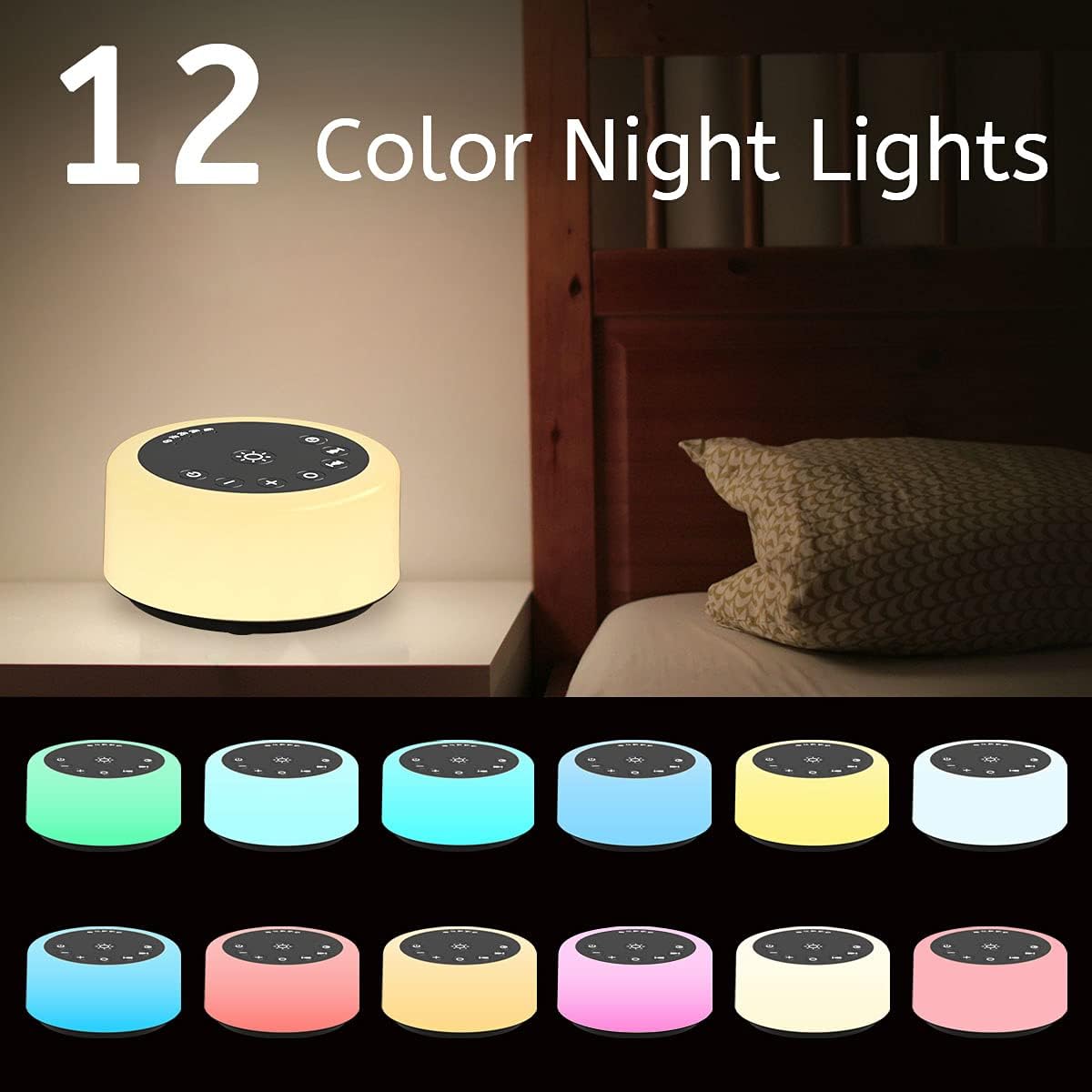
Image: The ColourNoise Sound Machine illuminating a bedroom, demonstrating its 12 color night light options.

Image: A user adjusting the brightness of the ColourNoise Sound Machine, illustrating the 10 available brightness levels.
Timer Settings
- Press the Timer button (
 ) to select a shutdown timer. Available options are 1 hour, 2 hours, 3 hours, 4 hours, or continuous play.
 - When the timer is nearing its end, the sound will gradually fade out before turning off completely, preventing an abrupt stop that might disturb sleep.

Image: A visual representation of the 5 timer settings (1H, 2Hs, 3Hs, 4Hs, Cont.) available on the ColourNoise Sound Machine.
Memory Function
- The device remembers your last sound, volume, and light settings when powered off, ensuring convenience for your next use.
Maintenance
- Cleaning: Unplug the device before cleaning. Use a soft, dry cloth to wipe the exterior. Do not use liquid cleaners or abrasive chemicals.
- Storage: When not in use for extended periods, store the device in a cool, dry place, away from direct sunlight and extreme temperatures.
Troubleshooting
| Problem | Possible Cause | Solution |
|---|---|---|
| Device does not power on. | Not properly connected to power source; Power outlet issue. | Ensure the power adapter and USB cable are securely connected. Try a different power outlet. |
| No sound or low sound. | Volume is too low; Sound is paused or muted. | Increase the volume using the '+' button. Ensure a sound is selected and not paused. |
| Night light not working. | Light is turned off; Brightness is set to minimum. | Press the Light button to turn it on. Increase brightness using the Brightness button. |
| Timer not functioning correctly. | Incorrect timer setting. | Press the Timer button repeatedly to select the desired duration (1h, 2h, 3h, 4h, or continuous). |
Specifications
| Feature | Detail |
|---|---|
| Model Number | CWN-R1 |
| Dimensions (L x W x H) | 10.8 x 10.8 x 5.33 cm (4.25 x 4.25 x 2.1 inches) |
| Weight | 290 g |
| Sound Tracks | 30 (3 White Noises, 2 Fan Sounds, 18 Natural Sounds, 7 Soothing Music) |
| Volume Levels | 32 |
| Night Light Colors | 12 |
| Brightness Levels | 10 |
| Timer Settings | 1h, 2h, 3h, 4h, Continuous Play |
| Power Source | Corded Electric (USB powered) |
| Material | Plastic Acrylonitrile Butadiene Styrene (ABS) |
| Manufacturer | ColourNoise |
Safety Information
This product should be used with caution to reduce the risk of electric shock. It is not a toy and should be kept out of reach of children. Prolonged exposure to high sound levels may be harmful to hearing.
- Do not disassemble or attempt to repair the device yourself.
- Keep away from water and high humidity environments.
- Use only the provided power adapter and USB cable, or a certified equivalent.
- Avoid dropping the device or subjecting it to strong impacts.
Warranty and Support
For any questions, concerns, or support needs regarding your ColourNoise Sound Machine, please contact the manufacturer directly. Refer to the product packaging or the seller's information for contact details.
The manufacturer, ColourNoise, is committed to providing assistance for their products.
Legal Disclaimer
Actual product packaging and materials may contain more and different information than what is shown on our website. We recommend that you do not rely solely on the information presented and that you always read labels, warnings, and directions before using or consuming a product.


