
Orbegozo RRW 1300
Orbegozo RRW 1300 Wi-Fi Energy Saving Radiator User Manual
Model: RRW 1300 | Brand: Orbegozo
Introduction
This user manual provides essential information for the safe and efficient operation of your Orbegozo RRW 1300 Wi-Fi Energy Saving Radiator. Please read this manual thoroughly before installation and use, and keep it for future reference.
The Orbegozo RRW 1300 is a 1300W Wi-Fi enabled radiator featuring an elegant aluminum design. It incorporates Real Warm Elements technology with 7 individual heating elements for homogeneous temperature distribution and reduced heat dispersion, ensuring a continuous and efficient heat flow. Key features include open window detection for energy saving, daily and weekly programming, three operating modes (Comfort, Eco, Anti-freeze), and a temperature range of 7°C to 35°C. It can be installed with both wall and floor supports and offers convenient control via the Orbegozo app, an LCD digital screen, and touch controls.
Safety Instructions
Always follow basic safety precautions when using electrical appliances to reduce the risk of fire, electric shock, and injury to persons.
- Ensure the power supply voltage matches the rating label on the appliance.
- Do not cover the radiator. Covering the radiator can lead to overheating and fire.
- Keep children and pets away from the hot surfaces of the radiator.
- Do not operate the appliance with a damaged cord or plug.
- Do not use the radiator in bathrooms, laundry areas, or similar indoor locations where it may come into contact with water.
- Unplug the radiator when not in use or before cleaning.
- Do not insert any objects into the ventilation or exhaust openings.
Product Overview

Figure 1: Front view of the Orbegozo RRW 1300 Wi-Fi Energy Saving Radiator with its elegant design and floor stands.
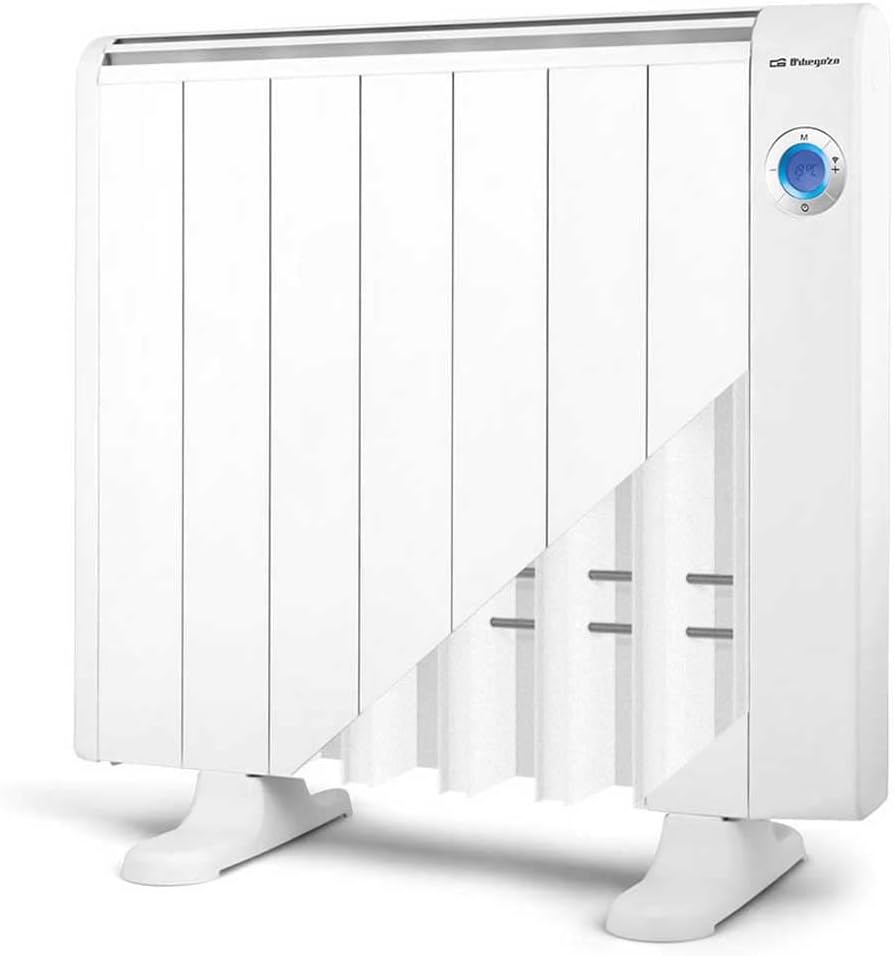
Figure 2: Cutaway view illustrating the internal Real Warm Elements technology with 7 individual heating elements for efficient heat distribution.

Figure 3: Detailed view of the digital LCD screen and touch controls, allowing for convenient temperature adjustment and mode selection.

Figure 4: The radiator shown with its approximate dimensions: 47.04 cm (width), 39.88 cm (depth), and 40.97 cm (height).
Setup and Installation
The Orbegozo RRW 1300 radiator offers flexible installation options: freestanding with included floor supports or wall-mounted.
Freestanding Installation:
- Carefully unpack the radiator and all accessories.
- Attach the provided floor supports to the base of the radiator using the supplied screws. Ensure they are securely fastened.
- Place the radiator on a flat, stable surface, ensuring adequate clearance from walls and furniture for proper air circulation.
Wall-Mounted Installation:
- Identify a suitable wall location, away from flammable materials and ensuring proper ventilation.
- Use the provided wall brackets and hardware. Mark the drilling points on the wall according to the bracket dimensions.
- Drill holes and insert wall plugs (if necessary). Securely attach the wall brackets to the wall.
- Carefully mount the radiator onto the installed wall brackets, ensuring it is stable and level.
Initial Power-Up:
- Before plugging in, ensure the radiator is correctly installed and positioned.
- Plug the power cord into a suitable electrical outlet.
- The LCD screen will illuminate, indicating the radiator is in standby mode.
Operating Instructions
Control Panel Overview:
The radiator features an intuitive digital LCD screen and touch controls for easy operation.
Figure 5: The control panel showing the LCD display and touch buttons for power, mode, and temperature adjustment.
Basic Operation:
- Power On/Off: Press the power button (usually indicated by a circle with a vertical line) on the control panel to turn the radiator on or off.
- Temperature Adjustment: Use the '+' and '-' buttons to set your desired temperature. The temperature range is from 7°C to 35°C.
- Mode Selection: Press the 'M' (Mode) button to cycle through the three operating modes:
- Comfort Mode: Maintains the set temperature for optimal comfort.
- Eco Mode: Operates at a lower power setting to save energy, maintaining a slightly reduced temperature.
- Anti-freeze Mode: Activates automatically when the room temperature drops below 7°C to prevent freezing.
Wi-Fi Connectivity and App Control:
The Orbegozo RRW 1300 can be controlled remotely via the Orbegozo app, available for smartphones.

Figure 6: The Orbegozo mobile application interface, enabling remote control and programming of the radiator.
- Download the "Orbegozo" app from your smartphone's app store (App Store for iOS or Google Play for Android).
- Ensure your radiator is powered on and your smartphone is connected to a 2.4 GHz Wi-Fi network (5 GHz networks are not supported for initial pairing).
- Follow the in-app instructions to pair your radiator with the app. This typically involves putting the radiator into pairing mode (refer to the radiator's display for Wi-Fi icon status) and entering your Wi-Fi credentials in the app.
- Once connected, you can control the radiator's power, temperature, modes, and programming from anywhere.
Programming Features:
- Daily and Weekly Programming: The radiator supports daily and weekly programming in one-hour increments. This feature allows you to set specific temperatures for different times of the day and week, optimizing energy consumption. This is best managed through the Orbegozo app for ease of use.
- Open Window Detection: This intelligent feature automatically detects a sudden drop in temperature (indicating an open window) and temporarily switches off the heating to prevent energy waste. The radiator will resume normal operation once the temperature stabilizes.
Maintenance
Regular maintenance ensures the longevity and efficient operation of your radiator.
- Cleaning: Before cleaning, always unplug the radiator and allow it to cool completely. Wipe the exterior surfaces with a soft, damp cloth. Do not use abrasive cleaners, solvents, or harsh chemicals, as these can damage the finish.
- Storage: If storing the radiator for an extended period, ensure it is clean and dry. Store it in a cool, dry place, preferably in its original packaging, to protect it from dust and damage.
- No Internal Maintenance: The internal components of the radiator do not require user maintenance. Do not attempt to open or repair the appliance yourself. Refer all servicing to qualified personnel.
Troubleshooting
| Problem | Possible Cause | Solution |
|---|---|---|
| Radiator does not turn on. | No power supply; Power button not pressed; Appliance in standby mode. | Check if the power cord is securely plugged into a working outlet. Press the power button on the control panel. |
| Radiator not heating sufficiently. | Temperature setting too low; Incorrect operating mode; Open window detected. | Increase the set temperature. Switch to Comfort mode. Close any open windows or doors. |
| Wi-Fi connection fails. | Incorrect Wi-Fi password; Not connected to 2.4 GHz network; Radiator not in pairing mode. | Double-check Wi-Fi password. Ensure your phone is on a 2.4 GHz network. Follow app instructions to put radiator into pairing mode. Restart the radiator and try again. |
| Unusual noises or smells. | First-time use (minor odors are normal); Internal issue. | A slight odor may occur during initial use, which will dissipate. If persistent or strong odors/noises occur, unplug immediately and contact customer support. |
Specifications
| Feature | Detail |
|---|---|
| Model Number | RRW 1300 |
| Brand | Orbegozo |
| Power Output | 1300 W |
| Dimensions (L x W x H) | 7.5 x 64.7 x 59 cm |
| Weight | 6.33 kg |
| Temperature Range | 7°C to 35°C |
| Operating Modes | Comfort, Eco, Anti-freeze |
| Connectivity | Wi-Fi (2.4 GHz) |
| Control | LCD Digital Screen, Touch Controls, Orbegozo App |
| Installation Type | Wall-mounted or Freestanding |
| Recommended Use | Indoor, Home (Living room or bedroom) |
| Thermal Coverage (Approx.) | 20 square meters |
Warranty and Support
Specific warranty details for the Orbegozo RRW 1300 radiator are not provided within this manual. Please refer to the warranty card included with your product packaging or contact Orbegozo customer support for detailed warranty information and service inquiries.
For technical support or assistance, please visit the official Orbegozo website or contact their customer service department. Keep your purchase receipt as proof of purchase for any warranty claims.
Ask a question about this manual
Ask about setup, troubleshooting, compatibility, parts, safety, or missing instructions. Manuals+ will review the question and use this page’s manual context to help answer it.