
Live Fine LVFWIFIPDF
LiveFine Smart WiFi Automatic Pill Dispenser User Manual
Brand: Live Fine | Model: LVFWIFIPDF
Introduction
The LiveFine Smart WiFi Automatic Pill Dispenser is designed to assist with organizing and dispensing medications, vitamins, and supplements. It features WiFi connectivity for remote monitoring and control via a mobile application, audible and visual alerts, and a secure locking mechanism. This manual provides detailed instructions for setting up, operating, maintaining, and troubleshooting your device to ensure effective medication management.
Key Features
- WIFI ENABLED SMART DISPENSER: Organize and dispense medications for up to 4 weeks with audio/visual alerts and a convenient phone app. Remote monitoring is available for patients, families, and caregivers.

Image: LiveFine Smart WiFi Automatic Pill Dispenser shown with its accompanying mobile application.
- CONVENIENT ONLINE MOBILE APP: The LiveFine Mobile App allows for easy adjustment of dispenser settings, notification reminders, and alarms. Family members and caregivers can connect to the app to monitor progress and send reminders.

Image: A smartphone screen showing the LiveFine app dashboard with medication schedule and cycle information.

Image: A smartphone screen showing the LiveFine app's alarm settings, allowing users to configure dosage times.
Video: An overview of the LiveFine WiFi Smart Automatic Pill Dispenser, demonstrating its features and mobile app connectivity.
- 11 INTERCHANGEABLE DOSAGE RINGS: Preset dosage templates provide multiple reminder options, improve dosage timing, and help prevent missed and double doses. 28 high-capacity slots accommodate multiple pills for minimal refills.

Image: A collection of 11 interchangeable dosage rings, each designed for different medication schedules.
- LCD DISPLAY & ADJUSTABLE ALERT OPTIONS: Large digital display shows time, upcoming alarm, tone and volume control options, battery indicator, and number of alarms set. Customization with 3 device beep patterns and 3 volume options.

Image: A detailed view of the pill dispenser's LCD screen, highlighting various indicators like time, alarm, and battery level.
- SIMPLE SETUP, USAGE & SECURITY: Plug-in, WiFi-enabled system sets up in seconds with 4-hour battery backup. Secure, lockable cover with manual key to block unauthorized access and avoid accidental spills. Sliding retrieval window provides greater accessibility.

Image: The pill dispenser featuring its secure lid and the included locking key for restricted access.

Image: The pill dispenser with its sliding retrieval window in the open position, showing easy access to medication.
Setup Guide
- Unboxing and Initial Power:
Carefully remove all components from the packaging. Insert the 4 AA batteries (included) into the battery compartment located on the underside of the dispenser. This provides backup power. Then, plug the dispenser into a power outlet using the provided USB power cable.
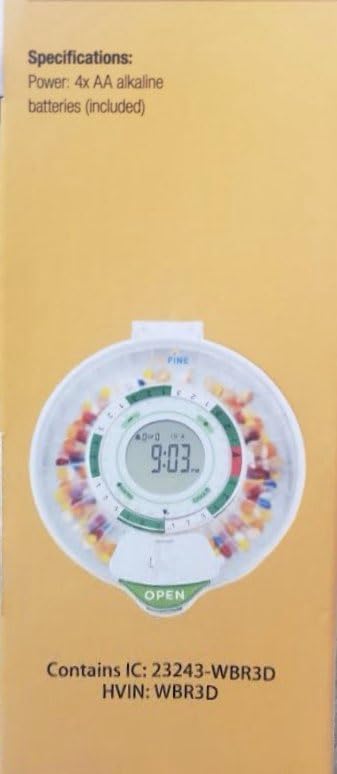
Image: The bottom of the dispenser with the battery compartment visible, where 4 AA batteries are inserted for backup power.
- Mobile App Installation and WiFi Connection:
Download the "LiveFine" app from your smartphone's app store. Follow the in-app instructions to connect your dispenser to your home WiFi network (supports 2.4GHz WiFi only). Ensure a strong WiFi signal for optimal performance. The app allows for remote control and monitoring of the dispenser.
Image: The dispenser connected to a smartphone via WiFi, illustrating the app's interface for setup.
For app download and more information, visit: LiveFine App Page
- Filling the Carousel and Selecting Dosage Rings:
Remove the clear carousel from the dispenser. Fill the 28 high-capacity slots with your prescribed pills, vitamins, and supplements. Select the appropriate dosage ring from the 11 included options based on your medication schedule (e.g., 1X per day for 28 days, 9X per day for 3 days). Place the selected ring onto the carousel.
Image: Various dosage rings are shown, indicating different medication frequencies and durations.
- Securing the Lid:
Once the carousel is filled and the dosage ring is in place, securely close the lid. Use the included manual key to lock the cover, preventing unauthorized access and accidental spills. This ensures the safety and integrity of your medication.
Image: The dispenser's lid is shown with the key inserted into the locking mechanism, securing the contents.
Operating Instructions
- Setting Time and Alarms:
You can set the current time and program up to 9 daily alarms directly on the dispenser's LCD control panel using the '+' and '-' buttons, or more conveniently via the LiveFine mobile app. The LCD display will show the current time and the next scheduled alarm.
Image: The LCD display showing time and alarm indicators, with buttons for manual adjustment.
- Adjusting Alarm Volume and Tone:
The dispenser offers 3 volume options and 3 different alarm tones. These can be adjusted through the LCD control panel or the mobile app to suit your preference. You can set the volume to high for distant alerts or mute it when audible alerts are not desired.

Image: The dispenser's control panel indicating options for setting timed reminders, selecting alarm tone, and controlling volume.
- Medication Dispensing:
When it's time for a dose, the dispenser will activate audible and visual alarms. The internal carousel will automatically rotate to present the correct medication compartment through the sliding retrieval window. Simply open the window and retrieve your pills. The alarms will automatically turn off once the medication is taken.
Image: The sliding retrieval window is open, allowing access to the dispensed medication.
- Monitoring via Mobile App:
The LiveFine app provides real-time information about your medication schedule, including the next alarm, remaining doses, and refill dates. You can also receive notifications on your phone to remind you when to take your medication. Multiple users (e.g., family members, caregivers) can connect to the dispenser via the app to monitor medication history and alarms.
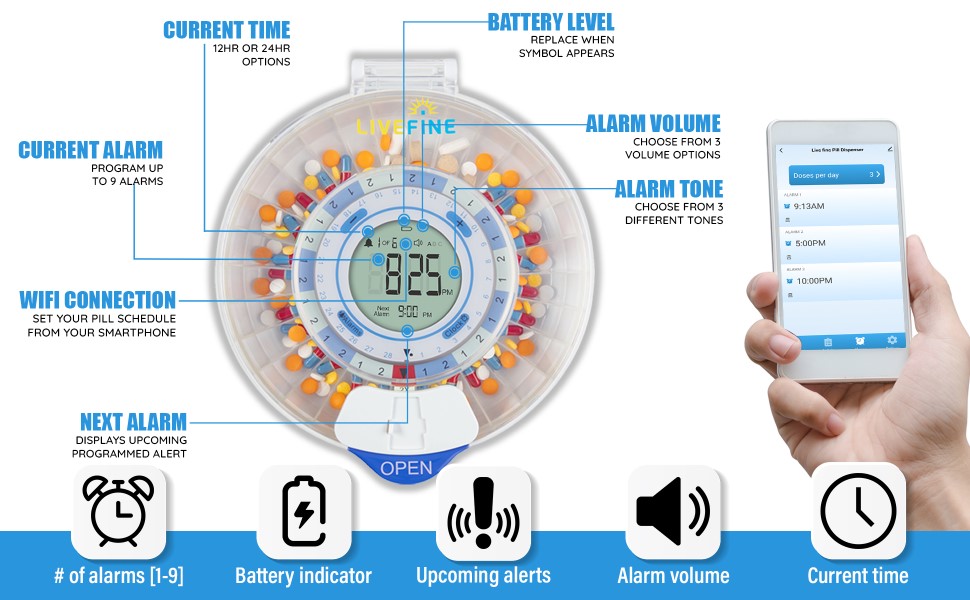
Image: A family is shown interacting with the pill dispenser and monitoring its status through the mobile app, emphasizing multi-user access.
Maintenance
- Cleaning:
To clean the dispenser, wipe the exterior with a soft, damp cloth. Do not submerge the unit in water or use abrasive cleaners. The removable carousel can be gently washed with mild soap and water, then thoroughly dried before reinserting.
- Battery Replacement:
The dispenser uses 4 AA batteries for backup power. Replace them when the battery indicator on the LCD display appears. Ensure the dispenser is plugged in or has fresh batteries to maintain settings during power outages or travel.
Image: The battery compartment on the underside of the dispenser, indicating where to replace the AA batteries.
Troubleshooting
- Dispenser Not Working / Low Battery:
The unit primarily operates via a USB power cable. Batteries are for backup only and last a few days. Ensure the dispenser is continuously plugged into a power source. If unplugged, the battery backup will activate, but it's not intended for long-term primary power.
- Voice Announcements / Annoying Sounds:
The dispenser may have voice announcements. Check the mobile app or the device's LCD control panel settings for options to adjust or mute the volume and tone of these alerts. There are typically 3 volume options available.
- No App Notifications:
While the app is designed to send notifications, some users report issues. Ensure your phone's notification settings for the LiveFine app are enabled. Also, verify that the dispenser has a stable 2.4GHz WiFi connection, as connectivity issues can prevent notifications.
- WiFi Connectivity Issues:
The dispenser only supports 2.4GHz WiFi networks. Ensure your router is configured for this frequency or that you are connecting to a 2.4GHz band. Place the dispenser where the WiFi signal is strong to avoid frequent disconnections and "phone is disconnected/reconnected" announcements.
- Device Malfunctions / Requires Reset:
If the device behaves unexpectedly, a reset may be required. Refer to the full user manual (PDF link in Support section) for detailed instructions on how to perform a device reset. This can often resolve minor operational glitches.
Specifications
| Feature | Detail |
|---|---|
| Product Dimensions | 7.99 x 9.09 x 2.56 inches; 1.98 Pounds |
| Item Model Number | LVFWIFIPDF |
| Manufacturer | Live Fine |
| ASIN | B09DMY6HCM |
| Color | Frosted Lid |
| Special Feature | Automatic |
| Included Components | 4 AA batteries |
Warranty and Support
For detailed warranty information and further support, please refer to the official user manual or contact Live Fine customer service.
- Official User Manual (PDF): Download PDF Manual
- Live Fine Brand Store: Visit Live Fine Store on Amazon
- LiveFine App Page: LiveFine App Information
Related documentsLVFWIFIPDF


Ask a question about this manual
Ask about setup, troubleshooting, compatibility, parts, safety, or missing instructions. Manuals+ will review the question and use this page’s manual context to help answer it.