
Introduction
This manual provides detailed instructions for the safe and efficient operation of your Retevis RB19P GMRS Walkie Talkies. Please read this manual thoroughly before using the product and retain it for future reference.
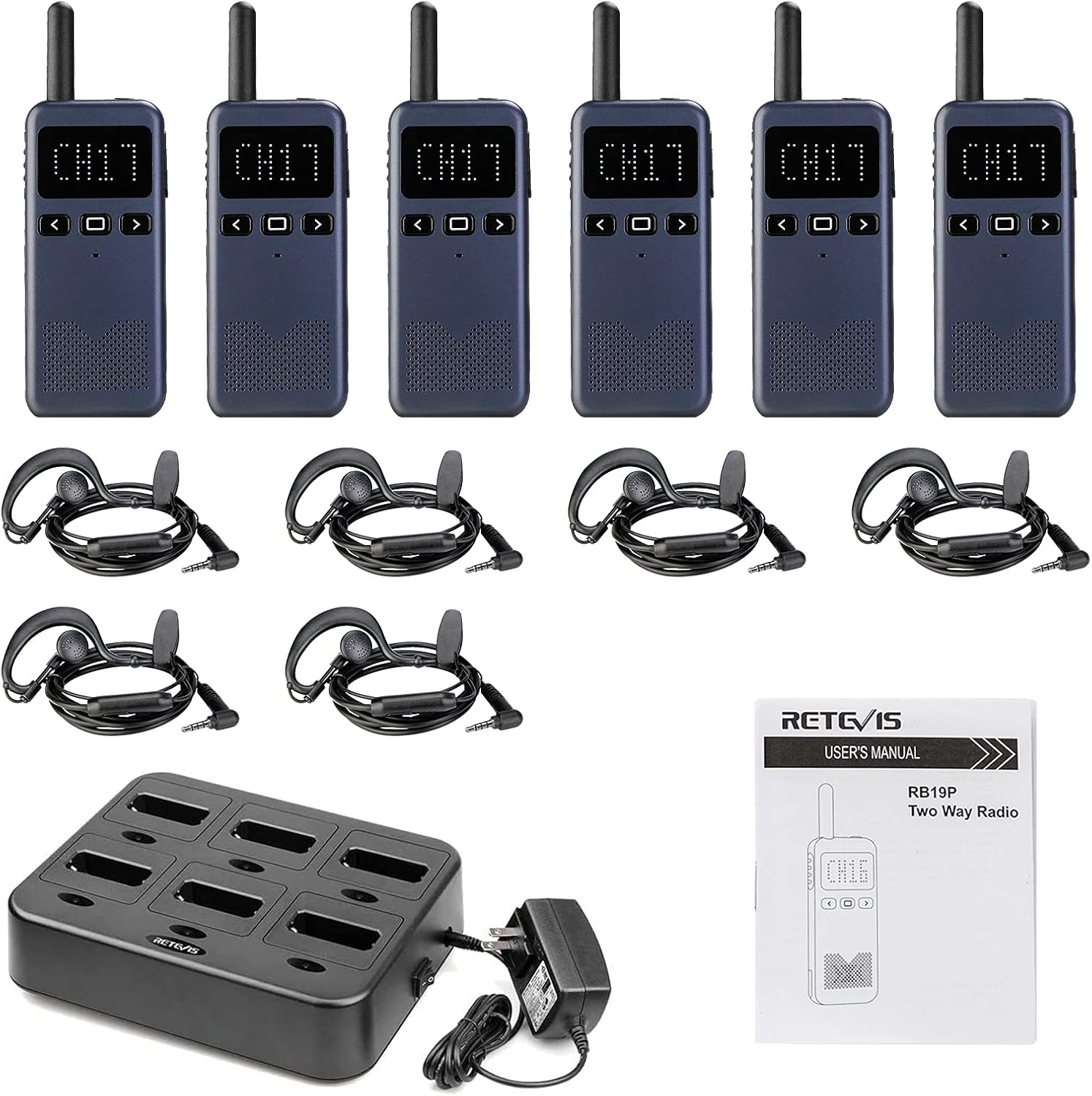
What's in the Box
- 6X RB19P GMRS Radios
- 6X G-type Earpiece
- 1X 6 Way Multi Unit Charger
- 1X Adapter
- 1X English Manual
Product Features
- Ultra-slim body design with a 1.7-inch screen for easy communication.
- 30 preset GMRS channels with enhanced penetration for longer range.
- 2000mAh Li-Ion battery providing 16 to 20 hours of heavy use.
- USB-C charging port for convenient charging.
- Includes earpiece and mic set with finger PTT for clear communication in noisy environments.
- Volume memory function to prevent excessively loud reboots.


Setup and Charging
Before first use, ensure the walkie talkie is fully charged. The device features a 2000mAh Li-Ion battery and can be charged via its USB-C port or the multi-unit charger.

To charge using the multi-unit charger, place the walkie talkie securely into an available slot. Ensure the charging indicator illuminates. A full charge typically takes approximately 4 hours.

Operating Instructions
Power On/Off
To power on or off, long press the power button located on the top of the radio. A voice prompt will confirm the action.
Volume Adjustment
Use the up and down arrow buttons on the front panel to adjust the volume. The display will show the current volume level.
Channel Selection
The RB19P has 30 preset GMRS channels. Use the left and right arrow buttons to cycle through the available channels. A voice prompt will announce the selected channel number.
VOX Hands-Free Operation
To activate VOX (Voice Operated Exchange) for hands-free communication, short press the square button twice. Ensure VOX is enabled before using an earpiece for hands-free operation.

Emergency Alarm
To activate the local and remote emergency alarm, long press the left arrow button. The radio will emit a loud alarm sound.
Keypad Lock/Unlock
To lock the keypad, long press the square button. To unlock, long press the square button again.
NOAA Weather Channel
The RB19P can access NOAA weather channels. Refer to the video for instructions on how to enter NOAA Regulation Mode and adjust channels.
Compatibility Notes
The Retevis RB19P (30 channels) supports direct calls on channels 1-5 for 16-channel radios, and channels 1-22 for 22-channel radios. Channels 23-30 of RB19P are repeater channels. Communication with other brands of walkie-talkies may require specific firmware; contact Retevis support for assistance.

Range Information
The effective range of your walkie talkie can vary significantly based on terrain, obstacles, atmospheric conditions, radio power, signal type, and antenna. While the RB19P offers strong penetration, dense environments like heavily wooded areas or urban settings with many buildings will reduce range.
How to extend further distance?
- Increase the transmission power (in theory, if the transmission power is doubled, the communication distance can be expanded to approximately 1.4 times the original distance).
- Improve the receiving sensitivity (adjust the squelch threshold of the walkie-talkie and use a high-gain antenna to correspondingly improve the receiving sensitivity of the walkie-talkie).
- Keep launching from a higher location.
- Keep your battery charged.
Specifications
| Item Weight | 9.1 ounces |
| Product Dimensions | 6.14 x 2.09 x 0.59 inches |
| Item Model Number | FA9059V-C9059C-C9154AX6 |
| Batteries | 1 Lithium Ion batteries required. (included) |
| Number of Channels | 30 |
| Special Feature | Ultra thin; high power; 2000mAh battery; USB-C; 1.7inch screen |
| Frequency Range | GMRS |
| Water Resistance Level | Not Water Resistant |
Warranty and Support
Retevis provides a 2-year warranty for the radio body and a 1-year warranty for accessories. For any issues or support, please contact Retevis via Amazon. They aim to reply within 12 hours.


