
FOREVER 5900495898951
Setty Powerbank 5000 mAh SPBL-05 User Manual
Model: SPBL-05 (5900495898951) | Brand: FOREVER
Introduction
The Setty Powerbank 5000 mAh SPBL-05 is a compact and portable power solution designed to keep your mobile devices charged on the go. With a 5000 mAh capacity, it can fully charge most smartphones. It features dual USB output ports, a Micro-USB input, and a USB-C input, along with a digital LCD display to show the battery level. This manual provides essential information for the safe and efficient use of your power bank.

Image: Angled view of the Setty Powerbank, highlighting its compact design and the digital LCD display showing "99" (indicating full charge).
Product Features
- High Capacity: 5000 mAh battery capacity, sufficient for a full charge of most smartphones.
- Dual Output Ports: Two USB-A output ports (1A each) allow charging of two devices simultaneously.
- Dual Input Ports: Equipped with both Micro-USB and USB-C input ports for convenient recharging of the power bank.
- Digital LCD Display: Clear display shows the exact battery percentage of the power bank.
- Compact Design: Small and lightweight, making it easy to carry for travel, school, or daily use.
- Included Cable: Comes with a Micro-USB charging cable.
Setup
1. Initial Charging of the Power Bank
Before using your Setty Powerbank for the first time, it is recommended to fully charge it to ensure optimal performance and battery calibration.
- Locate the input ports on the power bank. You will find a Micro-USB port and a USB-C port.
- Connect the included Micro-USB cable to the Micro-USB input port on the power bank. Alternatively, you can use your own USB-C cable and connect it to the USB-C input port.
- Connect the other end of the charging cable to a USB power adapter (e.g., a wall charger for a smartphone, not included) or a functional USB port on a computer.
- The LCD display on the power bank will illuminate and show the current battery percentage, indicating that it is charging. The numbers will increase as the power bank charges.
- Charging is complete when the LCD display shows 100%. Disconnect the power bank from the power source.
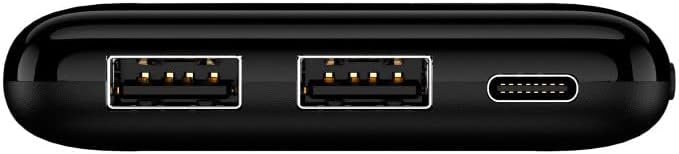
Image: Top view of the power bank, clearly showing the two USB-A output ports, the Micro-USB input port, and the USB-C input port for charging the power bank itself.
Operating Instructions
1. Charging Your Devices
The Setty Powerbank allows you to charge your smartphones, tablets, and other USB-powered devices.
- Obtain the charging cable for your specific device (e.g., USB-A to Lightning, USB-A to USB-C, USB-A to Micro-USB).
- Connect the USB-A end of your device's charging cable to one of the two USB output ports on the power bank.
- Connect the other end of the cable to your smartphone, tablet, or other compatible device.
- The power bank will automatically detect the connected device and begin charging. The LCD display will show the remaining battery percentage of the power bank.
- You can charge up to two devices simultaneously using both USB output ports.
- Once your device is fully charged, or when you are finished charging, disconnect the cable from both the power bank and your device.
2. Checking Power Bank Battery Level
To check the remaining battery level of the power bank, simply look at the digital LCD display. It will show the percentage of charge remaining (e.g., "99" for 99%). The display will automatically activate when a device is connected for charging or when the power bank is being recharged.

Image: A smartphone being charged by the Setty Powerbank, demonstrating typical use. The phone screen shows a charging animation.
Maintenance
- Storage: Store the power bank in a cool, dry place away from direct sunlight and extreme temperatures.
- Cleaning: Use a soft, dry cloth to clean the surface of the power bank. Do not use liquid cleaners, aerosols, or harsh chemicals.
- Handling: Avoid dropping the power bank or subjecting it to strong impacts, as this can damage internal components.
- Moisture: Keep the power bank away from water and high humidity. If it comes into contact with liquid, disconnect it immediately and allow it to dry completely before attempting to use it again.
- Battery Longevity: To maintain battery health, fully charge and discharge the power bank at least once every three months if it is not used regularly.
Troubleshooting
| Problem | Possible Cause | Solution |
|---|---|---|
| Power bank not charging. | Loose cable connection; faulty cable/adapter; power source issue. | Ensure cables are securely connected. Try a different charging cable or USB power adapter. Verify the power source is working. |
| Device not charging from power bank. | Power bank low on charge; loose cable connection; incompatible device cable; faulty power bank port. | Check power bank's battery level on LCD. Ensure device cable is securely connected. Try a different cable or a different USB output port on the power bank. Ensure your device is compatible. |
| LCD display not showing battery level. | Power bank completely discharged; display malfunction. | Connect the power bank to a power source to charge it. If the issue persists after charging, contact customer support. |
| Slow charging. | Using a low-power adapter for power bank; using a non-optimal cable for device; device drawing high current. | Use a higher-output USB power adapter (e.g., 2A or more) to charge the power bank. Ensure your device's cable is original or high-quality. |
Specifications
- Model: SPBL-05
- Model Number: 5900495898951
- Brand: FOREVER (Setty)
- Battery Capacity: 5000 mAh
- Battery Type: Lithium-Ion
- Input Ports: 1 x Micro USB, 1 x USB-C
- Output Ports: 2 x USB-A (1A each)
- Dimensions: 10 cm x 2 cm x 5.5 cm (Length x Width x Height)
- Weight: 150 grams
- Color: Black
- Special Feature: Compact design, LCD display
Warranty and Support
For warranty information, please refer to the documentation provided with your purchase or contact the retailer where you purchased the Setty Powerbank. Warranty terms may vary by region and retailer.
For technical support or further assistance, please visit the official FOREVER brand website or contact their customer service department. You may also reach out to the retailer for support related to your purchase.
Manufacturer: TelForceOne
Ask a question about this manual
Ask about setup, troubleshooting, compatibility, parts, safety, or missing instructions. Manuals+ will review the question and use this page’s manual context to help answer it.