
1. Introduction
Thank you for choosing the MIKO Ultrasonic Humidifier. This device is designed to enhance your indoor air quality by providing both cool and warm mist, ensuring optimal humidity levels for your comfort and well-being. Please read this manual thoroughly before operating the humidifier to ensure safe and efficient use.
2. Important Safety Instructions
- Always place the humidifier on a firm, flat, water-resistant surface away from direct sunlight and heat sources.
- Do not place the humidifier near furniture or appliances that are sensitive to water.
- Ensure the power cord is not pinched or damaged. Do not operate with a damaged cord or plug.
- Unplug the humidifier before filling, cleaning, or moving it.
- Do not add essential oils directly into the water tank. Use the designated essential oil pad.
- Keep out of reach of children and pets.
- Do not immerse the base unit in water or other liquids.
- Use only clean, cool tap water. Distilled or demineralized water is recommended to prevent mineral buildup.
3. Product Overview
The MIKO Ultrasonic Humidifier is equipped with advanced features for ease of use and effective humidification.

The MIKO Ultrasonic Humidifier, showcasing its sleek design and included remote control.
Components:
- Water Tank (1.2 Gallon capacity)
- Base Unit with Control Panel
- Mist Nozzle (Dual-direction)
- Remote Control
- Essential Oil Pad
Control Panel & Display:
The intuitive control panel features touch-sensitive buttons and a digital display for easy operation.
- Power Button: Turns the unit On/Off.
- Mist Mode Button: Toggles between Cool Mist and Warm Mist.
- Humidity Level/Auto Mode Button: Sets desired humidity or activates Auto Mode.
- Sleep Mode Button: Activates Sleep Mode, turning off lights and reducing noise.
- Timer Button: Sets the operating duration.
- Light Button: Controls the ambient light feature.
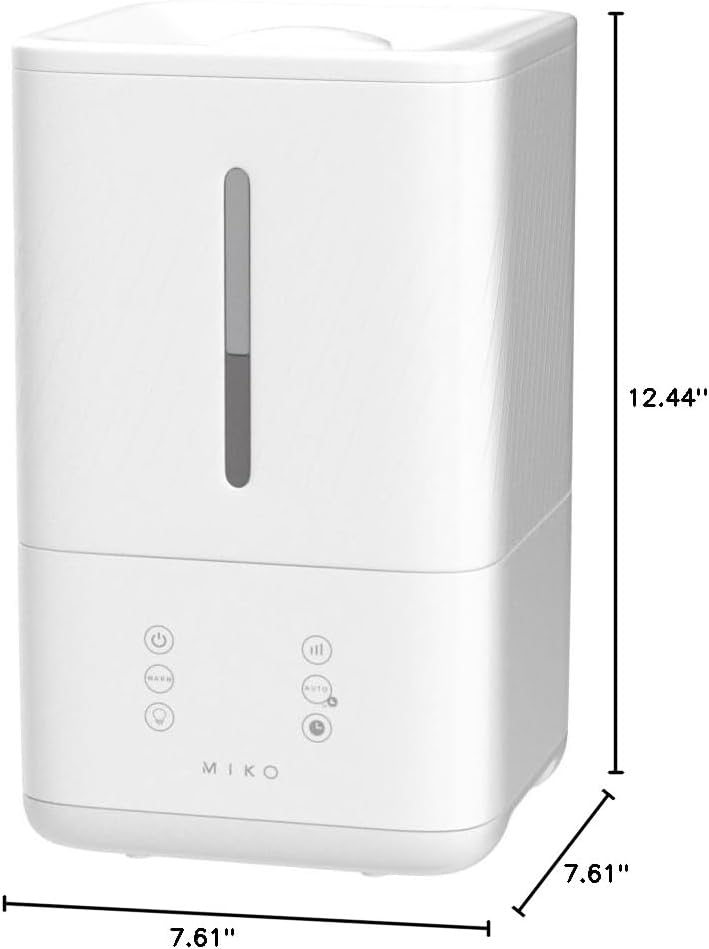
Product dimensions for placement planning: 7.68"D x 7.68"W x 12.56"H.
4. Setup
4.1 Unpacking
- Carefully remove all packaging materials from the box.
- Ensure all components are present and undamaged.
- Retain the packaging for future storage or transport.
4.2 Placement
- Place the humidifier on a flat, stable surface at least 6 inches (15 cm) away from walls and furniture.
- Avoid placing it on carpets or rugs, as this may obstruct airflow.
- Ensure the mist output is not directed at walls, furniture, or electronic devices.
4.3 Filling the Water Tank

Illustrates the top-fill design and detachable water tank for easy refilling and cleaning.
- Ensure the humidifier is unplugged.
- Remove the top lid of the water tank.
- Fill the water tank directly from the top opening with clean, cool tap water. Do not exceed the MAX fill line.
- Replace the top lid securely. The unit features a patented no-leak design that ensures the tank is fully secured before operation.
5. Operating Instructions
5.1 Power On/Off
Plug the power cord into a suitable electrical outlet. Press the Power Button on the control panel or remote control to turn the unit On or Off.
5.2 Mist Modes (Cool & Warm Mist)

Visual representation of cool and warm mist output, providing adjustable temperature for lasting relief.
Press the Mist Mode Button to cycle between Cool Mist and Warm Mist settings. Warm mist may take a few minutes to generate.
5.3 Humidity Control & Auto Mode
Press the Humidity Level/Auto Mode Button to set your desired humidity level (e.g., 40%, 50%, 60%). The humidifier will automatically adjust its mist output to maintain the set humidity. To activate Auto Mode, press the button until 'AUTO' appears on the display. In Auto Mode, the humidifier will intelligently sense the room's humidity and adjust operation accordingly.
5.4 Sleep Mode
Press the Sleep Mode Button to activate. In Sleep Mode, the LED screen and all lights will turn off, and the unit will operate at its quietest setting for undisturbed rest. The guided meditation feature, a breathing pattern projected by ambient lights, is also available in this mode.
5.5 Timer Function
Press the Timer Button to set the operating duration (e.g., 1 hour, 2 hours, up to 40 hours). The humidifier will automatically shut off once the set time has elapsed.
5.6 Aromatherapy (Essential Oil Pad)

Shows the essential oil pad located at the back of the unit for relaxing aromatherapy.
Locate the essential oil pad compartment at the back of the humidifier. Add a few drops of your favorite essential oil onto the pad. Do not add oils directly into the water tank. The mist will diffuse the aroma into the air.
6. Maintenance
Regular cleaning is essential for optimal performance and hygiene.
6.1 Daily Maintenance
- Unplug the unit and empty any remaining water from the tank and base.
- Wipe the tank and base dry with a clean cloth.
- Refill with fresh water before each use.
6.2 Weekly Cleaning
- Unplug the humidifier and remove the water tank.
- Pour 1 cup of white vinegar into the water tank and base. Let it soak for 20-30 minutes to loosen mineral buildup.
- Use a soft brush or cloth to clean the inside of the tank and the ultrasonic transducer (the small disc in the base).
- Rinse both the tank and base thoroughly with clean water until the smell of vinegar is gone.
- Wipe all surfaces dry.
6.3 Water Filter
The humidifier features enhanced water filtration. While specific filter replacement is not typically required for this type of integrated system, regular cleaning as described above helps maintain its effectiveness. If you notice significant mineral buildup, more frequent cleaning or using distilled water is recommended.
6.4 Storage
When not in use for an extended period, clean the humidifier thoroughly, ensure all parts are dry, and store it in a cool, dry place.
7. Troubleshooting
| Problem | Possible Cause | Solution |
|---|---|---|
| No mist or low mist output | No water in tank; Mineral buildup on transducer; Tank not properly seated. | Refill water tank; Clean transducer with vinegar solution; Ensure tank is securely placed. |
| Unusual odor | Dirty water or tank; Old essential oil on pad. | Clean water tank and base thoroughly; Replace essential oil pad or clean it. |
| Water leakage | Tank not properly seated; Overfilled tank. | Ensure water tank is securely placed on the base; Do not overfill past MAX line. |
| Unit not turning on | No power; Power button not pressed. | Check power connection; Press power button firmly. |
8. Specifications
| Feature | Detail |
|---|---|
| Brand | MIKO |
| Model Name | MYST (MAH-01W) |
| Operation Mode | Ultrasonic |
| Mist Type | Cool and Warm Mist |
| Water Tank Capacity | 1.2 Gallons (approx. 4.5 liters) |
| Max Run Time | Up to 40 hours |
| Coverage Area | Up to 540 square feet |
| Product Dimensions | 7.68"D x 7.68"W x 12.56"H |
| Item Weight | 5.39 pounds |
| Voltage | 120 Volts |
| Wattage | 22 watts |
| Control Method | Remote, Touch Panel |
| Special Features | Adjustable Speed Control, Countdown Timer, Auto Mode, Sleep Mode, No Leak Design, Essential Oil Pad |
9. Warranty & Support
MIKO products are designed for durability and performance. For warranty information, technical support, or any inquiries regarding your MIKO Ultrasonic Humidifier, please contact our customer service team.
Customer Support:
- Visit our official website: MIKO Store on Amazon
- Refer to the product packaging for direct contact details.

