
1. Introduction
Thank you for choosing the Candy FCT625WXL/E Ventilated Oven. This manual provides essential information for the safe and efficient use, installation, and maintenance of your appliance. Please read these instructions carefully before using the oven and keep them for future reference.
The Candy FCT625WXL/E oven combines linear design with advanced technology, offering 8 functions and a 77-liter capacity. Its A+ energy class and Aquactiva hydrolytic cleaning system ensure efficiency and ease of maintenance.
2. Safety Information
Important: Read all instructions before using the appliance. Keep this manual for future reference.
- Ensure the oven is correctly installed and earthed by a qualified technician.
- Do not allow children to operate the oven unsupervised.
- The oven becomes hot during use. Avoid touching heating elements or interior surfaces. Use oven mitts.
- Never use flammable liquids or aerosols near the oven.
- Do not store items that could melt or catch fire in the oven.
- Always disconnect the appliance from the power supply before cleaning or maintenance.
3. Installation and Setup
The Candy FCT625WXL/E is designed for freestanding installation. Ensure adequate ventilation around the appliance.
3.1 Unpacking
Carefully remove all packaging materials. Check the oven for any damage. If damaged, do not install or use it, and contact your retailer.
3.2 Electrical Connection
This appliance must be connected to the mains supply by a qualified electrician, in accordance with local wiring regulations. Ensure the voltage and frequency rating on the appliance data plate match your household supply.
3.3 Positioning
Place the oven in a stable and level position. Ensure there is sufficient space for the door to open fully. Refer to the installation dimensions provided in the specifications section.
4. Operating Instructions
Your Candy FCT625WXL/E oven features mechanical controls with a digital timer for precise cooking.
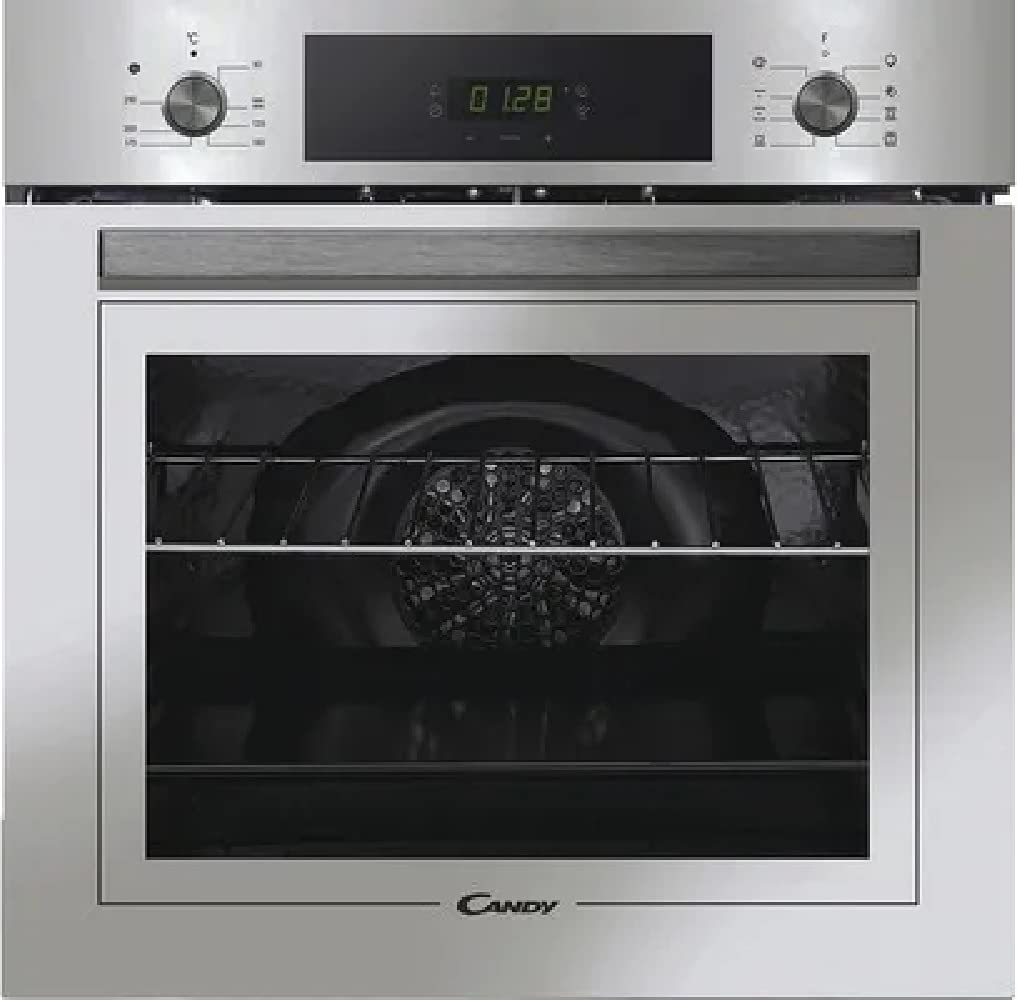
Figure 1: Front view of the Candy FCT625WXL/E ventilated oven, showing the control panel, door, and handle. This image illustrates the overall design and key external components.
4.1 Control Panel Overview
The control panel consists of function selector knobs, a temperature control knob, and a digital timer display with associated buttons.
4.2 Setting the Time
Upon first connection, the digital timer will flash. Use the timer buttons to set the current time. Confirm the setting as per the timer's specific instructions (usually by pressing a button or waiting a few seconds).
4.3 Selecting a Cooking Function (8 Functions)
Turn the function selector knob to choose one of the 8 available cooking functions. These typically include:
- Conventional: Top and bottom heating elements for traditional baking and roasting.
- Fan Assisted: Combines conventional heat with a fan for even heat distribution, ideal for multiple dishes.
- Grill: For grilling and browning.
- Fan Grill: Combines grill with fan for faster grilling and even browning.
- Bottom Heat: For dishes requiring more heat from the base.
- Defrost: Fan only, no heat, for thawing frozen foods.
- Cook Light: A special function for healthier cooking with reduced fat.
- Pizza Function: Optimized for baking pizzas with a crispy base.
4.4 Setting the Temperature
After selecting a function, turn the temperature control knob to the desired temperature. The oven will begin to heat up.
4.5 Using the Timer
The digital timer can be used to set a cooking duration or a delayed start. Refer to the specific instructions for your timer model for detailed programming steps.
4.6 Telescopic Guides and Side Grids
The oven is equipped with telescopic guides, making it easy to slide out and reposition shelves and trays for checking food during cooking. The side grids simplify the insertion of trays at different levels.
5. Cleaning and Maintenance
Regular cleaning and maintenance will ensure the longevity and optimal performance of your oven.
5.1 Aquactiva Hydrolytic Cleaning System
The Aquactiva system provides effective daily cleaning at low temperatures. To use:
- Pour 300 ml of distilled water into the bottom of the oven.
- Activate the Aquactiva function at 90°C for 30 minutes.
- Once the cycle is complete and the oven has cooled, wipe away any remaining residue with a damp cloth.
5.2 General Cleaning
- Always ensure the oven is cool and disconnected from the power supply before cleaning.
- Clean the exterior surfaces with a soft, damp cloth and mild detergent. Avoid abrasive cleaners.
- The oven door glass can be cleaned with a glass cleaner.
- Remove side grids and wash them in warm soapy water or in a dishwasher.
- Trays and shelves can be washed in warm soapy water.
6. Troubleshooting
If you encounter problems with your oven, consult the following common issues before contacting technical assistance.
| Problem | Possible Cause | Solution |
|---|---|---|
| Oven does not heat | No power supply; Function/temperature not set; Timer not set correctly. | Check power connection and circuit breaker; Ensure function and temperature knobs are set; Check timer settings. |
| Food not cooking evenly | Incorrect shelf position; Overcrowding the oven; Door not fully closed. | Use recommended shelf positions; Avoid overcrowding; Ensure door is sealed properly. |
| Smoke or odor during first use | Residues from manufacturing process. | This is normal. Run the oven empty at maximum temperature for 30-60 minutes to burn off residues. Ensure good ventilation. |
| Digital display not working | Power interruption; Faulty component. | Check power supply; If problem persists, contact service. |
7. Specifications
Here are the technical specifications for the Candy FCT625WXL/E oven:
- Model: FCT625WXL/E
- Product Code: 33703301
- EAN Code: 8059019031729
- Oven Type: Ventilated
- Power Supply: Electric
- Cleaning System: Aquactiva (Hydrolytic)
- Usable Volume: 70 liters
- Control Type: Mechanical with digital timer
- Guides: Castelletto (Side Grids)
- Trays: 1 x 15mm + 1 x 35mm
- Grids (Cavity 1): 1
- Number of Functions: 8
- Color: White
- Door Material: Glass
- Knob Color: Inox
- Handle Color: Inox
- Energy Class: A+
- Product Dimensions (mm): 595 (H) x 595 (W) x 568 (D)
- Installation Compartment Dimensions (mm): 585 (H) x 560 (W) x 560 (D)
- Net Weight (kg): 28.56
- Gross Weight (kg): 30.26
8. Warranty and Support
Your Candy FCT625WXL/E oven comes with a manufacturer's warranty. Please refer to the warranty card included with your appliance for specific terms and conditions.
For technical assistance, spare parts, or further information, please contact Candy customer support or visit the official Candy website. When contacting support, please have your model number (FCT625WXL/E) and serial number ready.


