
Muggo V10
Muggo 12 oz Self-Heating Coffee Mug User Manual
Model: V10
Introduction
Thank you for choosing the Muggo 12 oz Self-Heating Coffee Mug. This innovative mug is designed to maintain the ideal temperature of your hot beverages, ensuring a perfect sip every time. Please read this manual carefully before using your Muggo mug to ensure proper operation and longevity of the product.
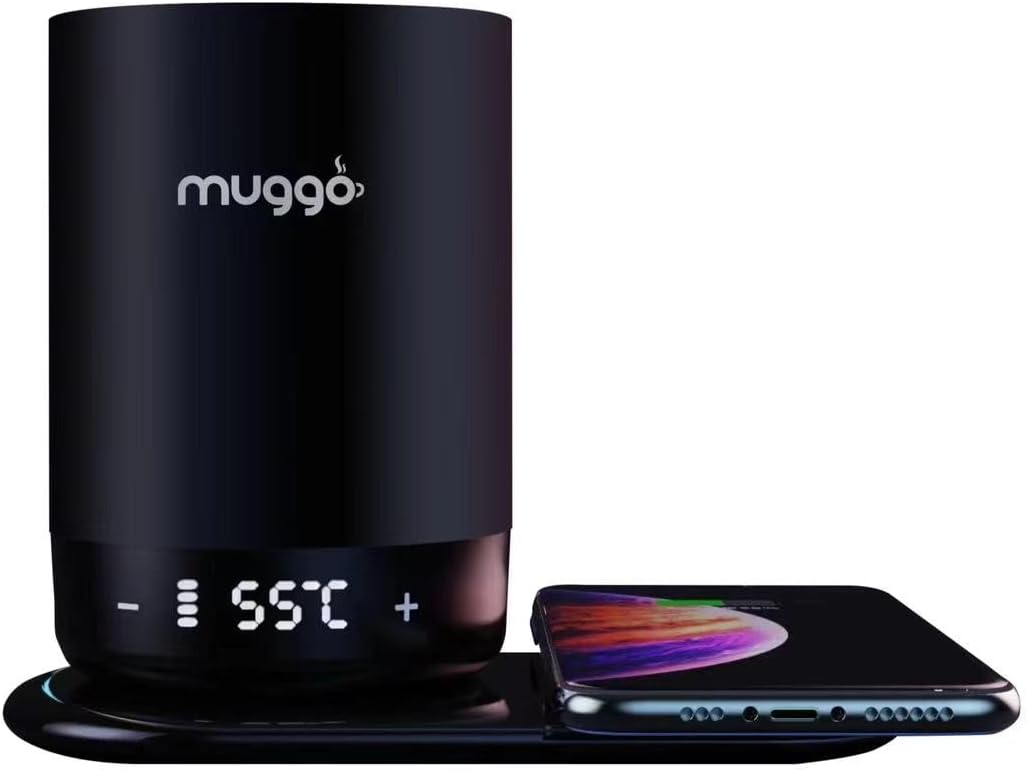
Image: The Muggo 12 oz Self-Heating Coffee Mug, showcasing its sleek black design, LED temperature display, and a charging base with a smartphone.
Product Overview
The Muggo Self-Heating Travel Mug is engineered for convenience and performance. Key features include:
- Temperature Maintenance: Designed to keep already hot liquids at your preferred temperature, not for reheating from room temperature.
- Touch-Sensitive LED Display: Easily adjust and monitor your beverage's temperature (range: 95°F - 160°F).
- Ergonomic Design: Features a stainless steel insulated inner vessel and a BPA-free black ceramic outer finish, fitting comfortably in hand or car cup holders.
- Leak-Resistant Lid: A 360-degree leak-proof lid with a push-to-open design prevents spills and helps maintain temperature for up to 3 hours.
- USB-C Charging: Equipped with a USB-C charging port and a built-in lithium-ion battery for direct warming and recharging.

Image: Visual representation highlighting the Muggo mug's ability to maintain perfect temperature, its long-lasting battery, and simple bottom controls.

Image: The Muggo mug is versatile and suitable for various hot beverages, including coffee, hot chocolate, milk, and tea.
Setup
1. Initial Charge
Before first use, fully charge your Muggo mug. Connect the provided USB-C cable to the charging port on the mug and plug the other end into a compatible USB power adapter (not included). The white indicator light on the mug will be solid when the battery is 100% charged.

Image: Charging the Muggo mug. The white indicator lights confirm charging status.
Operating Instructions
1. Turning On/Off
To turn the mug on or off, simultaneously touch and hold both the "-" and "+" touch-sensitive buttons located on the mug's display until the display activates or deactivates.
2. Setting Temperature
Once the mug is on, you can adjust the desired temperature:
- Touch "+" to increase the temperature.
- Touch "-" to lower the temperature.
The temperature range for the Muggo mug is 95°F to 160°F (35°C to 65°C). The current temperature will be displayed on the LED screen.
Image: Adjusting the temperature on the Muggo mug's LED display.
3. Using the Leak-Resistant Lid
The 360-degree leak-proof lid is designed for easy opening and closing. Press down on the center of the lid to open or close it. Ensure the lid is properly sealed before drinking to prevent spills and maintain beverage temperature.
4. Intended Use
The Muggo mug is designed to maintain the temperature of an already hot liquid. It is not intended for reheating liquids from room temperature. Attempting to reheat cold liquids will significantly reduce battery life and may not achieve desired results.

Image: Important note regarding the intended use of the Muggo mug for temperature maintenance, not reheating.
Maintenance and Care
Proper care ensures the longevity and performance of your Muggo mug.
| Category | Instructions |
|---|---|
| Prior to First Use | Fully charge the battery. |
| When Consuming Hot Beverages | Use caution when drinking hot beverages. Keep Muggo out of reach of children when filled with hot beverages. |
| Overfilling | Use caution to not overfill your Muggo. |
| Lid Care | To open and close your lid, press the center of the lid until you hear a click. Make sure your lid is completely attached and sealed before drinking. |
| Care for Your Muggo | Ensure the bottom of your Muggo is dry before placing on the charging coaster. The touch-sensitive button needs to be dry for the touch sensor to work properly. Do not leave your Muggo in extremely hot or cold environments. |
| Cleaning Your Muggo | Muggo is HAND WASH ONLY. The lid can be washed in the top-rack of the dishwasher with the lid in the open position during washing. Wash mug and lid thoroughly before each use and after every use with warm soapy water. Use mild cleaners, avoiding cleansers with bleach, chlorine, or abrasives. Store your Muggo with the lid off or in the open position to allow the mug to dry completely after washing. |
| DO NOT MICROWAVE | Muggo is an electronic device, which should never go in a microwave. Doing so may result in serious injury and device malfunction. |
| Warning! | Hot contents may create internal pressure resulting in a hot liquid spray when opening the lid. Be sure to always have the mug positioned away from the face when pressing down on the lid to properly release pressure inside the mug. |
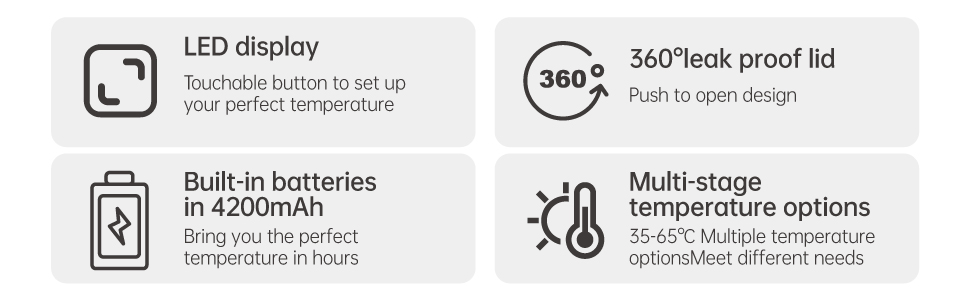
Image: Summary of important care and use guidelines for the Muggo mug.
Troubleshooting
If you encounter issues with your Muggo mug, refer to the following common solutions:
- Mug Not Heating / Short Battery Life:
- Ensure the mug is fully charged before use.
- Remember the mug is designed to maintain temperature, not to reheat cold liquids. Reheating from room temperature will drain the battery quickly.
- Verify the charging cable and port are clean and free of debris.
- Display Not Responding:
- Ensure the touch-sensitive area is dry and clean. Moisture can interfere with touch functionality.
- Try turning the mug off and on again by simultaneously touching "-" and "+".
- Lid Leaking:
- Ensure the lid is properly aligned and pressed down firmly until you hear a click, indicating a secure seal.
- Check the rubber seal on the lid for any damage or misalignment.
- Avoid overfilling the mug.
For issues not covered here, please contact Muggo customer support.
Specifications
| Feature | Detail |
|---|---|
| Brand | Muggo |
| Model Number | V10 |
| Capacity | 12 oz |
| Color | Black |
| Temperature Range | 95°F - 160°F (35°C - 65°C) |
| Battery Life | Up to 3 hours (when maintaining temperature) |
| Battery Type | 1 Lithium Ion battery (included) |
| Charging Port | USB-C |
| Materials | Stainless steel insulated inner vessel, BPA-free black ceramic outer finish |
| Item Weight | 1.91 pounds |
| Package Dimensions | 7.6 x 6.18 x 4.61 inches |
| UPC | 743811451820 |
Warranty and Support
Specific warranty information for the Muggo 12 oz Self-Heating Coffee Mug is not provided in this manual. For details regarding warranty coverage, product support, or to contact customer service, please refer to the product packaging or visit the official Muggo website.
You can also visit the Muggo Store on Amazon for more information: Muggo Amazon Store
Related documentsV10


Ask a question about this manual
Ask about setup, troubleshooting, compatibility, parts, safety, or missing instructions. Manuals+ will review the question and use this page’s manual context to help answer it.