
Introduction
The Knog Bandicoot Run Headlamp is a versatile and lightweight lighting solution designed for outdoor activities such as running, hiking, and camping. It features a comfortable, adjustable silicone strap, multiple light modes, and a convenient USB-rechargeable battery. This manual provides essential information for the safe and effective use of your headlamp.
Key features include:
- Integrated USB-rechargeable battery, eliminating the need for a separate charging cable.
- Fast charging technology, allowing a full charge in approximately 4 hours.
- Waterproof design for reliable performance in various weather conditions.
- Constructed from lightweight, sweat-resistant silicone for comfort and durability.
Setup
1. Charging the Headlamp
The Bandicoot Run Headlamp features an integrated USB-A connector for charging.
- Carefully detach the main light unit from the silicone strap. This is done by gently pulling the light unit out of its housing.
- Locate the exposed USB-A connector on the light unit.
- Plug the USB-A connector directly into any standard USB-A port (e.g., computer, wall adapter, power bank).
- The charging indicator light will illuminate. A full charge typically takes about 4 hours.
- Once fully charged, remove the light unit from the USB port and reinsert it securely into the silicone strap.
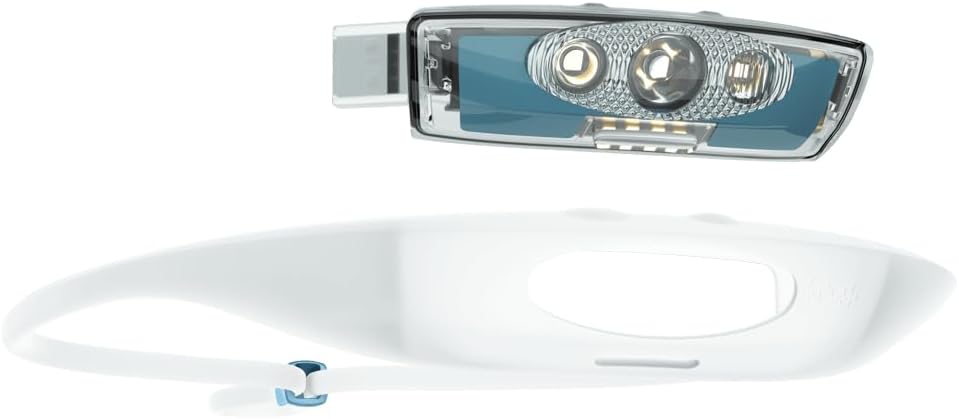
Image: The headlamp unit detached, revealing the USB-A charging connector.
2. Adjusting the Strap
The silicone strap is adjustable to fit head circumferences between 30 cm and 70 cm.
- Place the headlamp on your head.
- Use the adjustable buckle at the back of the strap to tighten or loosen it until it feels secure and comfortable. The silicone material is designed to sit snugly without bouncing during activity.

Image: Side view of the headlamp, illustrating the adjustable strap mechanism.
Operating the Headlamp
The Bandicoot Run Headlamp features 4 LEDs and offers 5 light modes, including a unique Halo mode. It is operated using two buttons located on the top of the light unit.

Image: Close-up of the headlamp unit, highlighting the LEDs and control buttons.
Basic Operation
- Power On/Off: Press and hold the main power button (usually the larger button) for 1-2 seconds to turn the headlamp on or off.
- Cycle Modes: Short press the main power button to cycle through the available light modes. The headlamp is designed to remember the last used mode when turned back on.
- Special Modes: The second button typically controls special features or brightness adjustments within a mode, such as the Halo mode or dimming. Refer to the detailed online manual for specific button functions for each mode.
ModeMaker App (Customization)
For advanced customization of light modes and settings, the Knog Bandicoot Run Headlamp is compatible with the Knog ModeMaker application.
- The ModeMaker app is currently available as a desktop application for Windows and Mac operating systems. It is not available as a mobile app.
- To use the app, you will need to download it from the official Knog website and register an account.
- Connect your headlamp to your computer via the integrated USB-A connector to customize light sequences, brightness levels, and access additional modes like strobe or SOS.

Image: User wearing the Bandicoot Run headlamp during a run.
Maintenance
Cleaning
The silicone strap and light unit are easy to clean.
- Wipe the headlamp with a damp cloth after use, especially if exposed to sweat, dirt, or mud.
- Avoid using harsh chemicals or abrasive cleaners, as these can damage the silicone or electronic components.
- Ensure the USB port is dry before charging.
Battery Care
To maximize the lifespan of your Lithium-polymer battery:
- Avoid fully discharging the battery frequently.
- Store the headlamp with a partial charge (around 50%) if not used for extended periods.
- Charge the headlamp regularly, even if not fully depleted, to maintain battery health.
Troubleshooting
- Headlamp does not turn on or charge:
- Ensure the battery is charged. Connect the headlamp to a USB-A power source and allow it to charge for at least 30 minutes.
- Verify the USB connection is secure and the power source is active.
- If the headlamp arrived without charge, it may take a few minutes for the charging indicator to appear.
- Controls are not intuitive / difficulty changing modes:
- Familiarize yourself with the two-button operation by referring to the detailed online manual available on the Knog website.
- Consider using the ModeMaker desktop app to customize and simplify your preferred light modes.
- Reduced battery life:
- Battery life can decrease over time with repeated charge cycles.
- Ensure the headlamp is fully charged before use.
- Operating the headlamp on its highest brightness settings will consume battery power more quickly.
Specifications
| Model Name | Bandicoot Run |
| Model Number | 7104334 |
| Brand | Knog |
| Light Output (Max) | 200 Lumens |
| Light Source | 4 x LED |
| Power Source | Rechargeable Lithium-Polymer Battery |
| Battery Included | Yes (1 required) |
| Runtime (Min.) | 8 hours |
| Charging Time | Approx. 4 hours |
| Weight | 60 Grams |
| Material | Silicone, Plastic |
| Water Resistance | Waterproof (up to 1 meter depth for 30 minutes) |
| Adjustable Strap | Yes (30-70 cm circumference) |
| Special Features | Motion sensor, Mountable, Adjustable strap |
| Recommended Use | Outdoor activities (running, hiking, camping), emergencies |
| GTIN | 09328389030526 |
Warranty Information
The Knog Bandicoot Run Headlamp is covered by a warranty in accordance with legal provisions. For specific details regarding warranty terms and conditions, please refer to the official Knog website or contact your point of purchase.
Support
For further assistance, detailed manuals, or to download the ModeMaker application, please visit the official Knog website.
Knog Official Website: www.knog.com


