
Introduction
This manual provides essential information for setting up, operating, and maintaining your Hisense 55U6G Series Quantum ULED 4K UHD Smart Android TV. Please read this manual thoroughly before using your television to ensure proper and safe operation. Keep this manual for future reference.

Figure 1: Hisense 55U6G Series Quantum ULED 4K UHD Smart Android TV (Front View)
This image displays the front of the Hisense 55U6G television, showcasing its slim bezels and the Hisense logo at the bottom center. The screen displays vibrant colors, highlighting its Quantum ULED capabilities.
What's in the Box
Verify that all components listed below are included in your package:
- Hisense 55U6G Television
- TV Stand (2 pieces)
- Remote Control (requires 2 AAA batteries, included)
- Power Cable
- Quick Start Guide
Setup
1. Physical Setup
Your Hisense TV can be placed on a stand or wall-mounted. Ensure the TV is placed on a stable, level surface or securely mounted to a wall according to the wall-mount manufacturer's instructions. When attaching the stand, align the stand pieces with the designated slots on the bottom of the TV and secure them with the provided screws.
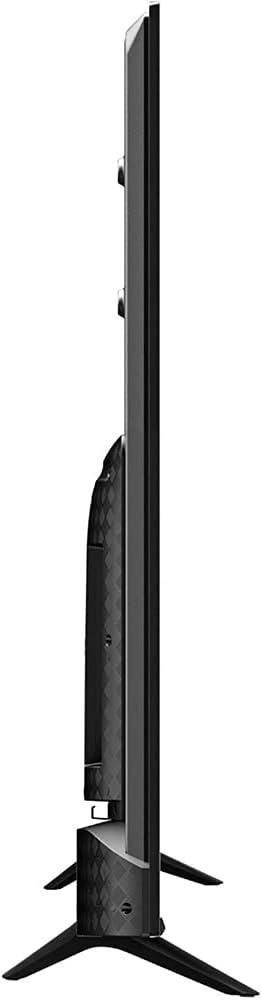
Figure 2: Hisense 55U6G Series Quantum ULED 4K UHD Smart Android TV (Side View)
This image shows the Hisense 55U6G television from the side, illustrating its slim profile and the placement of various input ports on the rear panel. This view is helpful for identifying where to connect cables.
2. Initial Power-On
Connect the power cable to the TV's power input and then to a power outlet. Press the power button on the remote control or on the TV itself. Follow the on-screen instructions to complete the initial setup, including language selection, network connection, and channel scanning.
3. Connecting External Devices
Your TV is equipped with multiple input ports for connecting external devices such as Blu-ray players, game consoles, and sound systems. Use HDMI ports for high-definition video and audio. Ensure the TV is powered off before connecting or disconnecting any devices.
4. Network Connection
To access Smart TV features and streaming services, connect your TV to the internet. You can connect via Wi-Fi or an Ethernet cable. Navigate to the Network settings in the TV menu to configure your connection.
Operating Your TV
1. Remote Control
The included remote control allows you to navigate menus, change channels, adjust volume, and access Smart TV features. Familiarize yourself with the button layout for optimal use.
2. Basic Navigation
Use the directional pad and 'OK' button on the remote to navigate through menus. The 'Home' button provides access to the Android TV interface, where you can find apps, settings, and input selections.
3. Picture and Sound Settings
Access the 'Settings' menu to customize picture and sound. Adjust brightness, contrast, color, and sharpness for picture quality. For audio, select sound modes or adjust equalizer settings to suit your preferences.
4. Smart TV Features (Android TV)
Your Hisense 55U6G runs on Android TV, providing access to a wide range of apps from the Google Play Store, including streaming services like Amazon Instant Video, Hulu, and Netflix. You can also use Google Assistant for voice commands.
5. Advanced Display Technologies
- 4K ULED: This technology enhances color, contrast, brightness, and motion for a superior viewing experience.
- Quantum Dot Wide Color Gamut: Delivers over one billion shades of color, producing purer, richer, and more brilliant visuals.
- Dolby Vision and Dolby Atmos: Provides cinema-quality HDR picture and immersive sound, enhancing realism in every scene.
- FilmMaker Mode: Disables post-processing and preserves correct aspect ratios, colors, and frame rates to display content as the filmmaker intended.
Maintenance
1. Cleaning Your TV
To clean the screen, gently wipe it with a soft, lint-free cloth. For stubborn marks, dampen the cloth slightly with water or a screen cleaner specifically designed for electronics. Avoid using harsh chemicals or abrasive materials. For the TV casing, use a soft, dry cloth.
2. Software Updates
Your TV may receive software updates to improve performance and add new features. Ensure your TV is connected to the internet. You can check for updates manually through the 'Settings' menu under 'About' or 'System Update'.
Troubleshooting
If you encounter issues with your TV, refer to the table below for common problems and solutions. If the problem persists, contact customer support.
| Problem | Possible Solution |
|---|---|
| No Power | Check if the power cable is securely connected to the TV and the power outlet. Ensure the outlet is functional. |
| No Picture, But Sound is Present | Check the input source. Ensure external devices are powered on and connected correctly. Try a different HDMI cable. |
| No Sound, But Picture is Present | Check the volume level and mute status. Verify audio output settings in the TV menu. Ensure external audio devices are connected and functioning. |
| Remote Control Not Working | Replace the batteries (2 AAA). Ensure there are no obstructions between the remote and the TV's IR sensor. |
| Cannot Connect to Wi-Fi | Ensure your Wi-Fi router is on and working. Re-enter the Wi-Fi password. Try restarting both the TV and the router. |
Specifications
| Feature | Detail |
|---|---|
| Model Name | 55U6G |
| Screen Size | 54.6 Inches (Visible screen diagonal: 55" / 139 cm) |
| Display Technology | ULED, Quantum Dot, LED |
| Resolution | 4K UHD (3840 x 2160) |
| Aspect Ratio | 16:9 |
| Operating System | Android TV |
| Connectivity Technology | Wi-Fi, Bluetooth |
| Supported Internet Services | Amazon Instant Video, Hulu, Netflix, Google Play Store |
| Power Consumption (On-mode) | 190 Watts |
| Voltage | 120 Volts (AC) |
| Product Dimensions (W x H x D) | 48.31 x 27.99 x 3.07 inches (without stand) |
| Item Weight | 33 pounds / 15 Kilograms |
| Color | Metal Gray, Black |
Warranty and Support
For warranty information specific to your Hisense 55U6G TV, please refer to the warranty card included with your product or visit the official Hisense website. Keep your proof of purchase for warranty claims.
If you require technical assistance or have questions not covered in this manual, please contact Hisense Customer Support. You can typically find contact details on the Hisense official website or in the Quick Start Guide provided with your TV.