
1. Introduction
Welcome to the FITFIU Fitness MC-260 Treadmill user manual. This document provides essential information for the safe and effective use of your new 2-in-1 foldable treadmill and walking machine. The MC-260 is designed for daily walking and moderate running sessions at home, featuring a quiet 1800W motor, adjustable speed up to 12 km/h, a heart rate monitor, integrated speakers, and 12 pre-set programs. Its ultra-compact folding system and transport wheels ensure convenient storage and mobility.
Please read this manual thoroughly before operating the device and retain it for future reference.

Image 1.1: The FITFIU Fitness MC-260 Treadmill, illustrating its operational and folded states.
2. Safety Information
To ensure your safety and prolong the life of your treadmill, please observe the following precautions:
- Read all instructions: Familiarize yourself with the entire manual before use.
- Consult a physician: Before starting any exercise program, especially if you have pre-existing health conditions.
- Supervision: Keep children and pets away from the treadmill during operation.
- Emergency Stop: Always attach the magnetic safety key to your clothing before starting. In case of an emergency, the key will detach, stopping the treadmill.
- Stable Surface: Place the treadmill on a flat, stable, and level surface with adequate clearance around it.
- Weight and Height Limits: The maximum recommended user weight is 110 kg. The maximum recommended user height is 1.80 m.
- Electrical Safety: Ensure the power cord is not damaged and is connected to a properly grounded outlet. Do not use extension cords. Unplug the treadmill when not in use or before cleaning/maintenance.
- Footwear: Always wear appropriate athletic footwear when using the treadmill.
- Hydration: Stay hydrated during your workout.
3. Package Contents
Carefully unpack your FITFIU Fitness MC-260 Treadmill and ensure all components are present:
- FITFIU Fitness MC-260 Treadmill unit
- Power cable
- Magnetic safety key
- User Manual (this document)
- Assembly tools (if required for minor setup)
If any parts are missing or damaged, please contact customer support immediately.
4. Setup
4.1 Unpacking and Placement
- Remove the treadmill from its packaging.
- Place the treadmill on a firm, level surface. Ensure there is at least 2 meters of clear space behind the treadmill and 0.5 meters on each side.
4.2 Unfolding the Treadmill
The MC-260 features an ultra-compact folding system for easy storage. To unfold for use:
- Gently lower the running deck from its vertical storage position until it locks into place horizontally.
- Ensure all locking mechanisms are securely engaged before use.
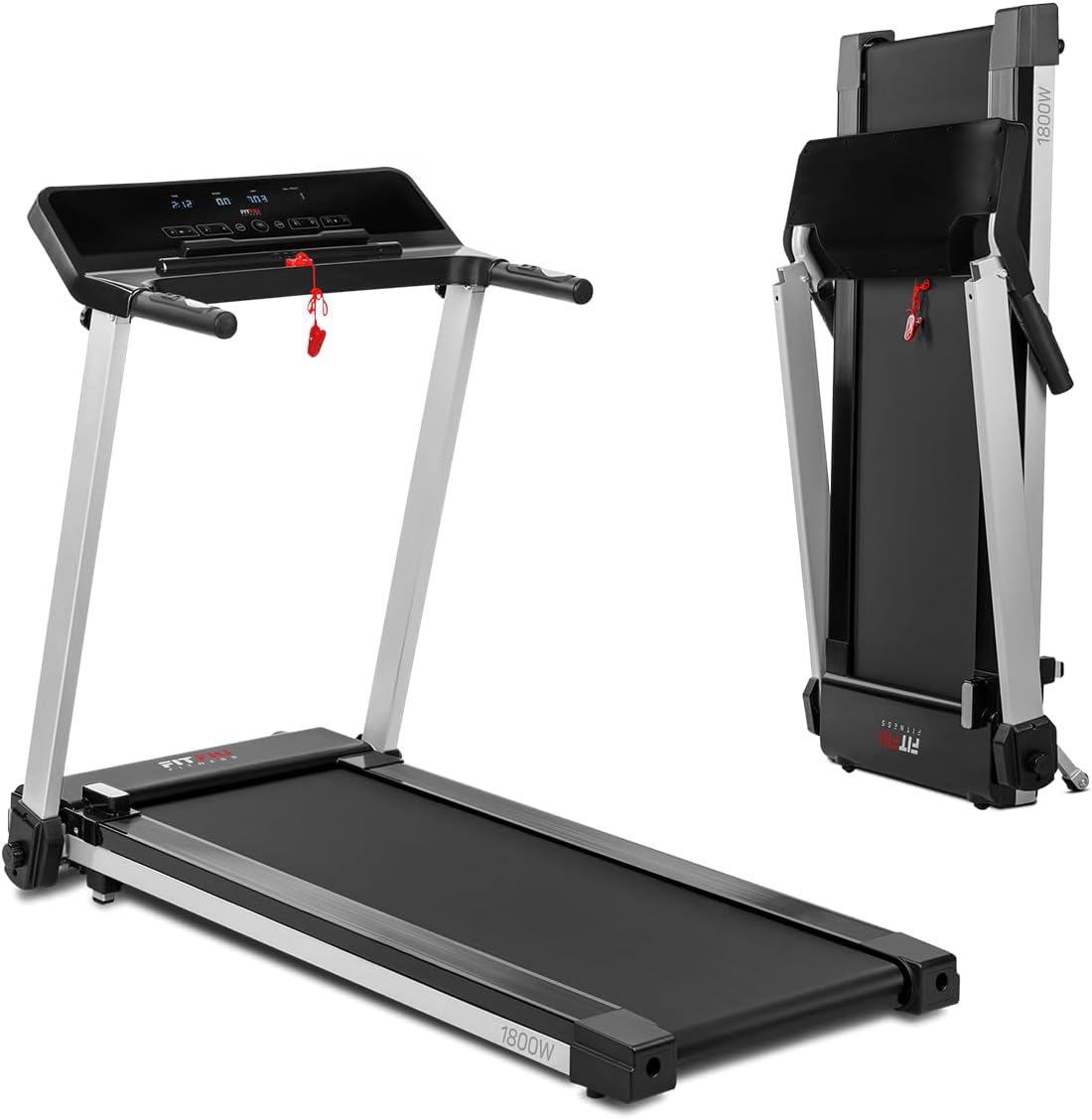
Image 4.1: The FITFIU Fitness MC-260 Treadmill in its unfolded, operational state.
4.3 Connecting Power
Plug the power cable into the treadmill's power port and then into a standard 220-240V grounded electrical outlet.
4.4 Attaching the Safety Key
Before starting the treadmill, attach the magnetic safety key to the designated area on the console. Clip the other end of the safety key to your clothing. The treadmill will not operate without the safety key in place.
5. Operating Instructions
5.1 Powering On and Off
- To Power On: Ensure the safety key is attached. Press the 'START' button on the console.
- To Power Off: Press the 'STOP' button on the console, or remove the safety key for an immediate stop.
5.2 Using the Control Panel and Display
The LCD display provides real-time information during your workout:
- Speed: Current speed in km/h.
- Time: Duration of your workout.
- Distance: Total distance covered.
- Calories: Estimated calories burned.
- Heart Rate: Your pulse when holding the heart rate sensors.

Image 5.1: Detailed view of the treadmill's control panel and LCD display.
5.3 Adjusting Speed
You can adjust the treadmill speed using the '+' and '-' buttons on the console or the quick-access buttons on the handlebars. There are also 4 pre-set speed buttons on the console for rapid adjustments.

Image 5.2: A user adjusting settings on the treadmill's control panel.

Image 5.3: Handlebar controls for quick start/stop and speed adjustments.
5.4 Using Pre-set Programs
The MC-260 offers 12 pre-set programs to vary your workout intensity. Select a program from the console to automatically adjust speed and incline (if applicable) throughout your session.
5.5 Heart Rate Monitor
To measure your heart rate, firmly grip the heart rate sensors located on the handlebars. Your pulse will be displayed on the LCD screen.
5.6 Bluetooth Connectivity and Speakers
The treadmill features Bluetooth connectivity for two main functions:
- Music Playback: Connect your smartphone or tablet via Bluetooth to the treadmill's integrated speakers to enjoy your favorite music during your workout.
- Kinomap App: Connect to the Kinomap app to access interactive workouts, track your performance, and engage with a fitness community.
5.7 Emergency Stop
In case of an emergency or if you need to stop the treadmill quickly, simply pull the magnetic safety key from the console. The treadmill will immediately cease operation.

Image 5.4: A user exercising on the FITFIU Fitness MC-260 Treadmill.
6. Maintenance
Regular maintenance ensures the longevity and optimal performance of your treadmill.
6.1 Cleaning
- Always unplug the treadmill before cleaning.
- Wipe down the console and exterior surfaces with a damp cloth. Avoid abrasive cleaners or excessive moisture.
- Periodically vacuum underneath the treadmill to prevent dust buildup.
6.2 Lubrication
The running belt requires periodic lubrication to reduce friction and wear. Refer to the specific lubrication instructions provided with your treadmill or contact customer support for guidance on the correct lubricant and application frequency.
6.3 Belt Adjustment
Over time, the running belt may become misaligned or loose. If the belt slips or drifts to one side, consult the detailed instructions in your product manual for adjusting belt tension and centering. Incorrect adjustment can damage the treadmill.
6.4 Storage
To store the treadmill, carefully fold the running deck upwards until it locks into its vertical position. Use the integrated transport wheels to move the folded treadmill to a suitable storage location. Its ultra-compact design allows it to be stored in small spaces.

Image 6.1: The FITFIU Fitness MC-260 Treadmill in its folded storage configuration.

Image 6.2: Side view of the treadmill in its compact, folded state.
7. Troubleshooting
If you encounter issues with your treadmill, refer to the following common problems and solutions:
| Problem | Possible Cause | Solution |
|---|---|---|
| Treadmill does not start | No power; Safety key not in place; Power switch off | Check power connection; Ensure safety key is attached; Turn on power switch |
| Running belt slips | Belt too loose; Insufficient lubrication | Adjust belt tension (refer to manual); Lubricate running belt |
| Unusual noise during operation | Loose components; Belt misalignment; Motor issue | Check for loose screws; Adjust belt alignment; Contact customer support if noise persists |
| Display not working | Loose cable connection; Power issue | Check console cable connections; Verify power supply |
If you cannot resolve the issue using the table above, please contact customer support.
8. Specifications
| Feature | Specification |
|---|---|
| Model | MC-260 |
| Brand | Fitfiu Fitness |
| Motor Power | 1800W (2.4 HP) |
| Voltage | 220-240V |
| Maximum Speed | 12 km/h |
| Running Surface | 41 x 122 cm |
| Display Type | LCD (Speed, Time, Distance, Calories, Heart Rate) |
| Programs | 12 pre-set programs |
| Heart Rate Monitor | Integrated handlebar sensors |
| Connectivity | Bluetooth (for music and Kinomap app) |
| Speakers | Integrated |
| Safety Feature | Magnetic emergency stop system |
| Maximum User Weight | 110 kg |
| Maximum User Height | 1.80 m |
| Product Dimensions (Unfolded) | 105 x 69 x 148 cm (L x W x H) |
| Product Dimensions (Folded) | 69 x 147 x 24 cm (L x W x H) |
| Product Weight | 35 kg |
| Material | Alloy Steel |
| Storage | Vertical, ultra-compact folding |
| Transport | Front wheels |

Image 8.1: Dimensions of the FITFIU Fitness MC-260 Treadmill.
9. Warranty and Support
9.1 Warranty Information
Your FITFIU Fitness MC-260 Treadmill is covered by a manufacturer's warranty. Please refer to the warranty card included with your purchase for specific terms, conditions, and duration. Keep your proof of purchase for any warranty claims.
9.2 Customer Support
For technical assistance, spare parts, or any questions regarding your treadmill, please contact FITFIU Fitness customer support. Contact details can typically be found on the manufacturer's website or on your product packaging.

