
RedThunder K10
RedThunder K10 Wireless Gaming Keyboard and Mouse Set User Manual
Model: K10
Introduction
Thank you for choosing the RedThunder K10 Wireless Gaming Keyboard and Mouse Set. This high-performance 2.4G wireless combo is designed to provide an optimal balance for both work and gaming, featuring LED backlighting, long-lasting rechargeable batteries, and an ergonomic design. This manual will guide you through the setup, operation, maintenance, and troubleshooting of your new device.
Package Contents
- RedThunder K10 Wireless Keyboard
- RedThunder Wireless Mouse
- USB Receiver (located at the bottom of the mouse)
- Charging Cable
- User Manual
Setup
Initial Charging
Before first use, it is recommended to charge both the keyboard and mouse for approximately 8 hours to ensure full battery capacity. Use the provided charging cable to connect the devices to a USB power source.
Connecting the Wireless Set
- Locate the USB receiver at the bottom of the mouse. Gently remove it.
- Insert the USB receiver into an available USB port on your computer.
- Turn on the power switch for both the keyboard and the mouse. The devices are pre-paired from the factory.
- Your RedThunder K10 keyboard and mouse are now ready for use.

Image: The RedThunder K10 wireless keyboard and mouse set, demonstrating the 2.4G wireless connection via a single USB receiver. The receiver is shown plugged into a monitor's USB port, indicating a simple plug-and-play setup.
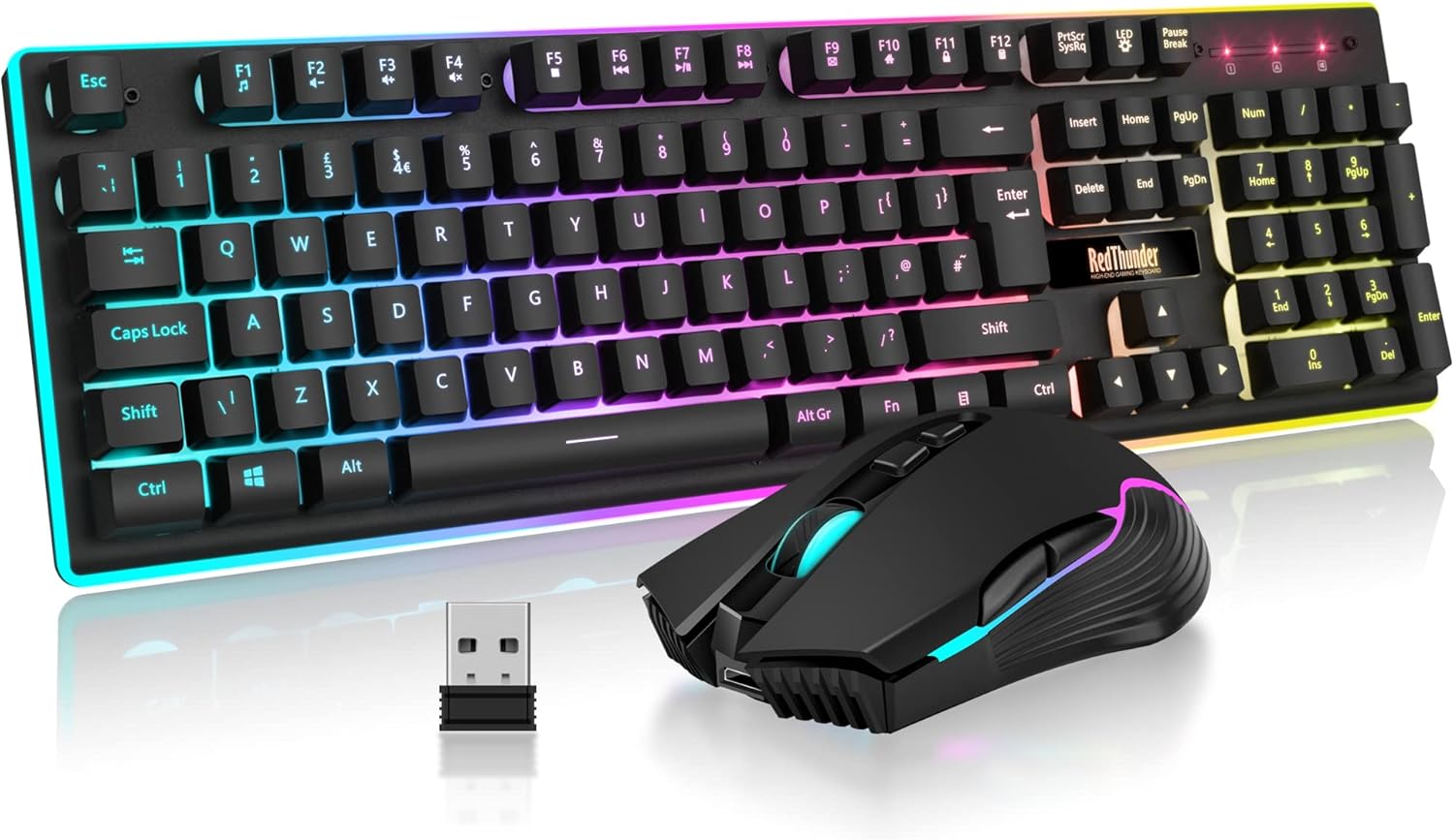
Image: A close-up view of the RedThunder K10 wireless keyboard and mouse, alongside the compact USB receiver. This image highlights the primary components of the set, ready for connection.
Operating Instructions
Keyboard Features
- Backlighting Effects: The keyboard features three groups of rainbow backlight effects.
- Supports 2 breathing modes.
- Supports 3 static modes.
- Adjustable with 4 levels of brightness.
- Multimedia Keys: Use the FN key in combination with F1-F12 for various multimedia functions (e.g., volume control, media playback).
- Gaming Functions:
- FN + W: Swaps WASD keys with arrow keys.
- FN + WIN: Locks the Windows key to prevent accidental presses during gaming.
- Ergonomic Design: The keyboard features a 7-degree tilt for comfortable typing and gaming.

Image: Multiple RedThunder K10 keyboards displayed with different rainbow lighting patterns, showcasing the customizable backlighting options available to illuminate your gaming setup.

Image: A visual representation of the ergonomic design of the RedThunder K10 keyboard, showing its 7-degree tilt, and the comfortable grip of the mouse, designed for extended use.
Mouse Features
- DPI Adjustment: The mouse supports up to 3200 DPI for precise control. DPI settings can typically be cycled through using a dedicated button on the mouse.
- Lighting Effects: The mouse has a built-in 7-color cyclical progressive lighting effect.
- 7 Buttons: The mouse features 7 programmable buttons for enhanced gaming and productivity.
- Ergonomic Design: Designed to fit perfectly in the palm, with anti-sweat and anti-slip features for complete control.

Image: The RedThunder K10 gaming mouse, highlighting its 7-button layout and dynamic RGB lighting effects, with a spectrum of colors shown below it.
Maintenance
Battery Charging
- The keyboard is equipped with a 3000 mAh battery.
- The mouse is equipped with an 800 mAh battery.
- When the battery is low, the indicator light may flash or the device may become unresponsive. Connect the charging cable to recharge.
- Both devices feature intelligent power-saving functions. If there is no operation for 2 minutes, they will automatically enter sleep mode. Press any key to wake them up.

Image: An illustration depicting the battery capacities of the RedThunder K10 keyboard (3000mAh) and mouse (800mAh), emphasizing their super battery life for extended gaming sessions.
Cleaning
To clean your keyboard and mouse, use a soft, dry cloth. For stubborn dirt, a slightly damp cloth can be used, but ensure no liquid enters the devices. Avoid using harsh chemicals or abrasive materials.
Troubleshooting
| Problem | Possible Cause | Solution |
|---|---|---|
| Keyboard/Mouse not responding | Low battery; USB receiver disconnected; Connection lost. | Charge the devices. Ensure the USB receiver is securely plugged in. If connection is lost, reset pairing (refer to "Resetting Connection" below). |
| Backlight not working or dim | Backlight turned off; Brightness set too low; Low battery. | Adjust brightness levels using keyboard shortcuts. Charge the keyboard. |
| Input lag or erratic movement | Interference; Distance from receiver; Low battery. | Ensure no strong wireless interference. Move devices closer to the receiver. Charge the devices. |
Resetting Connection (if connection is lost)
If the connection between the keyboard/mouse and the USB receiver is lost, you may need to re-pair them. While specific re-pairing instructions are not detailed in the product information, typically this involves:
- Unplug the USB receiver from your computer.
- Turn off both the keyboard and mouse.
- Plug the USB receiver back into your computer.
- Turn on the keyboard and mouse. They should automatically attempt to re-establish connection. Some models may require holding a specific key combination (e.g., FN + P) on the keyboard or a button on the mouse during power-on to enter pairing mode. Refer to the quick start guide if provided with your product for exact steps.
Specifications
| Feature | Detail |
|---|---|
| Brand | RedThunder |
| Model | K10 |
| Connectivity Technology | 2.4G Wireless (USB Receiver) |
| Keyboard Battery Capacity | 3000 mAh |
| Mouse Battery Capacity | 800 mAh |
| Keyboard Backlight | Rainbow LED (2 breathing modes, 3 static modes, 4 brightness levels) |
| Mouse Lighting | 7-color cyclical progressive lighting effect |
| Mouse DPI | Up to 3200 DPI |
| Keyboard Key Life | 10,000,000 keystrokes |
| Keycap Material | ABS (two-color injection molding) |
| Compatible Operating Systems | Windows 2000/XP/Vista/Win7/Win8/Win10, MAC OS, Linux, Chrome OS, XBOX, PS4 |
| Keyboard Dimensions | 439mm x 134mm x 38mm (17.2" x 5.2" x 1.5") |
| Mouse Dimensions | 127mm x 72mm x 40mm (5" x 2.8" x 1.6") |

Image: A visual guide to the RedThunder K10 keyboard and mouse dimensions, alongside a display of various compatible operating systems including Windows, Mac OS, and Linux.
Warranty and Support
Every RedThunder product comes with a 30-day money-back guarantee and a 12-month worry-free warranty. RedThunder is committed to providing the best customer service. For any issues or support, please contact RedThunder customer service through the platform where you purchased the product.
Related documentsK10


Ask a question about this manual
Ask about setup, troubleshooting, compatibility, parts, safety, or missing instructions. Manuals+ will review the question and use this page’s manual context to help answer it.