
1. Product Overview
The Waveshare SX1302 LoRaWAN Gateway HAT is a communication HAT designed for Raspberry Pi, supporting the LoRaWAN protocol. It integrates the Semtech SX1302 core module and an SX1250 radio RF front-end chip, making it suitable for EU868 frequency bands. This HAT enables long-range communication, concurrent communication with multiple nodes, and features a standard Mini-PCIe socket for easy integration into various embedded systems.
It incorporates an L76B GNSS module for precise clock and location information, enhancing gateway functionality. The design includes onboard PA (Power Amplifier) and LNA (Low Noise Amplifier) for improved signal performance.
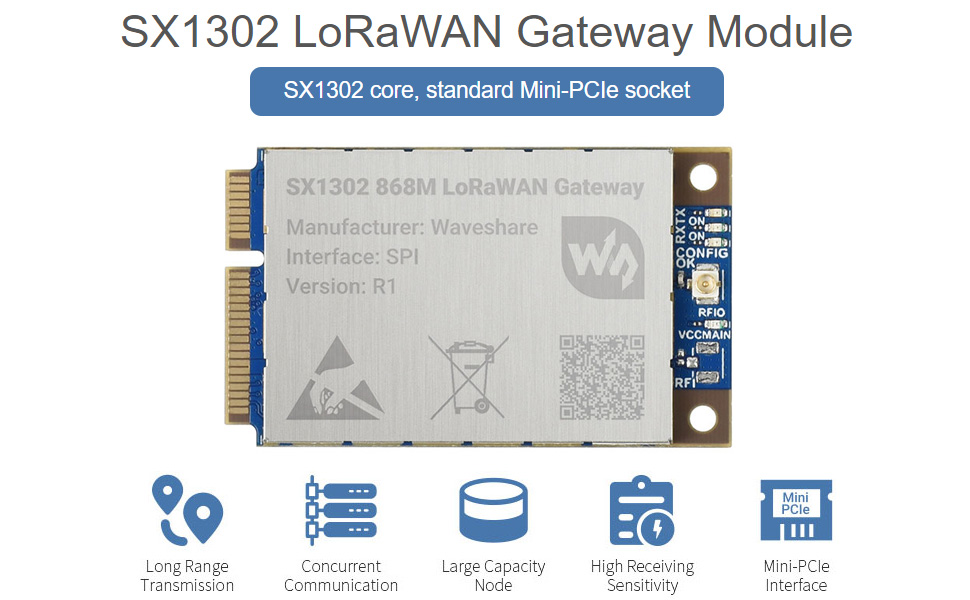
Image 1.1: Overview of the SX1302 LoRaWAN Gateway HAT for Raspberry Pi, illustrating its core features such as long-range transmission, concurrent communication, large capacity node support, high receiving sensitivity, GNSS module, and Mini-PCIe interface.
2. Key Features
- Integrates Semtech SX1302 baseband processor and SX1250 radio RF front-end chip, optimized for EU868 frequency band.
- Features onboard PA and LNA, providing 26dBm transmit power and -141dBm high sensitivity receiving gain.
- Supports 10 signal channels, enabling concurrent communication with multiple LoRa nodes.
- Includes FEC (Forward Error Correction) algorithm for enhanced data reliability.
- Supports SF5 to SF12 spreading factors, with a maximum data rate of 19Kbps (SF5/BW125KHz).
- Utilizes SPI communication protocol for data exchange with the host system.
- Standard Mini-PCIe socket for straightforward integration into compatible embedded systems.
- Incorporates L76B GNSS module for accurate positioning and timing.

Image 2.1: Illustration of the upgraded SX1302 chip, highlighting its performance benefits including lower power consumption, faster data rates, and extended communication range.

Image 2.2: Explanation of the FEC (Forward Error Correction) algorithm, demonstrating how it improves data integrity and anti-interference performance for LoRa spread spectrum technology.
3. Product Components
The Waveshare SX1302 LoRaWAN Gateway HAT package typically includes the following components:

Image 3.1: Contents of the SX1302 LoRaWAN Gateway HAT kit, showing the main HAT board, SX1302 868M LoRaWAN Gateway module, GPS antenna, LoRa antenna, and necessary connectors and standoffs.
3.1 What's On Board

Image 3.2: Labeled components on the SX1302 LoRaWAN Gateway HAT board. Key components include the SX1302 868M LoRaWAN Gateway module, Mini-PCIe socket, L76B module, RT9193-33 power chip, status indicators (PWR, TXD/RXD, PPS), LoRa antenna connector, L76B antenna connector, Raspberry Pi GPIO header, and battery holder.
- SX1302 868M LoRaWAN Gateway module
- Mini-PCIe socket and buckle
- L76B module
- RT9193-33 power chip
- PWR: power indicator
- Raspberry Pi GPIO header for connecting with Raspberry Pi series boards
- L76B antenna connector
- LoRaWAN antenna connector
- Battery holder: Supports ML1220 rechargeable cell for preserving ephemeris information and hot starts.
4. Setup and Installation
Follow these steps to install the SX1302 LoRaWAN Gateway HAT onto your Raspberry Pi:
- Attach the SX1302 Module: Carefully insert the SX1302 868M LoRaWAN Gateway module into the Mini-PCIe socket on the HAT board. Secure it with the provided buckle or screws if applicable.
- Connect Antennas: Connect the LoRaWAN antenna to the LoRaWAN antenna connector and the GPS antenna to the L76B antenna connector on the HAT. Ensure connections are finger-tight.
- Mount on Raspberry Pi: Align the 40-pin GPIO header of the HAT with the GPIO pins on your Raspberry Pi. Gently press down to ensure a secure connection. Use the provided standoffs and screws to fix the HAT to the Raspberry Pi board for stability.
- Power On: Once the HAT is securely mounted and antennas are connected, power on your Raspberry Pi.

Image 4.1: Application example showing the SX1302 LoRaWAN Gateway HAT properly installed on a Raspberry Pi, with both LoRa and GPS antennas connected. The Raspberry Pi board is for reference only and is not included with the HAT.
5. Pinout Definition
Understanding the pinout is crucial for proper software configuration and interfacing with other components. The HAT utilizes the Raspberry Pi's 40-pin GPIO header.

Image 5.1: Pinout definitions for the SX1302 LoRaWAN Gateway HAT, detailing the connections for the GNSS module (UART) and LoRa Gateway (SPI, I2C, GPIO) to the Raspberry Pi's GPIO header.
5.1 GNSS Module Pinout
| Pin | Function |
|---|---|
| 5V | 5V power supply |
| Ground | Ground |
| L76B module UART RX | L76B module UART RX |
| L76B module UART TX | L76B module UART TX |
5.2 LoRa Gateway Pinout
| Pin | Function |
|---|---|
| SDA | Module I2C SDA |
| SCL | Module I2C SCL |
| MOSI 0 | Module SPI data output |
| MISO 0 | Module SPI data input |
| SCK 0 | Module SPI clock input |
| CS 0 | Module SPI chip select |
| D18 | Module radio power on/off |
| D20 | Module GPIO6 multiplex pin |
| D23 | Module reset pin |
6. Operating Instructions
To operate the Waveshare SX1302 LoRaWAN Gateway HAT, you will need to configure the software on your Raspberry Pi. This typically involves installing necessary drivers and LoRaWAN gateway software.
- Operating System: Ensure your Raspberry Pi is running a compatible Linux-based operating system (e.g., Raspberry Pi OS).
- Enable SPI and UART: The LoRaWAN module communicates via SPI, and the GNSS module via UART. These interfaces must be enabled in your Raspberry Pi's configuration. You can typically do this using
sudo raspi-config. - Install Gateway Software: Install a LoRaWAN gateway packet forwarder or a full LoRaWAN stack (e.g., ChirpStack Gateway OS, Semtech Packet Forwarder) compatible with the SX1302 chip. Refer to the Waveshare product wiki or Semtech documentation for specific software setup guides.
- Configure Gateway: Configure the gateway software with your LoRaWAN network server details, frequency plan (EU868), and gateway ID.
- GNSS Configuration: If using the GNSS module for precise timing (PPS) or location, ensure the UART interface is correctly configured and any necessary GNSS daemon or software is running to process the NMEA data.
- Testing: After configuration, test the gateway's functionality by sending LoRaWAN packets from a LoRa node and verifying their reception on your LoRaWAN network server.
7. Specifications
Detailed technical specifications for the SX1302 LoRaWAN Gateway HAT and its integrated modules:

Image 7.1: Comprehensive specifications table for both the LoRa Gateway and the integrated GNSS module, detailing electrical, communication, and environmental parameters.
| Parameter | LoRa Gateway | GNSS Module |
|---|---|---|
| Power Supply | 5V | 5V |
| Frequency Range | EU868 (863-870MHz) | GPS L1 (1575.42MHz), BD2 B1 (1561.098MHz) |
| Modulation | LoRa/GFSK | - |
| Emit Power | > 26dBm@5V | - |
| Receiving Sensitivity | -141dBm@125KHz/SF12, -121dBm@125KHz/SF5 | acquisition: -148dBm, tracking: -163dBm, re-acquisition: -160dBm |
| Overall Power Consumption | emitting: 710mA@5V, GPS on; receiving: 99mA@5V, GPS on; sleep: 41mA@5V, GPS off | - |
| Communication Bus | SPI, I2C | UART |
| External Connector | Mini-PCIe | - |
| Operating Temperature | -40~85°C | - |
| Dimensions | 50.95 x 30mm (module) | - |
7.1 Outline Dimensions

Image 7.2: Outline dimensions of the SX1302 LoRaWAN Gateway HAT board and the SX1302 868M LoRaWAN Gateway module, provided in millimeters for precise integration.
8. Troubleshooting
If you encounter issues with your Waveshare SX1302 LoRaWAN Gateway HAT, consider the following troubleshooting steps:
- No Power/LEDs Off: Ensure the Raspberry Pi is powered correctly. Check all connections, especially the 40-pin GPIO header, for proper seating. Verify the power supply meets the Raspberry Pi's requirements.
- LoRaWAN Module Not Detected: Confirm that SPI is enabled in your Raspberry Pi's configuration (
sudo raspi-config). Check the physical connection of the SX1302 module in the Mini-PCIe socket. Verify that the correct drivers or packet forwarder software are installed and configured for the SX1302. - No LoRaWAN Traffic: Double-check your gateway configuration, including the frequency plan (EU868), gateway ID, and network server settings. Ensure antennas are securely connected and positioned correctly. Verify that LoRa nodes are transmitting on the correct frequency and spreading factor.
- GNSS Not Working: Ensure UART is enabled in your Raspberry Pi's configuration. Check the GPS antenna connection and ensure it has a clear view of the sky. Verify that any GNSS processing software is running and configured to read from the correct UART port.
- Software Issues: Consult the Waveshare product wiki or the documentation for your chosen LoRaWAN gateway software for specific installation and configuration instructions. Ensure all dependencies are met.
9. Maintenance
The Waveshare SX1302 LoRaWAN Gateway HAT is designed for reliable operation with minimal maintenance. However, following these guidelines can help ensure its longevity and performance:
- Environmental Conditions: Operate the HAT within its specified operating temperature range (-40~85°C). Avoid exposure to extreme humidity, dust, or corrosive environments.
- Physical Inspection: Periodically inspect antenna connections for tightness and ensure the HAT is securely mounted to the Raspberry Pi.
- Software Updates: Keep your Raspberry Pi's operating system and gateway software updated to benefit from bug fixes and performance improvements.
- Cleaning: If necessary, gently clean the board with a soft, dry brush or compressed air to remove dust. Avoid using liquids or harsh chemicals.
10. Resources and Support
For additional resources, detailed documentation, and technical support, please refer to the official Waveshare resources:

Image 10.1: Waveshare provides various resources including user manuals, circuit diagrams, example code, and development resources to assist users.
- Waveshare Wiki: The official Waveshare wiki often contains detailed tutorials, example code, and technical documentation for their products. Search for "SX1302 LoRaWAN Gateway HAT" on the Waveshare wiki.
- Technical Support: For specific technical inquiries or issues not covered in this manual or the wiki, contact Waveshare's customer support.
11. Warranty Information
Waveshare products typically come with a standard manufacturer's warranty. For detailed information regarding the warranty period, coverage, and claims process for your SX1302 LoRaWAN Gateway HAT, please refer to the warranty policy provided with your purchase or visit the official Waveshare website. Keep your proof of purchase for warranty claims.